Route4Me Route Planner
- 2.93K
- 4.4
- Installs
- 500.00K
- Price
- Free

Screenshots
Analysis by Reviewed
I like to know what a route-planning app is asking me to do before I trust it with a day on the road. Route4Me Route Planner is built around organizing trips with multiple stops, rather than simply finding a way from where I am to one destination. That makes it most useful when the order of visits matters: deliveries, appointments, errands, or a workday that sends you across town several times. It is a free Maps & Navigation app from Route4Me, Inc, and its audience is broad, but its real value depends on whether you regularly juggle more than one stop.
What to expect from a route planner
The app has an average rating of 4.4 from around 15,000 ratings, and more than 500,000 installs. Those figures suggest that many people have found a use for it, though they don’t guarantee that its workflow will suit every driver. I’d think of it as a planning tool first: it can help arrange a list of destinations, while a standard navigation app is often the simpler choice when I only need directions to one place.
That difference is worth keeping in mind before installing. A route optimizer can save mental effort when a list gets long, but it cannot make every real-world stop predictable. Traffic, parking, access instructions, and a customer who is not ready can all change the best plan. I still treat the suggested order as a useful starting point, not a promise that the day will run exactly on schedule.
Getting Started with Route4Me
First things first, setting up Route4Me Route Planner is a breeze. The app is available on both Android and iOS, so no matter what kind of phone you’re rocking, you’re covered. Once downloaded, you’re greeted with a clean interface that’s not just pretty but also super intuitive. You don’t need to be a tech wizard to figure it out, which is always a plus in my book.
From installation to a useful first route
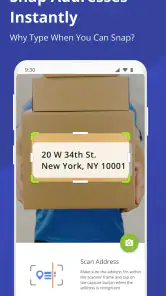
For a first run, I’d begin with a small set of familiar destinations instead of loading a whole day’s work at once. Add stops carefully, check that each address points to the intended place, then look at the proposed sequence before setting off. This simple test teaches you how the app handles your list and gives you a chance to catch a misspelled street or an unexpectedly distant stop while you are still at home.
A practical first success might be a morning with a grocery pickup, a parcel drop-off, and an appointment on the other side of town. Rather than deciding the order from memory, I would enter all three, review the plan, and compare it with any fixed appointment time. If one stop has to happen at a particular hour, that constraint matters more than a route that looks neat on a map. The useful habit is to check the route against your real commitments, not to follow it blindly.
Features That Stand Out
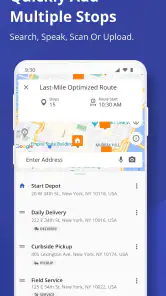
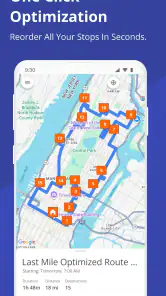
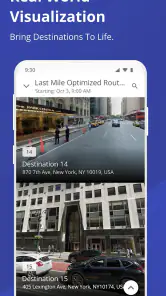
Now, let’s talk features. This app is packed with goodies. It allows you to plan routes with multiple stops, which is perfect if you’re running errands or working in delivery services. You can either manually enter addresses or let the app do the heavy lifting by optimizing the most efficient route for you. It’s like having a personal navigator who never leads you astray.
More From Our News Desk

Clash of Clans Is Won Between the Battles

Android Auto Makes the Case for Quieter Car Software

MobiOffice: Transforming Mobile Productivity with Seamless Integration

EA SPORTS FC™ Mobile Soccer: Redefining Mobile Sports Gaming

How Microsoft OneDrive Became a Mobile Productivity Giant

How Google Translate Breaks Language Barriers Effortlessly
Another neat feature is the app’s ability to sync across devices. So, if you start planning on your tablet but need to hit the road with your phone, all your info is right there waiting for you. No more jotting down notes or trying to remember details — it’s all stored in the cloud.
Making a multi-stop plan easier to trust
The best way I’ve found to use an optimized sequence is to separate what can move from what cannot. If a delivery window or appointment fixes one stop in place, I would plan around that commitment rather than assuming the app knows the customer’s schedule. For flexible errands, the suggested order can reduce backtracking; for timed visits, a quick manual review prevents an efficient-looking route from becoming an inconvenient one.
Address quality is another small detail with an outsized effect. When several businesses share a street or a building has multiple entrances, I’d verify the destination before leaving and keep any entry notes somewhere easy to consult. Route planning can organize where to go, but the driver still needs to confirm that the mapped destination is the actual door or loading point. That check is especially useful for new customers and unfamiliar commercial areas.
Real-Time Updates and Adjustments
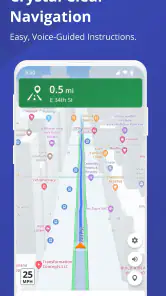
One of the highlights for me is the real-time traffic updates. The app adjusts your route on the fly, which is a lifesaver if you’re trying to dodge rush-hour traffic. It’s like having a sixth sense for traffic jams, and I’m all about that life.
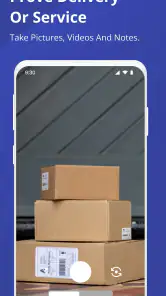
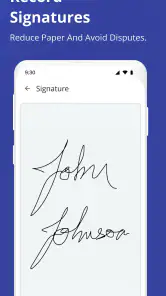
If you’re in a business that involves multiple deliveries or pickups, you’ll appreciate the app’s tracking abilities. You can monitor your progress, see how much time you’re saving, and even send updates to clients or your boss. It’s these little details that make the app not just useful but essential.
Where it fits in a working day
For a small delivery run, I’d use the route as a shared plan for the day: prepare the stops before leaving, keep the phone available for navigation, and check progress between visits rather than while driving. That makes the app more helpful as an organizer than as a substitute for attention on the road. If a customer changes plans, I would pause and review the remaining stops instead of trying to make a last-second adjustment in traffic.
Compared with entering every destination one by one into a basic map app, a multi-stop planner can reduce the tedious work of choosing an order. A conventional navigation app may still be better for a single destination, a spontaneous detour, or someone who wants the least setup possible. Route4Me makes more sense when the list itself is the problem; if the challenge is simply finding one address, its planning focus may feel like extra steps.
User Experience
Using the app is pretty straightforward, but what about the actual user experience? Well, I found it to be smooth sailing for the most part. The app loads quickly, and I didn’t encounter any major bugs, which is always a relief. The interface is designed to be user-friendly, so even if you’re not the most tech-savvy person, you’ll find your way around it easily.
Who will get the most from it
I’d recommend trying it if you routinely visit several places in one outing, especially when you repeat delivery or service routes and want a clearer order for the stops. A busy parent coordinating pickups and errands may also appreciate seeing the trip as one plan instead of a chain of separate searches. The app is rated Everyone, and its current version is 5.1.1, but the planning style still suits people who are comfortable checking a route before they travel.
On the other hand, I would skip it if most of my trips are just home-to-work or a single destination, or if I strongly prefer a map app that requires almost no preparation. It may also be more tool than a casual driver needs. There are in-app purchases, with items ranging from around one dollar to about three hundred and twenty dollars, so I’d review the available options carefully before treating it as a long-term business workflow.
Room for Improvement
While Route4Me Route Planner offers a lot, there’s always room for improvement. For instance, the free version has some limitations on the number of routes you can plan, which might be a bit of a bummer for heavy users. Also, while the app offers a lot of features, it can feel a bit overwhelming at first. A little patience goes a long way, but a more streamlined tutorial could help new users get up to speed faster.
Choosing a sensible next step
Route4Me was released in 2012, and its focused approach is still easy to understand: it is for people who need to arrange multiple destinations, not merely display a map. My advice to a first-time user is to test it with a short, low-pressure route, confirm each address, and see whether the suggested order actually makes your trip easier. That gives you a fair sense of the workflow before you rely on it for a busy shift.
If the free experience handles your usual number of routes, you may have no reason to spend anything. If your workload grows, check the in-app purchase choices against the specific limits you encounter rather than paying based on a vague expectation of extra convenience. The app’s developer, Route4Me, Inc, has built a specialized tool, and that specialization is both its strength and its trade-off: it can bring order to a stop-heavy day, while a basic map is often enough for an ordinary drive.
Keeping the plan practical
A useful routine is to prepare the route while parked, then use the stop list as a checklist rather than trying to manage every detail from memory. Before leaving, I’d scan for duplicated addresses, stops that are far outside the main cluster, and any visit that has a firm time attached. This quick review can reveal when a mathematically tidy sequence conflicts with the day’s actual priorities.
For example, imagine a service worker starting across town with several scheduled visits and one flexible supply pickup. I’d protect the appointments first, place the pickup where it fits, and let the planned order handle the remaining travel. If a visit runs long, the next decision should be made after stopping safely. The benefit is not that every disruption disappears; it is that I have a clear baseline to adjust instead of rebuilding the entire day in my head.
What to check before relying on it
One question I’d ask before making this part of a regular work routine is whether the free plan covers the number of routes I actually need. The app’s purchase options vary considerably, so I would identify the limit I am hitting and compare it with the specific paid choice rather than assuming that a higher-priced option is necessary. A casual user may never need to move beyond a simple trial, while a business user should test the workflow against a representative workday before committing.
It is also worth separating route planning from customer communication. The app’s tracking and update tools may help with progress visibility, but a route cannot explain a late arrival or confirm that a recipient is available. I’d still keep essential instructions and contact details accessible through the tools I already use. That makes Route4Me useful as a routing layer without asking it to replace every part of a delivery operation.
Final Thoughts
So, is Route4Me Route Planner worth your time? If you’re looking for an app that simplifies your life on the road, then absolutely. It’s packed with features that are genuinely useful, and it helps you save time and fuel, which is a win-win in my book. While it has its quirks, the pros definitely outweigh any minor hiccups.
In a nutshell, whether you’re a delivery driver, a busy parent, or just someone who loves efficiency, this app is a solid choice. Give it a whirl and see how it transforms your travel plans. You might find that it’s exactly what you’ve been missing!
Route4Me Route Planner Frequently Asked Questions
What does Route4Me Route Planner do, and what should I expect when I open it?
Route4Me Route Planner is a Maps & Navigation app centered on organizing trips with multiple destinations. Its store summary describes it as a solution to routing chaos, and the short description is simply “Route4Me.” It is best approached as a route-planning tool rather than only a basic map: you can consider whether planning a sequence of stops suits the way you travel or work.
Is Route4Me Route Planner suitable for someone who only needs directions to one destination?
It may still be useful, but Route4Me Route Planner’s main appeal is planning routes that involve multiple destinations. If you usually travel from one starting point to one destination, a simpler navigation app may be enough for your needs. The app is more worth exploring when you regularly organize several stops and want to think about the route as a whole.
Is Route4Me Route Planner free to download, and can it include extra costs?
Route4Me Route Planner is free to download, so you can install it and explore the app without an upfront purchase. It also offers in-app purchases, with prices ranging from around one dollar to around 320 dollars per item. Review the options shown in the app before buying, especially if you are considering features for regular or business use.
Who is Route4Me Route Planner designed for?
Route4Me Route Planner is a Maps & Navigation app for people who need to plan routes with multiple destinations. It may be useful for personal errands as well as work that involves deliveries, field sales, or other trips with several stops. Its focus on organizing routes makes it worth considering if you want more than a simple point-to-point navigation app.
What platforms is Route4Me Route Planner available on?
Route4Me Route Planner is available on both Android and iOS platforms. Users can download the app from the Google Play Store or the Apple App Store, making it accessible for a wide range of devices. The app is designed to work seamlessly on smartphones and tablets, providing flexibility for users on the go.
Pros
- Intuitive interface for easy navigation.
- Supports multiple stop planning efficiently.
- Real-time traffic updates included.
- Syncs across devices seamlessly.
- Customizable route preferences.
Cons
- Free version has limited features.
- Occasional slow loading times.
- Requires stable internet connection.
- Advanced features need subscription.
- Battery drain can be significant.
- Category
- Maps & Navigation
- Version
- 5.1.1











