

Route Planner - GetWay
- 39.00
- 3.8
- Installs
- 100.00K
- Price
- Free

Screenshots
Analysis by Reviewed
I usually judge a navigation app twice: first by how quickly it helps me plan a trip, and then by whether I still want it on my phone after the first week. Route Planner - GetWay makes a reasonable first impression because it focuses on one clear job: helping me work out a route rather than turning travel planning into a crowded collection of unrelated tools. It is a free Maps & Navigation app from Logi Way, aimed at anyone who wants a more direct way to think about getting from one place to another.
That narrow purpose is both its appeal and its main question mark. A route planner can be genuinely useful when I am arranging several stops, checking the shape of a journey, or trying to avoid wasting time on a badly ordered itinerary. At the same time, most phones already include a familiar mapping service, so GetWay has to earn a regular place in my routine instead of merely being interesting once. After using it with that standard in mind, I see it as a practical planning companion for certain journeys, but not an automatic replacement for a full navigation suite.
What makes GetWay appealing during the first week
The first thing I appreciate is the app’s straightforward identity. Its store short description is “Route Planner,” and that is a more useful expectation than a vague promise about travel. I can approach it with a specific task: decide how to organize a trip, compare a possible route, or prepare a sequence of destinations before setting off. That clarity matters because planning and live navigation are not always the same activity. I often want to arrange the journey calmly before I begin driving or walking, rather than making decisions at every turn.
In the first few sessions, this kind of focused tool can feel lighter than a general-purpose map. A broad mapping app may be excellent at finding businesses, showing traffic, offering street imagery, and guiding me in real time, but those extras can also make trip preparation feel busy. GetWay’s value is easier to understand when I treat it as a planning desk: I decide where I need to go, examine the route, and use that information to prepare the day.
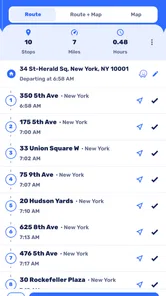
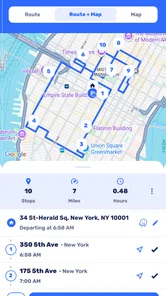
A realistic example is a day with several appointments on opposite sides of town. Instead of entering each destination separately and relying on memory to decide the order, I can use a route-planning workflow to think about the whole outing. The important benefit is not just seeing a line on a map. It is noticing whether the proposed sequence creates unnecessary backtracking, whether one stop should be moved earlier, and whether the plan is realistic before I leave home.
I also find this useful for errands. If I have to collect something, visit a shop, stop at a service location, and finish at home, the app can help turn a loose list into an actual journey. That is a different need from asking for directions to one address. The planning mindset encourages me to group nearby stops and consider the complete route, which can save more effort than repeatedly searching for individual destinations.
There is a useful habit hidden in this approach: I can plan the route before I am under time pressure. When I wait until I am already travelling, every change feels urgent. When I prepare earlier, I can notice awkward sequencing and make a backup decision. For me, that is one of the strongest reasons to try GetWay during the first week. It encourages preparation rather than constant reaction.
More From Our News Desk

 Weather - By Xiaomi
Weather by Xiaomi Review: Clear at a Glance, Less Clear Up Close
Xiaomi’s weather app makes everyday forecasts quick to scan, but its calm surface can leave useful details and recovery paths harder to find than they should be.

 X
XX Under Pressure: Can It Recover When Posting Goes Wrong?
A resilience-focused review of X, examining setup, mistaken posts, interruptions, weak connections, and the gaps that matter when recovery needs to be dependable.

 Clash of Clans
Clash of Clans Is Won Between the Battles
Its raids are quick; its community is a long-term project of coordination, teaching, rivalry, and shared responsibility—with all the friction that entails.

 Android Auto
Android Auto Makes the Case for Quieter Car Software
The car interface is no longer judged by how much it can do, but by how quietly it helps. Android Auto shows what drivers now expect—and what still gets in the way.

 MobiOffice: Word, Sheets, PDF
MobiOffice: Transforming Mobile Productivity with Seamless Integration
MobiOffice: Word, Sheets, PDF is redefining mobile productivity with a surprising blend of functionality and innovation.

 EA SPORTS FC Soccer Mobile 26
EA SPORTS FC™ Mobile Soccer: Redefining Mobile Sports Gaming
Dive into EA SPORTS FC™ Mobile Soccer, where immersive gameplay and strategic depth transform mobile sports gaming.
Latest News



Where the focused design helps
The app is particularly suitable for people who travel for work, make several deliveries, visit multiple customers, or organize a day away with more than one destination. It can also help families preparing a busy outing, especially when the route needs to be discussed before everyone gets into the car. Someone who regularly moves between familiar places may not need a full map search every time; a dedicated planning step can be quicker and easier to repeat.
Another good use is preparing a route for somebody else. I may be arranging a journey for a relative, colleague, or friend who wants a clear plan rather than a stream of last-minute instructions. A route planner gives me a chance to think through the order and explain the day in ordinary terms. That is more dependable than sending several separate destinations and expecting another person to assemble them correctly.
Still, the first-week experience depends on what I expect the app to do. If I want detailed live traffic decisions, extensive place information, public transport coverage, or a deeply familiar voice-guided experience, my usual map app may remain more comfortable. GetWay makes more sense when the main problem is route organization. It is not automatically the best answer to every navigation question.
Small planning choices that improve the result
I get better results when I prepare destinations carefully instead of entering vague names. A business name can refer to multiple branches, and a building may have several entrances. Checking the selected place before committing to the route is a simple step, but it prevents a polished-looking plan from being built around the wrong location. This is especially important when the destination is a large venue, industrial area, or shopping complex.
I also prefer to plan in the same order that the day will actually happen. It is tempting to add places in the order I remember them, but memory order is rarely the most efficient travel order. Once the stops are visible together, I can question the sequence. That is a more advanced use of a route planner than simply asking for a start and an end point, and it is where the app’s purpose becomes more valuable.
For a busy day, I would save a little time before leaving rather than assuming the plan will remain perfect. A road closure, a delayed appointment, or an unexpected change can make the original sequence less useful. The app helps me create a starting plan, but I still need ordinary judgement. No route planner removes the need to check whether the schedule makes sense in real life.
Whether it keeps earning space month after month
The first-week novelty of a route-planning app is easy to understand. The longer-term test is harder: does it become part of a repeatable routine? In my view, GetWay has recurring value when I regularly manage multi-stop journeys. Each new workday, errand circuit, or group outing gives me a reason to plan again. The app does not need to entertain me or constantly introduce new material; it needs to reduce the mental work involved in arranging travel.
That kind of value is practical rather than dramatic. I might open it every few days, use it for a particular route, and close it. If it helps me avoid a badly ordered itinerary, it has done its job. A navigation tool does not need to dominate my screen time to be worthwhile. Its success can be measured by whether I arrive with fewer avoidable decisions and less uncertainty.
GetWay is more likely to become a lasting habit for people whose routes change often. A courier, field worker, property professional, event organizer, or sales representative may repeatedly face the same planning problem with different destinations. For these users, a route planner can be more relevant than a standard map’s single-destination search. It supports the thinking that happens before movement begins.
For a person who only travels from home to one regular workplace, the benefit is much smaller. Once that route is familiar, opening a separate planner may add another step without solving a meaningful problem. The same is true for someone who mainly needs nearby restaurant searches, transit departures, or live congestion alerts. In those cases, a general map application is probably the better long-term home.
My month-to-month judgement also depends on consistency. A planning app becomes useful when I trust myself to open it before a complicated journey, not only after I have already become confused. I would build a simple routine around it: collect the destinations, review their order, check the route at a sensible time, and then use the most suitable navigation method while travelling. That division of labour keeps the app useful without forcing it to replace every other travel tool.
How it compares with familiar alternatives
The usual alternative is a broad map application that combines route guidance with place discovery, traffic information, saved locations, and other travel features. Those apps are often stronger when I need live decisions during a journey or want to search for something nearby. Their advantage is familiarity: I already know where the controls are, and the app may already contain my frequent destinations.
GetWay’s possible advantage is concentration. When I am planning several stops, a dedicated route-planning environment can make the task feel more deliberate than jumping between searches in a general map. That does not mean it will always produce a better travel decision. It means the app encourages me to treat the journey as one connected plan instead of a collection of unrelated directions.
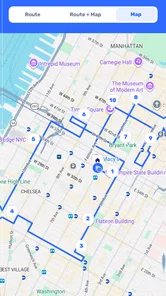
I would also distinguish it from a paper itinerary or a notes app. Notes are excellent for remembering addresses, appointment times, and special instructions, but they do not naturally show the relationship between destinations. A map shows geography, while a note shows text. GetWay sits closer to the planning layer between those two: it helps me think spatially while keeping the focus on the route.
For public transport users, a transit-focused application may be more appropriate because departure times, platform changes, and service interruptions can matter more than the overall road shape. For hikers or cyclists, a specialized outdoor mapping tool may offer information that a general route planner does not emphasize. The right choice depends on the journey, and GetWay is strongest when the central question is how to arrange a trip with multiple places.
The maintenance burden behind a useful route
Every planning app creates a small maintenance task: I must enter accurate destinations, review the route, and update it when the day changes. GetWay cannot remove that responsibility. If I add stops carelessly or forget that an appointment moved, the resulting plan can be tidy but wrong. The app is most helpful when I treat it as a preparation aid, not as an authority that understands my schedule automatically.
There is also a difference between planning and following. A route can look efficient on a screen while being inconvenient in practice because of parking, loading access, walking distance, opening hours, or the amount of time needed at each stop. I would never judge a multi-stop plan only by its visual shape. I also consider where I can safely stop, whether a destination has a difficult entrance, and whether the timetable leaves enough breathing room.
That is one of the less obvious trade-offs of using a focused route planner: it can improve the order of movement while leaving the human logistics to me. This is not a flaw unique to GetWay, but it is important when deciding whether the app deserves a permanent role. It saves planning effort, not all planning effort.
Technical upkeep matters as well. The current version is 1.1.30, and the app runs on Android starting with version 5.0. That makes it accessible to many older devices, which is useful if I keep a spare phone in the car or prefer not to replace a working handset. At the same time, an older compatible device may offer a less comfortable experience than a newer phone, especially when switching between planning and other travel tools.
The app is free to install, which makes testing the workflow relatively easy. It is marked for Everyone, so its presentation is not restricted to an adult-only audience. There are in-app purchases listed from $13.99 to $369.99 per item, so I would pay attention to the purchase screen before committing to anything beyond basic use. The free entry point is helpful, but the presence of optional paid items means I would not assume every useful capability follows the same pricing model.
What can cause fatigue over time
The biggest source of fatigue is duplication. If I must plan a route in GetWay and then repeat the same work in another app for live guidance, the extra step may become annoying. That two-stage workflow is worthwhile for complicated journeys, but excessive for a simple trip. I would not open it merely to travel to one familiar address unless I had a specific planning reason.
Another possible frustration is the gap between a planned route and changing conditions. A route prepared in the morning may no longer suit the afternoon. If my day is unpredictable, I may spend more time revising the plan than benefiting from it. This is why I see the app as most useful for journeys with a reasonably stable list of destinations, not for work where new stops appear constantly without warning.
There is also a mental burden in trying to optimize everything. A route planner can encourage me to chase the perfect order when a simple, comfortable plan would be good enough. I have found that the best use is not always the shortest-looking route. Sometimes I choose a slightly less elegant sequence because it gives me a longer break, makes parking easier, or places the most time-sensitive appointment first. GetWay can support the decision, but it should not make the decision for me.
The average rating is 3.8 from around 386 ratings, with roughly 39 written reviews, and the app has passed 100K installs. I read that as a sign of meaningful interest rather than proof that it will suit everybody. The numbers suggest that people are trying it, while the middling average reminds me to keep expectations realistic. I would test it with an ordinary multi-stop journey before depending on it for an important day.
One practical way to reduce fatigue is to reserve the app for trips that genuinely benefit from planning. I would not make it part of every commute. I would use it for a day with several errands, a sequence of client visits, a family outing, or an unfamiliar area where the order of stops matters. That selective habit keeps the tool from becoming another compulsory step in simple travel.
My long-term verdict on Route Planner - GetWay
After the initial appeal fades, I think GetWay earns lasting space for a specific kind of user: someone who regularly needs to organize journeys with multiple destinations before setting out. Its strongest contribution is not replacing every map feature on a phone. It is giving route preparation its own place in the travel process, which can make complicated days easier to understand and less mentally tiring.
I would recommend trying it if your travel often involves errands, appointments, deliveries, or visits that must be arranged in a sensible order. Start with a familiar multi-stop day rather than an important trip where you cannot afford surprises. Enter each destination carefully, inspect the sequence, and ask whether the plan works with real parking, walking, appointment, and rest needs. That test will tell you more than a quick glance at the store page.
I would skip it if your needs are mostly single-destination directions, live traffic decisions, public transport timing, or detailed local discovery. In those situations, the map app you already know may be faster and less repetitive. I would also be cautious about making it central to a constantly changing schedule, because maintaining a route can become work when stops and timings shift every few minutes.
For me, the app’s lasting value comes from disciplined use. I would open it before a complicated outing, use it to challenge my first instinct about the order of destinations, and then switch to whatever navigation method is best for the journey itself. That workflow gives it a clear job without asking it to do everything. Its real strength is turning a scattered list of places into a plan I can think through before I travel.
Logi Way has created a useful option in the Maps & Navigation space, especially for people who feel that ordinary map searches do not handle multi-stop planning as comfortably as they would like. I do not see it as an essential app for every Android user, but I can see it becoming a dependable part of the routine for the right person. If your travel repeatedly involves more than one destination, the free starting point makes it worth testing; if not, its focused purpose may remain more interesting than necessary.
Route Planner - GetWay Frequently Asked Questions
Is Route Planner - GetWay suitable for the kind of trips I take?
Route Planner - GetWay is a Maps & Navigation app from Logi Way, focused on making travel as fast and short as possible. It may suit people who want help planning a route, whether they are preparing for a regular drive or a longer journey. Its store description is simply “Route Planner,” so consider whether route planning is the main feature you need before installing.
What is Route Planner - GetWay, and who is it designed for?
Route Planner - GetWay is a navigation and trip-planning app designed to help users organize routes before or during a journey. It can be useful for daily commuters, travelers, delivery drivers, and anyone who needs to compare destinations or plan multiple stops. Before downloading, check whether its available maps, transport options, and routing tools match the type of travel you normally do.
Does Route Planner - GetWay work without an internet connection?
Offline availability can vary depending on the app version, device settings, and the specific map or route features being used. Some navigation apps require an internet connection to calculate routes, retrieve traffic information, or search for places, while others allow maps to be downloaded in advance. Users should review the app’s current offline-map support before relying on it in areas with weak mobile coverage.
Can I plan routes with multiple stops in Route Planner - GetWay?
Route Planner - GetWay is intended for users who need more than simple point-to-point navigation, so multi-stop planning is an important feature to look for. Depending on the version, you may be able to add destinations, reorder stops, and review the route before starting. However, the number of supported stops and optimization options may differ, so confirm these limits before planning a long itinerary.
Does Route Planner - GetWay provide live traffic and accurate travel times?
The usefulness of any route planner depends heavily on the freshness of its traffic and road-condition data. Route Planner - GetWay may offer estimated travel times and route guidance, but these figures can change because of congestion, construction, accidents, weather, or inaccurate map information. Treat the suggested arrival time as an estimate, keep your attention on the road, and follow local traffic regulations.
Pros
- Plans routes with multiple stops in one trip.
- Offers clear turn-by-turn navigation for everyday journeys.
- Helps compare route options before starting navigation.
- Useful for delivery drivers
- commuters
- and frequent travelers.
- Can reduce travel time by organizing stops efficiently.
Cons
- Route accuracy may vary in areas with outdated map data.
- Some advanced tools may require a paid subscription.
- Heavy navigation use can drain battery and mobile data.
- Traffic updates may be limited depending on location.
- The interface can feel crowded when planning many stops.











