The Roku App (Official)
- 249.97K
- 4.7
- Installs
- 50.00M
- Price
- Free
Screenshots
Analysis by Reviewed
I think of The Roku App (Official) less as a replacement for every part of watching TV and more as a handy second control point for a Roku device. Its most useful idea is simple: the phone you already keep nearby can help you find something to watch, navigate the screen, and listen privately. That makes the app most worthwhile when the television is part of your daily routine, not just something you use once in a while.
When your phone becomes the useful remote
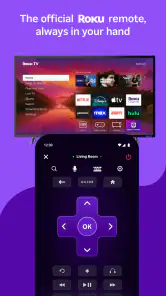
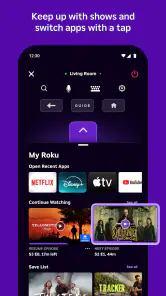
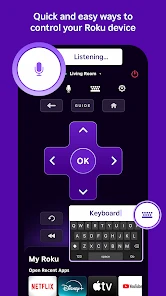
The remote-control function is the capability I notice most in everyday use. If the physical remote has slipped between sofa cushions, the phone can keep a viewing session moving rather than turning a small annoyance into a search around the room. It can also be convenient when someone else has the remote or when I want to handle a quick search without reaching for it. The phone is not automatically better in every situation, but having another control option can save a surprising amount of friction.
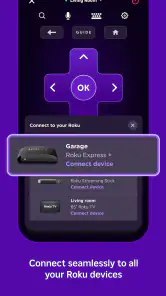
Setup depends on the phone and Roku device being on the same Wi-Fi network. Once connected, the app can find Roku devices on that network and let me choose one to control. That makes it useful at home, but it also explains a common point of confusion: if the device does not appear, checking that both are on the same network is a sensible first step. A phone connected to a guest network while the Roku is on the main network may not be able to find it.
Voice search and private listening in real routines
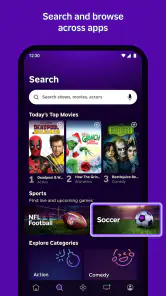
Voice search is a practical alternative to typing a title with a remote. I find it especially helpful when I remember only part of a show name or want to search while keeping the television menu in view. It is not a guarantee that every spoken request will be understood perfectly, so I still expect to correct a result now and then. For a familiar title, though, speaking can be quicker than navigating an on-screen keyboard one letter at a time.
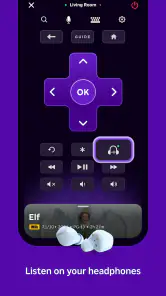
Private listening is useful for a different reason: it lets me hear the TV’s audio through headphones connected to the phone. The clearest everyday case is watching later at night while someone else is sleeping nearby. It can also help when I want to keep the room quieter without turning the television volume down so far that dialogue becomes hard to follow. I would treat it as a personal listening option, not a substitute for a dedicated home-audio setup.
How it fits around a Roku device
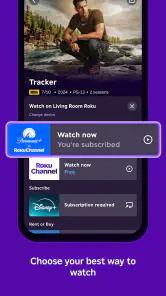
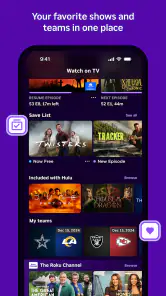
Browsing channels from the phone and adding them to a Roku device can make setup or discovery feel less cramped than doing everything through the TV interface. I would use that workflow when I already know what I want to add, then return to the television to watch. It is a small division of labor: the phone is convenient for searching and control, while the larger screen remains the place to enjoy the result.
A helpful companion, with a few trade-offs
Compared with a basic physical remote, the app offers voice search and phone-based private listening, but it relies on a charged phone and a working network connection. A physical remote is often the simpler choice when I want to press a button immediately, especially if my phone is charging elsewhere or being used for something else. The app makes more sense as a companion than as a promise that the original remote will never be needed.
More From Our News Desk

Clash of Clans Is Won Between the Battles

Android Auto Makes the Case for Quieter Car Software

MobiOffice: Transforming Mobile Productivity with Seamless Integration

EA SPORTS FC™ Mobile Soccer: Redefining Mobile Sports Gaming

How Microsoft OneDrive Became a Mobile Productivity Giant

How Google Translate Breaks Language Barriers Effortlessly
Battery use is worth keeping in mind during long stretches of remote use. If I am watching for hours, I would avoid leaving the app open and active unnecessarily, particularly when the phone is already low. Network discovery can also add a step compared with picking up a remote that is already paired. These are manageable limits, but they matter if the phone is your only planned way to control the TV.
For someone choosing among entertainment apps, the key distinction is that this one is designed around controlling and complementing Roku viewing rather than serving as a general-purpose remote for every television platform. If you do not use a Roku device, a remote app made for your own TV or streaming system is a better fit. If you want a standalone service for watching shows on your phone, this is not the same kind of app; its value is tied to a Roku setup.
Who gets the most from it
I would recommend it to Roku households where the remote goes missing, people who often search for titles, and anyone who wants a quieter way to watch with headphones. A realistic example is getting home late, opening a show without waking the household, and using the phone to control playback while listening privately. It is less compelling for someone who rarely uses Roku, prefers physical buttons, or does not want to depend on a phone and Wi-Fi for TV control.
There is also a useful practical habit: make sure the phone is on the same home network before settling in to watch, and keep the physical remote somewhere accessible as a fallback. That avoids turning the app’s convenience into a troubleshooting task. If several Roku devices are available, check which one is selected before issuing commands, so a search or control action goes to the screen you actually mean to use.
The Roku App (Official) is a free entertainment app from Roku, Inc. and its affiliates, and its focused role is clear: it makes a compatible Roku setup easier to control from a phone. Its 4.7 average rating from around four million ratings and more than 50 million installs suggest it has broad appeal, while the Teen age rating is worth noting for households that check age labels. Version 13.3.0.7000024 supports operating systems from version 9 onward.
My overall take is that it earns a place on the phone when Roku is already part of the home setup. I would not install it expecting it to replace every remote or work as a universal television controller, but its combination of phone control, voice search, channel browsing, and private listening can make ordinary viewing smoother. If those are the moments that tend to interrupt your evenings, it is a practical companion to try.
Why This App is a Game Changer
You know that feeling when you're comfortably seated on your couch, and the remote control is nowhere to be found? Yeah, been there, done that! The The Roku App (Official) is here to save the day. It's like having a universal remote right in your pocket, which is super handy if you're like me and tend to misplace things.
Setting Up: Easy Peasy
First things first, the setup process is a breeze. You just download the app, ensure your phone and Roku device are on the same Wi-Fi network, and voila! You're ready to roll. The app automatically detects your Roku devices, making the whole process as smooth as butter.
Features That Make Life Easier
One of my favorite features is the voice search. Just tap the mic icon and say what you want to watch. It's that simple! No more tedious typing with a remote — just speak your mind and let the app do the rest. Plus, you can browse through a plethora of channels and add them directly to your Roku device. It's like having your own personal entertainment hub in the palm of your hand.
And let's not forget about the private listening feature. If you're a night owl like me, you can plug in your headphones and let the app stream audio directly to your ears. This means late-night binge-watching sessions without disturbing anyone else. Pretty neat, right?
Performance and User Experience
The app's performance is top-notch. It's responsive, intuitive, and comes with a clean interface that's easy to navigate. Whether you're a tech-savvy user or someone who just wants to watch their favorite shows without a hitch, this app caters to all.
However, I did notice that the app tends to drain the battery a bit faster than I'd like, especially when using the remote feature extensively. But hey, that's a small price to pay for convenience, right?
Final Thoughts
All in all, the app adds a layer of convenience that's hard to beat for Roku users. From navigation to private listening, it can make the streaming routine feel easier.
So if you're tired of hunting for the remote or simply want to enhance your Roku experience, give this app a whirl. You won't regret it!
The Roku App (Official) Frequently Asked Questions
Does the Roku App (Official) work without an internet connection?
The Roku App (Official) is intended to connect your mobile device with a Roku streaming player or Roku TV, so its main companion features rely on a working network connection. For the remote-control and content-search functions, your phone and Roku device need to be able to communicate over your home network. If you are looking for an offline viewing app, this is not its primary purpose.
Can I use my phone’s keyboard or voice to search for entertainment on Roku?
Yes. One useful advantage of the Roku App (Official) is that it lets you search using your phone’s keyboard or voice commands rather than entering every character with a TV remote. Search can gather results across multiple streaming channels, which makes it easier to find a show or movie without opening each channel separately. What you can watch still depends on the services available to you.
Does the Roku App (Official) require a Roku device to be useful?
The app is designed as a companion for Roku streaming players and Roku TVs, using your mobile device to control and interact with them. Its remote-control and TV-casting features are most useful when you have a compatible Roku device set up. You can still explore the app, but its core viewing and control functions are intended to work with Roku hardware.
What features does the Roku App (Official) offer to enhance my viewing experience?
The Roku App (Official) provides a multitude of features to enrich your viewing experience. It allows you to use your smartphone as a remote control, stream free channels, and search for content across multiple channels. You can also cast videos, photos, and music from your phone to your TV, ensuring a seamless entertainment experience.
Is the Roku App (Official) free to use, and are there any in-app purchases?
Yes, the Roku App (Official) is free to download and use. However, while the app itself is free, some streaming channels may require a subscription or purchase. The app may also offer features that could involve additional costs, depending on the content or service you wish to access.
Pros
- Easy to navigate interface
- Seamless streaming control
- Wide device compatibility
- Supports voice search
- Personalized content feed
Cons
- Limited to Roku devices
- Occasional connectivity issues
- Ads in free content
- Some features are locked
- Requires stable internet
- Category
- Entertainment
- Version
- 13.3.0.7000024