RocKnow: Rock ID & Collection
- 152.00
- 4.6
- Installs
- 50.00K
- Price
- Free

Screenshots

Analysis by Reviewed
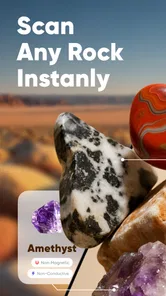
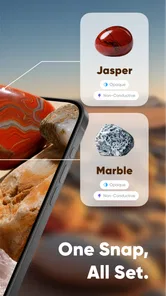
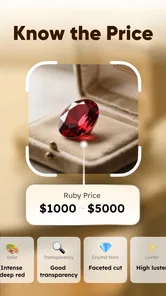
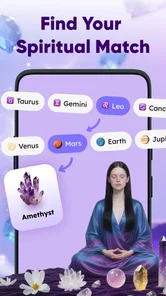
I enjoy apps that turn an ordinary walk into a small investigation, and RocKnow: Rock ID & Collection is built around exactly that feeling. It is a lifestyle app from River Stone Tech that uses a quick camera scan to help identify rocks, then adds context about rarity, possible value, and authenticity. That combination makes it more interesting than a simple visual search tool, especially if you like collecting stones, exploring outdoors, or learning the differences between minerals that look deceptively similar.
My first impression is that RocKnow is easiest to appreciate when I treat it as a helpful field companion rather than a final authority. Pointing a phone at a rock is fast and satisfying, but geology is full of lookalikes, changing surfaces, mixed specimens, and lighting problems. The app can give me a useful starting point, while the responsibility for an important purchase, a valuable specimen, or a serious authenticity decision still belongs with a qualified human or a more rigorous examination.
How RocKnow fits into a real rock-hunting routine
The basic appeal is clear: I find a rock, open the camera experience, and try to learn what I am looking at without immediately searching through long articles or image galleries. That makes the app approachable for someone who knows very little about minerals. Instead of beginning with unfamiliar terms, I can begin with the object in my hand and let the scan suggest a direction.
That quick start is particularly useful for casual discovery. A child can become curious about a stone found near a trail, a beginner can compare two pieces from a collection, and a hobbyist can use the app to organize the questions that come up during sorting. The Everyone age rating also fits this broad audience. I would still supervise younger children outdoors, of course, but the app itself is positioned as an accessible learning tool rather than a specialist-only instrument.
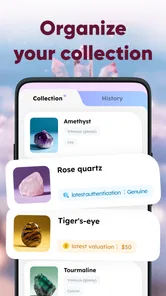
The collection angle gives the experience more staying power than a one-time identification. I can imagine using a scan while sorting specimens at home, then returning to the same group later to compare likely identities and decide which pieces deserve closer research. That workflow is more practical than trying to remember every result from a walk. It also encourages me to slow down and look at the collection as a set of clues: color, texture, shape, transparency, and the conditions in which each rock was found.
What a scan can and cannot settle
The most important habit is to photograph the specimen clearly. I get better results when the rock fills much of the frame, the surface is not hidden by dirt or glare, and the background is visually quiet. Natural light is useful, but harsh direct sunlight can create bright reflections that make a polished or wet surface look unlike itself. A second scan from another angle can be more informative than repeatedly photographing the same view.
I would also clean a specimen gently before scanning, while avoiding anything that could damage it. A dusty surface may hide the grain or luster that separates one mineral from another. On the other hand, aggressive cleaning can remove a coating or alter the very evidence that matters. For a valuable or fragile piece, I would photograph first, handle it carefully, and regard the result as a suggestion rather than a command.
More From Our News Desk

Weather by Xiaomi Review: Clear at a Glance, Less Clear Up Close

X Under Pressure: Can It Recover When Posting Goes Wrong?

Clash of Clans Is Won Between the Battles

Android Auto Makes the Case for Quieter Car Software

MobiOffice: Transforming Mobile Productivity with Seamless Integration

EA SPORTS FC™ Mobile Soccer: Redefining Mobile Sports Gaming
The useful question is not “Is the answer guaranteed?” but “What should I investigate next?” RocKnow is strongest at narrowing curiosity into a manageable path. If it points me toward a particular mineral family, I can then examine hardness, streak, cleavage, crystal form, locality, and other physical clues. That makes the app a beginning for better observation, not a replacement for observation.
Why connectivity changes the moment of discovery
The network matters most when I am away from home. A scan made beside a trail, at a beach, or during a market visit may depend on the phone being able to send or process information through the app’s connected experience. I would not plan a remote collecting trip on the assumption that every part of RocKnow will remain available without a connection. Instead, I would prepare as if the most convenient identification features might be less dependable in weak coverage.
This changes how I use it outdoors. In a city park or near a populated campground, I can treat the app as an immediate answer tool. In a remote area, I would photograph each specimen carefully, note where I found it, and keep a short written description so that I can revisit the identification when connectivity improves. That small backup habit protects the value of the trip even if the scan cannot finish at the exact moment I want it.
There is also a social side to connected use. If I am with friends, the quick scan can turn a quiet pause into a shared conversation. We can compare guesses before checking the result, which makes the app feel less like a private utility and more like a prompt for learning together. But that same speed can encourage everyone to accept the first label and move on. I get more from it when I discuss why the result seems plausible and what evidence might challenge it.
Using it comfortably on a phone
RocKnow makes the most sense on a phone because the camera is already part of the activity. I can use it while standing, kneeling, or holding a specimen in one hand, although awkward angles and moving subjects make any visual scan harder. For a small stone, I prefer placing it on a stable surface rather than trying to hold it over a busy background. That gives me a steadier image and leaves my other hand free to adjust the light.
At home, the experience becomes more deliberate. I can group similar rocks, take several images, and compare the app’s suggestions with a reference book or a trusted geology resource. This is where RocKnow feels most valuable to beginners: it reduces the intimidation of starting research. I do not need to know the right terminology before I begin, but I should be willing to learn that terminology after the scan.
A practical mobile routine is to separate discovery from verification. During a walk, I capture the specimen and record its location in my own notes. Later, with a clean table and better lighting, I perform a more careful scan and compare the result with physical observations. This two-stage method is less exciting than an instant answer, but it reduces the chance that a muddy, shadowed, or hurried image becomes the permanent label for a collection.
The app also suits people who buy stones casually, but I would be cautious at markets or shops. A quick result may help me ask better questions about a piece, yet the mention of rarity, value, or authenticity should not turn into an impulse to spend. If the financial decision matters, I would seek independent confirmation. A phone-based result can support negotiation or further research, but it should not be the only reason I believe a specimen is rare or genuine.
What happens when a scan struggles
Every visual identification tool has difficult subjects, and rocks create plenty of them. A specimen may be partly covered by soil, cut from a larger formation, artificially polished, mixed with other material, or photographed under unusual light. Small pieces can also lack enough visible structure for a confident distinction. When RocKnow gives an uncertain or surprising result, I would not keep forcing the same image through the process. I would change the conditions.
My recovery routine would be simple: wipe away loose dust, place the rock on a plain surface, avoid reflections, capture the full specimen, and then take a closer image of its most distinctive feature. If the result changes dramatically between views, that is useful information in itself. It tells me that the visual evidence is weak or that the specimen has several competing characteristics.
Connectivity failures deserve a similar response. If the app cannot complete a scan in the field, I would save clear photos and my notes rather than repeatedly retrying while the battery and signal disappear. When I am back on a reliable connection, I can try again with the same images or with improved ones. This approach also avoids confusing a temporary network problem with a bad identification.
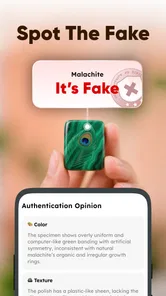
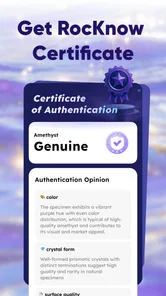
I would be especially careful with authenticity claims. A scan can notice visual patterns, but genuine verification may involve tests that a phone camera cannot perform, such as examining internal structure, hardness, density, treatment, or provenance. If I were considering an expensive specimen, I would use RocKnow to prepare questions, not to close the case. That is not a weakness unique to this app; it is a boundary that anyone should understand before trusting camera-based identification.
Keeping data use under control
Because the experience is centered on scanning, I would use it thoughtfully when mobile data is limited. I would avoid running repeated scans on nearly identical images and would wait for a stronger connection when the situation is not urgent. A short field note can preserve the context while I postpone the digital part. This is particularly sensible on long trips, where a collection of photographs and repeated attempts could consume more data than expected.
Battery planning matters too. Camera use, screen brightness, and weak-signal searching can all make a phone work harder. Before a day of collecting, I would charge the phone, reduce unnecessary screen brightness, and carry a power bank if I expect to scan often. I would also keep the original photos instead of assuming that an app result alone is enough. Those images remain useful for comparison, sharing with an expert, or trying again under better conditions.
There is a privacy-minded reason to be selective as well. A rock photo can reveal more than the specimen if the frame includes a home, a distinctive private location, or other personal details. I would crop or reframe when necessary, especially if I plan to share the image. The most useful scan is usually a close, clean view of the rock anyway, so removing the surrounding scene can improve both privacy and identification quality.
The free price makes trying RocKnow easy, but the app includes in-app purchases ranging from $3.99 to $79.99 per item. That wide range is a reason to explore the free experience first and understand what I actually need before paying. I would not purchase simply because a scan produced an interesting label. A paid feature is worthwhile only if it improves a repeated workflow, supports a collection I actively maintain, or provides information I can use responsibly.
Who will get the most from it
I think RocKnow is a good match for beginners, families, casual collectors, hikers, and anyone who enjoys turning found objects into learning opportunities. It is also useful for people who already know some geology but want a fast first pass when sorting a large number of specimens. The app’s combination of identification, collection-oriented use, and clues about rarity or value gives those users a reason to return after the novelty of the first scan.
It is less suitable for someone who needs laboratory-level certainty, professional appraisal, or a definitive authenticity certificate. It is also not the right choice for a user who dislikes camera-based tools or expects every result to work instantly in remote places. A printed field guide may be better when there is no dependable signal, while a specialist reference or expert examination is better when the specimen has serious financial or scientific importance.
Compared with a general image-search service, RocKnow feels more focused on the rock itself and on the collecting mindset around it. A broad search engine may return more scattered possibilities, but it can leave a beginner to decide which pages are credible. Compared with a traditional field guide, RocKnow is faster to start and easier for visual newcomers, while the book usually encourages deeper attention to physical tests and regional geology. I would happily use both: RocKnow for orientation, a trusted reference for confirmation.
My experience of the current package
The app is free to install, supports devices running Android 8.0 or later, and is currently at version 1.1.42.0630. Its audience appears to be growing, with over 50 thousand installs and a 4.6 average from around 1.1 thousand ratings. Those figures suggest that it has found a real audience, but they do not remove the need for sensible scanning habits. A popular tool can still be used poorly, especially when a visual suggestion is mistaken for proof.
River Stone Tech has kept the concept easy to understand: point the phone at a rock and use the result to guide discovery. I like that the idea does not require a long setup before the first useful moment. The friction comes later, when I want to distinguish a confident identification from a plausible guess, manage weak connectivity, or decide whether information about value deserves independent checking.
For me, that balance is the defining character of RocKnow. It is not merely a novelty camera filter, because the collection and research angle can shape an ongoing hobby. At the same time, it is not a substitute for geology training or professional assessment. The best results come from combining the app’s speed with careful photography, written context, physical observation, and restraint around money.
My connectivity verdict
I recommend RocKnow to anyone who wants a friendly way to begin identifying rocks, provided they understand that the smoothest experience is likely to happen when the phone has a reliable connection and the specimen is photographed clearly. In a backyard, classroom, shop, or connected park, it can make curiosity immediate. On a remote trail, I would treat it as one part of a larger plan rather than the only source of information.
The app earns its place on my phone because it helps transform “What is this?” into a practical next step. I can scan, record, compare, and decide what deserves deeper study. I would keep a field guide or notes alongside it, avoid treating rarity and authenticity hints as final judgments, and test the free experience before considering any purchase. Used that way, RocKnow: Rock ID & Collection is a genuinely enjoyable lifestyle app for learning through observation, with connectivity acting as a useful advantage rather than something I should take for granted.
RocKnow: Rock ID & Collection Frequently Asked Questions
Is RocKnow: Rock ID & Collection free to download, and are there in-app purchases?
RocKnow is free to download, so you can try the app without paying an upfront price. It also offers in-app purchases, with prices ranging from $3.99 to $79.99 per item. Check the purchase details shown in the app before confirming anything, particularly if a child will be using your device or you want to avoid unexpected spending.
What devices and age groups is RocKnow suitable for?
RocKnow is a lifestyle app for Android devices running version 8.0 or later. Its age rating is Everyone, making it suitable for a broad audience, including families and beginners interested in geology. As with any app that includes optional purchases, it is sensible for parents to review purchase settings and supervise children’s use of the device.
What is RocKnow: Rock ID & Collection used for?
RocKnow: Rock ID & Collection is designed for people who want to identify, organize, and learn more about rocks and minerals. You can use it to examine a specimen, explore information about different types of stones, and keep a personal collection of discoveries. It is particularly useful for beginners, students, hikers, collectors, and anyone curious about geology.
How does RocKnow identify rocks and minerals?
The app generally relies on information provided by the user, such as photographs and visible characteristics, to suggest possible rock or mineral matches. Results should be treated as helpful guidance rather than a professional geological certification, especially when specimens look similar or the image quality is poor. For valuable, unusual, or potentially hazardous samples, confirm the identification with a qualified expert.
Does RocKnow require an internet connection to work?
Some features may be available without a constant connection, but internet access is commonly needed for functions such as loading identification data, browsing the full reference library, synchronizing collection records, or receiving updated content. Before going outdoors, it is worth checking which information has been cached and ensuring that the app has permission to use mobile data or Wi-Fi when required.
Pros
- Identifies many rock types from a single photo.
- Useful reference for beginners learning geology.
- Collection tools help organize discovered specimens.
- Provides visual details to compare similar rocks.
- Works well as a quick field companion for rock hunting.
Cons
- Photo results can be unreliable with poor lighting or dirty specimens.
- Rare or unusual rocks may receive limited identification details.
- Some features may require an in-app purchase or subscription.
- The collection interface may feel basic for advanced collectors.
- Requires camera access and may use mobile data for online results.











