Rizzler AI: Texting Wingman
- 123.00
- 4.9
- Installs
- 100.00K
- Price
- Free

Screenshots
Analysis by Reviewed
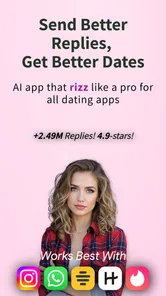
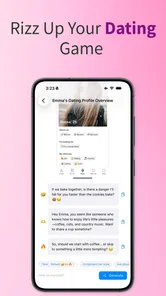
I tried Rizzler AI: Texting Wingman as a practical lifestyle app rather than treating it like a magic solution for dating. Its basic idea is straightforward: you bring a conversation, a dating prompt, or a moment when you do not know what to say, and the app helps you shape a more confident reply. That makes it most useful when the problem is wording, tone, or getting past a blank screen—not when you expect artificial intelligence to create a real connection for you.
The app is free to start, and it is published by Cognix Dev. It sits in the lifestyle category, with an age rating of Everyone 10+, and its store summary presents it as an AI texting and dating wingman focused on charisma and pickup lines. I found that description reasonably clear, although the word “rizz” can make the app sound more focused on jokes and flashy openers than it really needs to be. In practice, the better use is often quieter: making a message warmer, less awkward, or easier to answer.
What using the app feels like in everyday conversations
The first thing I noticed is that an AI texting assistant works best when I give it enough context to understand the situation. A short request such as “give me a good line” may produce something usable, but it can also lead toward a generic compliment or an exaggerated joke. A more useful prompt explains whether I am replying to a dating profile, continuing an existing conversation, apologizing for a slow response, or trying to sound playful without being too intense.
That distinction matters because charisma is not one fixed style. A confident first message needs a different tone from a reply to someone who has already shared something personal. I would use the app to generate a few directions, then choose the one that sounds closest to me. I would not paste every suggestion unchanged. The strongest result usually comes from treating the output as a draft that needs a personal detail, a simpler phrase, or a question connected to the other person’s message.
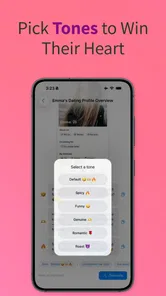
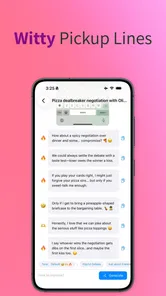
A realistic example is a conversation that has stalled after a few polite exchanges. Instead of asking for a random pickup line, I might describe the last message and ask for three replies: one curious, one lightly funny, and one direct. This gives me a small set of tones to compare. If the suggestions are too dramatic, I can steer the next attempt toward natural language. That workflow is more valuable than pressing a button and accepting the first sentence.
It can also help with the small decisions people often overthink. Should I respond with a question? Is this compliment too strong? Does this message sound needy, cold, or overly formal? Those are useful questions for an AI assistant because they involve editing and perspective. The app is less convincing when the task depends on knowing the full history between two people, since a generated answer can miss emotional details that are obvious to the participants.
The app’s popularity gives it some useful context. It has passed one hundred thousand installs and holds a 4.9 average from around thirteen thousand ratings. Those figures suggest that the concept is connecting with a sizeable audience, but they do not tell me whether every generated line fits real conversations. I still judge each suggestion by whether I would actually say it aloud, not by the app’s visibility in the store.
More From Our News Desk

Weather by Xiaomi Review: Clear at a Glance, Less Clear Up Close

X Under Pressure: Can It Recover When Posting Goes Wrong?

Clash of Clans Is Won Between the Battles

Android Auto Makes the Case for Quieter Car Software

MobiOffice: Transforming Mobile Productivity with Seamless Integration

EA SPORTS FC™ Mobile Soccer: Redefining Mobile Sports Gaming
Why the drafting approach is better than chasing a perfect line
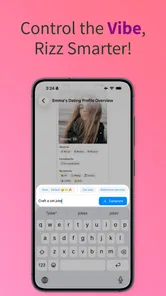
My most useful tip is to ask for a range of intensity rather than a single “best” answer. A low-pressure option can keep a conversation comfortable, while a more playful option may suit someone who is already joking with you. Asking for alternatives also exposes a trade-off: the bolder a line becomes, the more it may sound artificial if it does not match your normal personality.
Another good habit is to remove the parts that sound too polished. AI-generated flirting often becomes less believable when it uses elaborate compliments, forced confidence, or a punchline that does not connect to anything the other person said. I would keep the structure but replace the decorative wording. For example, a suggestion that refers to a hobby can become a simple question about how the person got into it. That turns a performance into an actual conversation starter.
I also found that the app makes more sense as a preparation tool than as a live replacement for judgment. Before sending a message, I can use it to compare tones and notice how a sentence might be interpreted. During an emotional conversation, however, I would slow down rather than outsource the response. A polished line can still be insensitive if the underlying situation calls for honesty, an apology, or space.
Trust begins with what I choose to share
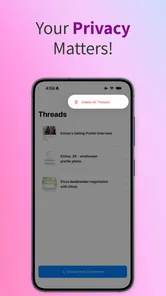
Dating messages can contain names, locations, routines, relationship histories, photographs, and private feelings. That makes the input box a more sensitive place than an ordinary writing assistant. I recommend removing identifying details before asking for help. Instead of pasting a full conversation with names and personal references, I would summarize the situation and include only the last message or the specific wording that needs improvement.
This is not just a privacy habit; it also improves the quality of the result. Too much conversation history can distract from the actual task. A compact prompt such as “They said they enjoy hiking, and I want to ask a natural follow-up without sounding like an interview” gives the assistant a clear job while keeping unnecessary personal information out of the request.
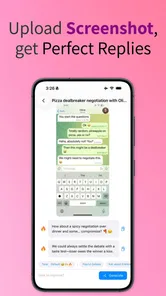
I would be especially careful with screenshots. A screenshot may include profile names, notifications, timestamps, contact details, or other conversations that I did not intend to submit. Cropping or rewriting the relevant text manually is slower, but it gives me much better control over what leaves my device. For an app centered on personal communication, that small extra step is worth building into the routine.
The same caution applies to intimate or emotionally vulnerable exchanges. I would not use a generated line to pressure someone, disguise my intentions, or keep a conversation going after the other person has clearly lost interest. The app can help with wording, but it cannot make an unwanted message welcome. My rule is simple: use assistance to express myself more clearly, not to bypass another person’s boundaries.
Controls, cost, and the choices a user should check
The app is free, but it includes in-app purchases ranging from $2.49 to $34.99 per item. That means I would explore the free experience first and avoid assuming that every useful part of the product is included without charge. Before committing to a purchase, I would check what the item unlocks, whether it is a one-time purchase, and how it fits my actual usage. Someone who only needs occasional help may find the free starting point sufficient, while frequent users should pay close attention to the purchase screen.
I also recommend reading every visible prompt before submitting a message. The important user control is not only whether the app generates a reply; it is whether I decide what context goes in, what wording comes out, and whether anything is sent elsewhere. I would never treat a suggested response as an automatic message. Copying it into the dating service myself gives me a final chance to edit the tone and confirm that it is appropriate.
Account and device choices deserve the same attention. If the app presents sign-in, storage, notification, or other permission choices, I would review them rather than tapping through quickly. I would enable only what supports the way I intend to use the app, and I would revisit those choices if I stop using it. I am not comfortable assuming that a convenience setting is necessary simply because it appears during setup.
For people comparing this app with ordinary alternatives, the difference is mainly speed and specialized framing. A general writing assistant can rewrite a text, adjust formality, or brainstorm questions, and it may be the better choice for work, friendship, or sensitive personal writing outside dating. A notes app gives more privacy for drafting offline, while advice from a trusted friend can provide emotional context an AI cannot. This app is more convenient when I want dating-oriented ideas without building the prompt from scratch, but convenience should not replace careful editing.
Where the app is genuinely helpful
I see three particularly good use cases. The first is the hesitant opener: someone has a profile detail they genuinely want to mention but cannot turn into a natural first message. The second is tone checking, especially when English is not the user’s first language or when a message feels harsher on screen than it sounded in the writer’s head. The third is variation. If I have written the same type of reply several times, the app can suggest another angle and help me avoid repeating myself.
There is also a less obvious benefit for people who tend to over-edit. Asking for a few concise versions can set a stopping point. Instead of rewriting one sentence for half an hour, I can compare alternatives, choose the clearest one, personalize it, and move on. That does not make the message more meaningful automatically, but it can reduce the anxiety that comes from trying to find a flawless line.
Another useful workflow is to ask the app to make a message less performative. Rather than requesting more confidence, I might ask for a version that is warm, specific, and easy to answer. That changes the goal from impressing someone to opening a door for conversation. In my experience, this produces more practical results than constantly asking for stronger flirtation.
It can also support reflection after a conversation, provided I keep the shared details minimal. I might describe a confusing exchange and ask what interpretations are possible, then use those possibilities to think before reacting. I would not treat the output as a diagnosis of the other person’s feelings. The value is in slowing down my assumptions, not in receiving a definitive answer about someone else.
Who should skip it or use another approach
I would skip this app if I wanted a fully private, offline writing space, because an AI texting tool is inherently designed around sending a request for generated assistance. I would also avoid relying on it for serious relationship conflict, consent-related conversations, breakups, or apologies where my own words and accountability matter more than clever phrasing.
It is not the right fit for someone who dislikes the idea of AI influencing personal communication. Even with careful editing, the suggestions can shape how a person presents themselves. If authenticity is the main concern, writing a rough message alone and asking a friend for feedback may be a better option. A general writing app may also be preferable for users who want grammar help without dating-specific language.
There is a practical limitation in the app’s central promise: no generated opener can compensate for a weak match or a conversation with no mutual interest. Repeatedly searching for better lines can become a distraction from recognizing when the exchange is naturally ending. I would set a limit for myself—try a thoughtful message, respond to the answer, and accept the result instead of endlessly optimizing.
Device compatibility is also worth checking before installing. The current version is 4.4.2, and it requires Android 7.0 or later. The app is available as an Android lifestyle tool, so someone using an older device or looking specifically for an iOS experience should confirm that it fits their platform before planning around it. That is a simple check, but it prevents frustration after deciding the app suits a particular routine.
My final view after using it as a writing aid
I think Rizzler AI: Texting Wingman is most convincing when it behaves like a quick brainstorming partner. It can help me move from “I have no idea what to say” to a few workable drafts, especially when I explain the context and request a specific tone. Its best contribution is not a spectacular pickup line; it is helping me write something clearer, more personal, and easier for another person to answer.
The trade-off is that personal messages deserve more care than ordinary generated text. I would limit the information I share, review any visible user choices, avoid sending suggestions automatically, and edit every response into my own voice. The free entry point makes it easy to test, while the in-app purchase range means I would inspect the upgrade details before spending money. Those steps keep the app useful without handing it more control than it needs.
After its release on December 18, 2023, the app has built a strong audience, and Cognix Dev has kept it moving through its current version. I can understand why people enjoy the focused approach, but the high rating should be treated as encouragement to try it, not proof that every suggestion will work for every personality. My recommendation is cautious but positive: use it for ideas, tone checks, and conversation practice, then let your own judgment decide what gets sent. The best result comes when the app supports your voice instead of replacing it.
Rizzler AI: Texting Wingman Frequently Asked Questions
What devices and operating systems can run Rizzler AI: Texting Wingman?
Rizzler AI: Texting Wingman is a mobile app for Android and iOS users looking for help with everyday messaging and dating conversations. On Android, it requires version 7.0 or later, so check your device’s software version before downloading. The app is in the Lifestyle category, and its age rating is Everyone 10+, which is worth considering when deciding whether it is suitable for a younger user.
Who makes Rizzler AI: Texting Wingman, and is it a popular app?
Rizzler AI: Texting Wingman is developed by Cognix Dev. It has an average rating of 4.9 from around 13,000 ratings, with over 100,000 installs. Those figures suggest that many people have tried it and that user feedback is generally positive, though ratings cannot guarantee that its suggestions will fit your style. Treat them as one point of reference and consider whether an AI writing assistant suits the way you prefer to communicate.
What is Rizzler AI: Texting Wingman, and how does it work?
Rizzler AI: Texting Wingman is an AI-powered messaging assistant designed to help you create replies, opening lines, compliments, and conversation ideas. You can provide a message or describe the situation, and the app suggests responses based on the tone you want, such as funny, confident, flirty, casual, or respectful. It is best viewed as a writing aid rather than a replacement for genuine conversation.
Can Rizzler AI: Texting Wingman help with dating apps and difficult conversations?
Yes, the app is intended for situations where you are unsure what to say, including dating-app introductions, follow-up messages, playful banter, and awkward conversations. Its suggestions can help you overcome writer’s block and adjust your tone before sending a message. However, the quality of the result depends on the context you provide, and you should always edit the generated text so it sounds natural and reflects your own personality.
Is Rizzler AI: Texting Wingman free to download and use?
The app is free to download, but it offers in-app purchases ranging from $2.49 to $34.99 per item, so some features may cost extra. Before buying, check the current purchase details in the app store and make sure you understand what each item includes. The app’s free download does not necessarily mean every tool or feature is available without payment.
Pros
- Suggests confident replies for awkward or difficult conversations.
- Offers multiple tones
- from playful and flirty to casual and respectful.
- Can help users start conversations when they do not know what to say.
- Useful for polishing messages before sending them to someone new.
- Simple interface makes generating a response quick and accessible.
Cons
- AI suggestions may sound generic or unlike your natural communication style.
- Flirty replies can occasionally feel too forward or inappropriate for the context.
- The best features may require a subscription or in-app purchases.
- Sharing private chats with an AI service may raise privacy concerns.
- Generated messages can miss sarcasm
- emotions
- or important conversation details.











