

RideMETRO
- 635.00
- 3.5
- Installs
- 100.00K
- Price
- Free

Screenshots
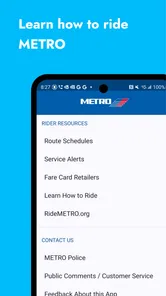
Analysis by Reviewed
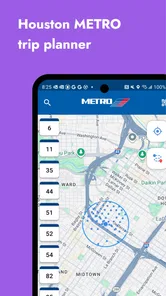
When I opened RideMETRO, I approached it as a practical tool rather than a full travel companion. It is a free Maps & Navigation app from Houston METRO, built for people using public transit around Houston, Texas. That focus is its biggest advantage: instead of trying to cover every travel possibility, it keeps its attention on getting around the local METRO network.
I can easily imagine keeping it on a shared household phone. One person may need it before work, another may check it before an appointment, and a visitor may use it while learning Houston’s transit system. In that situation, the app is most useful as a quick reference that each person can open when needed. It is not something I would treat as a family organizer or a shared messaging space, but it can support everyday coordination when everyone is traveling independently.
My overall impression is positive but measured. RideMETRO is helpful when your trip begins and ends within the Houston METRO world, especially if you already understand the basics of where you are going. It is less convincing as the only navigation tool for a complicated unfamiliar journey, a trip that combines several transportation companies, or a situation where you need broad walking, driving, cycling, and transit planning in one place.
How RideMETRO fits into a shared household routine
The most realistic use case is simple: someone in the household is about to leave, checks the transit information, and hands the phone to the next person when finished. Because the app is free and aimed at an Everyone audience, it is easy to consider for a family device, a spare phone, or a phone used by different members of a household. The important boundary is that the app serves the person making the trip; it does not replace a conversation about who is traveling, where they are meeting, or whether plans have changed.
For example, imagine one person needs to reach an appointment while another is heading to work. The first traveler can use RideMETRO to review the Houston transit portion of the journey, then tell the second person the intended route or departure plan. The second traveler can check the same app independently rather than relying on a screenshot that may become outdated. That small distinction matters in shared use: each person remains responsible for checking the trip that applies to them.
I would not expect the app to coordinate a whole household automatically. It is better understood as a common source of local transit information than as a place where family members manage plans together. If your household needs shared calendars, live location, arrival notifications, or a group chat, those jobs belong to other apps. RideMETRO can sit beside those tools, but it should not be mistaken for them.
There is also a useful privacy habit here. On a shared phone, I would avoid leaving a planned trip visible if another person may use the device immediately afterward. Even without treating the app as a personal account hub, travel searches can reveal destinations and routines. Closing the app or returning to a neutral screen after checking a journey is a sensible household practice, particularly when the phone is passed among adults, teenagers, or visitors.
More From Our News Desk

 Weather - By Xiaomi
Weather by Xiaomi Review: Clear at a Glance, Less Clear Up Close
Xiaomi’s weather app makes everyday forecasts quick to scan, but its calm surface can leave useful details and recovery paths harder to find than they should be.

 X
XX Under Pressure: Can It Recover When Posting Goes Wrong?
A resilience-focused review of X, examining setup, mistaken posts, interruptions, weak connections, and the gaps that matter when recovery needs to be dependable.

 Clash of Clans
Clash of Clans Is Won Between the Battles
Its raids are quick; its community is a long-term project of coordination, teaching, rivalry, and shared responsibility—with all the friction that entails.

 Android Auto
Android Auto Makes the Case for Quieter Car Software
The car interface is no longer judged by how much it can do, but by how quietly it helps. Android Auto shows what drivers now expect—and what still gets in the way.

 MobiOffice: Word, Sheets, PDF
MobiOffice: Transforming Mobile Productivity with Seamless Integration
MobiOffice: Word, Sheets, PDF is redefining mobile productivity with a surprising blend of functionality and innovation.

 EA SPORTS FC Soccer Mobile 26
EA SPORTS FC™ Mobile Soccer: Redefining Mobile Sports Gaming
Dive into EA SPORTS FC™ Mobile Soccer, where immersive gameplay and strategic depth transform mobile sports gaming.
Latest News



What the first setup tells you
RideMETRO is not the kind of app I would install expecting a long onboarding process. Its purpose is clear from the start: public transit in Houston, Texas. The developer is Houston METRO, so the app makes the most sense for riders who actually use that local system. If you live in another city and only occasionally pass through Houston, it may still be useful during a visit, but it is not a general-purpose transit planner for your home area.
The app’s current version is 2.71, and it supports devices running at least iOS version 10. That broad operating-system reach is convenient for people using an older iPhone, although an older device can still affect the overall experience through slower loading, smaller screens, or an aging battery. I would check the device itself before relying on the app for a time-sensitive trip, especially if it has been sitting unused for a long period.
On a household device, I would set up a straightforward routine rather than trying to personalize the app for every person. Keep the phone charged, make sure the app opens normally, and check a sample local transit search before the day of an important journey. This is one of my more practical recommendations: test the complete workflow before you need it, not while standing at a stop with a low battery and no time to troubleshoot.
The app is free, which removes one barrier to installing it for occasional use. That does not mean it should be installed on every device automatically. A person who never uses Houston transit will gain little from it, while someone who rides regularly may want it readily available. For a shared phone, the decision depends less on storage cost and more on whether the household actually travels through the Houston METRO network.
Using it when plans involve more than one person
RideMETRO works best when the person checking it knows the important details of the trip: the starting area, the destination, the preferred departure window, and whether walking to or from transit is realistic. In a shared household, missing one of those details can create confusion. I would ask the traveler to confirm the exact destination and timing before another person helps plan the route.
A useful coordination method is to separate planning from confirmation. One household member can look up the likely transit option, while the actual traveler checks it again shortly before leaving. This avoids a common mistake with shared devices: assuming that information found earlier still matches the current plan. It also prevents one person from becoming the permanent “transit expert” for everyone else.
For a child or teenager traveling independently, I would treat RideMETRO as one part of the preparation rather than the entire safety plan. The young traveler should know where to go, what to do if the route feels wrong, and whom to contact. The app can help them review the transit portion, but it does not remove the need for age-appropriate judgment or an agreed meeting plan with a parent or guardian.
For older relatives, the main issue may be clarity rather than technical ability. I would show them how to identify the relevant trip and how to return to the main screen, then let them repeat the process themselves. That is more reliable than sending a complicated set of instructions through text. If the screen or route presentation feels difficult for them to interpret, a broader navigation app with more familiar walking guidance may be the better companion.
Visitors can also benefit, but I would not hand the phone over without context. Houston’s transit layout may be unfamiliar, and a visitor may not know which local destination name or stop area to enter. I would first explain the intended neighborhood and the final walking point, then use RideMETRO to support that plan. The app is more useful when the traveler understands the journey than when they are simply following labels they do not recognize.
Where it is stronger than a general map app
The best reason to choose RideMETRO over a general mapping application is its local focus. A broad map app has to handle driving routes, businesses, walking directions, cycling, and transit across many regions. RideMETRO is more directly relevant to Houston METRO riders. That can make it feel less cluttered when your only question is about using the local public transportation network.
There is a trade-off, though. A general map app is often more convenient when your journey includes a long walk, a rideshare pickup, a private vehicle, or transit operated by another organization. It may also be easier for someone who wants one continuous view of every part of a mixed journey. I would use RideMETRO for the METRO-specific portion and keep a general map available for the surrounding streets and final approach.
This two-app workflow is one of the most useful ways to think about it. Use RideMETRO to answer the local transit question, then use the broader map when you need street-level orientation or a non-transit alternative. Trying to force one app to handle every part of a complicated journey can be slower than dividing the task between tools that each do a narrower job.
I would also avoid assuming that a transit app can predict every real-world complication. A route that looks sensible on a screen may still be inconvenient if you are carrying luggage, traveling with a stroller, walking with someone who moves slowly, or arriving after dark. Those factors require personal judgment. RideMETRO can inform the transit choice, but it cannot decide whether the complete trip is comfortable for your household.
Age, trust, and responsibility on the road
The Everyone content rating makes RideMETRO suitable in an age-rating sense for a broad audience. In practical terms, suitability still depends on the traveler. A young child may be allowed to open the app but should not be expected to manage an unfamiliar transit journey alone. A teenager may be able to plan a straightforward trip but still need a backup contact and a clear rule for what to do if plans change.
That distinction is important for shared-device use. An age rating describes the type of content in the app; it does not guarantee that every traveler has the experience needed to interpret transit information safely. I would trust the app as a planning aid, not as a substitute for supervision, local knowledge, or a backup plan.
Adults sharing a device should also agree on who is responsible for checking the final journey. If one person searches a route for another, details can be misunderstood when the departure time, destination entrance, or walking portion is not repeated clearly. My preferred approach is to have the traveler look at the result personally, even if someone else helped with the initial search.
For a household with different comfort levels, keep the workflow predictable. Use the same phone layout, explain the same basic steps, and write down important destination details separately when necessary. This is especially helpful for someone who becomes anxious when a route changes. The app can provide information, but a calm human explanation often makes the difference between useful guidance and confusion.
Limitations I would consider before relying on it
RideMETRO’s narrow Houston transit focus is both its identity and its main limitation. If you are outside the service area, it is not likely to become part of your daily routine. If you regularly cross between transit systems, you may have to supplement it with other tools. If your priority is door-to-door navigation that combines several modes, a larger mapping app may be more convenient.
I also would not choose it as the only tool for a high-stakes trip without checking the journey again close to departure. Transit conditions can change, and a responsible rider should confirm that the planned option still makes sense. This is not a criticism unique to one app; it is a general limitation of planning from a screen. The practical lesson is to leave enough time for a wrong turn, a longer walk, or a changed plan.
The average rating is 3.4 from around 1.6 thousand ratings, with more than 600 written reviews. I read that as a sign to keep expectations realistic rather than as a reason to dismiss the app. A middling score can reflect differences in device behavior, route expectations, or the needs of riders who want features beyond a locally focused transit tool. I would judge it by whether it covers your Houston METRO use case, not by the number alone.
Its reach is still meaningful: the app has passed 100 thousand installs. That suggests it is not an obscure experiment, but popularity does not make it universally suitable. A household that rides Houston transit often has a clear reason to try it; a household that mostly drives or uses another network may have no reason to keep it installed.
My household verdict after using it
I would recommend RideMETRO to a Houston household that wants a dedicated way to check local public transit, especially when several people share a phone or help one another prepare for separate trips. Its free price makes trying it easy, and its Everyone rating keeps the content accessible across a household. The strongest fit is a rider who wants focused Houston METRO information without turning every transit question into a search through a much larger navigation app.
I would not recommend making it the household’s only travel application. Keep a general map tool available for walking details, mixed-mode journeys, and destinations outside the local network. For children and inexperienced riders, pair the app with direct guidance and a backup contact plan. For visitors, explain the destination and final walking point instead of assuming the app alone will make the city familiar.
My final view is that RideMETRO earns its place when its job is clearly defined. It is a focused transit aid, not a family-control system, not a live household coordinator, and not a universal replacement for maps. Used that way, it can make Houston METRO planning more direct and less cluttered. If your household understands those boundaries and checks each trip with the actual traveler, I think it is worth keeping available.
RideMETRO Frequently Asked Questions
Is RideMETRO available for both Android and iOS?
RideMETRO is an app from Houston METRO for public transit in Houston, Texas. Before downloading, check that your device runs a supported operating system and that RideMETRO is available through the app store you use. The app is rated for Everyone, so its content rating is suitable for a broad audience. Once installed, you can explore its transit tools and decide whether they suit your regular trips.
What is RideMETRO and what can I use it for?
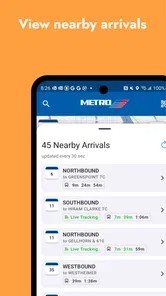
RideMETRO is the official mobile app for planning and managing trips on the METRO public transportation network. After installing it, you can generally use the app to search for routes, check schedules, view nearby stops or stations, and receive service information. It is designed to make everyday bus and rail travel easier, especially when you need to compare options or check whether a vehicle is arriving soon.
Does RideMETRO provide real-time arrival and service information?
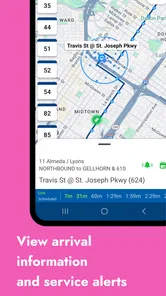
RideMETRO is intended to provide current transit information, including estimated arrival times, route details, and alerts about disruptions or changes. However, arrival predictions depend on GPS data, network coverage, and information supplied by the transit agency, so they may occasionally be delayed or inaccurate. Before leaving, it is still wise to confirm the selected route, stop, direction, and any active service notices.
Can I use RideMETRO to buy tickets or manage fares?
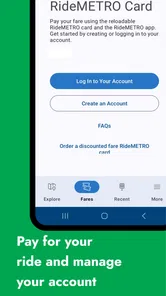
Fare features can vary depending on the METRO system and the version of the app available in your area. Some users may be able to purchase mobile tickets, reload a transit account, or review fare information, while others may only have access to trip planning and arrival tools. Check the app’s fare section before relying on it for payment, and verify accepted payment methods, ticket activation rules, and expiration conditions.
Does RideMETRO work without an internet connection?
RideMETRO works best with an active internet connection because trip planning, live arrival times, alerts, and map data may need to be retrieved from METRO servers. Basic information that has already loaded might remain visible temporarily, but real-time features are unlikely to update offline. If you expect poor reception, plan your journey in advance, save important details, and keep an alternative source of route information available.
Pros
- Real-time train information helps plan journeys with fewer surprises.
- Mobile ticketing reduces the need to wait at station ticket machines.
- Route planning makes it easier to compare connections and travel times.
- Service alerts can warn users about delays
- closures
- and disruptions.
- A digital transit app is convenient for regular METRO commuters.
Cons
- Some features may depend on an active internet or mobile data connection.
- Location permissions may be needed for accurate nearby station suggestions.
- Service information can occasionally lag behind rapidly changing conditions.
- Ticket purchases may require account creation and stored payment details.
- Coverage and features may vary depending on the METRO service area.











