

REVER - Motorcycle GPS & Rides
- 1.63K
- 4.4
- Installs
- 1.00M
- Price
- Free

Screenshots

Analysis by Reviewed
What decides whether a riding app lasts on my phone is not how appealing it looks on the first outing, but whether I reach for it again when planning the next one. REVER - Motorcycle GPS & Rides has a clear reason to return: it brings route planning, navigation, ride recording, and rider-focused community features together. That combination suits someone who treats the road as part of the destination, though it is less persuasive if all you need is the quickest way across town.
I would judge it over several rides rather than one impressive afternoon. A scenic route may be fun once, but the stronger test is whether the app helps me find another worthwhile loop, remember what I rode, and make the next outing easier to organize. Those recurring jobs are where its value can outlast the initial novelty.
Who is likely to keep using it?
REVER is most compelling for riders who plan leisure trips, enjoy exploring unfamiliar roads, and like having a record of where they have been. It can also suit a group ride organizer who wants to share a route and give companions a common reference before departure. A commuter with a fixed daily journey may get less from those strengths; a standard map app is often a better fit when speed and direct directions are the only priorities.
It is also worth asking how you feel about phone-based navigation on a motorcycle. The app can support the ride, but using it well still means preparing before moving and making sensible decisions when conditions change. If you prefer not to mount or consult a phone, or you want a dedicated navigation device to be your primary guide, REVER may be an addition rather than a replacement.
Planning a ride that works in practice
For a realistic weekend use, I would open REVER before leaving home, choose a route with the ride itself in mind, and review the general shape instead of waiting for each instruction on the road. I would then keep the address of the stop or meeting point handy in a familiar navigation app as a fallback. That is not needless duplication: it separates the enjoyable route from the practical need to reach a specific place if plans change.
Before a longer outing, I would also decide what I want the tracking record for. If I hope to reuse a loop, I should make a note of the route and save or share it in the way the app supports; if I only want a memory of the day, a simple ride log may be enough. Being clear about that purpose makes the record more useful later and keeps tracking from becoming another task with no payoff.
Group rides bring a different trade-off. Shared routes can help everyone start with the same plan, but riders should agree on meeting points and what to do if the group gets separated rather than assuming a shared app will coordinate every moment. I would use REVER to support the plan, not replace the conversation that makes a group ride safe and manageable.
More From Our News Desk

 Weather - By Xiaomi
Weather by Xiaomi Review: Clear at a Glance, Less Clear Up Close
Xiaomi’s weather app makes everyday forecasts quick to scan, but its calm surface can leave useful details and recovery paths harder to find than they should be.

 X
XX Under Pressure: Can It Recover When Posting Goes Wrong?
A resilience-focused review of X, examining setup, mistaken posts, interruptions, weak connections, and the gaps that matter when recovery needs to be dependable.

 Clash of Clans
Clash of Clans Is Won Between the Battles
Its raids are quick; its community is a long-term project of coordination, teaching, rivalry, and shared responsibility—with all the friction that entails.

 Android Auto
Android Auto Makes the Case for Quieter Car Software
The car interface is no longer judged by how much it can do, but by how quietly it helps. Android Auto shows what drivers now expect—and what still gets in the way.

 MobiOffice: Word, Sheets, PDF
MobiOffice: Transforming Mobile Productivity with Seamless Integration
MobiOffice: Word, Sheets, PDF is redefining mobile productivity with a surprising blend of functionality and innovation.

 EA SPORTS FC Soccer Mobile 26
EA SPORTS FC™ Mobile Soccer: Redefining Mobile Sports Gaming
Dive into EA SPORTS FC™ Mobile Soccer, where immersive gameplay and strategic depth transform mobile sports gaming.
Latest News



What to check before relying on it
Phone navigation is only as dependable as the device, its location signal, and the rider’s preparation. REVER’s route-focused approach is appealing, but my experience with GPS hiccups in remote areas means I would not set off on an unfamiliar back road without checking the route first. A second navigation option, or at least a clear idea of the intended destination and general direction, is sensible insurance.
There is a useful distinction between route discovery and turn-by-turn certainty. REVER may help make a ride more interesting, while a conventional map app can be more convenient for a quick address search or a last-minute detour through town. I would choose based on the task, and switch tools when the task changes rather than expecting one app to be best at everything.
Riders should also consider whether the screen and phone setup suit their bike and habits. A route that looks clear while parked can be harder to manage once gloves, weather, road conditions, and attention are involved. I would set the route before starting, avoid fiddling with the phone while moving, and stop somewhere safe if I need to make a change. That is a practical boundary, not a special feature of the app.
Setting the Wheels in Motion
Getting started with REVER is as easy as pie. The app is available on both Android and iOS, so whether you're team Android or team iPhone, you're covered. Once you download and install it, you're greeted with a sleek and intuitive interface. The sign-up process is straightforward, and you can even use your Google or Facebook accounts to sign in, which is super convenient.
REVER is a free Maps & Navigation app from REVER LLC, with a 4.3 average from around 16 thousand ratings and more than a million installs. It is rated Teen, and version 9.3.2 requires Android 8.0 or later. Those details make it easy to judge whether it fits your phone and comfort level, while the optional in-app purchases, priced from $7.49 to $19.99 per item, are worth keeping in mind if you expect to use paid extras regularly.
Exploring the Features
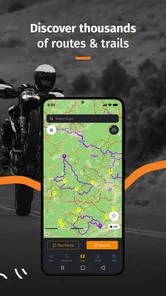
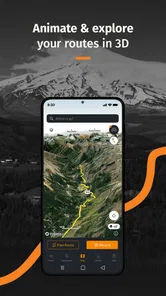
The app is packed with features that cater to both casual riders and hardcore adventurers. One of the standout features is the GPS navigation, which is specifically tailored for motorcyclists. The routes are curated to offer the best riding experiences, focusing on scenic paths rather than just the fastest way to get from point A to point B. I found this particularly useful when exploring new areas.
That distinction matters on an ordinary weekend, too. I might use a conventional map app to reach a café, but REVER makes more sense when the route itself is the plan: I can look for a more enjoyable ride, record the trip, then use the saved track as a reference when deciding where to go next. A useful habit is to check the route before setting off and keep a familiar backup navigation option available, especially if the ride heads into an area where GPS performance can be less dependable.
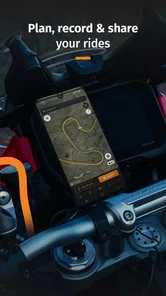
Another feature I absolutely love is the ride tracking. It logs your rides, allowing you to keep track of your mileage, speed, and even the elevation changes. It's like having a digital diary of all your adventures. Plus, you can share your rides with friends or the REVER community, which adds a social element to the app.
For a regular rider, the record becomes more useful when it answers a practical question rather than just collecting numbers. I would use past rides to remember which roads made a good loop, compare the shape of familiar outings, and share a route with a friend before a group ride. If you prefer not to make riding social, tracking still has value as a personal log; sharing is an option to enjoy, not a reason you need to use the app.
A Community for Riders
The social side can add a second reason to open the app between rides: other riders’ routes may give me ideas when I know I want to get out but have not settled on a destination. I would treat that inspiration as a starting point, then check whether the distance, roads, and stops make sense for my own plans. Someone else’s appealing track is not automatically the right ride for my bike, schedule, or comfort level.
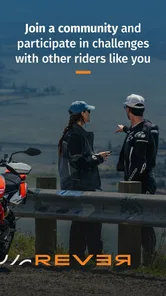
Speaking of community, the social aspect of REVER is quite engaging. You can join groups, participate in challenges, and even follow other riders. It's a great way to connect with fellow enthusiasts, share experiences, and get inspired by the journeys of others. The app also hosts numerous challenges and events, which can be a fun way to push your limits and discover new routes.
This is where month-to-month value can either grow or fade. Riders who enjoy browsing other journeys and setting themselves a reason to get out may find the community keeps the app interesting after the novelty of tracking wears off. On the other hand, if you ride alone and have no interest in following groups or sharing trips, that layer may feel like extra noise. I would start by using the route and tracking tools, then join the social side only if it genuinely helps me plan rides or stay motivated.
Where the Rubber Meets the Road
While the app is brimming with features, no app is without its rough patches. I did encounter a few hiccups with the GPS accuracy in remote areas, which can be a bit frustrating when you're deep into your ride. However, the developers are quite responsive, and updates are frequent, so I'm hopeful that this will improve over time.
That limitation changes how I would rely on it. In a remote stretch, I would not make one phone app my only source of direction; I would review the route in advance and be ready to use another navigation option if the signal or location tracking becomes unreliable. For commuting through familiar streets, a general-purpose maps app may be simpler and more direct. REVER is the more appealing choice when discovering roads and keeping a record of the ride are part of the goal.
Maintenance is mostly a matter of keeping the app and phone ready for riding. I would check that the route and tracking setup are in order before leaving, keep the device usable and powered, and avoid trying to adjust a screen while moving. That small preparation helps prevent a ride from turning into a roadside troubleshooting session. Riders who want a completely hands-off experience may prefer simpler navigation, while those who value route records will likely find the preparation worthwhile.
Another thing to note is that while the basic version of the app is free, some of the more advanced features require a subscription. It's not a deal-breaker, but it's something to keep in mind if you're looking to unlock the app's full potential.
Because purchases are optional, I would spend time with the free experience first and decide what I actually use before paying for anything. The right question is not whether every extra sounds appealing, but whether a paid option solves a recurring need in my riding routine. If I only take occasional local trips, paying may not make sense; if I regularly plan rides and rely on the app, the added capabilities may be easier to justify.
Keeping the habit without adding clutter
A small routine can make the app feel less like another thing to maintain. I would check the route while planning, confirm the phone is ready before leaving, and look at the ride record afterward only if I have a reason to keep or share it. If I stop using the community, tracking, or route tools for several outings, that is a useful signal to reassess rather than keep the app out of habit alone.
That approach also helps with the paid features. I would first identify a repeated frustration in my riding routine, then see whether an optional purchase addresses it. Paying simply because an upgrade exists is hard to justify; paying for something I use on regular rides is a more grounded decision. Since the app is free to start, there is little reason to decide before I know which parts I actually return to.
Riders who mainly want snowmobile or off-road trip tracking may also be drawn to REVER’s broader riding focus, but the same practical rule applies: check the route and prepare for the conditions of the outing rather than treating a phone app as a guarantee. For someone who wants a basic street address, a more conventional navigation tool remains the easier everyday choice.
Final Thoughts
All in all, REVER - Motorcycle GPS & Rides is a fantastic tool for any motorcycle enthusiast. It combines functionality with a vibrant community, making your rides not just journeys, but memorable experiences. If you're passionate about motorcycling and love discovering new routes, this app is definitely worth a try. So gear up, hit the road, and let REVER guide your next adventure!
My long-term verdict is a little more specific: REVER earns space on my phone if I ride often enough to revisit routes, keep a personal log, or draw inspiration from other motorcyclists. It is less compelling for someone who only needs dependable point-to-point directions or dislikes maintaining another account and app. Give it a fair trial on a familiar ride first, then use it on a planned scenic outing; that makes it easier to judge whether its tracking, navigation, and community are useful habits rather than first-week novelties.
REVER - Motorcycle GPS & Rides Frequently Asked Questions
Who develops REVER, and what kind of app is it?
REVER is a Maps & Navigation app developed by REVER LLC. It is aimed at people who ride motorcycles, go off-road, or use snowmobiles, with a focus on tracking and guiding riding experiences. If you are looking for a general-purpose navigation app, its riding-centered approach is the main distinction to consider before downloading.
Is REVER suitable for motorcycle, off-road, and snowmobile trips?
REVER is built around riding and navigation, with its focus extending beyond motorcycle journeys to off-road and snowmobile experiences. That makes it worth considering if your outings involve different types of riding rather than only road touring. Before downloading, think about which activities you want to track or plan, then explore the app’s available options to see how they fit your usual trips.
What devices can install REVER, and is it free to download?
REVER is a free Maps & Navigation app from REVER LLC, with in-app purchases available for riders who want additional options. It is rated Teen and requires Android 8.0 or later on Android devices. Its current version is 9.3.2. If you use an iPhone or iPad, check the relevant App Store page for device compatibility before downloading.
What is REVER and how does it enhance my motorcycle riding experience?
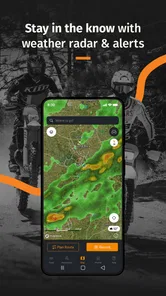
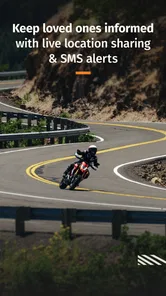
REVER is a comprehensive app designed specifically for motorcycle enthusiasts to enhance their riding experience. It offers GPS navigation tailored for motorcycles, allowing riders to explore new routes with ease. Additionally, it provides features like ride recording, route planning, and community sharing, enabling users to connect with fellow riders and share their journeys. The app's real-time tracking and weather updates ensure a safer and more enjoyable ride.
Can I use REVER offline and how reliable is its GPS functionality without internet?
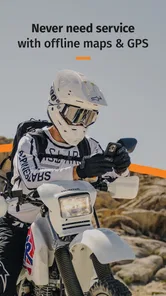
Yes, REVER offers offline capabilities, which is particularly useful when riding through areas with limited or no internet connectivity. The app allows you to download maps in advance, ensuring you have access to navigation at all times. While offline, the GPS functionality remains reliable, but features requiring internet, such as real-time weather updates and community sharing, may be limited.
Pros
- Easy-to-use interface for all riders
- Comprehensive route planning features
- Real-time weather updates included
- Social sharing for ride experiences
- Offline maps for remote locations
Cons
- Limited free version features
- Occasional GPS signal loss
- Battery drain on long rides
- Requires constant internet connection
- Subscription model can be pricey











