Resident Portal
- 10.13K
- 4.8
- Installs
- 1.00M
- Price
- Free

Screenshots
Analysis by Reviewed
For many renters, apartment admin arrives in small, unrelated pieces: a balance to check, a repair to report, or a question for the property team. I find Resident Portal most useful when those everyday tasks can be handled through the same resident account. It is a free Lifestyle app from Entrata, Inc, rated for Everyone, but it works as a practical extension of a property’s own systems—not as a universal service for every tenant.
Start with Your Property’s Setup
I’d consider this a practical renter’s tool, not a replacement for every conversation with a property manager. Its 4.8 average from around 69,000 ratings and more than a million installs suggest plenty of residents find it useful. The key question is whether your property uses it as its resident portal. If it does, the app can bring routine tasks together; if your landlord handles everything through another system, installing it alone won’t move a request or payment along.
A useful way to think about the starting point is the information you need to act on: a rent balance, a repair that needs attention, or a message for the property team. Rather than searching old emails and trying to remember which office number to call, I’d open the portal and see whether the relevant task is available there. That makes it especially appealing to residents who prefer a phone-based record of everyday apartment business. Someone who rents a room informally or has a landlord who works only by text may be better off sticking with that direct arrangement.
Before relying on it, I’d make sure the account is connected to the right residence and that the home screen reflects the tasks I expect to handle. This small check matters because the app’s value comes from the property relationship behind it. A resident who has just moved in, changed apartments, or received new account details should take a moment to verify that the portal is showing the appropriate household before paying or submitting a request.
Managing the Everyday Apartment Workflow
The appeal is not that every part of renting becomes effortless; it is that common tasks can start in one place. When I open the app, I’m looking for a clear route from the problem or question I have to the property team that can act on it. That can save time compared with switching between a paper notice, an email thread, a phone call, and a separate website, provided the property keeps its portal in use.
From Balance Check to Payment Record
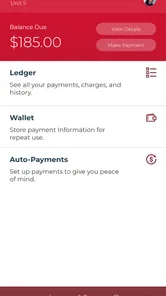
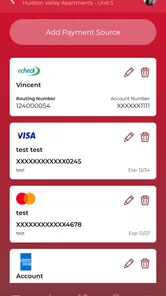
One feature that stood out to me immediately was the rent payment system. Gone are the days of writing checks or making trips to the leasing office. With this app, you can pay your rent in seconds. It even offers multiple payment options, including credit cards and bank transfers. Plus, it keeps track of all your transactions, so you never have to worry about missing a payment again.
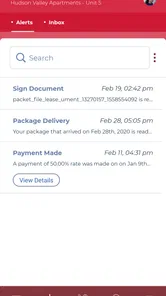
For a realistic routine, imagine checking the balance while planning the month’s bills, then making the payment when you’re ready and returning later to review the transaction record. I’d still treat that record as a helpful reference, not a reason to stop checking that a payment went through as expected. A portal can simplify the handoff, but your own budgeting calendar remains useful, especially if you share household expenses or need to coordinate who is responsible for paying.
More From Our News Desk

Weather by Xiaomi Review: Clear at a Glance, Less Clear Up Close

X Under Pressure: Can It Recover When Posting Goes Wrong?

Clash of Clans Is Won Between the Battles

Android Auto Makes the Case for Quieter Car Software

MobiOffice: Transforming Mobile Productivity with Seamless Integration

EA SPORTS FC™ Mobile Soccer: Redefining Mobile Sports Gaming
Compared with paying through a separate property website, calling the office, or sending a check, a mobile portal can keep the task closer to the place you already check for apartment matters. The trade-off is that the available process depends on the property’s setup. Before relying on it for a deadline, I’d confirm the account details and payment options shown for your residence, then leave enough time to resolve an issue with the property team if something looks wrong.
A less obvious but useful habit is to separate the act of submitting a payment from the act of confirming your household budget. If roommates split rent, agree in advance who will pay through the portal and how everyone else will reimburse that person. The app can help the responsible resident manage the property-facing task, but it does not settle the private arrangement between housemates. Keeping those two steps distinct can prevent confusion when one person sees a transaction record and assumes the whole household has coordinated.
Turning a Repair into a Clear Request
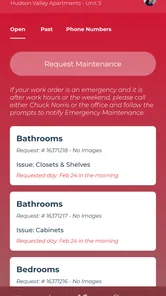
We've all been there—something breaks in your apartment, and you have to jump through hoops to get it fixed. Submitting a maintenance request is straightforward: describe the issue, include a picture when it helps, and send it to the property team. The app also allows you to track the status of your request, so you can return to it rather than relying only on memory or a scattered message thread.
The most useful habit here is to make a request specific enough for someone else to act on: describe what is happening, where it is, and when you first noticed it. A photo can add context, but it does not replace a clear explanation. After sending the request, keep an eye on its status and use the property’s usual contact route if the problem becomes urgent or the situation changes. The app helps pass information to the team; it cannot repair the issue itself or guarantee how quickly the next handoff happens.
This is where the portal can be more orderly than a scattered chain of texts: the request and its progress have a home you can revisit. It’s also where expectations matter. If you need to discuss access, clarify a repair, or report a new symptom, a direct conversation may still be the better next step. I’d use the app to create a clear starting record, then follow up through the channel the property team asks residents to use.
For example, if a leak changes from a slow drip to water spreading across a floor, I wouldn’t assume that the original submission is enough to communicate the change. I’d contact the property through its urgent route and explain that the situation has become more serious. The portal is well suited to documenting ordinary maintenance needs; a time-sensitive problem calls for a human handoff as well. This distinction is easy to overlook when a request tracker makes a problem feel formally handled.
Using the Resident Community Carefully
Another feature I find distinctive is the community bulletin board. It gives residents a place to connect, share events, and offer or trade items. I’ve personally used it to find a new roommate and sell some old furniture. It can be a convenient way to reach neighbors without posting to a broad public marketplace.
A board like this is most valuable when you want to reach people in the same residential community rather than post to a broad public marketplace. For example, someone moving out might use it to offer furniture to a neighbor, while a new resident could look for local notices or shared interests. I’d still use ordinary care when arranging an exchange or discussing personal details; a community space is convenient, but it doesn’t remove the need to make sensible decisions about meeting and communication.
The trade-off is that a resident board is only as useful as the community’s participation and the relevance of its posts. I’d treat it as a local noticeboard rather than a guaranteed source of answers or a replacement for official property communication. If I’m trying to resolve a billing issue or get a repair scheduled, I’d use the appropriate account or maintenance route instead of relying on a neighbor’s post or informal advice.
Who Gets the Most from It
This app makes the most sense for someone whose property already uses the portal and who wants a phone-friendly way to handle recurring apartment tasks. It may be especially handy for residents who travel, work irregular hours, or prefer to keep routine requests and account activity in one place. The benefit is less about adding a new service and more about reducing the number of places you need to check for ordinary property business.
It is less compelling for tenants whose landlord prefers direct calls or texts, people who rarely use mobile apps, or residents who need a detailed conversation before making a decision. If a situation involves a disagreement, a complicated charge, or a policy question, I’d contact the property team directly and keep a record of the exchange. The app can support the relationship, but it cannot replace judgment or guarantee that every concern is best handled through a form.
Compared with a generic budgeting app, the portal is closer to the property-facing task: it can connect a resident account with rent, maintenance, and communication. A budgeting app may be better for planning spending across bills, while a personal email folder may be better for preserving long correspondence. I wouldn’t expect this one app to do both jobs equally well. Its advantage is convenience when the property has made it part of the resident workflow; its limitation is that it is not an independent rental-management tool a tenant can impose on a landlord.
Where the Convenience Has Limits
The app’s usefulness depends on whether your property actively uses the portal and keeps its resident information current. It is not a universal renter service that can resolve disputes, set building policy, or make a maintenance team respond. If you prefer speaking to a person, have a complicated billing question, or need urgent help, contacting the property directly may be faster and clearer than trying to handle everything in an app.
Resident Portal is currently at version 5.61.1 and supports Android 5.0 or later. I’d check that your device meets that requirement and that your property can connect your resident account before making it the center of your routine. The app is free, but the specific payment choices and procedures you see are tied to your property’s arrangement, so I wouldn’t assume that every resident has an identical setup. The app was released on April 18, 2014, and has 9,800 reviews, another sign that it has been used by a substantial resident community over time.
One practical question is whether you can rely on it as your only way to reach the property team. I wouldn’t. I’d use the portal for routine submissions and account checks, while keeping the property’s established contact method available for urgent problems, unclear responses, or matters that need a conversation. Another is whether every resident will see the same options: the experience depends on the property’s configuration, so it’s sensible to check what is actually available in your own account rather than assume another resident’s workflow applies to you.
For a new resident, I’d also avoid treating a successful sign-in as proof that every detail is ready for action. Confirm the residence and account context, review the available tasks, and learn which route the property expects for urgent issues. That quick orientation helps avoid sending a request to the wrong place or assuming that a general portal message is equivalent to a direct conversation. Once the setup is clear, the app can become a useful everyday shortcut without becoming your only source of information.
All in all, I’d recommend Resident Portal to renters whose property already relies on it and who want a convenient starting point for routine rent and maintenance tasks. It can make apartment admin feel more organized, especially when you return to check a request or transaction, but it works best alongside sensible budgeting and direct contact when the situation calls for it. If your landlord does not use the portal, or you need a tool for broader personal finance and record-keeping, a different option will fit better. For the right resident, it is a useful practical link between home life and the people managing the property.
Resident Portal Frequently Asked Questions
What does the Resident Portal app help residents do?
Resident Portal is a lifestyle app for handling everyday property-related tasks on a mobile device. Its main tools let residents pay rent, submit maintenance requests, and communicate with their property. It brings these common tasks together in one place, which can make it easier to reach the services your property provides without relying only on a computer.
Who develops Resident Portal, and how popular is it?
Resident Portal is developed by Entrata, Inc. It has an average rating of 4.8 from around 69,000 ratings, with about 9,800 written reviews and over 1 million installs. Those figures indicate that many residents have tried it, though whether it is useful for you depends most on whether your property uses Resident Portal and offers the services you need.
Is Resident Portal free, and what should I know before installing it?
Resident Portal is a free lifestyle app from Entrata, Inc. It is intended for residents who want to use their property’s online services from a mobile device, including paying rent, submitting maintenance requests, and communicating with property management. Before installing it, consider whether your property uses Resident Portal and whether you have access to the account details needed to connect with its services.
What device do I need to install Resident Portal?
Resident Portal is available for Android devices running Android 5.0 or later. Before downloading, check your device’s operating system version and make sure there is enough available storage for the app. The app is designed for mobile use, so you can access its resident services from a compatible phone or tablet rather than relying only on a computer.
What is Resident Portal and how does it enhance property management?
Resident Portal is a comprehensive app designed to streamline property management for both residents and property managers. It offers a centralized platform where users can pay rent, submit maintenance requests, and communicate with management seamlessly. By digitizing these processes, the app enhances convenience, reduces paperwork, and improves communication efficiency, making it a valuable tool for modern property management.
Pros
- User-friendly interface for easy navigation.
- Secure access to important documents.
- Quick maintenance request submission.
- Convenient rent payment options.
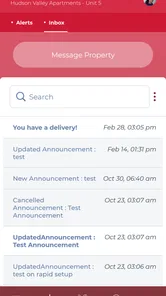
- Real-time community announcements.
Cons
- Limited customization options for users.
- Occasional app crashes reported.
- Requires stable internet connection.
- Notifications can be overwhelming.
- Limited offline functionality.











