RentCafe Resident
- 23.65K
- 4.8
- Installs
- 1.00M
- Price
- Free

Screenshots
Analysis by Reviewed
For me, the biggest question with a resident app is whether it helps at the exact moment I need to deal with something at home. RentCafe Resident brings rent payments, maintenance requests and property communication into one mobile place, which can make ordinary rental chores feel less scattered. Its usefulness, though, depends partly on having a reliable connection and a property that uses the service.
When a steady connection matters
Tasks such as submitting a repair request or paying rent are most convenient when I can complete them in one sitting. A weak signal or an interrupted connection can get in the way, so I’d avoid starting a payment while moving between networks or rushing out the door. I’d also check that a request has actually been submitted before assuming the management team has received it.
That small habit matters most for time-sensitive issues. If a leak or other urgent problem needs immediate attention, I wouldn’t rely on an app message alone; I’d use the property’s established urgent-contact route as well. The app is useful for keeping routine matters together, but it shouldn’t replace an emergency process.
Useful at home and on the move
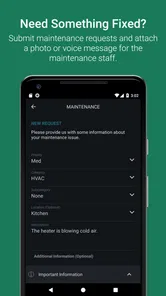
A realistic use case is noticing a maintenance problem just before leaving for work. I can make a note of what happened, take a clear photo if the request flow offers that option, and send the details when I have a moment. A concise description—where the issue is, when it started and what I observed—can make a request easier to understand than a vague “please fix this.”
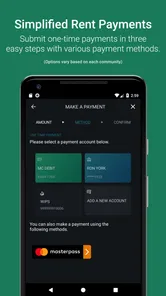
For rent, I’d choose a calm moment to review the amount and payment details rather than tapping through while distracted. Recurring payments can reduce the chance of forgetting a regular task, while a one-time payment gives more control when I prefer to handle each month separately. Which approach is practical depends on my own budgeting habits and the payment options available through my property.
What to do if something goes wrong
If a screen stalls or I’m unsure whether a payment or maintenance request went through, I’d pause before submitting it again. First I’d check the app for a confirmation or updated status; if the result remains unclear, contacting the property team can help avoid duplicate requests or payments. Keeping any relevant confirmation details until the matter is settled is a sensible extra step.
This is where a direct call or email can still be the better choice: it gives me another route if I can’t get through the app, and it can be more suitable when a problem needs a quick back-and-forth. RentCafe Resident is a useful channel, not a guarantee that every issue will be resolved instantly.
More From Our News Desk

Weather by Xiaomi Review: Clear at a Glance, Less Clear Up Close

X Under Pressure: Can It Recover When Posting Goes Wrong?

Clash of Clans Is Won Between the Battles

Android Auto Makes the Case for Quieter Car Software

MobiOffice: Transforming Mobile Productivity with Seamless Integration

EA SPORTS FC™ Mobile Soccer: Redefining Mobile Sports Gaming
Data-conscious everyday use
I’d use a trusted connection for account and payment tasks, especially when handling personal or financial details. On a limited mobile plan, it also makes sense to wait until Wi-Fi is available before browsing community updates or sending photos. A photo can clarify a repair, but I’d frame it tightly around the issue rather than include unrelated personal details or belongings.
Compared with managing rent through a separate payment method, reporting repairs by phone and tracking notices in email, an all-in-one resident app can reduce the number of places I need to check. The trade-off is that its usefulness is tied to the participating property’s setup; it is not a general-purpose rental marketplace or a substitute for a landlord’s own procedures.
Your Rental Life Made Easy
If you’ve ever struggled with the hassle of managing rent payments, maintenance requests, or communication with your property management, RentCafe Resident might just be the app you’ve been looking for. It’s designed to streamline all those headaches into a smooth digital experience, right at your fingertips.
First Impressions Count
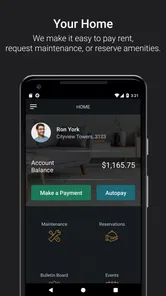
Upon launching the app, I was greeted with a clean and intuitive interface. The layout is straightforward, which means you won't find yourself lost in a sea of unnecessary features. The main dashboard gives you quick access to all essential functions: you can pay your rent, submit a maintenance request, or even check out community news with just a few taps. Pretty neat, right?
Features That Stand Out
One of the most impressive features is the ability to make online rent payments. No more writing checks or lining up at the leasing office. You can set up recurring payments or make a one-time payment. Plus, it’s secure, so you can trust your transactions are safe.
The maintenance request feature is another winner. The app lets you snap a photo of the issue and send it directly to the management team. This way, you’re not just describing the problem; you’re showing it. This can speed up response times significantly.
For those who love staying in the loop, the app offers a news feed from your community. Whether it’s information about upcoming events or important notices, you’re always one step ahead. It’s like having a mini social network just for your building.
From Annoyance to Convenience
Communication is key when it comes to dealing with property management, and the app makes it easy. You can send messages directly through it, ensuring your concerns don’t get lost in translation or buried in email. This direct line of communication can really enhance the tenant experience.
There are a few practical details I’d consider before relying on it as my only way to manage the tenancy. The app is free and developed by Yardi Systems, but access to useful resident services depends on your property using RentCafe. If your building does not provide the service, installing it alone will not replace the contact methods your landlord already uses. I’d confirm with the leasing office how residents are expected to handle payments and urgent repairs.
It is best suited to renters who want routine tasks in one place and are comfortable handling them on a phone. Someone who prefers paper records, avoids mobile payments, or needs a service that works across unrelated landlords may be happier with their existing methods. Even for a regular user, keeping a separate note of important conversations can be worthwhile when a repair or account question needs follow-up.
The app sits in the lifestyle category, has an Everyone age rating and is free to install. It has a 4.7 average from around 147,000 ratings, with over a million installs. Those figures suggest it is widely used, but they don’t tell me whether every feature is enabled at every property; I’d judge it by the services my own building makes available.
Picking the right routine for your household
The most useful way to approach the app is to decide which parts of tenancy management you actually want to move onto your phone. If you mainly need a reliable place to make a payment and submit repair details, those tasks may justify installing it even if you never read community updates. If you share a household, it’s also worth agreeing who will submit requests and keep track of replies. Two residents independently reporting the same issue can create confusion, while one person acting as the point of contact makes follow-up clearer.
I’d treat the app as a practical record of routine interactions, not as my only archive. When I send a repair request, I’d note the date and keep a short description of what I reported. If the issue changes, I’d add the new observation rather than assume the original message explains everything. That approach is especially useful for intermittent problems, such as a fixture that works at some times and not others, because a specific timeline gives the property team something concrete to investigate.
For a move between apartments, the property connection is an important distinction. This is not a universal account for every rental home; the services available depend on the building’s arrangement. I would check with the new leasing office before expecting my existing setup to carry over. That small check can prevent a frustrating first rent day spent searching for a function that the new property handles another way.
Where the app fits among other methods
Renters already have familiar alternatives: a bank or payment service for bills, email for written communication, and a phone call for urgent conversations. Those options can be better when I want a record that sits outside a property’s platform, when I need a quick human response, or when the building does not use RentCafe. The app’s advantage is convenience when several ordinary resident tasks are available together, rather than an ability to replace every channel.
There is a useful trade-off here. Centralizing routine tasks can save me from hunting through messages to remember where a payment or notice belongs, but it also means I should know what to do if I cannot sign in or the connection drops. I’d keep the property’s normal contact details somewhere accessible and avoid treating an on-screen status as proof of a completed transaction until it is clear. That is not extra effort for its own sake; it is a sensible backup for anything involving rent or a repair that needs attention.
The community feed is most valuable when the property uses it for notices residents genuinely need. I wouldn’t install the app expecting a broad social network or lively discussion; its role is tied to resident services and property information. For someone who wants only a way to pay rent, the feed may be incidental. For a resident who otherwise misses building announcements in email, having updates beside the practical tasks could be a real convenience.
My Verdict
So, is RentCafe Resident worth the download? If you’re looking to make your rental experience as seamless as possible, I’d say absolutely. It’s user-friendly, packed with features that address real tenant pain points, and brings everything you need into one convenient app. Whether you’re a tech-savvy millennial or someone who just wants an easier way to manage your rental life, this app could be a game-changer.
Its release goes back to December 2013, and version 25.10.1 supports devices running Android 8.0 or later. I’d still keep the property’s usual contact information handy, since an app is most helpful when it complements—not replaces—the arrangements your building already relies on.
So go ahead, give it a try, and let me know what you think. Happy renting!
RentCafe Resident Frequently Asked Questions
Can I use RentCafe Resident if my property does not use RentCafe?
RentCafe Resident is designed for residents whose properties are managed through RentCafe. The app’s usefulness depends on your community being connected to the service and providing resident account access. If your property does not use RentCafe, you may not be able to sign in or use its property-related tools. Check with your property management team to find out whether residents can use the app.
What kinds of resident tasks can I handle from the app?
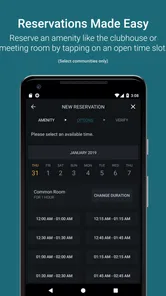
RentCafe Resident brings common property-related tasks to a mobile app. Its core functions include paying rent and submitting work orders, so residents can handle these tasks from their phone rather than relying only on other ways of contacting the property team. The features available to you depend on your property’s setup and the resident services connected to your account.
What do I need to get started with RentCafe Resident?
RentCafe Resident is intended for people living in properties managed through RentCafe, so the first step is to have access to your resident account. After installing the app, sign in with your account details to reach the features available for your property. If you are not yet connected to a managed property account, the app may not be useful for handling resident tasks.
Is RentCafe Resident free to download, and what devices can run it?
RentCafe Resident is free to download and is rated for Everyone. It is available for Android and iOS devices, with Android support starting at version 8.0. Before installing, check that your device’s operating system meets that requirement. The app is a lifestyle tool for residents, focused on accessing property-related services from a phone.
What is RentCafe Resident and how does it work?
RentCafe Resident is a mobile application designed for residents living in properties managed by Yardi. It allows users to pay rent, submit maintenance requests, and communicate with their property management team directly from their mobile device. By logging into the app, residents can access their account details, review payment history, and handle all property-related tasks efficiently. The app streamlines communication and management, making it easier for residents to manage their living arrangements.
Pros
- User-friendly interface
- Quick maintenance requests
- Secure online payments
- Community news updates
- Responsive customer support
Cons
- Occasional app crashes
- Limited customization options
- Slow loading times
- Requires stable internet
- Some features are paid











