

ReciScan - Cookbook Maker
- 5.00
- 4.1
- Installs
- 10.00K
- Price
- Free

Screenshots

Analysis by Reviewed
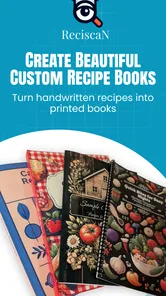
I tried ReciScan - Cookbook Maker with a simple goal: turn recipes that normally live on loose paper, in screenshots, or inside old family folders into something easier to keep and use. It is a free Food & Drink app from Dustin Runnells, and its central idea is refreshingly practical. Rather than asking me to search a huge recipe library, it focuses on recipes I already have and helps move them toward a custom printed cookbook.
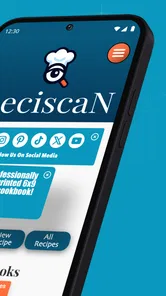
That makes the app feel less like a conventional cooking platform and more like a bridge between scattered recipe material and a physical keepsake. The store summary describes scanning recipes, designing books, and ordering printed copies, and that sequence is the best way to understand the experience. The important question is not whether it replaces a full meal-planning service. It does not try to do that. The useful question is whether it makes the journey from “I should organize these recipes” to “I can actually hold the finished collection” easier.
From a pile of recipes to a usable cookbook
My first impression is that the app makes most sense when I begin with a clear collection in mind. That might be a family recipe box, a set of handwritten cards, recipes clipped from magazines, or pages I have saved over the years. If I open it expecting an endless stream of new dinner ideas, I am probably looking in the wrong place. Its strength is in organizing personal material, not replacing discovery apps or general cooking websites.
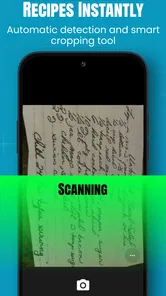
The starting condition matters because scanning is only useful when the source material is reasonably readable. A clean printed page is a better candidate than a folded, stained card with writing running into the margins. Handwriting can be especially unpredictable. I would treat the scan as a starting point rather than assuming every ingredient, abbreviation, or instruction will be captured perfectly. That mindset prevents a small recognition mistake from becoming a cooking mistake later.
A sensible first project is deliberately small. Instead of attempting an entire family archive in one sitting, I would begin with a handful of recipes that belong together, such as holiday baking or weeknight favorites. This makes it easier to notice whether the pages are being captured in a consistent way and whether the finished design feels coherent. It also reduces the frustration of discovering late in the process that a particular paper size, handwriting style, or layout needs extra attention.
The app is rated for Everyone, which fits the idea of a household cookbook that may be handled by different members of a family. It runs on Android devices using version 7.0 or later, so the practical starting question is simply whether the phone or tablet being used meets that requirement. The current version is 1.0.82.0, and the app has reached over ten thousand installs, giving it a modest but real user base rather than making it feel like an entirely untested concept.
Scanning is the first handoff
The move from paper to a digital recipe is the first important handoff in the workflow. I would prepare the source before opening the camera: flatten the page, remove anything covering the text, and use even light. A quick scan in poor lighting may save a few seconds at the start but create much more work during editing. With handwritten recipes, I would also keep the original card nearby because the paper remains the authority when a word looks uncertain.
More From Our News Desk

 Gmail
GmailGmail in a Busy Inbox: Who Benefits Most?
From first account to crowded workday, Gmail earns its place through dependable search and flexible sorting—but its best fit depends on how much inbox maintenance you can tolerate.

 Prime Video
Switching to Prime Video: What Changes in Your Viewing Routine
Prime Video can make a compelling second home for streaming, but switching means learning a different catalog, rental layer, and route from browsing to playback.

 Universal TV Remote Control
Universal TV Remote Control Works Best as a Reliable Backup
A phone remote earns its place through quick setup and reliable habits. Here is how to get more from Universal TV Remote Control—and where its limits show.

 Weather - By Xiaomi
Weather by Xiaomi Review: Clear at a Glance, Less Clear Up Close
Xiaomi’s weather app makes everyday forecasts quick to scan, but its calm surface can leave useful details and recovery paths harder to find than they should be.

 X
XX Under Pressure: Can It Recover When Posting Goes Wrong?
A resilience-focused review of X, examining setup, mistaken posts, interruptions, weak connections, and the gaps that matter when recovery needs to be dependable.

 Clash of Clans
Clash of Clans Is Won Between the Battles
Its raids are quick; its community is a long-term project of coordination, teaching, rivalry, and shared responsibility—with all the friction that entails.
Latest News



One useful way to work is to scan in batches by purpose rather than by location. For example, I might gather all dessert recipes first, then scan them together, instead of moving randomly between a drawer, a folder, and a phone gallery. This creates a more natural structure for the eventual book and makes missing pages easier to spot. It also gives me a chance to decide whether a recipe belongs in the final collection before spending time polishing it.
The non-obvious trade-off is that convenience at capture time can reduce confidence later. A quick photograph preserves the source, but it does not automatically make the recipe pleasant to read. A careful capture gives the design stage better material, yet it takes more attention. I would choose accuracy over speed for recipes with unusual measurements, family shorthand, or instructions that depend on small details.
I would also avoid treating a scan as a substitute for proofreading. Ingredient quantities, oven temperatures, and timing deserve a deliberate check. This is especially important when the original recipe uses old-fashioned measurements or informal phrases such as “a little” or “until done.” The app can help gather the material into one place, but the cook still has to decide what the recipe actually means.
Designing the collection instead of merely storing it
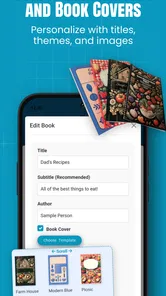
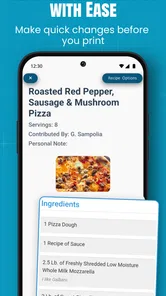
Once the recipes are gathered, the workflow changes from capture to presentation. This is where the app becomes more interesting than a basic document scanner. The purpose is not only to keep digital copies; it is to shape them into a book that someone can browse, share, and use in a kitchen. I found it helpful to think about the intended reader before arranging pages. A personal archive can tolerate rough edges, while a gift for a relative benefits from consistent titles, sensible ordering, and readable pages.
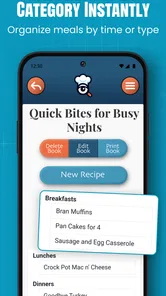
A practical sequence might begin with a cover concept, continue with broad recipe groupings, and finish with a careful page-by-page review. I would group recipes by meal, season, or family branch rather than relying on the order in which they were scanned. That small editorial decision has a large effect on how useful the printed result feels. A cookbook that reflects how people actually cook is easier to navigate than one that simply mirrors a stack of papers.
There is also a meaningful choice between preserving character and correcting everything. A handwritten card may look imperfect, but that imperfection can be the emotional reason for making the book. A fully cleaned-up presentation may be easier to read, yet it can lose the feeling of the original source. I would preserve distinctive handwriting or notes when they add family meaning, while making sure the essential cooking instructions remain legible.
For a collection intended for regular cooking, I would prioritize function over decoration. Clear recipe names, enough breathing room around instructions, and a predictable order matter more than an elaborate visual style. For a keepsake, the balance can shift toward personal touches. The app’s design stage is therefore not just a cosmetic step; it is where I decide whether the finished book is primarily a kitchen tool, a family record, or a mixture of both.
The handoff from screen to printed book
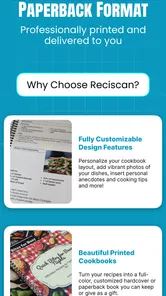
The most distinctive part of the workflow is the transition from a digital project to a physical order. That handoff changes how I review the collection. On a phone screen, I can overlook small text, awkward breaks, or a page that feels crowded. Before ordering, I would inspect the entire book as if I were already holding it open beside a mixing bowl. Are the instructions easy to follow? Does the recipe begin and end in a sensible place? Are related recipes kept together?
This is also the point where I would ask who will use the book. A collector may be happy with a compact archive, while someone cooking from it every weekend needs quick navigation and comfortable reading. A gift recipient may care more about the emotional story behind the recipes. Thinking through that use case before placing an order helps prevent the common mistake of designing for appearance alone.
The app is free to install, but in-app purchases are listed at $4.99 per item. That makes the initial exploration relatively low-risk, while the paid stage deserves a little planning. I would not start scanning dozens of pages before deciding what the finished project is meant to be. A small trial collection can show whether the workflow suits me and whether I am willing to invest more time and money in a larger book.
The developer, Dustin Runnells, has positioned the app around this specific scan-to-cookbook path rather than a broad social food network. That focus is a strength for someone with a personal archive, but it also means the app should be judged by the quality and clarity of that complete handoff. If I only want a private digital folder, a cloud drive or notes app may be simpler. If I want a tangible collection assembled from my own recipes, the printed-book route gives ReciScan a clearer reason to exist.
What the finished result is good for
The strongest outcome is a cookbook with personal context. Imagine finding a box of recipes after a relative has moved house. The cards may be meaningful, but they are difficult to sort, easy to damage, and inconvenient to share with several people. I could scan the cards, organize them into a themed collection, check the text against the originals, and create a book for the family while keeping the digital material available for future projects. That is a genuinely useful everyday scenario, not just a novelty.
Another good use is a shared household collection. Several people may each have a few reliable recipes, but no one has assembled them into one place. The app can serve as the project’s organizing center: gather the sources, decide on the order, and turn a mixed set of contributions into one readable volume. The editorial work still belongs to the person making the book, but the workflow gives that work a clear destination.
I can also see value for a small event or milestone where the recipes carry more meaning than a standard present. A collection of holiday dishes, baking notes, or recipes associated with a family tradition can become a physical reminder rather than another digital file that disappears among thousands of photos. The app is particularly appealing when the outcome matters emotionally as well as practically.
The result is less compelling for someone who cooks from constantly changing online recipes. If my routine depends on live links, automatic nutrition calculations, grocery lists, or collaborative meal planning, I would choose a more specialized cooking service. ReciScan’s payoff comes from permanence and ownership. It is about making a stable collection from material I already consider worth keeping.
Where the workflow becomes demanding
The biggest limitation is that scanning does not remove the need for editorial work. A cookbook project can sound effortless when described in three verbs, but real source material is messy. Pages may have missing quantities, inconsistent names, stains, corrections, or instructions that assume the reader already knows the recipe. The app can organize the project, but it cannot replace the judgment needed to make an inherited recipe understandable.
That means the time saved depends heavily on the condition of the originals. Neat printed recipes should move through the process more smoothly than faded cards or dense notes. I would plan for a review pass after scanning and another pass after arranging the pages. Skipping either one risks producing a book that looks finished while still containing avoidable errors.
There is also a psychological friction point: a printed cookbook feels final. A digital note can be corrected immediately, but a physical order encourages me to make decisions before committing. That is not necessarily a flaw, but it changes the right workflow. I would keep a temporary working collection, remove duplicates, standardize obvious naming issues, and ask another family member to check recipes that are historically important before ordering.
The app may also be a poor fit if I want extensive recipe writing from scratch. Its appeal is strongest when I already possess source material to scan and shape. Someone starting with a blank page may find a conventional writing app more flexible for drafting, revising, and rearranging long-form recipes. Likewise, people who want a searchable personal database without a printed outcome may prefer a notes or recipe-management tool.
The modest average rating of 4.1 from around twenty ratings suggests a generally positive but still limited public track record. I would read that as encouragement rather than proof that every workflow will be smooth. The app has only a small review footprint, so my own test project matters more than assuming it will behave like a mature, widely documented platform. I would begin with a manageable collection before committing to a large archive.
Who should use it, and who should pass
I would recommend it to people who have recipes worth preserving and want more than a folder of images. It is especially suitable for family cookbook projects, personal archives, thoughtful gifts, and households where a physical book would actually be used. The free entry point makes it reasonable to explore the process with a small group of recipes before deciding whether the paid items fit the project.
I would be more cautious if my main need is fast meal planning. The app does not become a grocery assistant simply because it contains recipes, and it is not the obvious choice for discovering new dishes every evening. It also requires patience from anyone working with handwriting or damaged paper. If I dislike proofreading, arranging pages, or making design decisions, the promise of a custom cookbook may feel like work rather than convenience.
My best tip is to define the book’s purpose before scanning. Decide whether it is a practical kitchen manual, a sentimental family archive, or a gift. Then choose the recipes and page order to match that purpose. My second tip is to preserve the originals until the printed result has been checked. My third is to create a small test collection first, because the real value of the app appears in the complete workflow, not in the act of capturing a single page.
After using it as a cookbook-making tool rather than judging it as a general food app, I see a focused product with a clear audience. It turns a personal recipe archive into a project with a visible endpoint, and that endpoint is more meaningful than simply storing another scan on a phone. The trade-off is hands-on involvement: I still need to prepare pages, verify text, make editorial choices, and review the final arrangement.
For me, that balance is acceptable when the recipes have a story behind them. ReciScan works best when the value is in preserving your recipes, not replacing your cooking routine. I would install it for a small family collection, test the scan-to-design process, and only then build a larger book. If that sounds like the kind of project I want to finish, ReciScan - Cookbook Maker is a thoughtful, specialized option. If I only need searchable notes, new recipe ideas, or automated meal planning, I would choose a different tool.
ReciScan - Cookbook Maker Frequently Asked Questions
What devices can I use ReciScan - Cookbook Maker on?
ReciScan is a Food & Drink app by Dustin Runnells, with a minimum OS requirement of version 7.0. Before downloading, check that your device meets that requirement and that the app is available for your platform. The app is free to download, and its age rating is Everyone, making it suitable for a broad audience interested in collecting and organizing recipes.
Can I make a printed cookbook with ReciScan?
Yes. ReciScan is presented as a custom cookbook app where you can scan recipes, design a collection, and order printed books. That makes it useful for more than keeping digital recipes on your phone: you can prepare a personal cookbook from recipes you have collected. Review your scanned entries and design carefully before ordering so the printed version reflects the recipes and presentation you want.
What is ReciScan - Cookbook Maker and how does it work?
ReciScan - Cookbook Maker is designed to help you turn recipes from printed pages, screenshots, photos, or other sources into an organized digital cookbook. After capturing or importing a recipe, the app can recognize the text and arrange details such as ingredients, instructions, titles, and categories. You can then review the result, correct recognition mistakes, and keep your recipes easier to search and manage.
Can ReciScan accurately scan handwritten or printed recipes?
The app is generally most useful with clear, well-lit printed recipes and readable digital images. Handwritten notes, decorative fonts, blurry photographs, unusual layouts, and low-contrast pages may produce recognition errors. Before saving a scanned recipe, it is worth checking quantities, ingredient names, cooking times, and preparation steps carefully. The scanning feature saves time, but it should not replace proofreading.
Can I edit and organize recipes after scanning them?
Yes, the main benefit of using a cookbook-making app is that scanned recipes can be refined after import. You can typically correct recognized text, update recipe information, and organize entries so they are easier to find later. Depending on the version and available features, recipes may also be grouped by categories or other labels, making the app more practical than storing unrelated recipe photos in your phone gallery.
Pros
- Scans recipes quickly from cookbooks
- notes
- and printed pages.
- Keeps recipes organized in a searchable personal cookbook.
- Useful for preserving family recipes and handwritten instructions.
- Reduces the need to retype ingredients and cooking steps.
- Makes favorite recipes easier to access while shopping or cooking.
Cons
- Scan accuracy may drop with messy handwriting or poor lighting.
- Some recipes may need manual editing after automatic recognition.
- Large recipe collections can require time to review and organize.
- Advanced features may be limited or require in-app purchases.
- Users may need to check imported measurements and formatting carefully.











