RecargaPay: Pix Cartão e Conta
- 935.00
- 4.7
- Installs
- 10.00M
- Price
- Free

Screenshots


Analysis by Reviewed
When I try a finance app for the first time, I want to know two things: what useful task can I finish quickly, and what should I check before I trust it with more? RecargaPay: Pix Cartão e Conta is best understood as a payments-focused app for everyday money tasks in Brazil. I’d begin with one familiar action, learn where its confirmation and transaction details appear, and only then decide whether its wider set of services belongs in my routine.
What to expect before you begin
RecargaPay is a free finance app from developer RecargaPay, built around payments and everyday money tasks in Brazil. It has a 4.7 average from around 1.4 million ratings, and more than 10 million installs. Those figures suggest plenty of people use it, but they don't tell you whether its mix of services fits your habits. Pix is the key point: if you don't use Brazil's instant payment system, much of the app's appeal may not apply to you.
The app is rated for Everyone, and version 5.8.10 requires Android 7.0 or later. I’d think of it as a convenient place to handle a few recurring tasks rather than a replacement for every banking relationship. Keep your usual account available while you explore; that makes it easier to compare the available options and avoid moving money before you understand how each action works.
All-in-One Financial Solution
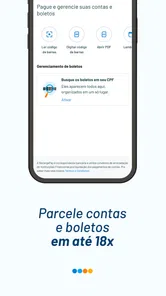
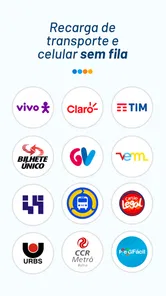
What struck me first about RecargaPay: Pix Cartão e Conta is its attempt to be a one-stop-shop for everything finance-related. Whether it's paying bills, transferring money using Pix, or simply topping up your cell phone credit, this app covers a lot of bases. The interface is quite user-friendly, which is a big plus if you're like me and get easily overwhelmed by too many options. Instead of navigating through countless menus, everything you need is laid out in a neat and tidy manner.
Starting carefully and finding your first win
When you first open a finance app, it’s tempting to try every button. I’d take a calmer route: look over the available services, decide which one you actually need today, and follow that single task through. For a first meaningful success, a small mobile top-up or a straightforward Pix transfer can be easier to understand than immediately making the app your hub for all spending. Check the recipient and amount before confirming, then review the result in the app so you know where to find the record next time.
A realistic use case is paying a friend back after lunch. Rather than switching between a chat, a banking app, and a note to remember the amount, you can use Pix in RecargaPay and keep the payment task in one place. That convenience is most useful when both people are comfortable with Pix and you have checked the recipient details carefully. For bills, I’d similarly verify the bill information before paying; a tidy interface makes actions easier to find, but it doesn’t remove the need to check what you’re confirming.
Making the first setup less stressful
I’d approach setup as a decision about what the app needs to do for me, not as a commitment to use every feature. Start by identifying whether you mainly want Pix, bill payments, mobile top-ups, or a closer look at the card offer. That simple choice gives you a clear test: if the app makes that one task understandable, it may earn a place in your routine; if not, there is little reason to add complexity.
More From Our News Desk

Weather by Xiaomi Review: Clear at a Glance, Less Clear Up Close

X Under Pressure: Can It Recover When Posting Goes Wrong?

Clash of Clans Is Won Between the Battles

Android Auto Makes the Case for Quieter Car Software

MobiOffice: Transforming Mobile Productivity with Seamless Integration

EA SPORTS FC™ Mobile Soccer: Redefining Mobile Sports Gaming
Before linking or using any payment method, read the on-screen instructions and check the details you enter. Financial apps can ask for information to support account access and transactions, but the exact steps can vary. I wouldn’t rush through screens simply to reach the home page. A careful setup is less frustrating than discovering later that you selected the wrong payment source or misunderstood what a confirmation meant.
Simplicity Meets Functionality
The app manages to maintain a balance between simplicity and functionality. It offers basic services like bill payments and mobile top-ups, but also goes further with features like prepaid cards and cashback opportunities. Yes, you heard it right—cashback! Who doesn't love getting a little something back for their purchases? The prepaid card feature is pretty handy, especially if you're cautious about overspending or just want to manage your finances better.
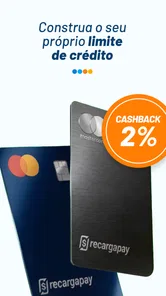
The card and cashback angle deserves a little scrutiny rather than an automatic yes. The current offer highlights a credit card with no annual fee and 1.5% cashback, but I’d still check the terms shown in the app and make sure the card suits how you actually pay. Cashback only helps if the spending is already planned; it isn’t a good reason to buy something or carry a balance. Someone who wants a simple account with no interest in another card may be better off using their existing bank app and ignoring this part.
Choosing between a payment hub and a bank app
Compared with using only a conventional bank app, RecargaPay’s appeal is the possibility of keeping Pix, bill payments, and phone credit top-ups near one another. That can be handy when those jobs are scattered across different apps today. But a familiar bank app may still be the better everyday choice if it already handles your transfers and bills clearly, or if you prefer to see your main account activity in one established place.
I’d compare the two by looking at the task, not by assuming one app must replace the other. For an occasional top-up, convenience may matter more than building a new habit. For repeated payments, check the displayed cost and the record you’ll use to track the transaction. A service that saves a few taps is worthwhile only if its terms, payment path, and follow-up information are easy for you to understand.
Using Pix without surprises
What's more, the app supports Pix, the Brazilian instant payment system, which means you can make real-time transactions without any hassle. It's incredibly convenient for splitting bills or paying friends and family instantly. I must say, the integration of Pix is seamless and makes the app even more versatile.
One useful habit is to treat a Pix payment like cash leaving your hand: pause to confirm the recipient and value, especially when paying someone for the first time. Pix is designed for immediate transfers, so checking before sending is more important than trying to sort out a mistake afterward. If your priority is simply moving money between your own accounts, your existing bank may feel more familiar; RecargaPay is more compelling when you also want its other payment and top-up tasks close at hand.
When a payment needs a second look
For a first Pix transfer, I’d avoid combining several unfamiliar steps. Choose the recipient carefully, compare the displayed details with what you intended, and check the amount once more before confirming. Afterward, take a moment to locate the transaction record. Knowing where to review a completed action makes the next payment less intimidating and gives you a practical way to check whether the first one finished as expected.
If a screen or status is unclear, I would stop rather than repeat the payment immediately. With instant transfers, making a second attempt before understanding the first can create an avoidable duplicate. The same restraint is useful for bill payments: verify the bill reference and amount, and check for a clear result before starting over. This is not a special trick so much as a good workflow for any app that moves money quickly.
A Few Quirks
No app is perfect, and RecargaPay is no exception. While it's packed with features, some users might find the occasional bug or two. In my experience, the app froze once while trying to process a transaction, but a quick restart fixed the issue. It's not a dealbreaker, but something to keep in mind if you're easily frustrated by tech glitches.
There is also a small learning curve in deciding which of its services belongs in your routine. The broad selection can be useful, but it can also make a finance app feel busier than a focused banking tool. I’d start with the one or two actions you expect to use often, and avoid treating a promotional offer as a reason to add a new financial product. If reliability is essential for a time-sensitive payment, having your regular bank app as a backup is sensible.
Another thing to note is that while the app is free to download, some of its services come with a fee. It's nothing outrageous, but worth considering if you're planning to use it frequently. However, the app often offers promotions and discounts, so keep an eye out for those to save some cash.
Before confirming any paid service, look at the amount and any displayed charge on that specific screen. A service that is convenient for an occasional task may not be the best choice for repeated use if its cost adds up. The same practical check applies to cashback: compare the terms and your normal spending, rather than judging the offer by its headline alone. That quick pause helps answer a common first-time question—whether “free to download” means every transaction is free. It doesn’t; the cost can depend on the service.
Keeping the app useful without making it your whole financial life
A sensible way to judge RecargaPay is to give it a narrow job at first. For example, use it for a phone top-up you already planned, then decide whether the process and the resulting record were clear. If that works well, try another service you genuinely need. This gradual approach lets you learn the app without shifting every payment, balance, or habit at once.
I’d also separate convenience from financial tracking. A payment app can make it easier to complete a task, but that alone doesn’t create a complete view of your spending. If you keep a budget in a separate tool or spreadsheet, continue doing so until you know the transaction history gives you the level of detail you need. The app is most useful when it reduces friction without encouraging you to lose track of where money is going.
Who will get the most from it
I’d recommend trying RecargaPay if you’re in Brazil, use Pix regularly, and like having bill payments or mobile top-ups alongside other payment options. It may also suit someone who wants to explore the credit-card offer while keeping an eye on cashback terms. On the other hand, if you rarely use Pix, prefer to do all banking through an established account, or want a single-purpose app with fewer choices, your existing provider may be a better fit. There’s no need to move every payment into one place to benefit from the app.
It is a stronger match for someone who can name a recurring task they want to simplify than for someone downloading it just because it has many options. A person who regularly sends Pix payments and occasionally needs a top-up has a practical reason to test it. Someone who avoids digital payments, wants only a basic account view, or is uncomfortable comparing terms for a card should not feel pressured to use the additional services.
My recommendation after the first few tasks
My advice to a first-time user is straightforward: begin with a low-stakes task, check each detail, and decide based on how clearly the app handles the complete process—from choosing the service to finding the result afterward. If that experience feels comfortable, keep the app for the specific jobs it does well for you. If you find yourself uncertain about a charge, a payment status, or the card conditions, pause and use a familiar alternative until you understand the choice.
That approach also answers whether RecargaPay needs to replace a bank: I don’t think it does. It can sit alongside your regular provider as a practical option for Pix and other supported money tasks. The useful question is not whether it can do everything, but whether its particular combination saves you effort without making costs or confirmations harder to follow.
Final Thoughts
All in all, RecargaPay: Pix Cartão e Conta is a solid choice for anyone looking to streamline their financial activities. It combines a wide range of services into one app while keeping things straightforward and easy to use. Sure, it has its quirks, but the convenience and functionality it offers make it worth a try. If you're in Brazil and looking for a reliable financial app, give this one a go. You might just find it becomes your new financial sidekick.
RecargaPay: Pix Cartão e Conta Frequently Asked Questions
Is RecargaPay free to download, and what should I know before installing it?
RecargaPay is free to download, so you can install the app and look through its available services before deciding whether it fits your needs. Keep in mind that downloading it for free does not mean every service or transaction inside the app is free. Review the terms shown for a feature before using it, especially if it involves a card or payment.
What devices and operating systems can I use with RecargaPay?
RecargaPay is a finance app for mobile devices, and its listed minimum operating-system requirement is Android 7.0. Before downloading, check that your device meets the requirements shown in the store you use. The app is free to download, so you can install it and explore its available services before deciding whether it suits the way you manage payments.
Is RecargaPay available on both Android and iOS?
RecargaPay is a finance app for mobile devices, and its listed minimum operating-system requirement is Android 7.0. Before downloading, check that your device meets the requirements shown in the store you use. The app is free to download, so you can install it and explore its available services before deciding whether it suits the way you manage payments.
Who makes RecargaPay, and is it a well-established app?
The app is developed by RecargaPay and has been available since December 17, 2012. It has more than 10 million installs and an average rating of 4.7 from around 1.4 million ratings. Those figures suggest broad use and a substantial body of user feedback, though individual experiences can differ depending on how someone uses the app and which services they need.
What is RecargaPay and what services does it offer?
RecargaPay is a versatile financial services app offering features like mobile recharges, bill payments, and the ability to pay via Pix, a popular Brazilian instant payment system. It also provides users with a prepaid card option and a digital account, making financial transactions seamless and efficient within one platform. Its store summary also highlights Pix payments with a card and a credit card with no annual fee and 1.5% cashback.
Pros
- User-friendly interface design.
- Fast transaction processing times.
- Supports multiple payment methods.
- Offers cashback on transactions.
- 24/7 customer service availability.
Cons
- Limited to Brazilian users only.
- Occasional app crashes reported.
- High fees for some transactions.
- Complex verification process.
- Limited integration with banks.











