

Real Time Phone Locator GPS
- 0.00
- 0.0
- Installs
- 10.00K
- Price
- Free

Screenshots
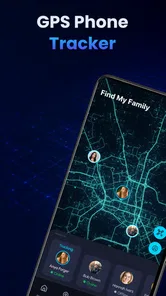

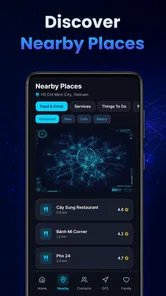
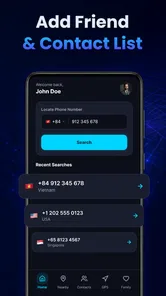
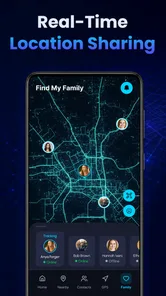
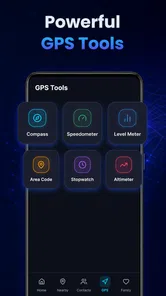
Analysis by Reviewed
Real Time Phone Locator GPS is the kind of Android navigation app I would approach with a practical question rather than excitement: does it make location sharing and nearby exploration easier without asking me to surrender control? After spending time with it, I see a straightforward tool aimed at people who want phone-location utilities in one place. It is free, designed for everyone, and developed by Nova Xponential Power. Its focus is clear: staying connected, sharing a location, and finding places around me through GPS-based tools.
That focus makes it more useful in everyday situations than its brief “Phone Locator” label suggests. I can imagine opening it before meeting someone in an unfamiliar area, using it while coordinating a family outing, or checking nearby places when I do not want to move between several unrelated tools. At the same time, I would not treat it as a complete replacement for a mature navigation platform. Its value depends heavily on how well its location functions fit my particular routine and how comfortable I am granting location access when I need those functions.
What the app is really trying to solve
The central idea is convenience. Instead of thinking of location as only a route-planning function, the app brings together phone locating, location sharing, and nearby discovery. That combination is useful because these activities often happen in the same moment. If I am meeting a friend, I may need to identify where I am, communicate that position, and find a café or landmark nearby. A focused GPS utility can reduce that small amount of friction.
I like that the concept is easy to understand without a long learning curve. The app belongs to the Maps & Navigation category, but it is not presented as a specialist mapping system for professional drivers or outdoor navigation. I would place it closer to a lightweight companion for personal location tasks. That distinction matters: someone looking for a simple way to share a position may appreciate its direct purpose, while someone expecting detailed traffic intelligence, complex route planning, or offline expedition tools should compare it carefully with established alternatives.
In a realistic scenario, I might be walking to a busy public venue with a friend. Rather than describing a meeting point using nearby shops and guessing which entrance is visible, I can use a phone-locator app to work from a current position. If we then decide to meet somewhere else, the nearby-place function could help us choose an option without opening a separate search tool. The benefit is not dramatic, but it is exactly the sort of small convenience that makes an app worth keeping.
A simple starting point for first-time users
My advice is to begin with the least sensitive task you actually need. Open the app, look at how it presents its location tools, and notice which actions require a device location. Do not immediately build an important travel plan around it. First check whether the map position feels understandable, whether sharing is easy to find, and whether nearby results are presented in a way that helps you make a decision.
This approach also answers a common concern: can someone use it without becoming dependent on it? Yes, that is how I would use it. I would treat it as a convenient layer for occasional location tasks, while keeping a familiar navigation service available for journeys where route accuracy, traffic context, or broad place information is more important. A phone locator is most useful when it complements good judgment rather than replacing it.
More From Our News Desk

 Weather - By Xiaomi
Weather by Xiaomi Review: Clear at a Glance, Less Clear Up Close
Xiaomi’s weather app makes everyday forecasts quick to scan, but its calm surface can leave useful details and recovery paths harder to find than they should be.

 X
XX Under Pressure: Can It Recover When Posting Goes Wrong?
A resilience-focused review of X, examining setup, mistaken posts, interruptions, weak connections, and the gaps that matter when recovery needs to be dependable.

 Clash of Clans
Clash of Clans Is Won Between the Battles
Its raids are quick; its community is a long-term project of coordination, teaching, rivalry, and shared responsibility—with all the friction that entails.

 Android Auto
Android Auto Makes the Case for Quieter Car Software
The car interface is no longer judged by how much it can do, but by how quietly it helps. Android Auto shows what drivers now expect—and what still gets in the way.

 MobiOffice: Word, Sheets, PDF
MobiOffice: Transforming Mobile Productivity with Seamless Integration
MobiOffice: Word, Sheets, PDF is redefining mobile productivity with a surprising blend of functionality and innovation.

 EA SPORTS FC Soccer Mobile 26
EA SPORTS FC™ Mobile Soccer: Redefining Mobile Sports Gaming
Dive into EA SPORTS FC™ Mobile Soccer, where immersive gameplay and strategic depth transform mobile sports gaming.
Latest News



Trust begins with the location request
Location apps deserve more attention than ordinary utility apps because location can reveal routines, relationships, and sensitive places. With this app, I would read every permission prompt instead of accepting it automatically. The practical question is not simply whether the request seems reasonable; it is whether the requested access matches the action I am trying to perform at that moment.
For example, if I only want to explore nearby places while I am actively using the app, I would prefer the narrowest location choice offered by the operating system that still allows the feature to work. If I am sharing a position, I would pause and confirm who will receive it and whether the screen clearly shows when sharing begins. These are small habits, but they keep the user in charge of a feature that can otherwise become easy to overlook.
I also would not assume that a location-sharing tool is private simply because it feels personal. Before sending anything, I would check the recipient, the displayed position, and any visible controls for stopping or changing the sharing action. If the app makes those choices clear, that supports trust. If I have to guess whether a location is still being shared, I would stop using the feature until I understand the control.
Controls matter more than the promise of convenience
The most important test for me is whether the app gives understandable choices at the moments that matter. Location access should be something I can review through the phone’s system settings, and sharing should be an action I intentionally start rather than something I leave running by accident. I would also look for visible indicators inside the app that distinguish my own current position from a location sent to another person.
These details are more important than a polished map screen. A beautiful interface cannot compensate for unclear sharing behavior. When I use a location tool, I want to know three things immediately: what position is being shown, who can see it, and how to stop the action. That is the standard I would apply to Real Time Phone Locator GPS, especially because its main appeal involves connecting people through location.
There is another useful habit: after finishing a location-sharing task, I would return to the app and verify that the activity has ended, then review the device’s location permission. This two-step check is sensible for any GPS application. It prevents a temporary need, such as meeting someone at an event, from quietly becoming a permanent part of my phone routine.
Handling sensitive moments responsibly
There are situations where a location app feels especially helpful but also deserves extra caution. Sharing a position while traveling alone can make coordination easier, yet it can also expose an exact movement pattern. Sending a location from home, work, school, or a medical appointment may reveal more than I intend. I would therefore share a place only with someone I trust and only for a clear reason.
A practical alternative is to share a public meeting point rather than an exact private address when precision is unnecessary. If I am meeting a friend near a station, for instance, the station entrance may be enough. This reduces exposure while preserving the useful part of the feature. The app can help me communicate where I am, but it cannot decide how much personal context is appropriate; that remains my responsibility.
I would also avoid treating any phone locator as a guarantee of safety. GPS can be affected by buildings, device settings, network conditions, or a phone that is unavailable. If a family member is late, I would use location information as one clue, not as proof that everything is fine or that an emergency has occurred. For urgent situations, direct contact and local emergency services remain more appropriate than relying on a consumer location utility.
Nearby places: useful when the decision is small
The nearby-exploration angle is most convincing for quick, local choices. If I have just arrived in a neighborhood and want to find something close, a GPS tool that keeps discovery beside location sharing can save a few steps. It is also handy when I am already looking at my position and do not want to copy it into another application.
Still, I would judge nearby results by usefulness rather than quantity. A long list is not automatically better. I want to see whether the results help me choose a place based on distance and context, not merely produce names that require another round of research. For important decisions, such as finding an accessible venue, checking opening information, or choosing a route through heavy traffic, I would verify the details with another trusted source.
One of my more useful workflows would be to use the app for orientation, then switch to a familiar mapping service only when the journey becomes complicated. That keeps this app in the role where it seems strongest: quick awareness of my position and nearby options. It also avoids forcing a lightweight locator to handle tasks it may not be designed to handle.
How it compares with familiar alternatives
Compared with a standard map application, Real Time Phone Locator GPS appears more focused on the relationship between a phone’s position, location sharing, and nearby discovery. A full map platform usually offers a broader ecosystem around directions and places. I would choose the established map option for driving, public transport planning, detailed business research, or a trip where route information is central.
Compared with a dedicated family-location service, this app may appeal to someone who wants a simpler, more occasional tool rather than a permanent household tracking arrangement. That difference is important. Continuous location monitoring can be useful for some families, but it also creates a larger privacy responsibility. I would not install a more intensive service merely because I need to share my position once in a while.
Compared with sending a location through a messaging application, the advantage here is concentration: the location task and nearby exploration sit within a navigation-oriented experience. The disadvantage is that friends may already be comfortable with the sharing controls in their messaging app. If everyone in a group already uses a familiar system and understands its privacy settings, introducing another tool may add more coordination than it removes.
Compatibility, scale, and practical expectations
The current version is 1.0.2, and the app supports Android 8.0 or later. That makes checking the phone’s operating system an important first step before installing it, particularly on an older device. I would also keep expectations realistic because the app has reached over ten thousand installs. That is enough to show that people are using it, but it is not the same scale as the largest navigation platforms with years of accumulated mapping infrastructure.
The app is free, which lowers the barrier to trying it. I still would not confuse free access with a reason to grant every available permission. Price answers whether I pay money; it does not answer whether a feature is suitable for my privacy preferences. I would make the installation decision based on the app’s actual controls, the usefulness of its location workflow, and whether it solves a problem I regularly have.
Its Everyone age rating makes it broadly approachable, but younger users still benefit from guidance about location sharing. I would explain that a map pin can reveal a real place and that sharing should be limited to trusted people. The rating describes general suitability; it does not replace sensible supervision around personal location.
Who should try it, and who should skip it
I would recommend giving it a try if you often need a quick phone-location tool, occasionally share where you are, or like the idea of checking nearby places without using a full navigation suite. It may also suit people who prefer a focused app for casual location tasks instead of a large platform filled with features they rarely touch.
I would be more cautious if my main need is turn-by-turn driving, live traffic decisions, detailed transit planning, offline maps, or professional-grade outdoor navigation. In those cases, I would choose a service built around that specific requirement. I would also skip it if I am uncomfortable with location-based apps in general or if the permission and sharing screens do not give me enough confidence. Convenience is not valuable when I have to worry about every tap.
For parents, partners, or friends considering it for safety, I would frame it as a communication aid rather than a surveillance solution. Agree on when location sharing is appropriate, make sure everyone understands how to stop it, and avoid turning an occasional tool into an expectation of constant availability. That conversation is more important than the app itself.
My cautious verdict
After looking at its purpose and the way I would use it, I see Real Time Phone Locator GPS as a practical, lightweight option for personal location tasks. Its strongest idea is the combination of phone locating, sharing, and nearby exploration. That combination can make ordinary coordination smoother, especially when I need a quick answer rather than a full route-planning session.
My recommendation comes with a clear condition: use it deliberately. Review the location permission, confirm every recipient before sharing, choose a less precise meeting point when exact precision is unnecessary, and verify that temporary sharing has ended. Those habits make the experience safer and also reveal whether the app’s controls work for you.
Nova Xponential Power has positioned this free Android app as a focused Maps & Navigation tool rather than an all-purpose replacement for every mapping service. I think that is the right way to judge it. Its real strength is convenience with user responsibility attached: it can simplify a quick location task, but it should not become an automatic record of where I go or the only tool I trust in an important journey.
If that balance suits your needs, the app is worth testing on a compatible phone. If you need deep navigation features or permanent family monitoring, I would choose a more specialized alternative. For occasional location sharing and nearby discovery, however, Real Time Phone Locator GPS offers a clear starting point, provided I remain attentive to permissions, recipients, and the difference between useful location context and unnecessary exposure.
Real Time Phone Locator GPS Frequently Asked Questions
Is Real Time Phone Locator GPS free to download?
Real Time Phone Locator GPS is a free Maps & Navigation app from Nova Xponential Power. Its main purpose is reflected in its short description, Phone Locator, while its summary highlights location sharing and tools for exploring nearby places. You can consider its basic purpose before downloading, and check the app’s current store page for the available installation option on your device.
Which devices can run Real Time Phone Locator GPS?
The app requires Android 8.0 or later, so check your phone’s operating system before installing it. It is designed around GPS and location sharing, which also means the device needs working location services and an internet connection for the intended experience. The app is rated for Everyone, but that rating does not replace a parent or guardian’s judgment about a child’s location sharing.
What is Real Time Phone Locator GPS and how does it work?
Real Time Phone Locator GPS is a location-sharing application designed to help users view the real-time position of a phone on a map. After installation, the app generally uses the device’s GPS, mobile data, Wi-Fi, and location permissions to determine its position. The accuracy and update speed can vary depending on signal strength, battery settings, internet access, and the phone’s surroundings.
Does Real Time Phone Locator GPS require permission to access my location?
Yes. The application needs location permission to identify and display a device’s position. Depending on the features you use, it may also request permission for notifications, background activity, contacts, or internet access. Before accepting, review whether the requested access matches the app’s purpose. You can manage or revoke permissions later through your Android or iOS privacy settings, although some tracking features may stop working.
Can I track another person’s phone without their knowledge?
No. Responsible location tracking should always be based on the other person’s clear consent, particularly when monitoring family members, friends, employees, or another adult’s device. The app should not be used to secretly follow someone, invade privacy, or bypass security protections. Users should explain how location sharing works, who can view the information, and how sharing can be stopped before activating the feature.
Pros
- Quickly shares your live location with trusted contacts.
- Uses GPS for accurate positioning outdoors.
- Helpful for coordinating meetups and family check-ins.
- Location updates are easy to view on a map.
- Can provide reassurance during travel or emergencies.
Cons
- GPS tracking can drain your battery during extended use.
- Accuracy may drop indoors or in areas with weak signals.
- Continuous location sharing raises privacy concerns.
- Some features may require an internet connection or subscription.
- Background tracking may be limited by phone power-saving settings.











