Rarevision VHS: Retro Cam
- 1.18K
- 4.7
- Installs
- 100.00K
- Price
- $4.99

Screenshots
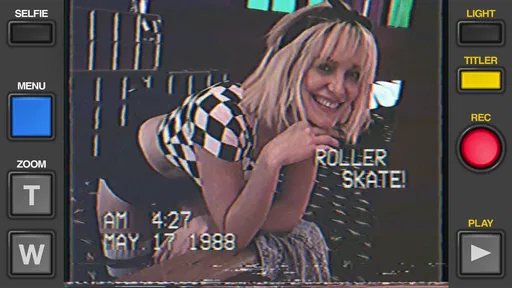
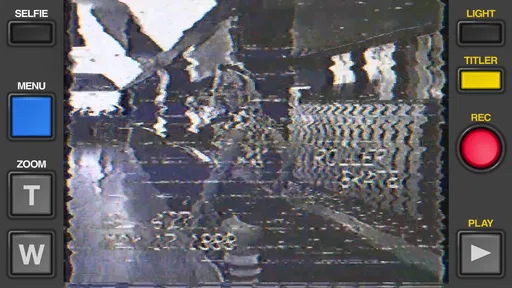
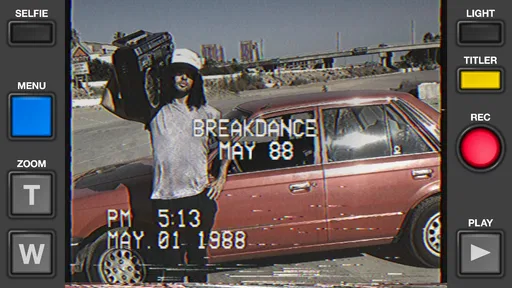
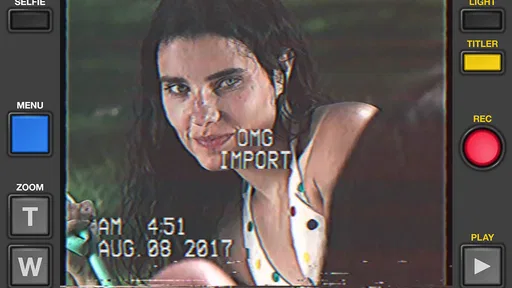
Analysis by Reviewed
Before paying for a camera app with a deliberately stylized look, I’d ask one practical question: do I want that look on the footage as I record, or do I want to keep a clean original and decide on an effect later? Rarevision VHS - Retro 80s Cam is aimed at the first kind of use. Its appeal is the VHS character, not a long list of general camera tools, so it makes most sense when you already have a scene in mind that will benefit from that treatment.
Quick capture, with a little planning
A direct recording workflow is useful when a moment is unfolding and there is no time to build an edit. Still, “quick” does not mean every scene is an easy fit. Before filming, I’d check the light, make sure the main subject is easy to see, and decide whether on-screen text or a date belongs in the image. Those small choices matter because the nostalgic finish is part of the recording, not merely a neutral clip waiting for later decisions.
That is also why I would not make this my only camera for an event that matters. A short test lets you see how the effect reads on your own phone and whether the composition works before the best moment arrives. If preserving a straightforward record is important, I’d capture a clean version with the regular camera as well, then use the VHS-style version for the moodier keepsake.
Where the stylized image earns its place
I’d reach for this app for clips where atmosphere matters more than fine detail: a quick birthday greeting, a playful shot of friends setting up for a picnic, or a little scene that I want to feel like it came from an old family tape. For a creator, the same look can help a short social post feel deliberately different from the polished, sharp footage that phone cameras usually produce. It is a specific creative choice, rather than a general improvement to every video.
The trade-off becomes clearer in low light, busy backgrounds, or scenes where a person’s expression and small details need to remain easy to read. A retro effect may add character, but it cannot replace careful framing or make obscured details more useful. I would also be selective about adding both a date and text: if the image already has a lot going on, those elements can compete with the subject instead of making the clip feel more authentic.
Choosing between capture and editing later
The usual phone camera is the more dependable option when I want clean footage that can serve several purposes. A general video editor is better when I want to keep the original recording and experiment with different treatments afterward, or assemble a more involved sequence. This app’s advantage is that it makes the retro look the point from the start; its limitation is that this narrow focus gives less reason to open it when I need neutral footage or a flexible editing process.
That difference can guide a simple workflow. For a casual clip, I’d record directly in the app and keep the framing uncomplicated. For a family moment I might want to preserve clearly, I’d first make a standard recording, then create a separate stylized take if there is time. That approach costs a little extra attention in the moment, but it avoids asking one intentionally imperfect version to do two jobs.
More From Our News Desk

 Gmail
Gmail in a Busy Inbox: Who Benefits Most?
From first account to crowded workday, Gmail earns its place through dependable search and flexible sorting—but its best fit depends on how much inbox maintenance you can tolerate.

 Prime Video
Switching to Prime Video: What Changes in Your Viewing Routine
Prime Video can make a compelling second home for streaming, but switching means learning a different catalog, rental layer, and route from browsing to playback.

 Universal TV Remote Control
 Works Best as a Reliable Backup
A phone remote earns its place through quick setup and reliable habits. Here is how to get more from Universal TV Remote Control—and where its limits show.

 Weather - By Xiaomi
Weather by Xiaomi Review: Clear at a Glance, Less Clear Up Close
Xiaomi’s weather app makes everyday forecasts quick to scan, but its calm surface can leave useful details and recovery paths harder to find than they should be.

 X
X Under Pressure: Can It Recover When Posting Goes Wrong?
A resilience-focused review of X, examining setup, mistaken posts, interruptions, weak connections, and the gaps that matter when recovery needs to be dependable.

 Clash of Clans
 Is Won Between the Battles
Its raids are quick; its community is a long-term project of coordination, teaching, rivalry, and shared responsibility—with all the friction that entails.
Latest News



Who is likely to enjoy it
I think it suits people who like a visible creative signature and want to make short videos feel nostalgic without turning each one into an editing project. It may also appeal to someone who grew up with VHS and wants to give present-day gatherings that home-movie mood. If you prefer accurate color, crisp detail, or a camera that can cover almost any situation, I’d skip it and stick with the built-in camera or a broader editing app.
The $4.99 price makes the decision less about collecting another camera and more about whether you will actually use this particular style. Its average is 4.8 from around 11,000 ratings, and it has more than 100,000 installs, but personal taste is still the deciding factor: a strong nostalgic effect can be exactly what one person wants and too conspicuous for another. I’d watch a few sample clips made in this style, if available to you, and decide whether you like the look before buying.
I also would not treat the effect as a substitute for planning. If the clip is intended as a memory, consider what you want to remember: the people talking, the details of a room, or simply the general mood of the gathering. That helps determine whether the stylized recording is enough on its own or whether a clean backup is worth making. For an informal moment, the extra version may be unnecessary; for a once-only milestone, I’d choose the safer option.
What I would check on my phone
Perceived speed and reliability are difficult to judge from an app’s premise alone, since a camera’s response can depend on the device and what else is running. I would not assume that a retro look makes recording effortless on every phone. If I were preparing for a longer outing, I’d open the app beforehand, make a brief test recording, and check that the result is the look I expected. That simple rehearsal can reveal whether the controls feel comfortable and whether I can frame a shot quickly.
For heavier use, I’d plan around ordinary video constraints rather than expect a special workaround. Long recording sessions can use battery and storage, so I’d avoid leaving the camera open when I am not filming and would capture highlights in shorter clips when that suits the occasion. Short takes are also easier to review and share selectively. This is a practical habit, not a promise that the app will behave identically on every device.
Details that shape the finished clip
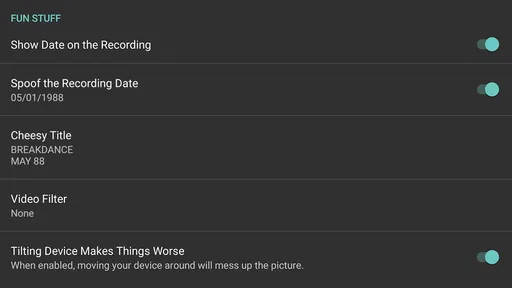
The date treatment can be more than a nostalgic flourish: it can help distinguish clips from different occasions when you revisit them later. But I’d make sure it does not imply a date that could confuse the memory. Likewise, the blue-backed text can give a clip a home-video feel, yet it may draw attention away from a face or sign. I’d use these elements only when they contribute to the story of the shot.
Glitches are another effect I’d apply with restraint. They can reinforce the intentionally imperfect mood, but frequent visual interruptions may make a short clip harder to watch, particularly if the important action happens at the same time. A useful approach is to decide what the viewer should notice first, then let the effect support that moment rather than compete with it. When the subject is the joke or the performance, a cleaner treatment may communicate it better.
My performance verdict
I see this as a focused creative camera, not an all-purpose replacement for the phone’s regular video tool. The most useful test is simple: if you want a recognizable retro mood immediately, it has a clear purpose; if you need speed in the sense of fast setup for dependable, neutral footage, your standard camera is the safer choice. A short practice recording is the best way to judge how it feels on your device before relying on it.
Rarevision is the developer, and the app is rated for Everyone. It was released on February 17, 2016; version 1.6.9 supports Android 5.0 and later. Those details make it worth checking compatibility on an older phone before installation. My recommendation is conditional but straightforward: choose it if the VHS look is something you will use, and pass if you mainly want clean video, broad editing options, or one camera for every kind of recording.
I find Rarevision VHS - Retro 80s Cam most appealing when I want a video to feel like a found home-movie clip rather than a clean phone recording. It is a paid photography app from Rarevision, priced at $4.99, and its appeal is deliberately specific: it gives footage a VHS-inspired look instead of trying to make every shot sharper or more polished. If you enjoy that visual character, the cost is easier to justify; if you mainly want an all-purpose camera, I would look elsewhere.
What to expect when recording
The app is built around quick, direct use. You point the camera, choose the retro treatment you want, and record, rather than spending time building a complicated edit. That makes it handy for capturing a small moment while it is happening. I would still frame a shot carefully before pressing record: VHS-style distortion can make an awkward composition feel more intentional, but it cannot rescue a subject hidden in a dark or cluttered scene.
Its listed average is 4.8 from around 11,000 ratings, and it has passed 100,000 installs. Those figures suggest that the distinctive look has found an audience, but they do not mean the effect will suit every taste. I see it as a creative camera for people who want a recognizable finish, not a replacement for a standard camera when clarity matters most.
A Trip Down Memory Lane
If you were around during the 80s or just a fan of that era, you’d know how iconic VHS tapes were. The app is a delightful homage to those times. It mimics the grainy, slightly distorted visuals of our beloved VHS tapes, giving your videos an authentically vintage vibe. This app’s interface is super user-friendly, and honestly, it feels like holding a retro camcorder in your hand.
Features That Stand Out
What’s really cool about this app is its attention to detail. You can add on-screen text with the classic blue background, adjust the date to any decade (not just the 80s), and even include glitches that add an extra layer of authenticity. Oh, and let's not forget about that amazing zoom-in sound effect – pure nostalgia!
Recording with this app is a breeze. You simply point, shoot, and relive the past. It also provides a range of filters and effects to tweak the look of your videos. Whether you want to recreate a home movie vibe or add a retro flair to your social media posts, this app’s got you covered.
Making the look work for you
A useful trick is to treat the date and text as part of the composition, not decoration to add automatically. For a birthday or family gathering, a date stamp can make a short clip feel like an archived memory; for a casual post, leaving text off may keep attention on the people in the frame. I would also use glitches sparingly. A little visual imperfection sells the camcorder mood, while too much can distract from a moment you want viewers to remember.
For a realistic everyday use, imagine filming friends arriving at a picnic or a child showing off a new drawing. The app suits those brief, spontaneous scenes because the retro treatment is part of capture rather than a separate editing project. If the clip is important for documenting fine detail, though, I would record it with the regular camera too. That gives you a clean version to keep, while the VHS-style take can be the fun one to share.
When another camera is the better choice
Compared with a typical phone camera or a general-purpose video editor, this app puts the vintage effect first. A standard camera is the safer choice for crisp, neutral footage, and an editor is more flexible if you want to build a polished sequence from several clips. This one makes more sense when the look itself is the point and you want to get there without a larger editing workflow.
That focus also sets a limit: the retro treatment is not ideal for every occasion, and its deliberately imperfect image may be unwelcome for work, records, or scenes where readability matters. The app is rated for Everyone, has been available since February 17, 2016, and its current version is 1.6.9. It supports Android 5.0 and later, so checking that requirement before installing is worthwhile if you use an older device.
Why You’ll Love It
Let’s face it, who doesn’t love a good throwback? The app perfectly captures the essence of the 80s, making it a hit for both nostalgia enthusiasts and the younger crowd looking to add a retro touch to their videos. The simplicity combined with its effects is truly commendable.
Plus, it’s a great conversation starter. Imagine showing up at a party and recording moments with this app - instant cool points! It’s like you’re the director of your own 80s movie. Seriously, the creativity it sparks is limitless.
Stability and the practical trade-off
Because the experience is centered on recording, I would test a short clip before relying on it for a one-off moment, especially on an older or heavily used phone. That is a sensible habit with any camera app: it helps you check framing and the finished look on your own device. For longer events, keep an eye on battery and available storage as you would with ordinary video recording, and consider filming several short clips rather than one continuous take if you only need highlights.
The app is not the right pick if you expect extensive editing controls or want every recording to look natural. But if you are choosing between a clean phone video and a playful VHS-style memory, the decision is simple: use this when mood matters more than fidelity. I would recommend it to anyone who enjoys making deliberately nostalgic clips and is happy to pay for a focused creative tool.
In conclusion, whether you’re looking to relive the golden days of VHS or just want to sprinkle some vintage magic on your videos, this app is the way to go. Just download it and let the good times roll!
Rarevision VHS: Retro Cam Frequently Asked Questions
Who makes Rarevision VHS - Retro 80s Cam, and what is its overall reputation?
Rarevision VHS - Retro 80s Cam is a photography app developed by Rarevision. Its appeal is easy to understand: it is built around a distinctive vintage-video look rather than general-purpose camera editing. The app has an average rating of 4.8 from around 11,000 ratings, giving prospective users a useful sense of how it has been received.
What is Rarevision VHS - Retro 80s Cam and what does it do?
Rarevision VHS - Retro 80s Cam is a mobile application that transforms your smartphone into a vintage VHS camcorder, complete with retro effects and date stamps reminiscent of the 1980s. This app allows users to capture videos with an authentic old-school aesthetic, perfect for nostalgic moments or creative projects that require a vintage feel.
Is Rarevision VHS - Retro 80s Cam free to use, or are there any in-app purchases?
Rarevision VHS - Retro 80s Cam is available for download with a free basic version, allowing users to access a range of retro effects. However, it also offers in-app purchases for additional features, such as advanced editing tools and exclusive filters, enhancing the overall user experience and video customization options. The app is priced at $4.99, so check the purchase details shown for your device before downloading.
What devices are compatible with Rarevision VHS - Retro 80s Cam?
Rarevision VHS - Retro 80s Cam is compatible with both Android and iOS devices. It requires Android version 5.0 or later and iOS version 12.0 or later. Ensure your device meets these requirements to enjoy all the features seamlessly. It is optimized for smartphones and may not be fully functional on tablets.
Can videos created with Rarevision VHS - Retro 80s Cam be shared on social media platforms?
Yes, videos created using Rarevision VHS - Retro 80s Cam can easily be shared on various social media platforms. The app allows direct sharing to popular sites such as Instagram, Facebook, and TikTok. It provides an easy export function that maintains the video quality and retro effects, making your vintage-style videos ready for instant sharing.
Pros
- Authentic 80s video effects.
- Easy to use interface.
- Supports HD video recording.
- Social media sharing enabled.
- Customizable date and time stamp.
Cons
- Limited free features.
- Occasional app crashes.
- Ads in free version.
- In-app purchases for full features.
- Limited editing tools.