

Radaris Caller Id Phone Lookup
- 71.00
- 3.5
- Installs
- 10.00K
- Price
- Free

Screenshots
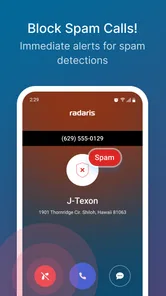
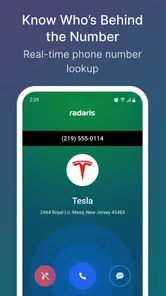
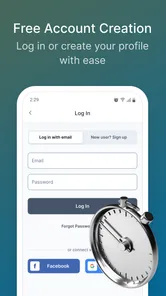
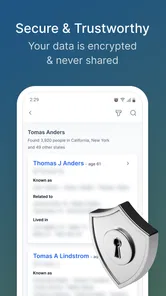
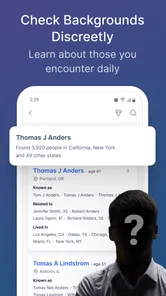
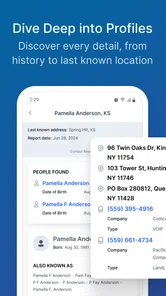
Analysis by Reviewed
I approached Radaris Caller ID Phone Lookup as a practical communication app rather than a replacement for the phone app already on my device. Its purpose is straightforward: help identify callers, look up phone numbers, and give me more control when an unfamiliar call appears. That focus makes it most interesting during small, everyday moments—when I am deciding whether to answer, return a call, or leave a number alone.
Developed by Virtura Corp., the app is free to install and aimed at Everyone. It has reached over ten thousand installs, with an average rating of three and a half stars from around one hundred forty ratings and roughly seventy reviews. Those figures suggest a useful but not universally polished experience, which matches how I would position it: worth trying if caller identification is a regular need, but not something I would install without thinking about how it fits my existing calling habits.
How Radaris Caller ID Phone Lookup feels in everyday use
The first thing I noticed is that the app’s value depends heavily on timing. A caller ID tool earns its place when it helps me make a quick decision before I answer. If I receive a call from a number I do not recognize, a lookup can provide context that the standard phone screen may not offer. That is the central appeal here, and it is more useful than simply keeping a long list of contacts.
In a realistic situation, I might be waiting for a delivery, a repair technician, or a return call from a business. An unfamiliar number appears while I am busy. Instead of answering every call or ignoring all of them, I can use the lookup approach to decide whether the call deserves attention. The benefit is not dramatic, but it can reduce interruptions and make unknown calls feel less random.
The app also makes sense for people who receive calls connected to several parts of life: work, family, appointments, online purchases, and services. A number that looks unfamiliar may be legitimate, while another may not deserve a response. That distinction is where a caller ID and lookup app can be more helpful than relying only on memory.
Speed expectations before relying on it
I would describe the expected experience as task-focused rather than instant in every situation. Looking up a number is a separate action, so it naturally requires more attention than glancing at a saved contact. The useful workflow is to keep the process simple: notice the number, open the relevant lookup function, review what is available, and then decide what to do.
That means the app is best suited to moments when I have a few seconds to assess a call. It is less convincing as a tool for someone who expects every unknown caller to be identified automatically with no extra interaction. The store summary presents a broad promise around finding people, looking up numbers, and taking control of calls, but in practice I would treat those as related tools rather than one seamless answer to every phone problem.
More From Our News Desk

 Gmail
GmailGmail in a Busy Inbox: Who Benefits Most?
From first account to crowded workday, Gmail earns its place through dependable search and flexible sorting—but its best fit depends on how much inbox maintenance you can tolerate.

 Prime Video
Switching to Prime Video: What Changes in Your Viewing Routine
Prime Video can make a compelling second home for streaming, but switching means learning a different catalog, rental layer, and route from browsing to playback.

 Universal TV Remote Control
Universal TV Remote Control Works Best as a Reliable Backup
A phone remote earns its place through quick setup and reliable habits. Here is how to get more from Universal TV Remote Control—and where its limits show.

 Weather - By Xiaomi
Weather by Xiaomi Review: Clear at a Glance, Less Clear Up Close
Xiaomi’s weather app makes everyday forecasts quick to scan, but its calm surface can leave useful details and recovery paths harder to find than they should be.

 X
XX Under Pressure: Can It Recover When Posting Goes Wrong?
A resilience-focused review of X, examining setup, mistaken posts, interruptions, weak connections, and the gaps that matter when recovery needs to be dependable.

 Clash of Clans
Clash of Clans Is Won Between the Battles
Its raids are quick; its community is a long-term project of coordination, teaching, rivalry, and shared responsibility—with all the friction that entails.
Latest News



A small but important tip is to use it as a decision aid, not as a reason to answer more calls. If a number is unfamiliar, I would first check the context of the call, then use the lookup, and only afterward decide whether responding makes sense. That workflow prevents the app from becoming another source of distraction.
What happens during heavier use
Light use is the natural fit: occasional searches, checking an unexpected caller, or investigating a number after a missed call. Heavier use changes the experience because repeated searches create more steps and demand more judgment from me. Someone who handles many incoming calls each day may find the app useful, but only if the information it returns consistently helps separate relevant calls from noise.
I would not choose it as my only system for managing a busy business line. A professional caller-management service, a well-maintained business contact database, or built-in phone features may be more efficient when calls arrive continuously. Radaris Caller ID Phone Lookup is more appealing for personal use, where the volume is manageable and each lookup has a clear purpose.
There is also a practical trade-off around repeated checking. Searching every unknown number can consume attention even when the answer does not change what I should do. My preferred approach is selective: investigate numbers that call repeatedly, appear at an important moment, or seem connected to something I am expecting. I would ignore low-priority calls rather than turning every missed call into a research task.
That selective workflow is one of the app’s less obvious strengths. It does not need to become a permanent part of every phone interaction to be useful. Keeping it for uncertain cases makes the feature feel more like a backup layer than a replacement for contacts, voicemail, or the normal dialer.
Reliability and the limits of caller information
Reliability here should be judged in two ways. The first is whether the app opens and lets me perform its intended tasks. The second is whether the information is useful enough to support a sensible decision. Those are not the same thing. An app can function correctly and still leave me uncertain about an unfamiliar number.
I would avoid treating any caller identification result as absolute proof of who is calling. A number may be associated with an old record, a shared business line, or a person whose details have changed. Even when a result looks convincing, I would still consider the timing and context of the call. If someone claims to represent a bank, delivery company, or public service, I would contact that organization through a trusted channel instead of relying on the lookup alone.
This is especially important because the app’s appeal can encourage quick conclusions. A name or possible identity may make a call feel safe, but it should not replace normal caution. My practical rule is simple: use the result to decide whether to investigate further, not to disclose sensitive information.
The rating of three and a half stars also gives me a reason to keep expectations measured. It indicates that the app has found an audience, but the experience is not universally regarded as flawless. I would install it with a trial mindset, check whether it fits my calling routine, and remove it if the extra step does not provide enough value.
Stability during normal phone routines
For a communication utility, stability matters more than visual excitement. I want it to be available when a call creates uncertainty, and I do not want a lookup tool to become another source of confusion. My assessment is therefore less about flashy behavior and more about whether the app supports a calm, repeatable routine.
The current version is 1.2.4, which is useful context for setting expectations. I would keep the app updated through the normal app-store process and pay attention to whether it continues to behave well alongside my phone’s built-in calling tools. Because its purpose is closely tied to calls and numbers, any friction in switching between the app and the phone interface can matter more than it would in a casual utility.
A sensible recovery plan is to avoid depending on it for urgent communication. If a lookup does not work as expected, I can still use voicemail, contact the person through a known channel, or wait for a message. That fallback makes the app easier to use confidently. It is a supplement to communication, not the communication system itself.
Device constraints and practical fit
The minimum operating-system requirement is Android 7.1, so the app is accessible to people using older Android hardware as well as newer phones. That broad compatibility is helpful, particularly for anyone who does not upgrade devices frequently. At the same time, compatibility does not guarantee identical behavior on every phone, so I would judge it on my own device rather than assuming the experience will be the same everywhere.
Resource demands are difficult to separate from the phone’s age, background activity, and Android setup. I would not expect a number lookup app to be especially demanding during a single search, but frequent use alongside other communication tools can still make the overall routine feel busy. On an older phone, I would be more attentive to how quickly it opens and whether switching between the caller screen and the lookup process feels comfortable.
One useful device-level habit is to keep the app for targeted searches instead of leaving it open throughout the day. That reduces clutter and makes it easier to notice whether it is genuinely helping. I would also avoid granting more access than I am comfortable with and review the app’s behavior through the phone’s own settings. Privacy decisions are personal, but a caller lookup tool naturally handles information that deserves thoughtful treatment.
The free price makes experimentation easy, although in-app purchases range from $3.99 to $84.99 per item. That range is significant enough that I would inspect any purchase screen carefully before confirming anything. I would begin with the free experience and only consider paying if a clearly explained feature solves a problem I actually have. A large optional purchase should not be confused with proof that the basic app is necessary.
Who will get the most from it
I see the strongest fit for people who regularly receive unknown calls and want a dedicated way to investigate them. It may also suit users who do not want to save every number as a contact but still need occasional context. For those users, the app can sit between the built-in dialer and a manual web search, offering a more focused place to handle the question “Who is calling?”
It is also useful for people who prefer a cautious call routine. Rather than answering first and sorting out the situation later, they can pause, check the number, and choose a response. That small change can make a difference for anyone who is frequently interrupted by calls while working, caring for family, or managing appointments.
However, I would skip it if my phone already provides caller identification that satisfies me, or if I rarely receive calls from unknown numbers. In that case, an additional lookup step may add more maintenance than value. I would also look elsewhere if I needed a full business phone platform, advanced team call routing, or a highly automated spam-blocking system. This app’s identity is narrower: it is about finding context around people and numbers.
How it compares with the usual alternatives
The built-in phone app is the obvious alternative. It is faster for saved contacts, already integrated into the device, and requires no separate habit. Radaris Caller ID Phone Lookup becomes more interesting when the number is not in my contacts and I want to investigate it rather than simply answer or ignore it.
Manual web searching is another option. That approach can sometimes provide broader context, but it is less focused and may lead through unrelated results. A dedicated lookup app is more convenient for repeated personal use because the task begins in a place designed around phone numbers. The trade-off is that I am adding another app and another layer between the call and my decision.
Specialized spam-call blockers may be better for someone whose main goal is automatic filtering. I would choose one of those when the priority is reducing interruptions at scale. I would choose this app instead when I want to investigate selected numbers and retain more personal control over whether a call is ignored, answered, or followed up.
That distinction matters. Caller identification, number lookup, and spam prevention overlap, but they are not identical. Radaris Caller ID Phone Lookup makes the most sense when I want information before deciding, not when I want every questionable call handled automatically in the background.
Three practical habits that improve the experience
First, I would create a simple threshold for searches. Repeated calls, a number connected to an expected appointment, or a call that arrives at an unusual time are all reasonable triggers. This keeps the app from turning ordinary phone use into constant checking.
Second, I would compare the lookup result with my own records. Calendar entries, order confirmations, voicemail, and recent conversations can provide better context than any single number result. Using those sources together is safer and often faster than relying on the app alone.
Third, I would separate identification from trust. Even if a result appears familiar, I would not share passwords, verification codes, payment details, or personal documents during an unexpected call. The app can help me decide whether to continue the conversation, but it should not make that security decision for me.
A fourth habit is useful for families sharing a phone or for people who manage calls for someone else: explain the workflow before an urgent call arrives. Knowing where to look up a number and what information not to disclose is more valuable than discovering the process under pressure. That is a practical benefit of testing the app during a quiet moment.
My performance verdict
After weighing its purpose, compatibility, cost structure, and everyday role, I see this as a modest but potentially useful communication utility. Its performance value is not about demanding graphics or long sessions. It is about whether it helps me reach a call decision with less uncertainty and without creating too much extra work.
The app is most convincing when used selectively on an Android phone that does not already provide enough caller context. The minimum requirement of Android 7.1 makes it approachable for older devices, while the free entry point allows a low-risk trial. I would still monitor how smoothly it fits my particular phone and would not assume that every lookup will produce a definitive answer.
The purchase range deserves caution, and the middling average rating tells me to keep expectations realistic. I would not recommend paying for optional features before using the free experience long enough to identify a genuine need. I would also avoid making it the sole defense against suspicious calls or the central tool for a high-volume business line.
My recommendation is therefore conditional but positive: try it if unknown calls are a recurring nuisance and you want a focused way to investigate numbers before responding. Skip it if your built-in caller tools already do the job or if you want automatic, enterprise-style call management. Used as a careful lookup layer—not as a guarantee of identity—Radaris Caller ID Phone Lookup can add useful context without asking me to change the way I handle every call.
For me, the best description is a practical second opinion. It does not remove the need for judgment, but it can make that judgment easier when a number appears without a clear name or reason. That is a small role, yet for the right user, it is exactly the role worth having.
Radaris Caller Id Phone Lookup Frequently Asked Questions
What should I check before installing Radaris Caller ID Phone Lookup?
Radaris Caller ID Phone Lookup is a communication app developed by Virtura Corp. It is free to download and is rated for Everyone. Before installing, check that your device meets the app’s minimum operating system requirement and review the permissions requested during setup. Also consider whether caller lookup features suit your needs and whether you are comfortable reviewing any optional paid features before using them.
Which devices and operating systems can run Radaris Caller ID Phone Lookup?
The app is available for Android and iOS devices that meet its minimum operating system requirement. Its current version is 1.2.4, and it was released on April 22, 2022. Check your device’s operating system version before downloading, then use the relevant official app store to find the compatible listing. Keeping your device’s software current can also help with app compatibility and security.
What is Radaris Caller ID Phone Lookup used for?
Radaris Caller ID Phone Lookup is designed to help identify unknown callers and provide additional information associated with a phone number. Depending on the number and the available public records, a lookup may show details such as a possible name, location, carrier, or related profiles. Results can vary considerably, so the app should be treated as an information tool rather than a guaranteed identification service.
Is Radaris Caller ID Phone Lookup free to use?
The app may offer free features, but some searches, reports, or advanced information can require payment, a subscription, or in-app credits. In-app purchases range from $3.99 to $84.99 per item, so carefully review the pricing screen, trial conditions, renewal terms, and cancellation instructions before completing a lookup. Users should also check whether a free trial automatically converts into a paid plan, particularly when downloading the app through the App Store or Google Play.
Can Radaris identify every unknown phone number accurately?
No phone lookup service can identify every number with complete accuracy. Radaris depends on public records, user-generated information, business listings, and other available databases, which may be outdated, incomplete, or associated with the wrong person. Mobile, prepaid, VoIP, private, and recently reassigned numbers can be especially difficult to match. Always verify important information independently before taking action.
Pros
- Identifies many unknown callers using a broad public-data database.
- Reverse lookup can provide names
- locations
- and possible contact details.
- Useful for checking suspicious numbers before calling back.
- Search results may include associated people or addresses for added context.
- Simple interface makes basic number searches easy to start.
Cons
- Results can be incomplete
- outdated
- or linked to the wrong person.
- Detailed information may require payment or a subscription.
- Privacy-conscious users may dislike the collection of public and user data.
- Caller identification may not work reliably for recently issued numbers.
- Some listings can contain sensitive personal information without clear context.











