

Radar, GPS & Speedometer - USA
- 109.00
- 4.0
- Installs
- 1.00M
- Price
- Free
Screenshots
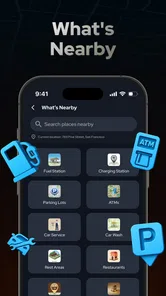
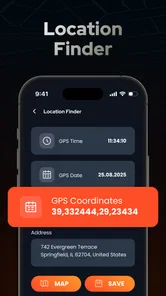
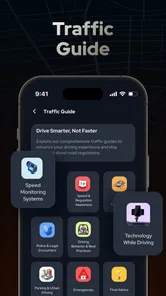
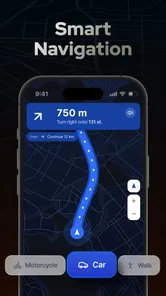
Analysis by Reviewed
My first question with a driving app is practical: what do I want to know before I pull away, and what should I be able to glance at without fiddling with my phone? Radar, Speedometer, GPS, HUD brings several kinds of driving information together, which can be useful when I want a compact dashboard rather than a second, elaborate navigation setup. I would treat it as a companion for a trip, not as a substitute for attention, road signs, or the car’s own instruments.
Choosing its job before the journey
I find this app most useful when I want a quick view of driving information rather than another complicated navigation setup. Bilge Bulut Mobile made it for Maps & Navigation, and the mix of speed, GPS, radar maps, trip information, and a windshield display gives it a broader role than a standalone speedometer. It is free to install, rated for Everyone, and has a 3.9 average from around 1.7K ratings, with over 1 million installs. That makes it easy to try, though the rating also suggests it may not suit every driver equally well.
Before setting off, I would decide what job I want it to do. If I already have directions running in a familiar navigation app, I can treat this as a companion for checking speed or reviewing a drive rather than asking it to replace everything. If I am unfamiliar with the route, I would compare its map guidance with the navigation tool I normally trust before relying on it for an important journey. That small check is more useful than discovering mid-drive that my preferred workflow does not fit the app.
From setup to the end of a drive
I’d treat the drive as a sequence of small decisions: choose what I need before setting off, keep the display simple while moving, then review the route only after arriving. The useful handoff is knowing when the phone should support my attention and when it should stay untouched. That makes it easier to judge whether this app belongs in my routine or whether my usual navigation setup is already enough.
A dashboard that makes sense at a glance
From the moment I launched the Radar, Speedometer, GPS, HUD app, I was greeted with a clean and intuitive interface. It's clear that the developers put a lot of thought into making sure the app is user-friendly. The dashboard is sleek, and all the essential features are just a tap away. Whether you're a tech-savvy user or someone who just wants a simple way to track your journey, this app has got you covered.
Speed, direction, and the windshield option
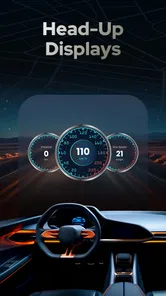
One of the first things I noticed was the app's ability to display real-time speed and direction with impressive accuracy. It's like having a digital speedometer right on your phone. Plus, the heads-up display (HUD) mode is a game-changer for night driving. By projecting the information onto your windshield, it keeps your eyes on the road and your hands on the wheel.
Another feature worth mentioning is the GPS functionality. The app provides detailed maps and turn-by-turn navigation, ensuring you never miss a turn or get lost on your way. It's a handy tool whether you're exploring new territories or just trying to find the quickest route home.
More From Our News Desk

 Weather - By Xiaomi
Weather by Xiaomi Review: Clear at a Glance, Less Clear Up Close
Xiaomi’s weather app makes everyday forecasts quick to scan, but its calm surface can leave useful details and recovery paths harder to find than they should be.

 X
XX Under Pressure: Can It Recover When Posting Goes Wrong?
A resilience-focused review of X, examining setup, mistaken posts, interruptions, weak connections, and the gaps that matter when recovery needs to be dependable.

 Clash of Clans
Clash of Clans Is Won Between the Battles
Its raids are quick; its community is a long-term project of coordination, teaching, rivalry, and shared responsibility—with all the friction that entails.

 Android Auto
Android Auto Makes the Case for Quieter Car Software
The car interface is no longer judged by how much it can do, but by how quietly it helps. Android Auto shows what drivers now expect—and what still gets in the way.

 MobiOffice: Word, Sheets, PDF
MobiOffice: Transforming Mobile Productivity with Seamless Integration
MobiOffice: Word, Sheets, PDF is redefining mobile productivity with a surprising blend of functionality and innovation.

 EA SPORTS FC Soccer Mobile 26
EA SPORTS FC™ Mobile Soccer: Redefining Mobile Sports Gaming
Dive into EA SPORTS FC™ Mobile Soccer, where immersive gameplay and strategic depth transform mobile sports gaming.
Latest News



A weekday trip with an unfamiliar stretch
Picture a familiar weekday trip that includes an unfamiliar stretch of road. I would set up the route before moving, choose the information I need to glance at, and keep the phone positioned safely rather than handling it while driving. The speed display can then serve as a quick reference, while the map helps with the unfamiliar turns. At the end, the trip record gives me a way to revisit the journey instead of relying on memory alone.
That workflow has a useful handoff: the app can help me prepare and monitor, but the driver still needs to make decisions based on road signs, conditions, and the vehicle’s own instruments. I would not treat a radar alert or a GPS reading as permission to stop watching the road. In particular, a HUD is only helpful if the reflection is easy to read from the driver’s seat; if it distracts or obscures the view, I would turn it off and use the ordinary display while parked or before departure.
What I would check after arriving
I've taken this app on several drives, and let me tell you, it holds up remarkably well. The speed readings are consistent and match up with my car's speedometer. I also appreciate how the app alerts me when I'm approaching speed limits. It's like having a virtual co-pilot keeping me in check.
The GPS is equally reliable, with real-time updates that adjust according to traffic conditions. It's particularly useful for city driving, where traffic can be unpredictable. And for those who love to document their travels, the app also logs your journeys, allowing you to look back on your adventures and even share them with friends.
Keeping the trip record useful
A trip log is most valuable when I give it a purpose. For a regular commute, I could use it to remember which route I took on a day with unexpected delays, rather than assuming every journey followed the same pattern. On a longer drive, the record can be a simple way to look back at the route afterward. I would not expect a log to replace a dedicated work mileage system or a carefully maintained travel diary; its strength is having trip context alongside the app’s driving tools.
There is a small but important timing choice here: I would decide before departure whether I need a record and whether I plan to share it. That keeps setup and review out of the moving part of the journey. If all I need is turn guidance, opening a trip-focused dashboard may add steps without helping. If I want speed awareness and a record of the drive in the same session, the combined workflow has a clearer payoff.
When one phone is doing too much
Using one phone for maps, speed, and a HUD can be convenient, but it also concentrates several tasks on a small screen. I would plan the route and adjust the view before driving, especially in a busy city where frequent turns compete for attention. If I need a full-featured navigation experience with a workflow I already know, my usual navigation app may be the better primary choice; this one makes more sense as an extra driving dashboard.
There is also a practical trade-off in the HUD idea: a windshield reflection depends on the phone’s position and the light around it, so I would test it while parked rather than assume it will be readable in every car. For longer trips, a secure mount and a charging plan matter more than any display feature. And because the app includes in-app purchases ranging from $2.99 to $29.99 per item, I would first try the free experience and only consider a purchase if a specific paid option addresses a need I actually have.
Matching the app to the driver
I would recommend it to drivers who want speed and location information together, enjoy keeping a record of trips, or are curious about using a phone-based HUD. It can also be handy when borrowing a car or riding as a passenger and wanting a quick sense of progress, provided the driver is not distracted by the screen. The current version is 4.3 and supports Android 6.0 and later, so it is an option for a range of Android devices.
On the other hand, I would skip it if I want a dedicated navigation system to replace every driving tool, or if I prefer not to mount a phone in the car. A car’s built-in display or a navigation app already established in my routine may be simpler for directions alone. Radar and speed information are best treated as aids, not substitutes for posted signs or careful driving; conditions and local rules still come first.
How it compares with familiar alternatives
Compared with using only a standard navigation app, this one makes more sense when I also want speed information, a HUD option, and a trip record in the same place. The trade-off is that a navigation app I already know may be quicker to set up and easier to trust for route guidance. Compared with a dedicated speedometer app, this offers a wider mix of tools, but that extra breadth is only helpful if I will actually use more than the speed readout.
A built-in vehicle display remains the better choice when it is clear, easy to read, and already gives me the information I need. It avoids adding a phone mount and keeps the driving setup simple. I would reach for this app when the car does not provide a convenient view of speed or trip details, or when I want to combine those checks with GPS on my phone. That is a situational advantage, not a reason to replace a setup that already works well.
Small decisions that improve the routine
For a first drive, I would test the display while parked, compare its speed reading with the vehicle’s gauge in ordinary conditions, and check whether the map presentation is comfortable to glance at. That is more useful than trying every feature while moving. If the HUD reflection is difficult to read in a particular car, I would regard that as a car-and-position mismatch, not something to solve by repeatedly adjusting the phone on the road.
I would also keep the screen’s role narrow. Before leaving, choose whether the priority is route guidance, a speed check, or reviewing the trip later; trying to watch every item at once defeats the point of a quick dashboard. If a passenger is available, they can handle route choices or trip review while the driver concentrates on driving. Without a passenger, I would leave anything requiring taps until stopped.
Where expectations should stay modest
The app’s different tools do not remove the need to judge which source is appropriate. GPS guidance can support navigation, but posted signs and the actual road take priority. A speed alert is a reminder, not a guarantee that a road’s limit has been interpreted correctly in every circumstance. I would use the radar-related information as an additional prompt and never as a reason to speed or to assume a route is free of hazards.
Some drivers may also find that combining a map and dashboard on a phone adds more visual activity than they want. That matters especially on an unfamiliar urban route, where signs, junctions, and traffic already demand attention. If the screen becomes another thing to monitor, the sensible choice is to simplify the setup or use a familiar navigation system instead. The best feature is not useful if it makes the drive feel busier.
My verdict after following the whole flow
In conclusion, the Radar, Speedometer, GPS, HUD app offers a comprehensive suite of tools for anyone who spends a lot of time on the road. From its accurate speed tracking to its reliable GPS and innovative HUD mode, it’s an app that truly enhances the driving experience. So, if you're looking for a way to make your drives safer and more enjoyable, I’d definitely recommend giving this app a try. It’s like having a digital co-pilot that’s always ready to assist you on your journey.
Radar, GPS & Speedometer - USA Frequently Asked Questions
Is Radar, Speedometer, GPS, HUD free to download, and what does it cost to upgrade?
Radar, Speedometer, GPS, HUD is free to download, so you can try its driving tools without paying upfront. Optional in-app purchases are available, with prices ranging from around $2.99 to $29.99 per item. Check the purchase details in the app before confirming, so you know what an upgrade includes and whether it suits the features you want.
Who makes the app, and which devices can install it?
The app is developed by Bilge Bulut Mobile and is available for Android devices running version 6.0 or later. It is a maps and navigation app intended for drivers who want speed and trip-related tools on their phone. Before downloading, check that your device meets the operating-system requirement and has enough room for the app.
What are the main features of Radar, Speedometer, GPS, HUD?
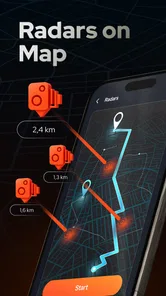
Radar, Speedometer, GPS, HUD is a multifunctional app designed to enhance your driving experience by providing real-time speed tracking, GPS navigation, and heads-up display (HUD) capabilities. The app features a radar detector for speed checks, a digital speedometer, and a GPS system for accurate navigation. Additionally, the HUD projects essential driving data onto your windshield, allowing for safer, distraction-free driving.
How does the HUD feature work in this app?
The HUD (Heads-Up Display) feature in Radar, Speedometer, GPS, HUD projects critical driving information onto your windshield. This functionality uses your device's screen to reflect data such as speed, navigation routes, and alerts directly in your line of sight. This ensures you can keep your eyes on the road while staying informed, thereby enhancing safety and convenience during drives.
Is the Radar, Speedometer, GPS, HUD app compatible with all vehicles?
While the Radar, Speedometer, GPS, HUD app is designed to work with most vehicles equipped with a smartphone mount or holder, its functionality might vary based on the type of windshield and dashboard setup your car has. Ensure your vehicle can accommodate a clear reflection of the HUD for optimal use. Additionally, the app works best in vehicles with a flat dashboard and standard windshield angle.
Pros
- Accurate speed tracking in real-time.
- User-friendly interface and design.
- Supports multiple units of measurement.
- Provides a heads-up display mode.
- Works offline without internet.
Cons
- May drain battery quickly.
- Limited customization options.
- Requires GPS for full functionality.
- Ads can be intrusive at times.
- Compatibility issues on older devices.











