Radar, HUD, Map, Speed Camera
- 504.00
- 4.4
- Installs
- 5.00M
- Price
- Free
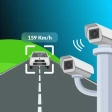
Screenshots
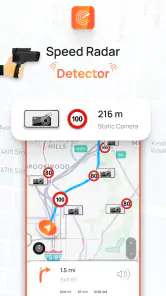
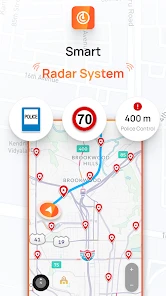
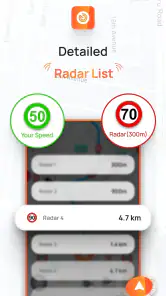
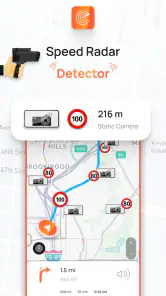
Analysis by Reviewed
I tend to judge driving apps by whether they help me stay aware without turning a trip into a screen-watching exercise. Radar, HUD, Map, Speed Camera is built around that balance: it brings navigation, a heads-up display and camera-related alerts together, with the aim of keeping useful information close at hand. I’d treat it as a driving aid, not a substitute for paying attention to road signs or local rules.
The appeal of keeping alerts in view
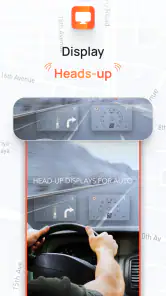
The most distinctive idea is the HUD: instead of checking the phone for every update, you can use a reflected display to glance at information while keeping your attention forward. That can be handy on a familiar commute where you mainly need occasional speed or direction reminders. It is less useful if reflections are hard to see in your car or the phone’s placement makes the display awkward, so I’d test it while parked before relying on it during a drive.
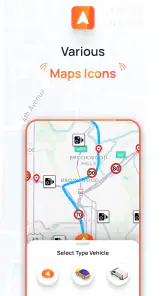
The app also brings map navigation and speed-camera alerts into the same driving setup. That combination is convenient when I want route guidance and reminders in one place rather than switching between separate tools. Still, an alert is only a prompt to check the road and posted limits; it should never be treated as permission to drive faster or as a guarantee that every camera or change will be detected.
How the driving tools fit together
In ordinary use, I’d choose the destination and route before setting off, then decide whether the HUD is readable and helpful for that particular car and lighting. A sensible workflow is to make adjustments while parked, start navigation, and leave the phone secured where it cannot distract or obstruct the view. This matters more than chasing a perfect layout: fewer interactions once moving make the app easier to use responsibly.
A practical trip, not a feature checklist
Picture a weekday drive across town on roads you know, but with an unfamiliar stretch near the destination. The map can guide the final turns, while camera reminders may call attention to places where it is especially important to check your speed. The HUD can keep basic prompts visible at a glance. For a longer trip, I would plan the route before departure and avoid changing settings in traffic; the benefit is having several kinds of driving information together, not needing to consult the phone constantly.
Compared with using a general-purpose navigation app alone, this one puts more emphasis on the driving display and camera-related warnings. A standard map app may be the better choice if your priority is route planning, familiar map tools or a navigation experience you already know well. Conversely, someone who only wants camera alerts may prefer a simpler dedicated tool. This app makes most sense if you genuinely want those functions together and will use them without letting extra alerts become noise.
Where expectations need a little care
Camera and radar-style warnings are useful only when treated as assistance, not certainty. Road layouts change, signs take priority, and a phone-based alert cannot replace a driver’s judgement. I would keep the volume and visual prompts at a level that supports awareness rather than competes with conversation or traffic. If the notifications feel too busy, simplifying how you use the app is wiser than trying to monitor every feature at once.
You May Like

Clash of Clans Is Won Between the Battles

Android Auto Makes the Case for Quieter Car Software

MobiOffice: Transforming Mobile Productivity with Seamless Integration

EA SPORTS FC™ Mobile Soccer: Redefining Mobile Sports Gaming

How Microsoft OneDrive Became a Mobile Productivity Giant

How Google Translate Breaks Language Barriers Effortlessly
The HUD also depends on a workable viewing angle and conditions in the cabin. A bright day, a reflective surface, or a phone mount that sits poorly can make a projected image less convenient than it sounds. Try it in a safe, stationary setup first, and switch back to ordinary navigation if the reflection is unclear. Anyone who needs reliable offline navigation should check their preferred mapping option for that specific requirement rather than assuming this app will meet it.
Who is likely to get the most from it?
I’d recommend it most to drivers who regularly travel the same routes but still want occasional camera reminders, or to people who like having navigation and a glanceable display in a single app. It may also suit someone preparing for an unfamiliar drive who wants route guidance alongside extra road-awareness prompts. New drivers should be especially careful not to let alerts replace learning signs, speed limits and safe driving habits.
It is less compelling if you already have a navigation setup that handles your needs comfortably, dislike phone-based displays, or find frequent prompts distracting. It is also not the right choice for anyone looking for an excuse to speed: the useful role of alerts is to encourage awareness and lawful driving, not to help evade enforcement. I would decide based on whether the combined display and warning approach genuinely reduces phone handling for you.
What to know before installing
Shandy Applications develops this free Maps & Navigation app. It is rated for Everyone and runs on Android 6.0 or later; its current version is 4.9. The app has an average rating of 4.4 from around 19,000 ratings, and it has been installed over five million times. Optional in-app purchases range from $1.99 to $9.99 per item, so I’d check the purchase details before paying for anything. It was released on November 21, 2021, and has 504 written reviews.
One practical question is whether it replaces a dedicated navigation app. For me, that depends on the trip: this app’s combination of HUD and camera-related prompts is its reason to try it, while a familiar navigation option may be preferable if you value a particular routing workflow. Another question is whether the HUD is essential; it is not. You can judge the app on the features you actually find useful rather than treating every tool as mandatory.
A measured recommendation
From the get-go, Radar, HUD, Map, Speed Camera positions itself as an all-in-one tool for drivers. It’s not just about getting from point A to point B. This app aims to make your journey smoother, safer, and a little more exciting. The app offers a blend of a detailed map, heads-up display (HUD), radar detection, and speed camera alerts. The goal? To keep you informed and aware at all times.
Mapping Out Your Route
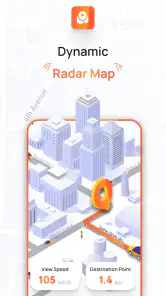
First off, let’s talk maps. The app uses real-time data to provide up-to-date traffic information, helping you avoid those pesky jams that can add hours to your trip. The interface is intuitive, with a clean design that makes it easy to see where you’re headed. I found the turn-by-turn navigation to be precise and timely, with voice guidance that’s clear and helpful.
Heads-Up Display for the Modern Driver
One of the standout features here is the HUD. It projects key information right onto your windshield, meaning you can keep your eyes on the road without missing out on crucial updates. It’s a futuristic touch that feels like something straight out of a sci-fi movie, but it’s practical too. Whether it’s your current speed, navigation instructions, or radar alerts, everything is displayed seamlessly.
Radar and Speed Camera Alerts
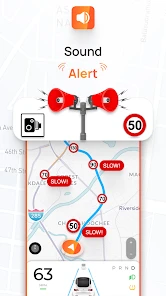
No one likes getting caught off-guard by a speed camera or a sudden speed limit change. That’s where the radar and speed camera alerts come into play. The app provides real-time alerts about upcoming speed cameras, helping you stay within the law and avoid fines. The radar detection is surprisingly accurate, detecting speed traps and other hazards well in advance. It’s like having a co-pilot who’s always looking out for you.
Performance and Usability
Using Radar, HUD, Map, Speed Camera is a breeze. The app runs smoothly without any noticeable lags, which is crucial when you’re relying on it for real-time updates. Setting it up is straightforward, and the customization options allow you to tailor the app to suit your driving habits and preferences. Whether you’re a daily commuter or a weekend road tripper, you’ll find something to love here.
In conclusion, if you’re in the market for a comprehensive driving app, Radar, HUD, Map, Speed Camera should definitely be on your radar (pun intended). It’s packed with features designed to enhance your driving experience, and its user-friendly interface ensures it’s accessible to everyone. So, next time you’re gearing up for a drive, why not give it a spin? You might just find it’s the perfect co-pilot you’ve been looking for.
Radar, HUD, Map, Speed Camera Frequently Asked Questions
Is Radar, HUD, Map, Speed Camera suitable for everyday driving?
Radar, HUD, Map, Speed Camera brings together navigation, speed monitoring, camera alerts, and a heads-up display, so it may suit drivers who want these tools in one app. Think about which features you would actually use and set them up before starting a journey. Use the app as a driving aid, keep your attention on the road, and always follow traffic laws.
What should I know about the app before downloading it?
It is a Maps & Navigation app from Shandy Applications, focused on camera detection, police controls, speedometers, and a heads-up display. It is free to download and has optional in-app purchases. The app is rated for Everyone, and its current version is 4.9. Check that your device meets the Android requirement before installing, then review any purchase options carefully if you choose to explore them.
Who developed Radar, HUD, Map, Speed Camera, and what is its age rating?
Radar, HUD, Map, Speed Camera is developed by Shandy Applications and is listed for Everyone, so it is presented as suitable for a broad audience. Its focus is driving assistance, including navigation, speed monitoring, camera alerts, and a heads-up display. Before installing, consider whether those tools match your needs and remember to use the app responsibly while driving.
Is Radar, HUD, Map, Speed Camera free to download?
The app is free to download, so you can install it without paying an upfront purchase price. It also offers in-app purchases, with items priced from $1.99 to $9.99. You can begin with the free version and decide whether any optional purchases are useful for your needs. Check the purchase details in the app before confirming a transaction.
What is the main purpose of the Radar, HUD, Map, Speed Camera app?
The Radar, HUD, Map, Speed Camera app is designed to enhance your driving experience by providing real-time navigation, speed monitoring, and alerts for speed cameras. It integrates seamlessly with your device to offer a Heads-Up Display (HUD) of essential driving information, helping you stay alert and informed on the road.
Pros
- Real-time speed camera alerts.
- Accurate GPS navigation.
- User-friendly interface.
- Customizable settings.
- Offline map access.
Cons
- Requires constant internet connection.
- Battery drains quickly.
- Occasional ads disrupt use.
- Limited features in free version.
- May miss some speed cameras.
- Category
- Maps & Navigation
- Version
- 4.9