

Qibla Finder Compass 100%
- 248.00
- 4.5
- Installs
- 10.00M
- Price
- Free

Screenshots
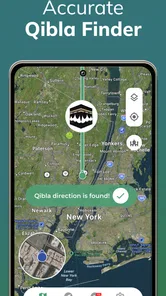
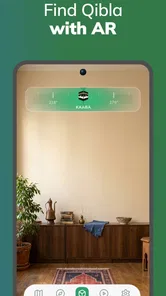
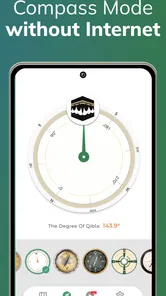
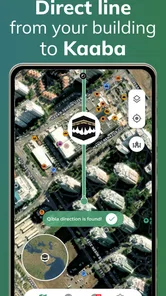
Analysis by Reviewed
I find a Qibla direction app most useful when it answers one specific question without turning a simple moment into a navigation task. Qibla Finder Compass 100% is built for that focused purpose: it gives Muslims a way to orient themselves at home or away from familiar surroundings. Its appeal is the directness, but a compass on a phone is still a visual tool that depends on how the device is used and where you are standing. I’d treat it as a practical aid, not as a substitute for every kind of navigation or for a method that better suits a person’s needs.
When a quick direction check helps
A useful way to judge a Qibla compass is to try it somewhere familiar before relying on it when travelling. At home, I can compare the indicated direction with what I already know; in a hotel or a friend’s house, I can open it when I need to orient myself without asking someone to interpret a map. That quick check is particularly handy after arriving tired, when working out streets and landmarks is the last thing I want to do.
For a realistic travel routine, I’d check the compass before settling on a place to pray, then put the phone down once I’m oriented. A phone compass can be affected by its surroundings and by how it is held, so I wouldn’t treat a moving needle as unquestionable proof. If the direction seems inconsistent, I’d step away from nearby metal objects and electronics, hold the phone level, and give the reading another look. This small pause is more useful than repeatedly turning in a circle and hoping the display settles.
Using Qibla Finder Compass 100% in everyday settings
First things first, downloading and installing the Qibla Finder Compass 100% app is a breeze. Available on both Android and iOS, it’s just a quick search away in your app store. Once installed, you’re greeted with a simple and intuitive interface that’s easy to navigate, even for those who aren’t the most tech-savvy.
Readability, navigation, and everyday access
What I value in a direction tool is how little interpretation it asks of me. A compass is more immediate than opening a general map, finding the Kaaba, and estimating a bearing from streets that may not run in the same direction. That simplicity can help someone who is unfamiliar with map apps, although it does not make the result independent of the phone’s compass or the user’s ability to see and understand its indicator.
Different situations call for different levels of confidence. In an unfamiliar building, I’d use the app to get an initial orientation, then check whether the phone is being held steadily rather than rushing to act on a fluctuating pointer. If I’m travelling with someone who has low vision or finds small on-screen controls difficult, I would not assume that a visual compass alone is accessible for them; I’d offer to help interpret it or use a method they already find comfortable. Its uncluttered approach is helpful, but a minimal screen is not automatically suitable for every ability.
How I would check a reading before relying on it
One practical point is to separate locating yourself from reading the compass. If I’ve just arrived somewhere new, I would first give the app a moment to settle on a direction while standing still, then make a single deliberate adjustment rather than continuously rotating the phone. That makes it easier to notice whether the pointer is stable. If I am unsure, I’d repeat the check after moving a short distance away from nearby electronics or metal furniture instead of assuming the first result is correct.
More From Our News Desk

 Weather - By Xiaomi
Weather by Xiaomi Review: Clear at a Glance, Less Clear Up Close
Xiaomi’s weather app makes everyday forecasts quick to scan, but its calm surface can leave useful details and recovery paths harder to find than they should be.

 X
XX Under Pressure: Can It Recover When Posting Goes Wrong?
A resilience-focused review of X, examining setup, mistaken posts, interruptions, weak connections, and the gaps that matter when recovery needs to be dependable.

 Clash of Clans
Clash of Clans Is Won Between the Battles
Its raids are quick; its community is a long-term project of coordination, teaching, rivalry, and shared responsibility—with all the friction that entails.

 Android Auto
Android Auto Makes the Case for Quieter Car Software
The car interface is no longer judged by how much it can do, but by how quietly it helps. Android Auto shows what drivers now expect—and what still gets in the way.

 MobiOffice: Word, Sheets, PDF
MobiOffice: Transforming Mobile Productivity with Seamless Integration
MobiOffice: Word, Sheets, PDF is redefining mobile productivity with a surprising blend of functionality and innovation.

 EA SPORTS FC Soccer Mobile 26
EA SPORTS FC™ Mobile Soccer: Redefining Mobile Sports Gaming
Dive into EA SPORTS FC™ Mobile Soccer, where immersive gameplay and strategic depth transform mobile sports gaming.
Latest News



This is also a useful distinction when comparing it with a map. A map can show how a direction lines up with a room, street, or building entrance, but it asks me to interpret more information. A dedicated compass reduces that mental work; it does not remove the need to hold the phone sensibly or use judgement. For someone who gets overwhelmed by busy maps, that narrower task can be a genuine advantage. For someone who needs a visual landmark or a route to a particular place, the map remains more informative.
A focused tool rather than a full navigation app
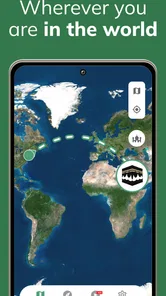
What really caught my attention was how the app combines simplicity with functionality. It uses your phone’s GPS to pinpoint your exact location and then directs you towards the Qibla with impressive accuracy. I tested it in several locations, and it worked flawlessly every time.
Moreover, the app doesn’t just stop at showing the direction. It provides additional information like the distance to the Kaaba, which is a nice touch for those who love to know the details. Plus, it doesn’t require an internet connection to work, which is a huge relief when you’re in areas with sketchy service.
For a practical check, I’d establish the direction while I have a clear view of the screen and enough room to hold the phone still, rather than trying to use it while walking through a busy station. Offline use is valuable when service is unreliable, but it should not be confused with eliminating every setup consideration: a phone still needs to establish where it is, and a compass reading can be disturbed by the environment. If I were heading somewhere especially remote, I’d get oriented before losing reception rather than leave the check until the last moment.
Motor and sensory considerations
The app’s central interaction is simple in concept: look at the screen and orient the phone. That can be easier than tracing a direction across a detailed map, but it still involves holding a device steady and interpreting a visual indicator. Someone with limited hand control may find that keeping a phone still is tiring, while a person with low vision may need help identifying the direction on screen. I would not assume the app offers spoken guidance or other specific assistive options; if those are essential, I’d test it in a low-pressure setting before depending on it.
A small change in routine can help when handling is difficult. I’d place the phone on a stable surface, if one is available, and check the indication without trying to keep it raised while moving around. In a shared setting, a companion can help with the orientation while the user decides where to stand. These are workarounds rather than app features, but they show why a quick compass check may fit one person comfortably and feel awkward to another.
User Experience and Interface
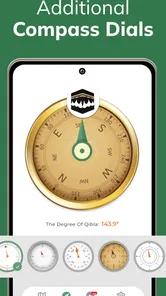
The user interface is clean and clutter-free, focusing on what truly matters: helping you find the Qibla direction quickly and efficiently. The compass is large and easy to read, with a clearly marked indicator for the Qibla. It’s a minimalist design that doesn’t overwhelm you with unnecessary features.
Another aspect I appreciated was the app’s speed. There’s no lag, and it responds instantly as you move your phone around. This is crucial, especially when you’re in a hurry to catch the prayer time.
That directness is also a trade-off. If I want to plan a route, save a place, or see how the direction relates to nearby streets, a conventional map app is the better choice; this tool is for answering a narrower question. Someone who needs spoken guidance, strong text enlargement, or other specific accessibility options should check whether the app works for them before relying on it. I would keep a familiar backup approach available, especially in a crowded or dim space where reading a screen and holding a phone steadily can be harder.
Choosing the right place and moment to use it
In a hotel room, a quiet corner at work, or a relative’s home, I’d use the app after I’ve found a comfortable place to stand. A cramped aisle or a busy platform is a poor time to rotate a phone and watch a pointer; I’d wait until I can pause without blocking anyone. The direction check itself may be brief, but choosing a calm moment makes it less stressful and gives me a better chance of reading the display carefully.
For a family trip, I can imagine checking the direction after arriving at a lodging, then sharing the orientation with the people travelling with me rather than having everyone open separate map apps. That is especially useful when some people are unfamiliar with the neighbourhood. If a traveller needs turn-by-turn help to reach a prayer space, though, this app is not the right tool for that part of the journey. I’d use a conventional navigation app to get there, then use a Qibla compass only for the final orientation if needed.
Who it suits, and where it falls short
Qibla Finder Compass 100% is a focused option for Muslims who want a quick direction check at home or while away, without having to work it out from a general-purpose map. It is also a reasonable choice for someone who prefers a single-purpose screen over a map full of labels and controls. I would skip it as my only navigation tool if I needed route planning, turn-by-turn directions, or a hands-free way to follow guidance; those jobs call for a different kind of app.
The app is free to download and is developed by CNT Interaktif Bilgi Tek. Yaz. San. ve Tic. A.S. It has a 4.5 average from around 84,000 ratings and more than 10 million installs. It is rated for Everyone, with in-app purchases ranging from $0.49 to $39.99 per item. Its current version is 3.8.3, and it requires Android 6.0 or later. Those details make it easy to judge whether it fits your device and expectations, but I’d still check the purchase prompts carefully if I prefer not to spend inside free apps.
What to consider before making it your usual method
The main question I’d ask before relying on it regularly is whether a visual phone compass suits my own habits. If I already use a familiar physical compass or have a trusted way to orient myself, this app may be a convenient backup rather than a replacement. If I often travel and want a quick check without interpreting a street map, it has a clearer role. Either way, I’d practise at home first, where I can take my time and compare the indicated direction with what I know.
Another sensible trade-off is to keep the app’s job narrow. It can help answer which way to face, but it is not a substitute for finding a suitable place, planning a route, or making a space comfortable for someone with particular sensory or mobility needs. I would not open it while walking or use it in a situation where looking down at a phone creates a safety concern. Pausing, getting oriented, and putting the phone away is a better workflow than trying to multitask.
Why You Should Download It
If you’re someone who travels often or simply finds themselves in need of a reliable Qibla finder, this app is definitely worth having on your phone. Its straightforward functionality and offline capabilities make it a must-have tool for Muslims around the world. Plus, it’s completely free, which is always a bonus!
In conclusion, the Qibla Finder Compass 100% app perfectly blends convenience with precision. Whether you’re at home or halfway across the globe, this app ensures you’re always facing the right direction during your prayers. So go ahead, give it a try, and make your daily prayers a little bit easier.
My recommendation is strongest for someone who wants a simple visual aid and is comfortable checking a compass reading. Before depending on it in a new place, I’d try it at home, learn how the indicator behaves, and identify a backup method that suits me. That is a sensible routine for anyone, and especially for people who may have difficulty seeing or handling a phone in the moment. For quick personal orientation it can be convenient; for more demanding navigation or individual accessibility needs, a map or another familiar aid may be the more dependable fit.
My inclusive verdict
I see this as a helpful, narrow-purpose option rather than an all-purpose answer. Its uncluttered compass approach may suit people who want less visual complexity than a full map, and the ability to check a direction away from home is useful in ordinary travel situations. The best experience still depends on having a readable screen, a steady enough hand or a place to rest the phone, and a moment when it is safe to pause. If those conditions do not fit, a map, a companion’s help, or another familiar orientation method may be a better choice.
Qibla Finder Compass 100% Frequently Asked Questions
Can I use Qibla Finder Compass 100% while traveling or in a place I have never visited?
Yes. Qibla Finder Compass 100% is designed to show the Qibla direction relative to your current location, which can be useful when you are traveling or staying somewhere unfamiliar. It uses your location and the phone’s magnetic sensors for guidance, so allow location access when prompted and hold the phone as you follow the compass. Sensor interference can affect the reading, so check it in an open area if the direction seems unstable.
What is the app’s age rating, and is it suitable for family use?
Qibla Finder Compass 100% has an Everyone content rating and is intended to help users find the Qibla direction for prayer. Its purpose is straightforward, though parents or anyone setting up a family device may still want to review the permissions and any purchase options shown during installation. The app is developed by CNT Interaktif Bilgi Tek. Yaz. San. ve Tic. A.S.
What permissions does Qibla Finder Compass 100% need, and why?
Qibla Finder Compass 100% uses your location to determine the Qibla direction from where you are, and it relies on your phone’s compass sensors to show that direction. When prompted, allow location access if you want the app to calculate the direction for your current position. You can review or change app permissions in your device settings, though limiting location access may affect location-based guidance.
Will Qibla Finder Compass 100% work on my phone?
Qibla Finder Compass 100% is an app in the Maps & Navigation category, and its current version is 3.8.3. It requires Android 6.0 or later, so check your device’s operating system before downloading. The app is free to install and is rated for Everyone. If your phone lacks a working compass sensor, the direction display may not behave as intended, since the app uses the device’s magnetic sensors.
What is Qibla Finder Compass 100%, and how does it work?
Qibla Finder Compass 100% is a mobile application designed to help Muslims accurately determine the direction of the Qibla, which is towards the Kaaba in Mecca, for prayer purposes. The app utilizes your device's GPS and magnetic sensors to provide a precise compass direction. Users simply need to open the app, and the compass will display the Qibla direction relative to their current location. This ensures convenience and accuracy, especially for those traveling or residing in unfamiliar areas.
Pros
- Accurate direction finding.
- User-friendly interface design.
- Offline functionality available.
- Supports multiple languages.
- Lightweight and fast loading.
Cons
- Contains in-app advertisements.
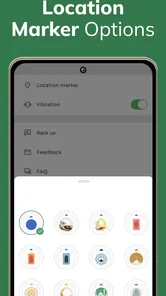
- Limited customization options.
- No integration with calendar apps.
- Requires location permissions.
- No live customer support.











