

Q: Waxing Check-in
- 0.00
- 0.0
- Installs
- 50.00K
- Price
- Free

Screenshots
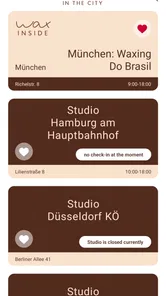
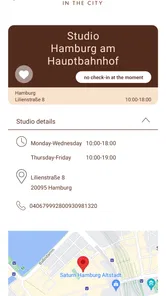
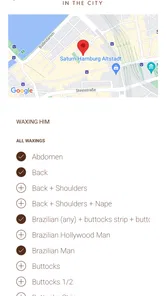
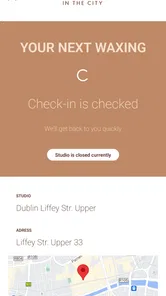
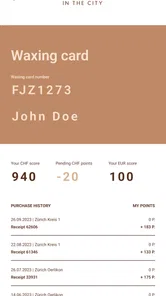
Analysis by Reviewed
Booking a waxing appointment is usually a small task, but it often happens at an inconvenient moment: while I am walking between errands, sitting outside a salon, or trying to arrange a visit before a busy week. Q: Waxing Check-in is designed around that narrow need. It is a free beauty app from delodi, connected with WAX IN THE CITY, and its focus is clear from the moment I open it: checking in for waxing rather than replacing a general salon-booking platform.
That focused purpose is both its appeal and its main limitation. I would not install it expecting a broad beauty marketplace, a personal skincare diary, or a tool for comparing every salon in town. I see it as a practical entry point for people who already use WAX IN THE CITY and want a mobile way to begin the check-in process. The app has been available since August 8, 2017, and its current version is 1.21.0, so it is an established utility rather than a brand-new experiment.
How the check-in experience fits real mobile routines
My first impression is that the app makes most sense when I am already committed to a waxing visit. The store summary, “WAX IN THE CITY’S App,” sets the context, while the short description, “Q: Waxing Check-in,” points toward a specific action. That distinction matters. The app is not trying to educate me about waxing or persuade me to build an elaborate beauty routine; it is meant to reduce the steps between deciding to visit and getting checked in.
In a realistic everyday scenario, I might finish work earlier than expected and decide to stop for a waxing appointment before heading home. Instead of opening a general map application, searching through salon listings, and then trying to work out whether the location has a suitable process, I would use this app if WAX IN THE CITY is already part of my routine. The value comes from that direct relationship. It can be quicker than using a broad booking service when the desired destination is already known.
At the same time, I would not treat it as a complete replacement for every usual alternative. A general salon-booking app is more useful when I am comparing providers, checking several appointment types, or looking for a new location. A map app is better when my immediate question is simply where the nearest suitable business is. Q: Waxing Check-in has a narrower job, and it is strongest when I want the WAX IN THE CITY check-in path rather than discovery.
The app’s beauty category is therefore a little different from apps built around tutorials, cosmetic shopping, or image editing. Its usefulness is operational. That may sound modest, but focused tools can be easier to understand when they match a repeated habit. I do not have to scroll through unrelated beauty content before reaching the action I came for.
What I would prepare before opening it
A small but important improvement to the experience is to decide what I need before launching the app. If I am only checking in, I should already know which WAX IN THE CITY location I intend to use and whether I am ready to proceed. This avoids treating the app like a search engine and then feeling disappointed when a specialized check-in tool does not behave like a full directory.
More From Our News Desk

 Gmail
GmailGmail in a Busy Inbox: Who Benefits Most?
From first account to crowded workday, Gmail earns its place through dependable search and flexible sorting—but its best fit depends on how much inbox maintenance you can tolerate.

 Prime Video
Switching to Prime Video: What Changes in Your Viewing Routine
Prime Video can make a compelling second home for streaming, but switching means learning a different catalog, rental layer, and route from browsing to playback.

 Universal TV Remote Control
Universal TV Remote Control Works Best as a Reliable Backup
A phone remote earns its place through quick setup and reliable habits. Here is how to get more from Universal TV Remote Control—and where its limits show.

 Weather - By Xiaomi
Weather by Xiaomi Review: Clear at a Glance, Less Clear Up Close
Xiaomi’s weather app makes everyday forecasts quick to scan, but its calm surface can leave useful details and recovery paths harder to find than they should be.

 X
XX Under Pressure: Can It Recover When Posting Goes Wrong?
A resilience-focused review of X, examining setup, mistaken posts, interruptions, weak connections, and the gaps that matter when recovery needs to be dependable.

 Clash of Clans
Clash of Clans Is Won Between the Battles
Its raids are quick; its community is a long-term project of coordination, teaching, rivalry, and shared responsibility—with all the friction that entails.
Latest News



I would also keep the app available in a convenient place on my phone rather than searching for it at the salon entrance. That is especially useful when I am carrying bags, wearing gloves in cold weather, or trying to complete the process discreetly. The best use case is not extended browsing; it is a short, purposeful interaction.
Another practical tip is to open it before reaching the front door if I am in a hurry. A stable connection is easier to assess while I am still somewhere comfortable than when I am standing in a crowded reception area. This is not a promise of offline behavior; it is simply a sensible way to reduce pressure around a network-dependent action.
Why connectivity matters more here than in a beauty guide
Because the app is built around check-in, connectivity shapes the experience more directly than it would in a static beauty reference app. A tutorial can often be read at leisure, but a check-in usually has a moment attached to it. I may be arriving, waiting, or trying to move quickly. If the app needs to communicate with an online service at that point, the quality of my mobile connection becomes part of the practical experience.
I would therefore avoid assuming that opening the app alone completes anything. I would look for a clear confirmation after submitting the check-in action and keep the screen visible until the process has finished. If the interface returns me to a previous screen or appears unusually slow, I would not immediately repeat the action several times. Repeated taps can create uncertainty about whether the request went through.
This is one of the most useful habits for this particular app: treat the check-in as a transaction that deserves confirmation, not as a button press that can be forgotten. The distinction is easy to miss because the task itself sounds simple. In practice, a short pause and a visible result can prevent confusion at the salon.
Using it while moving through the city
Q: Waxing Check-in is naturally suited to mobile contexts, but “mobile” does not always mean “comfortable.” I would avoid using it while walking across a street, boarding public transport, or balancing a phone with other items. The app may be quick to use, yet the surrounding situation can still make a small form or confirmation screen awkward.
A better workflow is to stop somewhere safe a few minutes before arrival. If I am traveling by bus or train, I can prepare the app while seated and finish the final step after reaching the relevant area. If I am driving, I would complete everything before moving rather than trying to interact with the phone in traffic. These choices are ordinary, but they matter because a check-in tool is most likely to be used during transitions.
The small screen also changes how I read the experience. I prefer short labels and obvious progress over dense information, particularly when I am standing in a bright street or a busy entrance. A specialized app has an advantage here because it can keep attention on one task. Its trade-off is that it may not answer broader questions I suddenly have, such as which alternative salon is nearby or what other beauty services are available.
What happens when the connection is unreliable
The most important limitation I would keep in mind is that an online check-in can be affected by weak or inconsistent connectivity. Underground travel, crowded venues, thick-walled buildings, and overloaded public networks can all make a simple action feel uncertain. I would not assume that a loading screen means failure, but I would also not assume that waiting forever will solve the problem.
My recovery routine would be deliberately cautious. First, I would wait briefly and check whether the app displays a completed state. Next, I would move to a place with a stronger mobile signal or a trusted network and try again only if the previous attempt clearly did not finish. If I remain unsure, I would tell the salon staff what happened instead of submitting repeated requests without knowing which one was accepted.
This approach is particularly useful because check-in systems can create an awkward gap between what the phone shows and what staff can see. The app may be the quickest route when everything works, but a direct conversation is the safer fallback when the result is ambiguous. That does not make the app ineffective; it simply means I would use it as part of the visit rather than as the only source of truth when connectivity breaks down.
I also would not uninstall it after one slow attempt in a poor-signal location. A failure caused by the environment is different from a consistent problem across several networks. Reopening the app from a stable connection, checking that I am using the latest available version, and then trying the process calmly gives a fairer assessment than judging it during a rushed arrival.
Keeping the process simple on a data-conscious phone
For a focused check-in app, I would expect my interaction to be brief, but brief use does not automatically tell me how much background activity an app performs. I would use it when needed rather than leaving it open throughout the day. That is a sensible habit for any service connected to an online account or location-based visit, especially when the app’s purpose does not require constant browsing.
I would also prefer a trusted Wi-Fi connection when I am preparing at home, while relying on mobile data only when the timing of the visit makes that more practical. The goal is not to avoid mobile data completely; it is to reserve it for the moment when the check-in is actually useful. This makes the app fit better into a controlled routine instead of turning a single salon visit into unnecessary background phone activity.
Another data-conscious tip is to avoid repeatedly refreshing the same screen when I am unsure whether the service has responded. Refreshing can consume more data and, more importantly, can make it harder to tell which attempt was successful. I would rather wait for a clear state, change to a better connection, or ask the salon than create a chain of duplicate actions.
Privacy also influences how I would use a specialized beauty app. I would pay attention to the screens that request information and provide only what is needed for the check-in process. I would not invent a complicated profile or fill in optional details simply because a form is available. Keeping the interaction purposeful makes it easier to understand what I am doing and reduces the amount of personal information I casually enter into any mobile service.
Who will appreciate this focused approach
I think the app is best for regular WAX IN THE CITY customers, people who already know the service they want, and anyone who values a direct check-in route over a broad salon search. It can also suit users who dislike navigating large booking platforms full of promotions, unrelated providers, and multiple appointment categories. The simpler the intention, the more convincing the app becomes.
It may also help someone who is coordinating a visit around a tight schedule. For example, if I have a short gap between two commitments, a dedicated check-in tool can keep the administrative part from expanding into a long search session. I still need to allow time for the actual appointment and any unexpected delay, but the app’s narrow purpose can make the arrival routine feel more manageable.
I would be less enthusiastic about recommending it to someone who is still choosing a salon, wants extensive price comparisons, or expects beauty advice and personalized recommendations. A general booking service, a map application, or a salon’s broader customer platform may be more suitable in those situations. Installing a specialized app does not make sense if I will use it only to discover providers it was not designed to compare.
The age rating of Everyone makes the app broadly approachable from a content perspective, and it is free to install. Those details remove two common barriers, but they do not change the central question: do I need a WAX IN THE CITY check-in tool? If the answer is no, the lack of an upfront cost still may not justify adding another app to my phone.
Compatibility and day-to-day upkeep
The app runs on Android devices using version 7.0 or later, which covers a wide range of phones while still making the operating-system requirement worth checking before installation. If I use an older handset, compatibility is the first practical question I would answer. On a supported phone, I would keep the application updated when updates are available, particularly because connectivity and sign-in behavior can depend on how well an app interacts with current mobile systems.
Its developer is delodi, and the app has reached over fifty thousand installs. I read that as evidence that it has found a real audience, not as a guarantee that every salon visit will be frictionless. A specialized tool can be useful to many people while still feeling unnecessary to users outside its intended service. The current version, 1.21.0, is the one I would evaluate rather than relying on impressions from older releases.
One thing I appreciate about a focused utility is that I can judge it by a clear standard: does it help me complete the WAX IN THE CITY check-in with less effort than my usual method? That is a more honest test than expecting it to compete feature for feature with a full beauty marketplace. If it saves time during the visits I actually make, it earns its place. If I rarely use the associated service, it probably does not.
My connectivity verdict after weighing convenience and friction
My overall view is positive but deliberately narrow. Q: Waxing Check-in is appealing because it concentrates on a concrete salon task and fits naturally into a phone-based arrival routine. The free price and Everyone content rating make it easy to try, while its long availability and current 1.21.0 release suggest a maintained product rather than a temporary listing. I would recommend it to someone who already visits WAX IN THE CITY and wants a dedicated check-in option.
The main trade-off is that its usefulness depends on context. It is not the app I would choose for salon discovery, broad beauty planning, or comparing providers. I would also prepare for the possibility that a weak connection could interrupt the moment when I need it most. Opening it before arrival, waiting for a definite confirmation, avoiding repeated taps, and knowing when to ask staff for help are small habits that make the experience more dependable.
My practical recommendation is to treat it as a focused arrival tool, not a complete beauty companion. Used that way, it can remove unnecessary steps from a familiar waxing visit without asking me to manage a large, distracting platform. If your routine already includes WAX IN THE CITY, the app is worth trying. If you are searching for a new salon or want a wider set of beauty features, I would choose a more general alternative and keep this one off my phone.
Q: Waxing Check-in Frequently Asked Questions
Who develops Q: Waxing Check-in, and what kind of app is it?
Q: Waxing Check-in is a beauty app developed by delodi and described as WAX IN THE CITY’S App. It is intended to support the check-in experience connected with waxing services, rather than serve as a general-purpose beauty guide. If you visit a participating business, the app may make arrival and reception steps more convenient; its practical usefulness depends on how that business uses it.
What is Waxing Check-in used for?
Waxing Check-in is designed to simplify the arrival process for clients visiting a waxing salon or beauty business. Instead of waiting at the front desk, customers can use the app to check in, confirm their appointment or visit details, and provide requested information. Its usefulness may vary depending on whether the salon has integrated the app into its daily booking and reception workflow.
Do I need an appointment to use Waxing Check-in?
The app may support both scheduled appointments and walk-in visits, but this depends on how the individual waxing business has configured its check-in system. Before downloading, users should confirm whether their salon requires a pre-booked appointment, accepts walk-ins through the application, or uses Waxing Check-in only for confirming an existing reservation. Availability and features can differ between locations.
What personal information does Waxing Check-in require?
During the check-in process, Waxing Check-in may request details such as your name, phone number, appointment information, or answers related to your service. Some salons may also ask clients to complete consent forms or provide relevant treatment information. Users should read each form carefully, review the app’s privacy policy, and only submit information they are comfortable sharing with the business.
Can Waxing Check-in replace booking or payment services?
Waxing Check-in primarily focuses on confirming arrival and streamlining the salon reception process, so it should not automatically be considered a complete booking or payment platform. Some businesses may connect it with appointment scheduling, customer records, or payment tools, while others may use it only for check-in. Contact the salon directly to verify whether reservations and payments are supported.
Pros
- Quick check-in helps reduce waiting time at busy salons.
- Useful for keeping appointment details organized in one place.
- Simple interface is easy to understand for first-time users.
- Can make recurring waxing visits easier to manage.
- Digital records may reduce the need for paper forms.
Cons
- Requires salon support
- so features may be limited at some locations.
- Account or personal details may be needed before checking in.
- A poor internet connection can disrupt the check-in process.
- Not useful if your preferred salon does not use the platform.
- Some users may prefer booking and check-in directly with staff.











