Punchbowl: Invites & eCards
- 5.98K
- 4.8
- Installs
- 1.00M
- Price
- Free

Screenshots
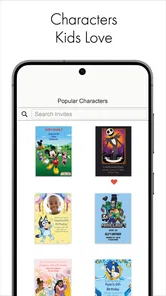
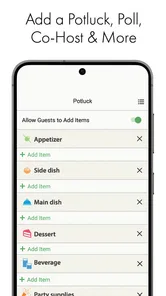
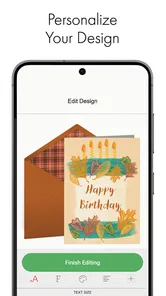
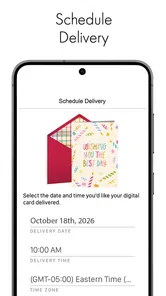
Analysis by Reviewed
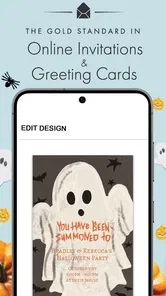
I usually judge invitation apps by one simple question: do they remove work, or just move it onto a smaller screen? Punchbowl: Invites & eCards makes a convincing case for the first option. It is a free lifestyle app from Punchbowl for creating and sending digital invitations and greeting cards from a phone, which makes it useful when a birthday, dinner, celebration, or quick message cannot wait until I am back at a computer.
What stood out to me is the app’s focus. It is not trying to be a full social network, a project planner, or a general design studio. Its job is narrower: help me prepare a polished invitation or eCard without starting from a blank page. That narrow purpose is also the key to deciding whether it belongs on your phone. If you want a fast, guided way to contact a group, it can be practical. If you need deep design control, advanced event management, or a completely custom visual identity, a different tool may suit you better.
What the free app actually offers
The basic attraction is clear: I can install the app without paying an upfront purchase and use it for digital invitations and eCards. That makes it easy to try for a single occasion rather than committing to a subscription or buying a specialized desktop program. The content rating is Everyone, so it is positioned as a broadly accessible family-and-social utility rather than an app aimed at a narrow age group.
There is an important distinction between free access and unlimited value, though. The app includes in-app purchases priced from $5.99 to $84.99 per item. I would therefore treat the free download as an opportunity to explore the available creation and sending experience, not as a promise that every design or optional element is included at no cost. Before finishing an important invitation, I would check the selected design and any purchase prompt carefully. That small habit prevents an unpleasant surprise when the goal was simply to send something quickly.
For occasional users, this pricing structure can still make sense. Someone arranging one family gathering may find free options sufficient, while another person who regularly sends formal invitations may decide that a paid design is worth considering. The sensible approach is to judge each event separately instead of assuming that paying once unlocks everything. The listed price range is wide, so the value depends heavily on what you choose and how often you use it.
The app has been available since October 30, 2015, and the current version is 4.2.4. It runs on Android devices using Android 5.0 or later. Those details matter if you are installing it on an older phone, especially a device that is still reliable for calls and messages but no longer handles newer apps comfortably. On a compatible phone, the app’s mobile-first purpose is straightforward: create something while travelling, between errands, or during the last-minute rush before an event.
Its scale also gives me some confidence that it is not an abandoned experiment. Punchbowl: Invites & eCards has passed 1 million installs, with an average rating of 4.8 from around 15 thousand ratings and roughly 6 thousand written reviews. Those figures do not prove that every user will love the app, but they suggest that the central invitation-and-eCard workflow has connected with a substantial audience.
More From Our News Desk

Weather by Xiaomi Review: Clear at a Glance, Less Clear Up Close

X Under Pressure: Can It Recover When Posting Goes Wrong?

Clash of Clans Is Won Between the Battles

Android Auto Makes the Case for Quieter Car Software

MobiOffice: Transforming Mobile Productivity with Seamless Integration

EA SPORTS FC™ Mobile Soccer: Redefining Mobile Sports Gaming
Why the mobile format is useful
I see the strongest benefit when the information already exists in my phone. If I have the date in a calendar, the location in a message, and the guest names in my contacts, creating an invitation on a mobile device avoids the awkward step of collecting everything again at a computer. It is also more convenient for small occasions where opening a full design program would be excessive.
A realistic example would be a parent planning a weekend birthday gathering after remembering that several relatives still need details. Instead of making a graphic in a separate editor, exporting it, opening a messaging app, and explaining the event manually, the parent can use Punchbowl to prepare a dedicated invitation or eCard and send it while the details are fresh. That does not eliminate all planning, but it reduces the number of tools involved.
There is a second useful scenario that is easy to overlook: the app can serve as a quick response to a social moment. If a friend moves house, a colleague celebrates good news, or a family member has a birthday, an eCard is more personal than a plain text message without requiring the time involved in buying and mailing a physical card. The mobile setting makes that kind of gesture realistic even when I am away from home.
Where it sits beside familiar alternatives
Compared with ordinary messaging apps, a dedicated invitation tool gives the message more structure and occasion-specific presentation. A group chat is excellent for conversation, but an invitation usually needs the date, time, place, and tone to be immediately visible. A designed card can also feel more deliberate than sending a casual line of text with an emoji.
Compared with email, the app is better suited to a visual, informal announcement that I want to prepare quickly on a phone. Email remains preferable when an event requires long instructions, attachments, workplace formality, or a searchable thread with extensive replies. Punchbowl is most comfortable in the space between a personal message and a formal event platform.
Compared with a general graphic-design app, its advantage is convenience rather than creative freedom. A blank canvas offers more control over typography, spacing, images, and branding, but it also asks me to make more decisions. Punchbowl is the better choice when I want a presentable result without becoming the designer of the event. A general design app wins when the invitation must match a business identity, a very specific theme, or a custom illustration.
Compared with printed invitations and physical cards, the digital route is faster and avoids printing and postage steps. That is valuable for a last-minute gathering or a recipient who is comfortable receiving everything digitally. Printed stationery still has a tactile quality that an app cannot reproduce, and some formal occasions deserve that physical presence. The right choice depends less on which format is superior and more on whether speed or ceremony matters more.
How I would use it for a real event
I would begin by deciding whether the message is an invitation or an eCard before worrying about decoration. That sounds obvious, but it keeps the purpose clear. An invitation needs practical information that guests can act on; an eCard needs a message and a mood. Mixing those goals can produce something attractive but confusing, especially if the recipient has to search for the actual event details.
For an invitation, I would prepare the essentials first: event name, date, start time, location, and any instruction that affects attendance. I would then choose a design that supports readability rather than selecting the most elaborate option automatically. On a phone, a decorative background can make small text harder to scan. The best invitation is not necessarily the most colourful one; it is the one a guest can understand in a few seconds.
For an eCard, I would write the personal message before choosing the visual treatment. This reverses the temptation to pick a pretty card and then force a generic sentence into it. A short, specific note usually makes the result feel more thoughtful. Mentioning why I am sending it or recalling a shared moment gives the card a purpose that a template alone cannot provide.
One practical tip is to review the finished item as a recipient would see it, not as the creator sees it. I would check that the event details are complete, that names are spelled correctly, and that the tone fits the audience. A children’s party, a family anniversary, and a sympathy message require very different choices even though they all fit under the same broad lifestyle category.
I would also avoid treating the invitation as a substitute for every follow-up conversation. Digital invitations are useful for presenting the core details, but guests may still need to ask about parking, food, accessibility, gifts, or whether children are welcome. If those points matter, I would include them clearly rather than assuming everyone will ask. The app can help me send the message; it cannot make an incomplete plan complete.
Small workflow choices that improve the result
The first non-obvious trade-off is speed versus editing patience. A mobile invitation app encourages quick creation, but rushing on a small screen increases the chance of overlooking a date or leaving an old detail in the message. I would draft the factual information in a note first, then transfer it into the invitation. That simple separation reduces mistakes and makes revisions easier.
The second is design consistency. If I am sending several related messages, I would keep the visual tone similar instead of choosing a completely different style each time. This is particularly helpful for a multi-part celebration where one message announces the event and another reminds people about it. Even without turning the process into a branding exercise, consistency makes the communication feel intentional.
The third is deciding when not to use a digital invitation at all. If the guest list includes people who rarely check digital messages, a phone call or printed card may be more dependable. If the event is formal enough that presentation and keepsake value matter, a physical invitation may justify its extra effort. Punchbowl is strongest when recipients are comfortable with digital communication and the host values convenience.
A fourth consideration is cost discipline. Because optional purchases range from $5.99 to $84.99 per item, I would not browse designs casually and assume that a purchase is necessary for a good result. I would first see whether a suitable free choice meets the occasion. If I decide to pay, I would do so because the particular design solves a real need, not simply because it appears more polished in a preview.
What feels smooth and what may cause friction
The app’s focused purpose is its main strength. I do not need to construct an invitation from an empty page, and I can think about the event rather than the mechanics of graphic composition. That is especially helpful for people who are comfortable writing a message but do not feel confident arranging a visual design themselves.
The limitation is that convenience usually comes with boundaries. A template-led experience cannot anticipate every unusual event, cultural preference, or personal style. If I want exact control over every line, image, colour, and layout decision, I may find the process restrictive. A dedicated design tool will take longer, but it can better accommodate a highly specific result.
Another possible friction point is the difference between making something attractive and managing the event afterward. The app is valuable for the invitation or card itself, but I would not choose it solely because I need a complex planning system. For a large event with detailed registration, ticketing, schedules, or extensive guest coordination, a purpose-built event service may be more appropriate. Punchbowl can be part of that workflow, but it should not automatically be mistaken for the entire workflow.
There is also a human limitation: digital delivery does not guarantee attention. A guest can overlook an invitation in a crowded inbox or message list. For an important event, I would send the invitation early enough to allow a personal reminder. That is not a failure of the app; it is a realistic part of relying on digital communication.
Who is likely to get the most value?
I would recommend it first to people who regularly organize informal gatherings and want a more polished alternative to a plain group message. It is also a good fit for someone who sends greeting cards occasionally but does not want to store physical cards or visit a shop every time. Families, students, busy workers, and anyone who plans from a phone can benefit from that convenience.
The free entry point is particularly useful for occasional users. If I only need one invitation every few months, I can try the app without treating it as another permanent household expense. The possibility of optional purchases means I would still inspect the final selection before sending, but the overall model allows me to start small and decide whether extra spending is justified by the particular occasion.
I would be more cautious recommending it to professional event organizers, businesses with strict brand requirements, or hosts who need detailed guest operations. Those users may value custom layouts, data handling workflows, response tracking, or integrations more than a quick mobile creation experience. A general design platform or dedicated event-management service could be the better investment in those situations, even if it requires more setup.
It may also be the wrong choice for someone who strongly prefers physical correspondence. A digital card can be warm and convenient, but it does not replace the experience of opening an envelope. Likewise, if the intended recipients are not comfortable receiving invitations electronically, the app’s central advantage disappears.
My value judgement
In value terms, I see Punchbowl as a practical free starting point with optional paid choices rather than an app I would install expecting every possibility at no cost. The free access lowers the barrier for casual use, while the item-based purchase range gives room for users who want to spend more on a particular design. Whether that is worthwhile depends on the emotional importance of the event and on how much the selected option improves the finished message.
I would not measure its value only by the number of templates or by the visual appeal of the first screen. The real benefit is the time saved between deciding to send something and actually having a usable invitation or card in hand. If it prevents me from opening several other apps, resizing an image, and rewriting the same details in a message, it earns its place for that occasion.
At the same time, I would keep expectations realistic. It is not a replacement for a full design suite, a printed stationery service, or a complete event-management platform. Its value is highest when the task is personal, visual, mobile, and relatively straightforward. The more specialized the requirements become, the more likely another category of tool will offer better control.
My buy-or-skip verdict
I would choose Punchbowl: Invites & eCards when I need to create a friendly digital invitation or eCard without spending time learning a complex editor. Its lifestyle focus, mobile convenience, and free starting point make it easy to justify for everyday celebrations and quick personal messages. The strong user response, including a 4.8 average and more than a million installs, supports the impression that it works well for its intended audience.
I would skip it when the invitation must follow strict branding, when the event needs advanced coordination, or when a physical card is part of the meaning. I would also pause before paying for a design simply because it looks premium. First I would test whether a free option communicates the essentials clearly; only then would I consider an in-app purchase priced between $5.99 and $84.99.
My final recommendation is positive but specific: use it as a fast digital invitation and eCard maker, not as an all-purpose event system. For a birthday announcement, a casual gathering, or a thoughtful digital greeting, it can remove just enough friction to make sending feel easy. For complex, formal, or highly customized occasions, I would compare it with a design or event-planning alternative before committing.
Punchbowl: Invites & eCards Frequently Asked Questions
Can I use Punchbowl to send both invitations and greeting cards?
Yes. Punchbowl: Invites & eCards is designed for both creating event invitations and sending digital greetings from your phone. You can use it to share details for a celebration or send an eCard for a personal occasion. The app’s focus is on making these tasks convenient on the go, so it can be useful when you want to organize an event or send a thoughtful message without mailing a physical card.
Does Punchbowl work for different kinds of occasions?
Punchbowl can be used for a range of celebrations and events, including birthdays, weddings, baby showers, and parties. Its invitations let you share event details with guests, while its eCards provide a way to send a digital greeting. When choosing a design, consider the occasion and the message you want to convey, then check the finished invitation or card before sending it.
Is Punchbowl: Invites & eCards available for my device?
Punchbowl: Invites & eCards is a mobile app for Android, and it requires Android 5.0 or later. Before downloading, check your device’s operating system version and make sure you have enough room for another app. Its focus is creating and sending invitations and digital greetings on the go, so it is most useful when you want to organize an occasion or send an eCard from your phone.
Who makes Punchbowl, and is it suitable for all ages?
Punchbowl is developed by Punchbowl and is listed as suitable for Everyone. The app is aimed at organizing celebrations and sending digital greetings, so families can use it for occasions such as birthdays and parties as well as more formal events. As with any app that involves sharing invitations, take a moment to review the event details and recipients before sending.
What is Punchbowl: Invites & eCards, and what can I use it for?
Punchbowl: Invites & eCards is designed for organizing celebrations and sending digital greetings from a mobile device. You can create online invitations for events such as birthdays, weddings, baby showers, and parties, then share event details with guests. The app also supports digital cards for occasions when you want to send a quick, more personal message without mailing a physical card.
Pros
- Create polished invitations with customizable templates and event details.
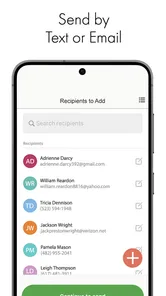
- Send digital invitations quickly without printing or postage costs.
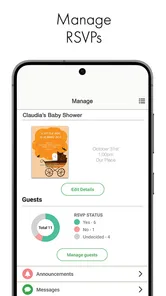
- Track RSVPs and guest responses from one convenient dashboard.
- Useful eCard options for birthdays
- holidays
- and other occasions.
- Helps organize guest information and keep event communication together.
Cons
- Some premium designs and features require a paid subscription or purchase.
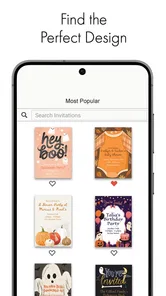
- The large template library can make finding a specific style time-consuming.
- Guests may need to check email or notifications to avoid missing updates.
- Advanced customization may feel limited compared with professional design tools.
- An internet connection is needed for most invitation and RSVP functions.











