Property Finder - Real Estate
- 47.00
- 4.1
- Installs
- 1.00M
- Price
- Free

Screenshots







Analysis by Reviewed
When I search for a home, trust matters as much as the photos: a polished listing is only a starting point, not proof that a property or its details are right for me. Property Finder - Real Estate is a House & Home app from Property Finder, aimed at people looking to explore homes and other properties in the UAE, Egypt, Saudi Arabia, Bahrain, and Qatar. It is free, rated for Everyone, and has an average rating of 4.1 from around 6,800 ratings. Those figures give a sense of its reach, but I still treat each listing as something to check carefully rather than a recommendation to act immediately.
A search tool, not a trust certificate
Property decisions carry more weight than ordinary online browsing. A home search can expose your budget, preferred neighborhoods, moving plans, and contact details to people you have not met. I find it useful to separate the app’s role from the decision itself: it can help me discover and compare listings, but I remain responsible for checking whether a particular property and the person representing it are suitable.
That distinction is especially important when a listing looks unusually convenient or its photos create a strong first impression. I would compare the written details with what an agent says, ask direct questions, and arrange a viewing before treating the property as a serious option. The app’s 1M+ installs show that many people use it to browse, but that popularity cannot confirm an individual listing or guarantee a safe transaction.
Discovering Properties with Ease
First things first, Property Finder - Real Estate has a super intuitive interface. I mean, even my tech-challenged aunt could navigate it without breaking a sweat. The app opens up to a clean and simple home screen where you can immediately start your search. Just type in your desired location, and voila! You get a list of potential homes that you can filter by price, property type, and more.
Useful controls, with a little homework still required
One of the features I absolutely love is the advanced filtering option. You can narrow down your search by specifying the number of bedrooms, bathrooms, and even amenities like a pool or a gym. This is especially useful if you have a clear picture of your dream home and don't want to waste time scrolling through irrelevant listings.
My practical tip is to begin with the essentials, such as area, budget, and property type, then add bedroom or amenity requirements once you see how many options remain. Very narrow filters can hide places that might work with a small compromise. I also compare the same few listings side by side in my own notes: advertised price, location, size if shown, and questions I need answered. That keeps a promising photo from outweighing the details that matter day to day.
A useful extra step is to run two searches rather than one: a practical version with firm limits and a second with one flexible preference. For example, I might keep the area and budget fixed while loosening an amenity requirement. Comparing those results helps me see whether a feature is genuinely limiting the search or merely reflecting a habit. It also gives me a more realistic sense of trade-offs before I contact anyone.
More From Our News Desk

Weather by Xiaomi Review: Clear at a Glance, Less Clear Up Close

X Under Pressure: Can It Recover When Posting Goes Wrong?

Clash of Clans Is Won Between the Battles

Android Auto Makes the Case for Quieter Car Software

MobiOffice: Transforming Mobile Productivity with Seamless Integration

EA SPORTS FC™ Mobile Soccer: Redefining Mobile Sports Gaming
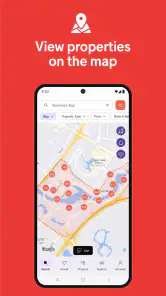
Another cool feature is the map view. Sometimes, seeing the location of a property in relation to nearby schools, grocery stores, or public transport can be a game-changer. The map allows you to see everything in one glance, making decision-making a breeze.
Making the search work in real life
For example, if I were relocating and had only a lunch break to review options, I would search the likely commute area first, save a manageable set of results, and use the map to spot listings that deserve a closer look. I would still check the route at the time I expect to travel and verify nearby services independently; a map helps me orient myself, but it cannot tell me whether a location suits my routine. This app is especially useful for people comparing rentals or purchases across neighborhoods in its covered markets, rather than browsing one local street with no wider search in mind.
One way I would make that shortlist more useful is to mark why each property made it onto the list. A place might be attractive because of its commute, another because it appears to fit the budget, and a third because it offers a useful layout. Keeping those reasons distinct makes it easier to compare the actual priorities later, rather than letting the newest listing or the best-looking photos take over.
Compared with general classified apps, a property-focused search can make it easier to sort homes by housing needs instead of wading through unrelated goods and services. Compared with contacting agents directly, browsing first gives me a clearer shortlist and helps me ask more specific questions. The trade-off is that an app search cannot replace a viewing, a document check, or a conversation about terms. If I already know the exact property or need advice on a transaction, a qualified local professional is a better next step than relying on search results alone.
This also helps answer who should skip it. If I were looking outside the countries it covers, I would choose a local service instead of trying to stretch these results to fit. If I had already settled on one building or needed help understanding a contract, I would go straight to a relevant local agent or adviser. Property Finder makes most sense at the discovery and comparison stage, when a wider set of options is still useful.
Staying informed without creating noise
If you're serious about finding the perfect property, you'll appreciate the alert feature. Simply save your search criteria, and the app will notify you whenever a new property that matches your preferences is listed. This way, you won't miss out on any opportunities, and you can act fast when something catches your eye.
I would keep alerts focused on searches I genuinely plan to pursue, rather than turning every possible combination into a notification. A broad search may surface more choices but can also create noise; a tightly defined one is easier to act on but may miss a suitable listing described differently. When something catches my eye, I use the alert as a prompt to inspect the listing and ask questions, not as a reason to rush into a deposit or share sensitive documents before I understand who I am dealing with.
For someone balancing a move with work or family responsibilities, alerts can be useful as a reminder to revisit the search rather than constantly checking the app. I would still judge each match on its details: an alert means that a listing fits the criteria I saved, not that it is a good fit in every important way. Opening the listing and checking the location, conditions, and questions it raises is the step that turns a notification into a useful lead.
Plus, with the in-app messaging system, you can easily contact property agents. No more waiting for emails or playing phone tag. Just send a quick message and get the information you need right within the app.
Questions worth asking before you commit
Messaging is most helpful when I make the first note concrete: I might ask whether the advertised price and availability are current, what costs or conditions apply, and whether a viewing can be arranged. That gives the agent a clear way to respond and leaves me with details to compare. I would avoid sending identity or financial information in an initial enquiry; an early chat is for establishing the basics, while sensitive steps belong later in a process I have independently checked.
I would also keep early messages focused on the property rather than sharing details about my household or schedule. A simple question about availability or viewing arrangements is usually enough to start a conversation. If an answer is vague, inconsistent with the listing, or pressures me to move faster than I am comfortable with, I would pause and verify before going further. That is not a judgment about every agent; it is a sensible way to protect my own decision-making.
For anyone wondering whether this is only for renters, the app is also intended for people browsing homes to buy, as well as villas, apartments, houses, and offices. That range is useful if your needs change, though someone searching outside the countries it covers will need a different service. It has been available since November 11, 2014, and its current version is 13.37.2, with Android 8.0 or later required. It has over one million installs, but popularity is not a substitute for checking an individual agent, listing, or contract.
The range of property types also makes it handy for people whose search is not a standard apartment hunt. Someone weighing a home against an office, or comparing a villa with a house, can begin exploring those categories in one place. I would still compare like with like: a commercial space and a home serve different purposes, and their listings should not be judged by the same needs or questions.
Taking care with personal information
The trust question is not only whether a listing is accurate; it is also how much information I choose to share as the search develops. Browsing, saving a shortlist, and making an enquiry are different stages, and I do not see a reason to treat them as one continuous commitment. I would share only what is needed for the current step, and I would wait until I have verified who I am speaking with before discussing sensitive paperwork or payment.
When comparing services, I would not assume that a property app has the same role as a government registry, a bank, or a legal adviser. Those tools answer different questions. A listing platform can help me find possibilities and begin contact; official records and qualified professionals are the appropriate places to check ownership, obligations, and transaction documents. That distinction keeps the convenience of browsing from being mistaken for due diligence.
Trust, choice, and my cautious verdict
What really sets Property Finder apart is its community vibe. The app isn't just about property listings; it's a platform where users can share reviews and experiences. This provides an added layer of transparency and trust, helping you make informed decisions.
I see reviews as one perspective, not a guarantee: I look for specific, relevant experiences and still verify important claims directly. When using any property app, I also pay attention to the choices I make while browsing and contacting people, and I keep conversations focused until I am comfortable proceeding. That is a sensible boundary for a search involving a home, where personal schedules, budgets, and eventually paperwork may enter the picture.
The app is free to use, which makes it easy to try as a search aid without making a paid commitment. Its Everyone content rating and 4.1 average across around 6,800 ratings offer context about the product’s audience and reception, not a measure of whether it will find the right home for me. I would base that judgment on whether its available listings, filters, and contact workflow help with my particular search.
Property Finder is a good fit if you want a convenient way to explore property options across its supported markets, use filters to build a shortlist, and contact agents from the same place. It is less suitable if you expect the app itself to validate every claim, provide independent legal advice, or replace an in-person inspection. I would use it to organize the search and compare possibilities, then take the time to confirm the details that affect a real decision.
For a renter with several neighborhoods in mind, or a buyer still working out what kind of property fits, I think it is a practical place to begin. Someone who values a broad browse-and-compare workflow will get more from it than a person who wants a single definitive answer. The main discipline is to treat results as leads: widen or tighten filters thoughtfully, check location assumptions, and keep an independent record of the questions that matter.
In conclusion, if you're on the hunt for a new place or just want to keep an eye on the market, this app is definitely worth checking out. It's user-friendly, efficient, and packed with features that make property searching a whole lot smoother. So go ahead, give it a try, and happy house hunting!
Property Finder - Real Estate Frequently Asked Questions
Can I use Property Finder to compare homes in different locations before deciding where to search?
Property Finder is useful for browsing homes across several markets, including the UAE, Egypt, Saudi Arabia, Bahrain, and Qatar. You can explore apartments, villas, houses, and offices, then narrow your search by location and property type. Comparing listings in different areas can help you get a feel for the available choices before contacting an owner or agent.
What is Property Finder and what does it offer?
Property Finder is a comprehensive real estate app designed to help users find properties for rent or sale. It offers a wide range of options including apartments, villas, offices, and retail spaces. The app provides detailed property listings with photos, prices, and descriptions, helping users make informed decisions. Additionally, it offers features like saved searches and customized alerts, making it easier to find the perfect property.
Is Property Finder free to use, or are there any hidden costs?
Property Finder is free to download and use for browsing property listings. However, some advanced features or premium services, such as highlighting listings or accessing exclusive deals, may require a subscription or additional payment. It's advisable to review the app's pricing details on the app store or within the app to understand any potential costs involved.
How user-friendly is the Property Finder app for first-time users?
The Property Finder app is designed with user-friendliness in mind, featuring an intuitive interface that is easy to navigate. First-time users will find the process of searching for properties straightforward, with filters and search tools that facilitate efficient browsing. The app also includes helpful guides and customer support to assist users in navigating any challenges they might encounter.
Can I use Property Finder to connect directly with property owners or agents?
Yes, Property Finder allows users to connect directly with property owners and real estate agents. Each property listing includes contact information, enabling users to reach out for more details or to schedule viewings. The app also supports messaging features for seamless communication, making it easier to negotiate or gather more information directly from the sellers or agents.
Pros
- User-friendly interface for easy navigation.
- Wide range of property listings available.
- Advanced search filters for accurate results.
- Detailed property descriptions and images.
- Regular updates with new property listings.
Cons
- Limited customer support options.
- Occasional app crashes reported.
- No offline mode available.
- Some listings lack contact information.
- Notifications can be overwhelming.
- Category
- House & Home
- Version
- 13.37.2