

Pronto Team Communication
- 64.00
- 3.9
- Installs
- 100.00K
- Price
- Free

Screenshots


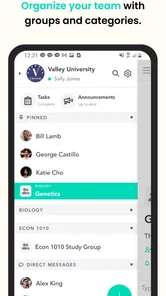
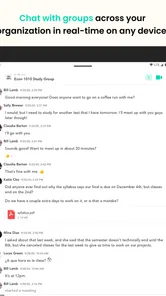
Analysis by Reviewed
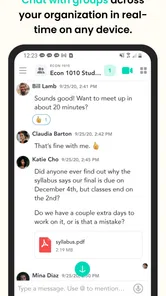
Pronto Team Communication is the kind of communication app that makes a strong first impression when a group needs to move quickly. I found its purpose easy to understand: bring team text conversations and video chats into one place instead of scattering them across ordinary messaging threads, email, and separate meeting tools. It is a free communication app from Hitlabs, aimed at an Everyone audience, and its appeal is less about replacing every messaging service than about giving a small group a shared space for active coordination.
That distinction matters. A team chat app can feel useful during a busy week and then quietly become another icon nobody opens. My experience with Pronto is that its lasting value depends on whether your group has a recurring reason to communicate together. If you are organizing volunteers, coordinating a project, running a small work group, or keeping a distributed team aligned, the combination of group text and video chat can be practical. If you only need occasional one-to-one messages, the usual messenger on your phone will probably be simpler.
Why the first week feels useful
The first-week appeal comes from having conversation and live discussion close together. Text is better for updates that people need to read when available, while video is useful when a written exchange starts producing confusion or too many back-and-forth replies. Pronto’s central idea handles that transition naturally: start with a group message, then switch to a video conversation when the subject needs voices and faces.
I especially like this arrangement for teams that do not need a formal meeting platform every time they have a question. A quick planning conversation, a check-in before an event, or a short discussion about responsibilities can stay within the same communication environment. That reduces the small amount of friction involved in telling everyone to leave one app, find another, and remember which meeting room to use.
The app is also approachable for people who are not interested in complicated workplace software. The store summary focuses on group text and video chat, and that straightforward scope is a strength. You do not need to learn a large project-management system just to participate in a conversation. For a family coordinating a shared task or a small community group arranging schedules, that simplicity can be more valuable than a long list of advanced tools.
Still, a clean first impression should not be confused with a complete collaboration system. I would not choose Pronto as the only place to manage detailed assignments, formal documentation, large archives, or complex approval processes. Its role is communication first. Once a group needs structured records, searchable knowledge, or a clear history of decisions, a dedicated work platform may be a better companion or replacement.
One useful habit is to decide early what belongs in text and what deserves video. I would keep announcements, short questions, and decisions in the written conversation. I would reserve video for topics where tone, explanation, or immediate discussion saves time. Without that discipline, a group can turn every small question into a call, which quickly makes the app feel demanding rather than convenient.
More From Our News Desk

 Gmail
GmailGmail in a Busy Inbox: Who Benefits Most?
From first account to crowded workday, Gmail earns its place through dependable search and flexible sorting—but its best fit depends on how much inbox maintenance you can tolerate.

 Prime Video
Switching to Prime Video: What Changes in Your Viewing Routine
Prime Video can make a compelling second home for streaming, but switching means learning a different catalog, rental layer, and route from browsing to playback.

 Universal TV Remote Control
Universal TV Remote Control Works Best as a Reliable Backup
A phone remote earns its place through quick setup and reliable habits. Here is how to get more from Universal TV Remote Control—and where its limits show.

 Weather - By Xiaomi
Weather by Xiaomi Review: Clear at a Glance, Less Clear Up Close
Xiaomi’s weather app makes everyday forecasts quick to scan, but its calm surface can leave useful details and recovery paths harder to find than they should be.

 X
XX Under Pressure: Can It Recover When Posting Goes Wrong?
A resilience-focused review of X, examining setup, mistaken posts, interruptions, weak connections, and the gaps that matter when recovery needs to be dependable.

 Clash of Clans
Clash of Clans Is Won Between the Battles
Its raids are quick; its community is a long-term project of coordination, teaching, rivalry, and shared responsibility—with all the friction that entails.
Latest News



A realistic everyday workflow
Imagine a small event team preparing for a weekend activity. One person posts a change to the arrival plan in the group conversation. Several members reply with availability, but the discussion becomes tangled because two people interpret the new timing differently. Instead of continuing with another dozen messages, the organizer starts a video chat, settles the issue, and returns to the text conversation with the final arrangement.
That workflow shows where Pronto can earn its place. The written thread provides a visible trail of the practical update, while video handles the part that is easier to resolve aloud. I would still encourage the organizer to post a concise final summary afterward. A conversation that ends only in video may work for those present but leave absent members guessing. The app can support communication, but the group still needs good communication habits.
For a remote team, I would use the same pattern for short recurring check-ins rather than keeping video open all day. A focused conversation is easier to join and easier to leave. For a volunteer group, I would avoid using video for routine reminders. The strongest use is selective: text for continuity, video for moments when live interaction genuinely removes a barrier.
Who will appreciate it quickly
Pronto is most inviting for small or medium-sized groups that want a shared communication space without paying for another service. It can suit people who already know one another and need a practical channel for coordination. The free price removes an obvious obstacle for informal groups, especially when not every participant is ready to commit to a more elaborate collaboration suite.
The Everyone content rating also makes the app broadly approachable from an audience standpoint. That does not automatically make every group conversation suitable for every age, of course; the people using the space and the topics discussed still matter. But the rating fits the app’s general communication purpose rather than presenting it as a niche tool for a specialized audience.
I would be more cautious about introducing it to a large organization without first testing how well it fits existing routines. A free communication app can be useful, but switching a whole team means dealing with invitations, participation, notification preferences, and the question of where important information should live. The smaller the group, the easier it is to establish those rules before the chat becomes messy.
What remains after the novelty fades
The month-to-month question is more important than the first-week reaction. A communication app earns lasting space when people return to it because it has become the obvious place for a recurring need. Pronto has a reasonable chance of doing that for teams that regularly combine group messaging with occasional video conversations. The two modes reinforce each other when they are used with a clear purpose.
Its average rating is 3.9 from around 229 ratings, with 64 written reviews, and the app has passed 100 thousand installs. Those figures suggest a real user base and enough interest to make the product worth considering, while also reminding me not to treat it as a universally loved replacement for every communication tool. I read the overall picture as moderate confidence: people can find value here, but the experience may depend heavily on group size, habits, and expectations.
Pronto’s current version is 7.0.7, and it requires Android 8.0 or later. For someone deciding whether to keep it installed, the practical point is compatibility rather than the version number itself. If your device meets that requirement, the more important test is whether your group actually returns to the app. I would give it a defined trial period with a real communication task instead of keeping it around only because the concept sounds useful.
A good monthly routine might include one active group for a specific project, with text updates kept brief and video used only for agreed discussions. That structure helps the app remain a tool rather than becoming a stream of interruptions. When a project ends, archive the habit mentally and decide whether another recurring activity justifies continued use. Not every successful short-term group needs to become a permanent channel.
There is also a social reason a team app may survive. People often keep using the place where everyone already knows to look. Once a group has built a rhythm around Pronto, moving back and forth between several alternatives can create more confusion than the app itself. The benefit is not merely the feature set; it is the shared expectation that a message posted there will reach the intended group.
Maintenance is mostly a people problem
The maintenance burden is not only about installing updates or opening the app. It is about keeping conversations understandable. I would name groups according to their actual purpose, avoid mixing unrelated projects in one thread, and make important decisions easy to find in the flow of conversation. Those habits are especially important in an app centered on quick communication, where a busy group can produce a lot of short messages.
Notification control deserves attention from the beginning. If every reply produces an interruption, members may mute the group entirely and miss something important. If notifications are too limited, the app loses its value as a coordination channel. I would agree on what counts as urgent and keep routine discussion from being treated like an emergency. This is a small rule, but it can decide whether people continue using a group chat after the initial enthusiasm.
Video conversations need their own etiquette. Before starting one, I would post a short reason and a rough expectation of what needs to be decided. That gives people a chance to join with context and prevents the call from becoming an open-ended substitute for planning. Afterward, someone should write the outcome in the text conversation. This workflow takes a little effort, but it protects members who cannot attend and makes the app more useful over time.
Another maintenance issue is membership. When a project changes, remove confusion by making clear who is still involved and which conversation is active. A group filled with former participants can make new members hesitant to speak and can send information to people who no longer need it. Pronto can provide the communication space, but the organizer has to keep the social structure current.
I would also avoid treating the app as a permanent storage cabinet. Chat history can be helpful for context, but it is not a substitute for a properly organized document or task record. If a decision matters months later, copy the essential information into the system your group uses for lasting records. That trade-off is easy to overlook when a conversation feels convenient in the moment.
Where fatigue starts to appear
The main source of fatigue is the same feature that makes Pronto attractive: conversation is immediate. A group that posts constantly can make the app feel like another obligation. Video adds a second kind of pressure because a live conversation requires people to be available at the same time. If the group does not respect asynchronous communication, members may feel that they must monitor both messages and calls throughout the day.
There is also a risk of duplication. Some teams will keep using their normal messenger, email, and a separate meeting service while adding Pronto on top. In that situation, the app may not simplify anything. I would choose one primary location for the group and explain why it is being used. If Pronto is only for occasional video while all written updates remain elsewhere, its role may be too narrow to justify another installed app. If it becomes the main group channel, the transition should be clear.
People who need deep collaboration features may become frustrated. Pronto’s communication focus is helpful when the goal is talking, but it is not the same as a full workspace for documents, task ownership, calendars, or formal reporting. A project manager handling many dependencies may prefer a platform designed around those needs, using a communication app only for conversation. A school or community group may be comfortable with Pronto, while a regulated or highly structured organization may need stronger administrative controls and records.
Video quality and participation can also shape the experience in ways that are not visible from a short description. A live chat is only useful when participants can join comfortably and understand the conversation. I would test it with the actual people and devices in the group before making it central to an important event. That is not a criticism unique to Pronto; it is a sensible precaution whenever a team depends on mobile video communication.
Privacy and boundaries are worth considering as part of the decision. I would not place sensitive information in a casual group simply because it is convenient, and I would make sure participants understand who belongs in each conversation. The app’s Everyone rating describes its content classification, not a guarantee that every use case is appropriate for every kind of confidential discussion. For ordinary coordination it may be suitable; for sensitive professional material, I would compare its fit with the organization’s requirements before committing.
How it compares with familiar alternatives
Compared with a standard messaging app, Pronto’s advantage is focus. A normal messenger may be where everyone already spends time, which makes it hard to beat for casual personal contact. Pronto becomes more attractive when a team needs a distinct shared space and wants text and video to belong to the same workflow. The trade-off is that every participant must adopt another communication destination.
Compared with email, the app is better suited to quick group exchanges and live discussion. Email remains stronger for formal notices, long explanations, attachments that need careful reference, and communication with people who do not want to join a chat environment. I would use Pronto for active coordination and email when the message needs a more deliberate record or must reach people outside the group.
Compared with large workplace collaboration suites, Pronto is easier to approach but less likely to cover the entire working process. A full suite can connect messages with files, calendars, tasks, and organizational accounts, but that breadth often brings more setup and more rules. Pronto makes sense when the team values a lighter communication layer and does not need every work function in one place. If your group already has a successful collaboration system, adding it may create overlap rather than improvement.
Compared with a dedicated video meeting service, Pronto appears better suited to spontaneous, group-centered communication than to formal presentations or large scheduled sessions. I would choose a specialized meeting platform when screen-sharing workflows, event management, or detailed meeting administration are central requirements. Pronto’s strength is the short path from a written group exchange to a live conversation, not necessarily the complete meeting infrastructure around a major event.
My long-term verdict
After the novelty fades, I think Pronto Team Communication can earn a lasting place for groups with a repeated, practical need to combine group text and video. Its free price makes experimentation easy, and Hitlabs has kept the product available across a substantial installed audience. The app is clearest when it replaces scattered coordination with one shared habit, not when it is added to an already crowded collection of communication tools.
I would recommend it to a small team, volunteer organization, club, or project group that can agree on simple rules: where updates belong, when video is justified, how decisions are summarized, and who maintains membership. Those rules turn a basic communication tool into a dependable routine. Without them, the same app can become noisy, repetitive, and easy to ignore.
I would skip it if you need a complete work-management system, highly formal records, or a communication platform for a large organization with complex administration. I would also skip it if your friends or coworkers already use one messenger consistently and have no real problem with it. Adoption is part of the product experience, and a theoretically useful app cannot help a group that refuses to check it.
My final recommendation is conditional but positive: install it when your group has a specific recurring communication problem, then judge it by whether people still open it once that first busy week is over. If text updates remain clear, video is used purposefully, and the app reduces rather than adds to your communication clutter, it deserves to stay. If it creates another inbox without replacing anything, uninstalling it is the more honest choice.
For me, that is the lasting test of Pronto Team Communication: not whether it can make a group conversation feel exciting on day one, but whether it quietly becomes the place where the right people know to meet, write, and resolve things month after month.
Pronto Team Communication Frequently Asked Questions
Can I use Pronto Team Communication for video calls as well as messaging?
Pronto Team Communication is described as a group text and video chat app, so it is intended to support more than written conversations. That can be useful when a team needs to discuss an issue face to face or bring several colleagues together remotely. The available calling options may depend on the organization’s workspace and settings, so check with your team administrator about how video chat is enabled.
Which devices and operating systems can run Pronto Team Communication?
Pronto Team Communication is a mobile app for workplace communication. On Android, it requires version 8.0 or later, so checking your device’s operating system before downloading can help avoid compatibility problems. The app is free to download and is rated for Everyone. If your workplace supports access on other devices, your administrator can explain which sign-in options and tools are available to your team.
What is Pronto Team Communication used for?
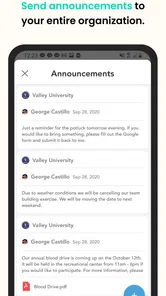
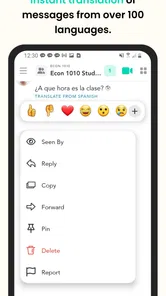
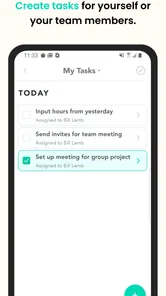
Pronto Team Communication is a workplace messaging and collaboration app designed to help teams communicate in real time. It can bring together text chat, group conversations, file sharing, announcements, and other communication tools in one place. It is particularly useful for organizations with distributed, mobile, or frontline employees who need quick access to team updates without relying only on email.
Is Pronto Team Communication suitable for businesses and frontline teams?
Yes. Pronto is aimed primarily at organizations that need structured communication between employees, departments, locations, or field teams. It can be useful in industries such as retail, hospitality, healthcare, logistics, construction, and customer service. Before downloading, businesses should confirm that its available administration, security, integration, and user-management features match their specific operational requirements.
Does Pronto Team Communication require an account or invitation?
In most workplace scenarios, Pronto Team Communication is not intended to function as a completely open social messaging app. Users generally need to join an organization, workspace, or team and may require an invitation or company-managed credentials. Availability of features can depend on the employer’s subscription and configuration, so employees should ask their administrator for the correct sign-in method before installing the app.
Pros
- Fast team messaging for sharing updates and coordinating tasks.
- Organized conversations help keep work-related discussions in one place.
- Useful for teams that need quick communication during busy shifts.
- Supports clearer collaboration than relying on scattered personal messages.
- Can reduce delays when employees need to contact coworkers quickly.
Cons
- Requires consistent team adoption to be useful for everyone.
- Message overload may make important updates harder to notice.
- May not replace advanced project-management or file-sharing tools.
- Notifications can become distracting during non-working hours.
- Effectiveness depends on a reliable internet connection and device access.











