

Premium Parking
- 509.00
- 4.2
- Installs
- 500.00K
- Price
- Free

Screenshots
Analysis by Reviewed
Parking decisions are easiest when the app, the lot entrance, and the plans for your day all line up. I’d treat Premium Parking as a way to handle payment at participating lots, not as a universal map of every curb and garage. That distinction matters: it can make a familiar destination smoother, but it won’t replace checking the actual signs or choosing a different parking service when the lot you need isn’t part of its network.
Start with the destination, not the drive
Before setting off, I’d check whether a Premium Parking facility is near the place I’m going and decide how long I expect to stay. That small bit of planning helps avoid arriving at a lot only to discover that it doesn’t suit the trip. For someone visiting the same downtown area for work, appointments, or regular errands, having one app ready for participating locations can be more useful than juggling several payment methods at the curb.
The app is a free Maps & Navigation tool from Premium Parking. It has a 4.4 average from around 2.3 thousand ratings, and more than 500 thousand installs. It’s rated for Everyone, with version 5.0.0 listed for devices running Android 6.0 or later. Those details suggest an established option, but they don’t guarantee that a particular lot will be available or convenient on the day you visit.
For a first visit, I’d make the parking choice before starting the drive, then confirm it again when I reach the entrance. That two-part check is useful because a map pin can bring me close without making the correct driveway obvious. I’d also save enough time to read the lot’s signs before beginning a session, rather than trying to sort out the details while traffic is waiting behind me.
Make the lot handoff carefully
Once I’m near the destination, the useful handoff is from the app’s information to the signs and instructions at the facility. I’d confirm that I’m entering the correct lot before paying, then keep the parking details handy until I leave. This is especially sensible in a busy area where neighboring facilities can look similar. If the lot’s posted instructions differ from what I expected, I’d follow the on-site directions rather than assume the app settles every detail.
For a realistic example, imagine heading to a downtown appointment with a fixed start time. I’d look for a participating facility before leaving, allow a little time to reach its entrance, and use the app to handle the parking payment instead of arriving and searching for a machine. The benefit is less curbside fumbling, not a promise that the drive or the walk from the lot will be effortless.
There’s a small but useful distinction between choosing a facility and completing the parking step. I’d check the facility name and the rules at the entrance before I enter payment details, especially if several lots are close together. That habit is more valuable than rushing through the app: a smooth phone payment only helps if it applies to the space where the car is actually parked.
More From Our News Desk

 Weather - By Xiaomi
Weather by Xiaomi Review: Clear at a Glance, Less Clear Up Close
Xiaomi’s weather app makes everyday forecasts quick to scan, but its calm surface can leave useful details and recovery paths harder to find than they should be.

 X
XX Under Pressure: Can It Recover When Posting Goes Wrong?
A resilience-focused review of X, examining setup, mistaken posts, interruptions, weak connections, and the gaps that matter when recovery needs to be dependable.

 Clash of Clans
Clash of Clans Is Won Between the Battles
Its raids are quick; its community is a long-term project of coordination, teaching, rivalry, and shared responsibility—with all the friction that entails.

 Android Auto
Android Auto Makes the Case for Quieter Car Software
The car interface is no longer judged by how much it can do, but by how quietly it helps. Android Auto shows what drivers now expect—and what still gets in the way.

 MobiOffice: Word, Sheets, PDF
MobiOffice: Transforming Mobile Productivity with Seamless Integration
MobiOffice: Word, Sheets, PDF is redefining mobile productivity with a surprising blend of functionality and innovation.

 EA SPORTS FC Soccer Mobile 26
EA SPORTS FC™ Mobile Soccer: Redefining Mobile Sports Gaming
Dive into EA SPORTS FC™ Mobile Soccer, where immersive gameplay and strategic depth transform mobile sports gaming.
Latest News



When another parking option makes more sense
Compared with a general map, Premium Parking is focused on parking at its own lots rather than helping me weigh every public garage, street space, and operator nearby. A city parking app or a broader parking search may be a better first stop when I need a wide comparison or want to explore street parking. I’d also skip relying on this app for a trip where the destination has no participating facility nearby; in that case, a standard navigation app and the local parking operator’s own payment method may be more practical.
That narrower focus is a genuine trade-off, not necessarily a flaw. If I already know the destination has a suitable Premium Parking lot, keeping payment and facility information together can be convenient. If I’m still deciding between a garage, a public lot, and a street space, I’d start with a broader search and use this app only if one of its facilities makes sense for the route and the visit.
Finding a Spot with Ease
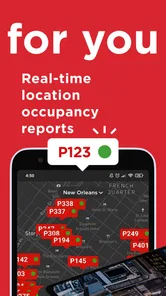
Let’s dive right in. The first thing that stood out about Premium Parking is its user-friendly interface. From the moment you open the app, it’s like the red carpet is rolled out for you. It’s easy to navigate, and within seconds, you can search for available parking spots near your destination. The app provides real-time data, so you're always in the loop about which spots are available, sparing you the dreaded surprise of a “full” sign.
Booking and Payment
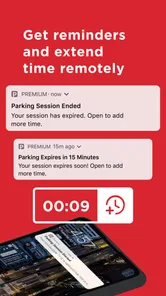
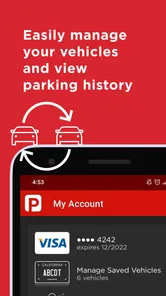
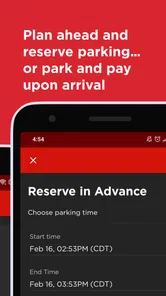
Once you’ve found your spot, booking it is a breeze. With just a few taps, you’ve secured your parking, and if you’re running late, there’s even an option to extend your time through the app. Payment is seamless too. You can link your credit card or PayPal, and it’s all done with a couple of clicks. No more fumbling for change or worrying about cards not working at the machine.
That convenience works best when I treat the parking session as one part of the trip rather than the whole plan. I’d check the entry instructions before pulling in, note the time I’ve paid for, and set a reminder on my phone if I tend to lose track during appointments or meals. If plans shift, I’d look in the app before the paid time ends and check the lot’s posted rules as well. An extension can help when it’s available, but I wouldn’t assume every facility handles late departures in exactly the same way.
For errands with an uncertain finish time, I’d decide in advance how I’ll keep track of the paid period. A phone reminder is a simple backup, particularly if I’m going into a building where I won’t be watching the clock. I’d also avoid assuming that a payment covers a different lot or a later visit: the session needs to match the facility and the stay I’m making.
Features that Stand Out
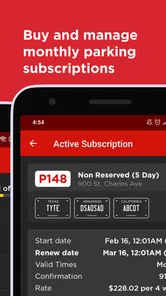
What really makes Premium Parking shine are its standout features. First off, the reservation option is a game-changer, especially in busy city centers where parking feels like a rare gem. Plus, the app offers a nifty GPS-guided direction service, so you can navigate directly to your spot without any hiccups. Feeling fancy? Some locations even offer valet services, all bookable through the app.
Those options are most valuable when I choose them before I’m already circling the block. A reservation may reduce uncertainty for a planned visit, while directions can help identify the facility entrance; neither removes the need to watch for road closures, confusing one-way streets, or signs at the lot. If I’m arriving during a crowded event, I’d leave extra time for the final approach instead of treating GPS guidance as a guarantee of a clear route.
For a scheduled evening out, I’d compare the convenience of a reserved facility with the extra walking distance it might involve. The closest entrance is not always the easiest stop if the road layout is awkward, and a navigation pin is only one part of the arrival. I’d pick a facility that suits both the car’s route and the walk to the destination, rather than choosing solely because it appears first in a search.
Another feature worth mentioning is the security aspect. The app shows you which parking facilities are well-lit and monitored, giving you peace of mind, especially during late-night ventures.
I’d use that information as one factor in choosing where to leave the car, not as a substitute for personal judgment. For a late appointment, it can help narrow the choice between facilities, but I’d still consider the walk to the destination and whether the entrance feels straightforward. A facility detail is useful only if it fits the whole route, from arriving to returning to the car.
Community and Support
Even more impressive is the sense of community and support. Users are encouraged to leave reviews and ratings for parking spots, which helps in maintaining the quality of service and reliability. If you encounter any issues, the customer support is just a tap away, ready to assist with any hiccups you might face.
Reviews are most helpful when I read them for practical clues rather than treating a high score as a guarantee. Comments about finding the entrance or the experience of a particular facility can inform my choice, while conditions may differ by visit. If something goes wrong, I’d keep the payment and facility details available before contacting support; that makes it easier to explain which parking session needs attention.
If payment or arrival does not go as expected, I’d first check that the selected facility matches the signs where I parked and that I still have the session details available. This is a sensible troubleshooting order because it helps separate a location mix-up from a question about the payment itself. When the lot’s instructions and the app seem to disagree, I’d follow the posted directions and seek help rather than making assumptions about what the session covers.
Who will get the most from it
I’d recommend it most to drivers who regularly use Premium Parking lots and want to pay from their phone instead of handling payment at a machine. It can also suit someone planning a one-off city visit who has already identified a participating facility and wants to sort out the parking step before arrival. The main trade-off is coverage: the app’s usefulness depends on the places you actually park, so frequent use of unrelated garages or street spaces makes a broader parking tool a better everyday companion.
It is less compelling for someone who parks in many different cities and wants one place to compare every operator, or for a driver who prefers to choose a space only after seeing the street conditions. In those situations, a general map or a local parking service gives more room to compare alternatives. I’d keep Premium Parking as a targeted tool for the lots it serves, rather than expecting it to replace every parking decision on a trip.
On Android, the stated minimum is version 6.0, so compatibility is straightforward for devices that meet that requirement. The app is free to install, which makes it easy to try when a participating lot is relevant to an upcoming trip. I’d still think of “free” as the cost of the app itself, not as a statement about parking charges; the facility’s own posted terms are what I’d use to understand the stay.
In summary, Premium Parking is like having a trusty sidekick in the urban jungle. It's a smart, efficient, and reliable tool that takes the stress out of parking. So, if you're tired of the parking grind, give it a shot. You might just find yourself wondering how you ever got by without it!
Premium Parking Frequently Asked Questions
Do I need an account to use Premium Parking?
Premium Parking is intended to make paying for parking on its lots convenient through a phone. Before relying on it for a trip, check the app’s sign-in and payment steps so you know what information you’ll need to get started. Having the app ready before arriving can make the payment process easier, especially when you are already at a lot and want to complete the transaction promptly.
What devices can run Premium Parking?
Premium Parking is available for mobile devices, and its minimum operating-system requirement is Android 6.0. Before downloading, check your device’s software version and make sure you have enough room for the installation. The app is free and rated for Everyone, so its basic download requirements are straightforward for users with a compatible device. Keeping your phone’s software current can also help apps run smoothly.
What is Premium Parking and how does it work?
Premium Parking is an app designed to simplify the parking experience in urban areas by allowing users to find, reserve, and pay for parking spots through their smartphones. The app provides real-time information on available parking spaces, pricing, and locations. Users can reserve a spot in advance or find one on the go, making it convenient for those who frequently travel to busy city centers. Additionally, the app supports multiple payment methods, ensuring a smooth and hassle-free parking experience.
Is Premium Parking available in my city?
Premium Parking is continually expanding its service areas across various cities. To check if it is available in your city, you can download the app and use the location search feature. The app will display supported locations and parking spots. Alternatively, you can check the Premium Parking website for an updated list of cities and areas where the service is active. Keep in mind that even if it's not in your city yet, the company is actively working to include more locations.
How secure is my payment information on Premium Parking?
Premium Parking takes the security of user information very seriously. The app uses advanced encryption technologies to safeguard your payment details, ensuring that transactions are safe and secure. Furthermore, the app complies with industry-standard security protocols and regularly updates its systems to protect against potential threats. Users can confidently store their payment information within the app for quicker checkouts without worrying about data breaches or unauthorized access.
Pros
- User-friendly interface for easy navigation.
- Real-time parking space availability updates.
- Secure payment options integrated.
- Wide coverage in multiple cities.
- Customizable notifications for parking time.
Cons
- Limited free features available.
- Occasional app crashes reported.
- Some areas have limited parking spots.
- Requires constant internet connection.
- Customer support response can be slow.











