Pregnancy Calculator: Due Date
- 60.00
- 4.8
- Installs
- 1.00M
- Price
- Free

Screenshots

Analysis by Reviewed
When pregnancy brings a rush of dates, questions, and new information, I find a small, focused tool can be more useful than an app trying to manage every part of the experience. Pregnancy Calculator: Due Date is built around estimating a due date and following pregnancy week by week. I see its value in giving you a simple timeline to refer to, while keeping a clear boundary between general information and decisions that belong with your prenatal care team.
Trust starts with a realistic role
A due-date estimate can help make an unfamiliar stretch of time easier to picture, but it is not a diagnosis or a promise about when a baby will arrive. Dates may be revised during prenatal care, and individual pregnancies do not always match a general weekly description. I would use the app to orient myself and prepare questions, not to judge whether a symptom is normal or decide whether to seek care.
That distinction matters most when something feels worrying. A week-by-week guide may provide context, but it cannot assess your symptoms or replace advice from a qualified clinician. If you have a concern, contacting your care team is more appropriate than trying to settle it by comparing yourself with a general timeline.
What a calculator can—and cannot—settle
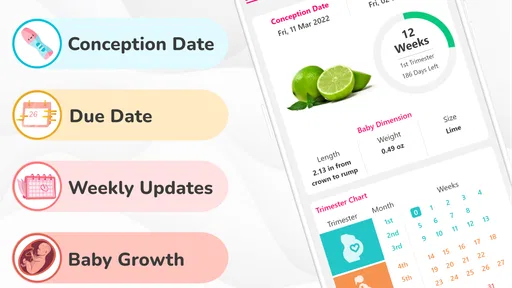
The app’s central job is to help estimate a due date and follow pregnancy week by week. That makes it useful when you want a quick point of reference, but I would treat the result as an estimate rather than a medical answer. Pregnancy dates can be adjusted during prenatal care, so I’d use the app’s timeline to orient myself and bring questions to a clinician—not to make decisions about care from a calendar alone.
For a realistic everyday use, imagine checking your pregnancy week while waiting for an appointment, then noting a question you want to ask about that stage. That is a more helpful role for a calculator than repeatedly checking the date whenever a symptom causes worry. If you are unsure how to enter your dates or your cycle makes a last-period estimate difficult, a clinician can help you work out which dating information to use.
Getting Started with the App
First off, setting up the Pregnancy Calculator: Due Date is as easy as pie. You just input the first day of your last menstrual period, and voila! The app calculates your due date. It’s like having a mini doctor in your pocket, and honestly, that’s pretty comforting when you’re navigating the new world of pregnancy.
Features That Stand Out
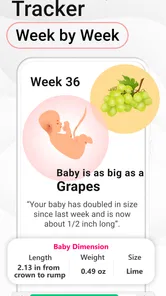
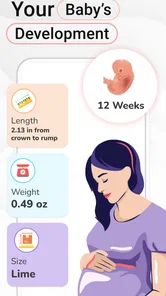
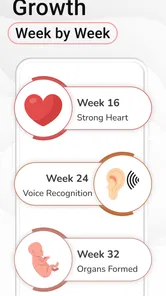
But it doesn’t stop at just calculating your due date. This app does so much more. It offers weekly updates on what’s happening with your baby’s development. It’s like getting a sneak peek into the womb, which is both fascinating and reassuring. I found myself eagerly waiting for each week’s update, learning about the tiny human growing inside.
More From Our News Desk

 Instagram
’s Power Comes From Its Place in Your Phone
A close look at how Instagram turns Meta’s reach, recommendation systems and everyday camera habits into durable platform power—and what that costs users.

 Gmail
Gmail in a Busy Inbox: Who Benefits Most?
From first account to crowded workday, Gmail earns its place through dependable search and flexible sorting—but its best fit depends on how much inbox maintenance you can tolerate.

 Prime Video
Switching to Prime Video: What Changes in Your Viewing Routine
Prime Video can make a compelling second home for streaming, but switching means learning a different catalog, rental layer, and route from browsing to playback.

 Universal TV Remote Control
 Works Best as a Reliable Backup
A phone remote earns its place through quick setup and reliable habits. Here is how to get more from Universal TV Remote Control—and where its limits show.

 Weather - By Xiaomi
Weather by Xiaomi Review: Clear at a Glance, Less Clear Up Close
Xiaomi’s weather app makes everyday forecasts quick to scan, but its calm surface can leave useful details and recovery paths harder to find than they should be.

 X
X Under Pressure: Can It Recover When Posting Goes Wrong?
A resilience-focused review of X, examining setup, mistaken posts, interruptions, weak connections, and the gaps that matter when recovery needs to be dependable.
Latest News



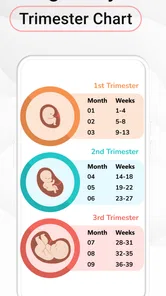
Another feature I particularly loved was the personalized pregnancy timeline. It breaks down each trimester and lists out potential symptoms and things to watch out for. This was a lifesaver because, let’s be honest, pregnancy can be overwhelming with all its changes and surprises.
Make the timeline useful without letting it run your day
I’d get the most from the weekly material by using it as a prompt for a short conversation with a clinician or a partner, rather than as a checklist of what must happen in a particular week. If a description raises a question, I would write that question down and bring it to an appointment. If it does not match my experience, I would not assume that anything is wrong—or that the app has identified a problem. The useful takeaway is often the question it helps you form, not a verdict about your pregnancy.
A small practical trade-off is that a week-by-week format naturally encourages regular checking. That can be enjoyable if you like following milestones, but it can also turn into a source of unnecessary comparison. I would pick a consistent moment to look at the update and then leave it alone until the next check-in. This keeps the app in the role of reference rather than letting it become a running test of whether your pregnancy is following a generic schedule.
Where it fits among pregnancy tools
Compared with writing dates on a calendar, this app offers a pregnancy-focused timeline rather than making you calculate weeks yourself. Compared with broader pregnancy apps, its calculator-and-weekly-progress approach is a straightforward fit if those are the things you want to check. It may be less suitable if you are looking for a detailed symptom diary, appointment planner, or a way to discuss concerns with a care team; I would choose a tool that clearly supports those tasks instead of assuming a due-date calculator covers them.
One useful habit is to check the week number at a consistent point in the week, rather than opening the app repeatedly to look for reassurance. That keeps the timeline practical and makes it easier to notice what information you want to ask about at your next visit. The trade-off is that weekly descriptions can be interesting, but they cannot tell you whether an individual symptom is harmless or whether your pregnancy is progressing normally.
Who is likely to find it useful
I think this is a sensible match for someone who wants a quick estimate, likes following pregnancy by week, and prefers a focused reference over a large collection of planning tools. It can also suit a partner or family member who wants a simple shared point of reference for discussing the current stage, provided the pregnant person is comfortable sharing that information. The app is less compelling for someone who wants detailed logging, coordinated appointment management, or personalized clinical guidance; in those cases, a dedicated tool or direct support from a care provider is a better fit.
It is also worth thinking about how you handle dates before setting anything up. If you are unsure which date is appropriate, or your cycle makes a last-period calculation difficult, it is better to ask a clinician than to keep trying different entries until one feels reassuring. A calculator can turn an input into an estimate, but it cannot decide which input is medically appropriate for you.
User Experience and Accessibility
Now, let’s talk about the user experience. The interface is clean and intuitive. Even my technologically challenged self had no trouble navigating through the app. The developers clearly put a lot of thought into making it user-friendly, which is a huge plus in my book. Plus, it’s available on both Android and iOS, so you can access it no matter what device you’re using.
Accessibility is another highlight. With a few taps, you can access all the information you need. It’s perfect for those moments when you’re in a doctor’s office or at home wanting to reassure yourself about your pregnancy progress.
Privacy, trust, and everyday choices
Pregnancy details are personal, so I would pause before entering dates and consider what I am comfortable storing in any app. I look for clear explanations of permissions and data practices, and I avoid granting access that does not make sense for the task. I would also check the available settings and choices in the app itself rather than assume that a simple calculator has no privacy considerations. Those checks are especially worthwhile if you share a phone or use it around family members.
For a shared device, I would think through the everyday visibility of the information as well as the app’s settings: who can open the phone, whether notifications might be seen, and whether the app is comfortable to keep on that device. If you prefer not to have pregnancy dates on a shared phone, using a personal device or a paper note for appointment questions may feel more appropriate. These are personal choices, not signs that the app is unsafe; they are simply part of deciding how much detail you want in a digital tool.
There is also a practical question about cost. The app is free to download, while in-app purchases are offered, with individual items ranging from around a dollar to about a hundred dollars. I would explore the free experience first and make sure I understand what an optional purchase includes before paying. It is rated for everyone, has a 4.7 average from around 16,000 ratings, and has been installed over a million times; those figures can offer context, but they do not replace checking whether its approach suits your needs.
Small decisions that make it easier to use well
If I were using it through an ordinary week, I would check the timeline at a calm moment, save any question somewhere I can find before the next appointment, and avoid using a weekly symptom description to explain away a new concern. That routine makes the app more useful without asking it to do work it was not designed to do. It also helps keep a general pregnancy reference separate from personal medical records and care instructions.
Before paying for anything, I would first decide what I actually want the app to help with, then check whether that need is met by the free experience. A due-date tool is most valuable when its core function is enough for you; an optional purchase is not automatically necessary just because it is offered. If the feature you want is unclear, I would hold off rather than buy on impulse.
Why You Should Try It
If you’re expecting, the Pregnancy Calculator: Due Date app is definitely worth a download. It provides peace of mind, keeps you informed, and makes the whole experience a tad less daunting. The app might not replace your prenatal visits or professional advice, but it sure does complement them beautifully.
The app comes from EclixTech, and its current version is 24.6.53; it runs on Android 6.0 and newer. I’d suggest it most to someone who wants a simple due-date estimate and week-by-week reference, especially if they are comfortable treating those details as general guidance. Someone who wants clinical monitoring, tailored medical answers, or extensive planning tools should look elsewhere or use those services alongside it.
For me, the best reason to try it is also the clearest limit: it gives a convenient way to keep a pregnancy timeline in view, not a substitute for personalized care. If that focused job matches what you need, it can be a reassuring companion between appointments. If you want a medical decision tool, a private care-team channel, or a full pregnancy organizer, I would choose a different resource for that purpose and keep this one, if at all, as a simple reference.
In conclusion, whether you’re a first-time mom or adding another member to your family, this app is a helpful companion. It’s like having a pregnancy coach available 24/7, and who wouldn’t want that? Give it a try and let it guide you through this incredible journey of bringing a new life into the world.
Pregnancy Calculator: Due Date Frequently Asked Questions
Does Pregnancy Calculator: Due Date require an internet connection to use?
Before downloading, consider how you expect to use a pregnancy app while you are out or away from a reliable connection. Pregnancy Calculator: Due Date focuses on a pregnancy timeline, including a due date estimate and week-by-week information. Your experience may depend on which parts of the app you want to access, so check the app’s behavior on your device after installation and avoid relying on it as your only source of pregnancy guidance.
Can I use Pregnancy Calculator: Due Date if I do not know the first day of my last period?
The app’s due date calculator is intended to estimate timing using pregnancy information, and the first day of the last menstrual period is a common starting point for that calculation. If you are unsure of that date, an estimate may be less useful or may differ from one based on a clinician’s assessment. You can still explore the app’s week-by-week focus, but ask a healthcare provider for help establishing your pregnancy timeline.
Is Pregnancy Calculator: Due Date suitable for first-time parents?
Pregnancy Calculator: Due Date is a Parenting app built around a pregnancy calculator, an estimated due date, and week-by-week pregnancy information. That straightforward focus can make it approachable for someone encountering these tools for the first time. Its calculations and updates are best treated as general guidance, not a replacement for individualized medical care, so discuss questions about your pregnancy with a qualified healthcare professional.
What devices can run Pregnancy Calculator: Due Date?
Pregnancy Calculator: Due Date is an app in the Parenting category, and its Android version requires Android 6.0 or later. It is suitable for a general audience, with an Everyone content rating. Before downloading, check that your device meets the operating-system requirement so you can install and use the app smoothly.
Who makes Pregnancy Calculator: Due Date, and is it widely used?
The app is developed by EclixTech and has been available since June 13, 2018. It has over 1 million installs and an average rating of 4.7 from around 16,000 ratings, alongside 57 written reviews. Those figures suggest that many people have tried it, though individual experiences with pregnancy tools can vary.
Pros
- Easy-to-use interface for tracking pregnancy.
- Accurate due date prediction.
- Weekly updates on baby development.
- Includes health tips for expecting mothers.
- Customizable reminders for appointments.
Cons
- Ads can be intrusive at times.
- Limited features in free version.
- Some information lacks medical validation.
- Occasional app crashes reported.
- No support for multiple pregnancies.