Post Star
- 86.00
- 3.0
- Installs
- 10.00K
- Price
- Free

Screenshots




Analysis by Reviewed
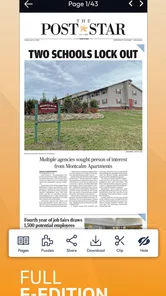
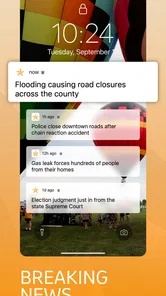
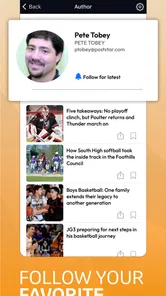
I found Post Star most useful as a focused way to keep up with local reporting rather than as a complete replacement for every news source on my phone. It comes from Lee Enterprises and sits in the News & Magazines category, with a clear emphasis on continually updated local coverage. That focus matters in a household, because a shared device often needs to serve very different reading habits: one person may want nearby breaking news, another may check community developments, and someone else may prefer a broader national news app.
The app is free to install and is rated for Everyone, which makes it easy to consider for a family tablet or a phone used by several people. Still, free installation does not mean every part of the experience is cost-free. In-app purchases range from roughly twenty-six dollars to more than three hundred dollars per item, so I would not treat the app as an automatic choice for unsupervised use on a shared device. The important question is not simply whether it opens without an upfront charge; it is whether everyone using the device understands what access may involve.
How it works in a shared household
In everyday use, I would place this app in the “check the local situation” role. Imagine a household preparing for a busy morning: one person wants to see what is happening nearby before leaving, another is looking for community information, and a third wants a quick glance at local developments during a break. A dedicated local-news app can be more practical than scrolling through a national feed where nearby stories are buried beneath subjects that do not affect the household directly.
That narrow purpose is also its main strength. The Post-Star name and local-news focus make the app easier to understand than a broad aggregator. I do not have to decide which of dozens of unrelated publishers deserve attention before I start reading. For someone who follows the area covered by the publication, that concentration can make short reading sessions feel more useful.
On the other hand, I would not install it as the only news source for a family. Local reporting and national reporting answer different questions. This app is better suited to nearby events and community awareness, while a general news reader, a national publication, or a broader aggregator may be better for international stories, business coverage, science, or a wide range of viewpoints. Using both is more sensible than asking one app to do everything.
The app has been available since early 2011, so it is not a new experiment in the mobile news space. Its current version is 9.22, and it requires Android 8.0 or later. That makes checking the household’s older phones and tablets worthwhile before anyone plans around it. A device that cannot meet the operating-system requirement will need another way to access local coverage.
Setting sensible boundaries before anyone reads
My first recommendation for a shared device is to decide who is responsible for installing the app and reviewing any purchase prompts. The Everyone age rating tells me that the subject matter is not presented as restricted content, but an age rating is not the same thing as a household spending plan. Younger readers may be perfectly capable of reading local news while still needing an adult to handle account and payment decisions.
More From Our News Desk

Weather by Xiaomi Review: Clear at a Glance, Less Clear Up Close

X Under Pressure: Can It Recover When Posting Goes Wrong?

Clash of Clans Is Won Between the Battles

Android Auto Makes the Case for Quieter Car Software

MobiOffice: Transforming Mobile Productivity with Seamless Integration

EA SPORTS FC™ Mobile Soccer: Redefining Mobile Sports Gaming
I would also avoid assuming that a single shared device creates separate reading spaces automatically. If several people use the same phone or tablet, each person should know whether their reading activity, saved items, or account state could be visible to the next user. I would not hand a child the device with the expectation that the app itself will create family boundaries. The practical boundary comes from the household’s device habits and account supervision.
This is especially important because the app is free to download but includes paid items. Before passing the device around, I would check which account is signed in to the app store, make sure purchase authentication is handled appropriately, and explain that tapping through a payment screen is not part of ordinary reading. That simple conversation prevents a common shared-device mistake: confusing free access to an app with permission to approve every option inside it.
For adults sharing a phone, the issue is less about age and more about clarity. If one person uses the app for local updates and another manages the device’s purchases, both should know where responsibility sits. I prefer a straightforward arrangement: one person handles installation and payment decisions, while everyone else treats the app as a reading tool. That keeps the news experience separate from account administration.
Using local coverage to coordinate the day
The most convincing household use case is coordination. Local news can affect when people leave, which route they choose, whether an event is still happening, or whether a community issue deserves attention. I would not use the app as a substitute for official emergency instructions, but I can see its value as an early awareness tool when a household wants to understand what is developing nearby.
A useful routine is to give the app a specific job instead of opening it aimlessly. For example, one family member can check it during breakfast for local developments, then tell the others which story is worth reading. Another person might use it before an evening activity to see whether the local situation has changed. This approach avoids everyone repeatedly checking the same screen and turns the app into a small coordination point rather than another source of endless scrolling.
That workflow also reveals a limitation: the app does not replace direct communication. If a household needs to decide who is collecting a child, changing plans, or responding to a time-sensitive issue, a message or conversation is still clearer than assuming everyone has seen the same article. News can inform a decision, but it does not confirm that every household member received the information.
I find this distinction important with local reporting. A story may provide valuable context, but it is not necessarily a personal alert for every reader. I would use the app to notice developments and then verify important details through the relevant official source when timing, safety, travel, or attendance is involved. That is a more reliable workflow than treating a news article as a personalized notification system.
Another practical tip is to share the story’s meaning, not just the headline. On a shared device, a headline can be read quickly and misunderstood just as quickly. If one person tells the household, “There is a local update about tonight,” it is better to explain what action, if any, follows. This keeps the app from creating confusion when different family members skim different parts of the same coverage.
Trust, age, and the limits of a general news app
The Everyone rating makes Post Star approachable for a broad household audience, but I would still match reading responsibility to the person’s age and judgment. Local news may include difficult subjects even when an app is generally suitable for everyone. A parent or guardian can decide whether a younger reader should browse independently or read selected stories with an adult available to explain context.
For older children and teenagers, I see a reasonable educational use. The local focus can help them connect news with places, schools, public decisions, and community events they recognize. It may feel more relevant than an abstract national feed. I would encourage them to compare important stories with another reputable source, not because this app has no value, but because comparing coverage is a useful way to notice differences in emphasis and detail.
For adults, trust should mean more than accepting a headline at face value. I like the convenience of a continually updating local feed, but speed can encourage hurried reading. When a story affects plans or raises concern, I would open the full article, check the publication context, and look for the latest update rather than relying on a fragment shared in conversation. The app works best when it starts an informed check, not when it ends one.
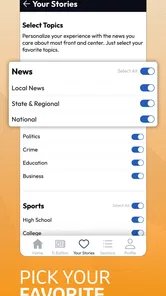
Its average rating is around three out of five from roughly three hundred ratings, with about eighty-six written reviews. I read that as a sign to keep expectations measured. The app clearly serves a real local-news purpose, but it is unlikely to satisfy everyone equally. Some readers will value the local focus; others may want a smoother, broader, or more personalized news experience. I would judge it by whether it covers the place and subjects that matter to you, not by expecting it to behave like a large national platform.
The install base is over ten thousand, which suggests a modest audience rather than the scale of a universal news service. That is not automatically a weakness. A smaller, publication-centered audience can be perfectly appropriate when the reader’s priority is a particular local area. It does mean that I would choose it for relevance, not because I expect a massive ecosystem of features or a huge community around the app.
Where it fits beside other news choices
Compared with a general news aggregator, Post Star gives me a more local starting point. Aggregators are useful when I want many publishers, topics, and viewpoints in one place, but they can make nearby reporting compete with everything else. This app is the better choice when local relevance is the first filter rather than an optional category.
Compared with reading the publication through a mobile browser, a dedicated app can feel more direct for repeated visits. I can open the local source from the device instead of navigating through a broader browsing session. The trade-off is commitment: a standalone app takes space and becomes part of the household’s app routine, while a browser can keep the device less cluttered and may be preferable for occasional readers.
Compared with a national news app, the difference is purpose rather than quality in the abstract. A national service may offer more subject variety and a stronger overview of wider events. Post Star makes more sense when the reader repeatedly asks, “What is happening near me?” If that question rarely comes up, installing a dedicated local app may not justify another icon or another account consideration on the device.
I also would not compare it directly with official alert tools. News coverage provides explanation and context, while official channels are the proper place to confirm instructions, closures, or urgent public information. Keeping those roles separate is one of the most useful habits I developed while evaluating the app for household use.
Small habits that make the experience more useful
My first practical habit is to use it at deliberate times rather than leaving every reading decision to impulse. A short morning check and a second look later can be enough for many people. That makes it easier to discuss meaningful local developments without allowing the app to dominate the shared device.
My second is to treat paid prompts as an account-management issue. Because individual in-app items can cost from about twenty-six dollars up to more than three hundred dollars, I would never let a child or casual household user approve a purchase without an adult’s involvement. The app’s free entry point is convenient, but the payment boundary deserves the same attention as any other app with purchases.
My third is to keep a second source available for decisions with consequences. If a local article affects travel, an appointment, a school-related plan, or a public event, I would use the article to understand the situation and then confirm the operational detail elsewhere. This two-step approach is more dependable than expecting one news app to provide every final instruction.
My fourth is to agree on a simple sharing rule. If one person finds a story relevant to the household, they should summarize why it matters and identify whether anyone needs to act. That is more effective than sending a headline without context, particularly when several people use the same device at different times.
These habits also answer a question many shared-device users have: does installing the app automatically improve household awareness? Not by itself. The value comes from matching the local coverage to a clear routine, keeping account boundaries visible, and communicating what a story means. Without those habits, it can become just another unread icon.
My household verdict
I would recommend Post Star to a household that follows the local area covered by Lee Enterprises and wants a direct, continually refreshed place to read nearby news. Its free installation, Everyone rating, and focused purpose make it approachable, especially for adults who want local context without sorting through a huge general feed. It can also give older children a useful connection to community events and issues when an adult helps them interpret what they read.
I would skip it if your main interest is national or international news, if nobody in the household regularly follows local reporting, or if you want one app to combine every subject and source. A browser may be enough for occasional visits, while a broad aggregator may be a better everyday companion for readers with wider interests.
The purchase range is the point I would discuss most clearly before installing it on a family tablet. Free access is appealing, but shared devices need deliberate account boundaries. With those boundaries in place, the app can serve as a useful local-news station for the household rather than an uncontrolled purchasing surface.
My final view is positive but specific: this is best as a focused local-news tool, not a universal family news hub. I would keep another source for broader coverage and official channels for urgent instructions, then use Post Star for the local reporting that helps a household understand what is happening close to home. That limited role is exactly why I think it can earn a place on the right device.
Post Star Frequently Asked Questions
Does Post Star provide local news, and what kind of app is it?
Post Star is a News & Magazines app from Lee Enterprises, intended for readers who want continually updating local news and more. Its focus is on accessing news through an app rather than creating social media graphics. It may suit people who prefer checking local coverage on a phone, while the experience will depend on the news and features available in the app.
What is Post Star and what can I use it for?
Post Star is an app designed to help users create, customize, and share visually appealing posts for social media and other online platforms. After exploring its main tools, the app appears particularly useful for preparing promotional graphics, announcements, quotes, stories, and personal updates. Its templates and editing options can save time compared with creating every design from scratch.
Is Post Star free to download and use?
Post Star can generally be downloaded without an initial payment, but some features, templates, design elements, or advanced editing tools may require in-app purchases or a subscription. Before downloading, check the current store listing for pricing details, trial conditions, and renewal information. Free content may be sufficient for basic projects, while frequent users may prefer the premium options.
What device requirements and age rating should I know about before installing Post Star?
Post Star is listed as suitable for everyone and requires Android 8.0 or later. The app is free to download, and its current version is 9.22. It has been available since January 24, 2011, and has more than 10,000 installs. Check that your device meets the operating-system requirement before installing so you can avoid compatibility issues.
Does Post Star require an internet connection?
An internet connection may be needed when opening the app for the first time, downloading templates, loading online content, synchronizing projects, or sharing finished designs. Some editing functions may work offline once the required resources are available on the device. However, offline availability can vary by feature, so users should not assume that every tool or template will work without mobile data or Wi-Fi.
Pros
- Simple interface makes creating and sharing posts quick.
- Useful scheduling tools help maintain a consistent publishing routine.
- Supports visual content that can make posts more engaging.
- Notifications can help you keep track of publishing activity.
- Suitable for users who want a focused social posting experience.
Cons
- Some advanced features may require a paid subscription.
- Performance can vary on older phones or slower connections.
- Limited customization may frustrate users seeking detailed controls.
- Frequent notifications could become distracting without adjustment.
- The app may offer fewer integrations than larger social platforms.













