NWI Times
- 274.00
- 3.6
- Installs
- 10.00K
- Price
- Free

Screenshots




Analysis by Reviewed
I spent time with NWI Times as a local news reader, paying particular attention to how comfortably it works in ordinary situations rather than treating it as just another headline feed. Developed by Lee Enterprises, this free News & Magazines app is aimed at people who want continually updated coverage connected to the Northwest Indiana area. That focus is its main reason to exist: it is more useful when local reporting matters to you than when you simply want a broad national news stream.
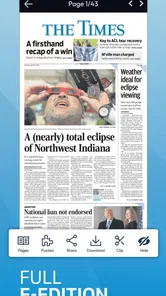
The app has been available since January 20, 2011, and its current version is 9.22. It supports Android 8.0 and later, carries an Everyone age rating, and has passed the ten-thousand-install mark. Those details make it approachable for many Android users, including people using older phones, although the experience still depends on the screen, system settings, and assistive tools available on the individual device.
Reading local news without getting lost
My first impression is that the app’s value comes from reducing the distance between a reader and local events. Instead of opening a general news service and searching through national stories, I can use this as a more focused starting point for Northwest Indiana coverage. That narrower purpose makes the app easier to understand: if a local story is the reason I opened it, I am not fighting through an enormous international feed to find it.
The continually updating approach is useful for short visits. I can check in while having coffee, scan what has changed, and leave without committing to a long reading session. For readers who follow local government, schools, traffic-related developments, community events, or breaking regional stories, that habit can be more practical than relying on social media posts that mix reporting with commentary and unrelated content.
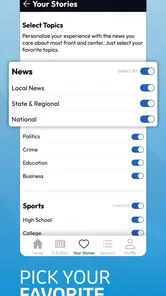
Navigation feels most successful when I treat the app as a quick local-news dashboard rather than a full research library. I would open it to see what is new, select a story that catches my attention, and return to the stream when finished. That workflow is simple enough for someone who does not enjoy complicated apps, but it also means readers who expect extensive filtering, elaborate topic controls, or a highly personalized news system may find the experience more limited than larger national platforms.
The strongest accessibility advantage is focus. A focused local publication can be easier to use than a crowded news aggregator because the reader has fewer competing destinations. This matters for people who become overwhelmed by dense menus or rapidly changing collections of unrelated headlines. The trade-off is that the app’s usefulness depends heavily on whether its local coverage matches the reader’s interests.
I also think the app suits a deliberate checking routine. Someone could look at it before leaving home, revisit it during a lunch break, and use it again in the evening when a local situation develops. That is different from an app designed to encourage endless scrolling. The shorter, purpose-driven visits make sense for readers who want information without turning news consumption into a constant background activity.
More From Our News Desk

Weather by Xiaomi Review: Clear at a Glance, Less Clear Up Close

X Under Pressure: Can It Recover When Posting Goes Wrong?

Clash of Clans Is Won Between the Battles

Android Auto Makes the Case for Quieter Car Software

MobiOffice: Transforming Mobile Productivity with Seamless Integration

EA SPORTS FC™ Mobile Soccer: Redefining Mobile Sports Gaming
Text comfort and visual clarity
Readability is not only about whether words technically fit on a screen. It is about how much effort it takes to identify a headline, distinguish one story from another, and stay oriented after opening an article. On a phone, those details matter more for readers with reduced vision, attention difficulties, or fatigue. I found that the app’s local-news focus helps with mental organization, but I would still pair it with the phone’s display settings if standard text feels small.
Android’s own font-size, display-size, contrast, and magnification options are important companions here. A reader who needs larger text should adjust those settings before deciding whether the app is comfortable. Enlarging the display can make reading easier, but it may also reduce how much content appears at once and require more scrolling. That is a normal trade-off on a small screen, not something unique to this publication.
Readers with dyslexia or other reading differences may benefit from changing the device’s visual presentation, but the result will vary depending on how the app responds to system-level adjustments. I would test a complete article rather than judging comfort from the first screen. Headlines, body copy, spacing, and the transition between the story list and article view can feel different, and the part that causes strain may not be obvious at first.
For people sensitive to motion or visual distraction, a calm reading routine is probably better than repeatedly refreshing the news stream. I would open the app when I am ready to read, select one article, and avoid treating every update as something that must be checked immediately. This is a small behavioral tip, but it can make a continually updating service feel less demanding.
Screen readers and spoken-output tools may also help users who prefer listening to text or who cannot comfortably read for long periods. I would not assume that every control or article element will be equally clear through assistive technology, so a short trial is worthwhile. If a reader depends on precise spoken labels, predictable focus order, or complete control descriptions, the app should be evaluated directly with the specific Android accessibility setup they use.
Touch, movement, and different ways of using the phone
News apps are often used with quick taps and vertical scrolling, which can be manageable for many people with limited dexterity. Still, repeated gestures may be tiring for users with tremors, joint pain, reduced range of motion, or one-handed use. My practical advice is to hold the phone in the position that gives the most stable grip and use the device’s built-in interaction aids when ordinary tapping is unreliable.
A person who has difficulty with precise touch may prefer Android’s accessibility controls, voice interaction, a switch-access setup, or an alternative input method. Whether every part of the app works smoothly with those tools can vary, especially when moving between a headline list and an article. The important point is that the app does not need to be used only through rapid fingertip gestures; the phone’s broader input options can change the experience considerably.
One-handed use is a realistic scenario. I might be standing on public transport, holding a bag, or using the phone while waiting in a place where two-handed operation is inconvenient. In that situation, the app’s usefulness depends less on advanced functions and more on whether I can select a story without accidental taps. I would avoid trying to read while walking or during any activity that requires full attention, both for safety and because the experience is less comfortable.
People with hearing loss are not excluded from a text-first news app in the same way they might be from an audio-dependent service. Written reporting is naturally suitable for readers who do not rely on sound. However, if an article includes media or if a user expects every part of a news item to be available in text, the individual story still deserves a quick check. I would not treat a text-based publication as automatically perfect for every hearing-related need.
For readers with cognitive disabilities, the app’s local scope can be helpful because it narrows the information field. A predictable routine also reduces decisions: open the app, review the latest local items, choose what matters, and stop. At the same time, continually changing news can create urgency or anxiety. Someone who is sensitive to alerts, crisis coverage, or information overload may prefer scheduled visits instead of checking every time something changes.
Where it fits into everyday life
The clearest use case is the local resident who wants a direct connection to regional reporting. Imagine planning a morning commute and wanting to know whether a local development could affect the day. I would open the app for a quick scan, read the relevant story, and then confirm any practical decision through the appropriate official source if necessary. The app can provide context and reporting, but it should not be treated as a substitute for emergency instructions or official notices.
It can also work for someone who has moved away but still cares about the area. A former resident may want a local perspective that national apps rarely provide. Likewise, a family member living elsewhere could use the app to stay aware of the community around relatives. In both cases, the focused regional identity is more valuable than a large collection of generalized headlines.
People who are learning about the area may find the app useful as a starting point. Local reporting can reveal the issues, institutions, and events that shape a community. I would recommend saving important details elsewhere or keeping notes if the information will be needed later, because a live news feed is designed for current reading rather than serving as a personal archive.
Situational access is another strength. I can use a phone in a quiet room, at a desk, or during a short waiting period without needing a television or a separate newspaper. That flexibility helps people whose schedules do not match broadcast times. It may also suit readers who need to control the pace themselves: skim a headline, stop, enlarge the display, and continue when ready.
On the other hand, the app is less suitable when connectivity, battery life, or attention is limited. A continually updating news service is most useful when I can give it a moment of concentration. If I am in an area with unreliable access or trying to minimize phone use, a prepared offline reading option or a printed local source may be a better fit. I would also choose a broader news service when my main goal is international coverage rather than Northwest Indiana reporting.
What may still make access difficult
The app’s rating provides a useful snapshot of public reaction: it has an average of 3.6 from roughly six hundred and sixty-seven ratings, with about two hundred and seventy-four written reviews. I read that as a sign that the experience is mixed rather than universally smooth. A rating cannot explain every individual problem, but it is a reminder to approach the app with realistic expectations instead of assuming that every phone and reading style will feel identical.
The free download is appealing, but in-app purchases range from $26.99 to $324.99 per item. That is important for households managing spending, parents supervising a device, and anyone who wants a completely predictable cost. I would review purchase prompts carefully and make sure the person using the phone understands which parts may involve payment before treating the app as a no-cost long-term news solution.
Cost can also become an accessibility issue. A reader may be able to install a free app but not be able to justify a large purchase, particularly if local news is only an occasional interest. Someone who needs the reporting for work, family, or community involvement may see more value in it, while a casual reader might prefer free alternatives such as public news websites or local broadcast apps.
Another barrier is the difference between “local” and “complete.” A focused publication can be excellent for its area while still leaving gaps for someone who wants national, international, business, science, or specialized accessibility coverage in the same place. I would not ask this app to perform the role of a general-purpose news reader. Using it alongside another source may be sensible, but that creates an extra step for readers who need one simple, unified service.
Privacy-conscious users may also want to review the app’s current permissions and device settings before regular use. I make that check with any news application, especially when a phone is shared or managed by a family. It is a practical way to understand notifications, background behavior, and purchase controls without assuming that every user wants the same setup.
For older adults, the best approach is a guided first session. I would show how to open a story, return to the news list, adjust text size, and silence unwanted interruptions if needed. After that, the app’s narrow purpose can be reassuring: there are fewer choices to explain than in a large aggregator. For a person who struggles with small controls or complex navigation, however, the phone’s accessibility settings may be just as important as the app itself.
How it compares with common news alternatives
Compared with a national news aggregator, NWI Times offers a clearer local identity and less temptation to browse unrelated subjects. That is a benefit for readers who want community relevance and a drawback for anyone who expects a broad mix of sources. Aggregators usually win on variety and customization; this app wins when the local publication itself is the priority.
Compared with social media, the app gives me a more intentional reading environment. Social feeds are convenient for discovering breaking conversations, but they can combine rumors, reactions, advertisements, and reporting in one stream. A local news app is a better first stop when I want journalism-oriented updates rather than a social timeline. I would still verify urgent claims through official channels rather than relying on any single feed.
Compared with reading a publication through a mobile browser, a dedicated app can feel more direct because it has a single-purpose entry point. The browser may be preferable for people who do not want another app installed, who switch between many publications, or who rely on browser features that are more familiar with their assistive technology. I would choose the app for routine local checking and the browser when I need a flexible, one-off visit.
Compared with television or radio, the app gives the reader control over timing and pace. That is valuable for people who cannot follow scheduled broadcasts or who need to reread a passage. Broadcast media may still be better for hands-free listening, live coverage, or people who find spoken information easier than screen reading. In practice, the most inclusive setup may be to use each format for the situation it handles best.
My inclusive verdict
I recommend NWI Times to Android users who specifically want Northwest Indiana news in a focused mobile format. Its local purpose, free entry point, long availability, and support for Android 8.0 and later make it approachable for a broad audience. The Everyone rating also makes it suitable as a general household news app, although families should still manage purchase settings and decide how much changing news is appropriate for each person.
For accessibility, I see a useful foundation rather than a guarantee of effortless use for everyone. The local focus can reduce cognitive clutter, written reporting works well for people who do not depend on audio, and Android’s own display and input tools can improve comfort. Readers with precise accessibility requirements should test the current version with their preferred screen reader, magnification, font settings, or alternative controls before relying on it every day.
I would skip it if my main need were worldwide coverage, offline reading, a highly customizable news dashboard, or a strictly predictable no-purchase experience. I would also look elsewhere if the app’s presentation feels tiring on my particular phone, because no local-news advantage makes up for a reading experience that causes strain. A browser or another publication may be the better choice in those cases.
For me, the app works best as a deliberate local-news check: open it, identify what matters, read at a comfortable pace, and leave. It is not trying to replace every news source, and that is both its limitation and its strength. If the Northwest Indiana focus matches your needs, the most inclusive way to use it is to combine its local reporting with the Android settings and reading routine that suit you, while keeping purchase controls and official emergency sources in mind.
NWI Times Frequently Asked Questions
Who publishes NWI Times, and which devices can run the app?
NWI Times is a News & Magazines app published by Lee Enterprises. It is available for Android devices running Android 8.0 or later, making it worth checking your device’s operating system before downloading. The app is intended for readers who want to follow NWI.com’s local news coverage on a phone or tablet.
What is NWI Times?
NWI Times is a news application focused on Northwest Indiana, offering access to local reporting, breaking news, community updates, sports, business, entertainment, and other regional coverage. After installing it, users can browse current stories in a mobile-friendly layout and keep up with developments in nearby cities and communities without relying only on a desktop browser.
Is NWI Times free to download and use?
The NWI Times app can generally be downloaded at no charge, but access to all articles and premium content may depend on the publication’s subscription or digital-access policy. Some stories may be available to everyone, while frequent readers could encounter a paywall or subscription prompt. The app offers in-app purchases, with prices ranging from around $27 to $325 per item, so check the current terms shown in the app before assuming that every article is free.
What type of news and content can I find in the app?
The app is designed primarily for Northwest Indiana news, including local government, crime and public safety, schools, weather, community events, sports, business, opinion, and regional features. Content availability can change throughout the day as journalists publish updates. It is most useful for readers who want detailed coverage of local issues rather than a general national news application.
Does NWI Times send breaking-news or other notifications?
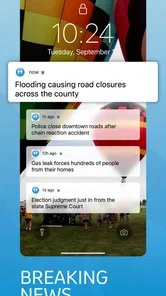
NWI Times may support notifications for breaking stories, important local developments, sports updates, weather-related information, or other selected topics. Notification behavior can vary by device and app version, so users should review the in-app settings and their phone’s notification permissions. If alerts become too frequent, they can usually be limited or disabled without removing the application.
Pros
- Clear coverage of local news
- politics
- and community events
- Fast access to breaking stories through mobile notifications
- Clean layout makes articles easy to browse and read
- Supports saving stories for convenient reading later
- Includes multimedia content such as photos and videos
Cons
- Some articles may require a subscription to access fully
- Notification frequency can feel high during major news events
- Coverage is mainly focused on Northwest Indiana communities
- Advertising may occasionally interrupt the reading experience
- Offline access to articles may be limited













