

PlugShare - EV & Tesla Map
- 3.21K
- 4.6
- Installs
- 1.00M
- Price
- Free

Screenshots
Analysis by Reviewed
I think PlugShare works best as a planning and cross-checking tool, not as a promise that every charger shown will be available when you arrive. For an EV driver, knowing where charging points are is only half the job; the more useful question is whether a stop looks practical for this particular trip. That is where this map can help, especially when I want to compare nearby options before setting off.
A useful second opinion on a charging stop
On a regular commute, I would use a map like this to find alternatives near work or a familiar route, then save the locations I might need later. For an unfamiliar drive, I would check candidate stops before leaving rather than waiting until the battery is low. That small change matters: it leaves time to compare locations and choose a fallback, instead of treating the first result as the only option.
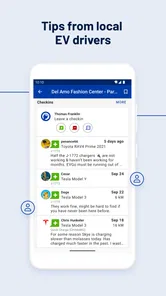
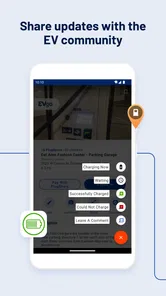
The community element is most valuable when I read it with a little care. A recent photo or a specific note about access can answer practical questions that a map pin cannot, while an old or vague comment is less reassuring. I would check more than one station if the stop is important, and keep another option in mind. That is a sensible habit with any crowd-informed charging map, not a reason to dismiss the app.
Where it fits among navigation apps
PlugShare is an app in the maps and navigation category, made by PlugShare LLC. Its focus on EV charging makes it more useful for comparing charging locations than a general-purpose map when that is the task at hand. The trade-off is that it should not automatically replace the navigation tools I already use for turn-by-turn driving or the information provided by a charging operator. I see it as a specialist layer: discover and assess possible stops here, then use the navigation method that suits the journey.
That distinction also helps answer a common concern: finding a station on the map is not the same as knowing every detail of a charging session. I would confirm the practical details that matter for my stop before committing to a detour, particularly on a tight schedule. Drivers who rely on one exact charger with no backup may find that extra checking inconvenient; people who like to compare options will get more out of the map.
Who is likely to get the most from it
I would recommend it most to EV owners who travel beyond their usual charging routine, share tips with other drivers, or want to scout stations before a trip. It can also be useful to a new EV owner learning where charging options sit around familiar destinations. Someone who rarely leaves a well-understood route and already has a dependable charging routine may have less reason to open it often. The app is free to download, with in-app purchases, so I would start with the basic experience and decide for myself whether any paid extras fit my needs.
For a realistic weekend drive, I would check a stop near the halfway point, look at recent user feedback and photos, and identify another location nearby before setting off. If the first choice looks uncertain, I can reconsider while I still have time and battery to do so. This is a more useful way to treat a charging map than assuming a route plan will remove every surprise.
More From Our News Desk

 Weather - By Xiaomi
Weather by Xiaomi Review: Clear at a Glance, Less Clear Up Close
Xiaomi’s weather app makes everyday forecasts quick to scan, but its calm surface can leave useful details and recovery paths harder to find than they should be.

 X
XX Under Pressure: Can It Recover When Posting Goes Wrong?
A resilience-focused review of X, examining setup, mistaken posts, interruptions, weak connections, and the gaps that matter when recovery needs to be dependable.

 Clash of Clans
Clash of Clans Is Won Between the Battles
Its raids are quick; its community is a long-term project of coordination, teaching, rivalry, and shared responsibility—with all the friction that entails.

 Android Auto
Android Auto Makes the Case for Quieter Car Software
The car interface is no longer judged by how much it can do, but by how quietly it helps. Android Auto shows what drivers now expect—and what still gets in the way.

 MobiOffice: Word, Sheets, PDF
MobiOffice: Transforming Mobile Productivity with Seamless Integration
MobiOffice: Word, Sheets, PDF is redefining mobile productivity with a surprising blend of functionality and innovation.

 EA SPORTS FC Soccer Mobile 26
EA SPORTS FC™ Mobile Soccer: Redefining Mobile Sports Gaming
Dive into EA SPORTS FC™ Mobile Soccer, where immersive gameplay and strategic depth transform mobile sports gaming.
Latest News



If you’re like me, always on the hunt for the next big thing in tech, you’ve probably heard of PlugShare - EV & Tesla Map. This app is a lifesaver for anyone driving an electric vehicle (EV). I recently took the plunge and installed it, and let me tell you, it’s a game-changer.
Finding Charging Stations Made Easy
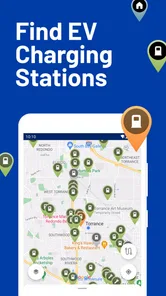
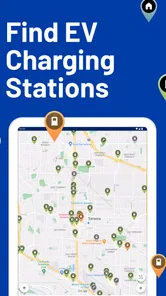
One of the coolest features of the PlugShare - EV & Tesla Map app is its ability to pinpoint charging stations with pinpoint accuracy. No more driving around aimlessly or stressing about running out of juice. The app does all the heavy lifting for you, showcasing a vast network of charging points, whether you’re in the heart of a bustling city or off on a countryside adventure.
User-Friendly Interface
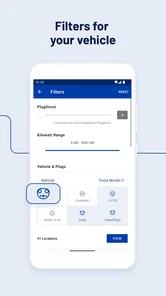
I was genuinely impressed with how intuitive the app is. As soon as you open it, you’re greeted with a sleek map interface displaying nearby charging stations. What’s more, you can filter these stations based on the type of charger, user ratings, and even the amenities available nearby. It’s like having a personal EV concierge right in your pocket!
Real User Reviews and Photos
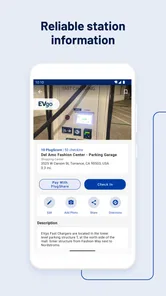
Another standout feature is the real-time reviews and photos from other users. Before heading to a charging station, I can check out what others have said about it, ensuring there are no nasty surprises. This community-driven aspect really adds a layer of trust and reliability to the app.
PlugShare also allows users to add new stations, keeping the map as up-to-date as possible. I found this feature particularly useful, as it means the app is constantly evolving and improving, thanks to its active user base.
Seamless Integration with Your EV
For anyone driving a Tesla or other popular EV models, the integration with your vehicle’s onboard navigation system is seamless. Just a couple of taps, and you can send the directions straight to your car. It’s small touches like these that make the app not just useful, but a joy to use.
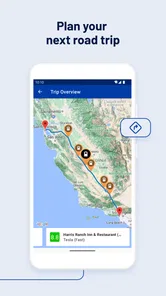
Moreover, if you’re planning a long trip, the app helps you strategize your charging stops, ensuring you’re never far from a station. It’s like having a co-pilot that’s always looking out for you.
Final Thoughts
After using the PlugShare - EV & Tesla Map app for a few weeks, I can confidently say it’s a must-have for any EV owner. It’s packed with features that make driving an electric vehicle even more enjoyable. Whether you’re a seasoned EV driver or new to the scene, this app offers peace of mind and a sense of adventure. So why not give it a try? You might just wonder how you ever got along without it!
What I would check before relying on a result
One practical question is whether the map is useful for a driver who does not own a Tesla. Its focus is broader than one vehicle brand: it is intended for EV charging discovery, so I would still use it when comparing stops for another electric car. The important part is to pay attention to the connector and station details relevant to my own vehicle rather than assuming every mapped point will suit it.
I would also treat the map and my car’s own range estimate as two different tools. The map can help me find and assess possible locations, while the vehicle’s navigation and battery information are better suited to judging the drive in front of me. If I am unfamiliar with an area, I would avoid planning a route around a single remote pin; a nearby alternative is a more reassuring backup than an optimistic assumption.
Small habits that make the map more useful
When comparing stations, I would look for comments that describe the actual issue or benefit—such as access, surroundings, or what a driver encountered—rather than relying only on a broad thumbs-up or rating. I would also check the photos against the written note, since an image can clarify whether a location is easy to recognize. If I discover a station that is missing or details that need attention, contributing an update can help the next driver, though community contributions still depend on people taking the time to share them.
For a day of errands, I might check charging options close to the places I already plan to visit, not just the shortest route between them. A station near a useful stop can make a charging break fit the day better, while a technically closer location may be less convenient in practice. The amenities filter can help with that comparison, but I would still judge the surroundings and access from the available information rather than assume every listed amenity will suit me.
Looking beyond a single map result
A useful way to plan is to compare stations by the role they play in the day, not just by which marker is closest. If I have time for a flexible break, a location with helpful surroundings may be more appealing than one that saves a few minutes of driving. If I am on a tight schedule, I would give more weight to current, specific reports and a workable alternative nearby. That is where the app’s filters and community contributions can inform a decision without making it for me.
I would also avoid treating a cluster of pins as proof that every option is equally convenient. Stations can sit on different sides of a road, behind a building, or in places that require a detour; the map gives me a starting point, while comments and photos help me imagine the actual arrival. When a stop is unfamiliar, checking the approach and access before I leave is a small step that can prevent a frustrating last-minute search.
When a specialist map earns its place
Compared with a standard navigation app, PlugShare is more focused on the question an EV driver asks before a journey: what charging choices are around my route or destination, and which ones look promising? A general map remains more convenient for ordinary directions and everyday places. An operator’s own app or information is better suited to details tied to that operator and a particular charging session. I would use these tools together rather than expect one to cover every part of the trip.
This split is especially helpful for visitors and occasional road-trippers. I can browse broadly in a charging-focused map, narrow down a few candidate stops, and then verify the final choice through the relevant source before driving there. The extra step is not a flaw unique to PlugShare; it reflects the difference between discovering a location and confirming the details that matter at the moment I need to charge.
A better routine for longer journeys
Before a long drive, I would check likely stops while I am still at home, rather than trying to make a careful comparison from the roadside. I would note a primary choice and a backup in the same general area, then use the car’s own range estimate to decide whether the plan still makes sense as conditions change. This keeps PlugShare in its strongest role—helping me see alternatives—without asking it to predict every variable on the road.
There is a practical trade-off here: researching several candidates takes a little time, and the more remote the route, the less comfortable I would be relying on sparse or older community notes. On a familiar urban trip, a nearby alternative may be easy to reach; in an unfamiliar area, I would be more conservative and avoid leaving the decision until the battery is low. The app is most reassuring when I use it early enough to retain choices.
Who may prefer another approach
Drivers who mainly need spoken directions from one known place to another may be better served by their usual navigation app. Likewise, someone who charges at home and rarely needs public charging may not find enough reason to check a specialist map routinely. PlugShare is more worthwhile when public charging is part of the plan, when a trip crosses unfamiliar areas, or when comparing stops around a destination could save an awkward detour.
It may also frustrate anyone who expects every listing to behave like a live guarantee. Community reports are useful precisely because they add local context, but their value depends on how specific and recent they are. I would not make a time-critical plan around a single encouraging comment. If the stop is essential, I would check more than one source and keep a realistic fallback.
Value, expectations, and the final call
The app has been available since July 2011 and has grown into a familiar resource for many drivers, with more than a million installs and a 4.7 average from around 47,000 ratings. It is rated Teen. Those figures suggest broad appeal, but they do not guarantee that every station record is current or that every driver will find the same coverage useful. I would judge it by how well it helps me make a better choice in the places I actually travel.
My main reservation is that community information can age: a helpful review is a clue, not a live assurance that a charger is working at this moment. The map is also less compelling if I only need ordinary road directions and already have a charging routine that works. But for discovering options, comparing a few candidates, and keeping a backup in mind, I find the specialized focus worthwhile. I would install it as a companion to my usual navigation, not as a substitute for checking the details of an important stop.
Overall, I would suggest PlugShare to an EV driver who wants more context around charging locations and is willing to do a little checking before a consequential detour. Its free starting point makes it easy to try, while optional in-app purchases range from $1.49 to $14.99 per item. If you prefer one simple navigation app to handle every decision, or expect a map to guarantee a charger’s current status, it may not change your routine. For drivers who value choice and community notes, it can make planning feel less like guesswork.
PlugShare - EV & Tesla Map Frequently Asked Questions
Can I use PlugShare without creating an account?
PlugShare is useful for looking up EV and Tesla charging stations, making it a practical option when you want to explore charging locations before deciding how you will use the app. If you plan to contribute reviews, photos, or tips, an account may be relevant to those community activities. For straightforward browsing, start by opening the map and searching for the places you need.
Can PlugShare help me find charging stations near a destination?
Yes. PlugShare is centered on finding EV and Tesla charging stations, so you can use it to explore charging options around a destination as well as along a journey. Looking at nearby locations before you travel can help you think through where to charge after arrival. Station details and community contributions can also give you useful context when comparing possible stops.
Is PlugShare available on both Android and iPhone?
PlugShare is a mobile app for finding EV and Tesla charging stations, and it is offered for Android and iOS users. Its Maps & Navigation focus makes it most relevant for drivers who want charging locations as part of their travel planning. The app is developed by PlugShare LLC, and its store summary describes its purpose simply: finding EV and Tesla charging stations.
Can I use PlugShare to plan an EV road trip before I leave?
Yes. PlugShare is intended to help EV drivers find charging locations along a journey, so you can review possible stops and consider where charging fits into your route before setting off. Its map and route-planning tools can make trip preparation easier, while checking station details and recent community contributions can help you choose practical places to stop.
Do I need to own an electric vehicle to use PlugShare?
No. You can use PlugShare to look up EV charging locations even if you are still researching electric vehicles or helping someone else plan a trip. It can be useful for comparing where charging points are located and learning about the charging options drivers may encounter. The app is focused on finding EV and Tesla charging stations, rather than serving as a general-purpose map.
Pros
- Comprehensive EV charging map coverage.
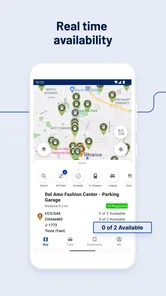
- Real-time charger availability updates.
- User reviews and ratings enhance reliability.
- Route planner for efficient travel.
- Supports various EV models including Tesla.
Cons
- Some locations may lack real-time data.
- Occasional app crashes reported.
- Limited offline functionality.
- Premium features require subscription.
- User interface may feel cluttered.











