PicVivid: AI Video Maker
- 3.00
- 2.3
- Installs
- 50.00K
- Price
- Free

Screenshots
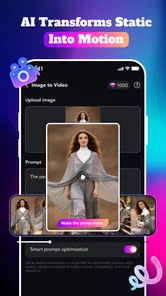
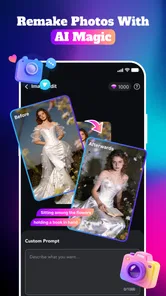
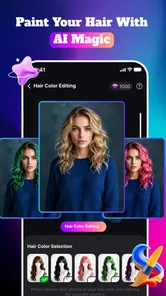
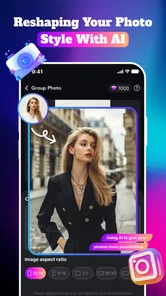
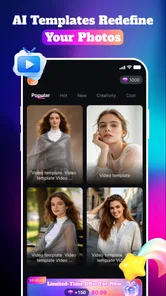
Analysis by Reviewed
PicVivid: AI Video Maker is a lifestyle app from Umair Quake Apps aimed at people who want to turn ordinary photos into more dramatic visual content. I approached it as a quick creative tool rather than a full video editor, and that distinction matters. Its appeal is the promise of AI-assisted motion, stylized edits, art treatments, and effects that can make a still image feel more suitable for sharing.
The app is free to install, which makes it easy to try without committing money first. It also carries a Mature 17+ content rating, so I would not treat it as a casual children’s photo app. The current release is version 1.0.4, and it supports devices running Android 7.0 or later. In practical terms, that gives it a broad compatibility range, although the experience will still depend on the phone’s hardware and available storage.
How PicVivid feels when used for everyday photo projects
The most useful way to think about PicVivid is as a shortcut between a photo gallery and a shareable visual post. Instead of opening a conventional editor, adjusting every control, and then learning a separate animation tool, I can start with an image and explore an AI-focused treatment. That makes the app more approachable for someone who wants a result quickly rather than a detailed lesson in editing.
A realistic example would be preparing a birthday image for a private message or social post. I would choose a clear portrait, try a restrained motion treatment, and compare it with a more noticeable art style before exporting the version that still looks like the person in the photo. The important step is comparison: AI effects can be attractive in a preview but overwhelming once the image is moving or heavily stylized.
PicVivid is also suited to small creative experiments. A landscape photo can become a short visual greeting, an old family picture can receive a more artistic presentation, and a product image can be given a livelier look for a personal listing. I would be careful with the last example, though. A dramatic effect may make an item look appealing while also changing its apparent color, texture, or shape, so it should not replace an accurate product photo.
The strongest reason to try PicVivid is speed, not control. People who dislike complicated timelines may appreciate an app that begins with a photo and focuses attention on visual transformations. In exchange, users who need exact timing, layered sound, manual keyframes, or precise text placement may find the experience too limited compared with a traditional mobile editor.
What the free access really means
The app is listed as free, so there is a low-friction entry point for testing its general approach. That is valuable here because AI effects are personal: one user may enjoy bold transformations, while another may find them artificial or distracting. Being able to explore before paying is more useful than a polished description alone.
More From Our News Desk

Weather by Xiaomi Review: Clear at a Glance, Less Clear Up Close

X Under Pressure: Can It Recover When Posting Goes Wrong?

Clash of Clans Is Won Between the Battles

Android Auto Makes the Case for Quieter Car Software

MobiOffice: Transforming Mobile Productivity with Seamless Integration

EA SPORTS FC™ Mobile Soccer: Redefining Mobile Sports Gaming
There are also in-app purchases ranging from $1.99 to $99.99 per item. That is a wide spread, and it means I would not assume that every creative option belongs to the free experience. Before starting an important project, I would check whether the chosen effect or export step introduces a purchase prompt. This is especially relevant if the goal is occasional use, because a single attractive effect may not justify a large commitment.
For me, the sensible value test is simple: use the free portion for a few different types of images, then decide whether the paid options solve a recurring problem. Someone who only wants one animated greeting may be satisfied without spending anything. Someone producing visual content regularly may see more value if the paid tools save enough time and produce a style they genuinely prefer.
I would also avoid judging the app solely by its download price. A free app can still be expensive in attention if it pushes a user through repeated prompts or if the results require many attempts. Conversely, a paid feature can be worthwhile when it consistently produces a usable result from a difficult photo. PicVivid’s value therefore depends on the quality of the particular effects available to each user, not just on the fact that installation costs nothing.
Where the visual approach works well
AI photo-to-video tools are most convincing when the source image is clean, well lit, and composed around a clear subject. A face that is partly hidden, a crowded background, or a very low-resolution picture gives the effect less reliable visual information to work with. I would prepare the image before importing it: crop away unnecessary edges, choose the sharpest copy, and avoid adding several competing subjects.
That preparation is one of the less obvious ways to get better results. Many people blame the effect when the real problem is the source photo. A simple portrait with visible eyes and a calm background is a better test than a group shot taken in poor lighting. If an output looks strange, I would first try a different image before deciding that the entire app is unsuitable.
Another useful workflow is to create a small set of variations rather than repeatedly editing one file. I would keep the original untouched, make one subtle version, and then try a stronger art treatment separately. This makes it easier to compare whether PicVivid is improving the image or merely adding more visual noise. It also prevents an experimental result from replacing the only copy of a meaningful photo.
The app’s lifestyle positioning makes sense for personal sharing. It can add novelty to images that would otherwise remain static, and the artistic direction may appeal to users who want something more expressive than a standard filter. The best results are likely to be the ones where the effect supports the subject. A gentle movement on a scenic image can feel intentional; an aggressive treatment on a serious portrait may feel inappropriate.
Tradeoffs that matter before relying on it
The first tradeoff is automation versus predictability. AI editing is convenient because it handles much of the transformation for the user, but convenience does not guarantee consistency. Small changes in the source image or selected style can alter the final mood. If I needed the same look across a large collection, I would test several images first instead of assuming one successful result will repeat perfectly.
The second tradeoff is creative polish versus authenticity. A stylized result can be more eye-catching than the original, but it may no longer represent the photo faithfully. That matters for memories, personal announcements, and anything where people expect an accurate appearance. I would use the more dramatic options for entertainment and keep a natural version available whenever the image carries factual or emotional importance.
The third tradeoff concerns cost. Free access is helpful for discovery, but the presence of purchases means the complete experience may not be identical for every user. The lower purchase point may suit a small experiment, while the upper end of the listed range requires much more careful consideration. I would not pay simply because an effect is popular; I would pay only after seeing that it works on my own images and fits a repeated need.
There is also a practical device consideration. Although Android 7.0 is the minimum operating system, AI-oriented processing can feel different on older and newer phones. I would leave room for processing time and keep storage available for source images and generated files. I would not begin a time-sensitive project immediately before a deadline without first testing the exact workflow on the device I plan to use.
The Mature 17+ rating is another reason to think about audience before sharing results. It does not automatically tell me that every image or effect is unsuitable for younger viewers, but it does mean I would not install it on a child’s device without reviewing the experience myself. For family use, especially involving children’s photos, I would keep the sharing decision with an adult and avoid treating the app as an unrestricted creative toy.
How it compares with familiar alternatives
Compared with a standard photo editor, PicVivid’s attraction is the move from still-image adjustments toward animated and AI-styled results. A conventional editor is normally better when I want exact brightness, cropping, color correction, or carefully controlled retouching. PicVivid makes more sense when the goal is to add a sense of motion or a distinctive visual treatment without building everything manually.
Compared with a full mobile video editor, it should be viewed as a faster starting point rather than a complete replacement. A timeline-based tool is usually the better choice for arranging multiple clips, controlling transitions, placing captions at exact moments, or shaping a longer story. I would use PicVivid to create a visual asset and then move to a broader editor if the project needs detailed assembly.
Compared with ordinary social-media filters, the app’s appeal is that it begins with a more deliberate photo transformation instead of a quick camera overlay. That can produce a more finished-looking result, but it may also require more patience and more trial and error. If all I want is a one-tap effect while taking a picture, a camera app with built-in filters may be faster. If I want to revisit an existing photo and explore several creative directions, PicVivid is the more relevant option.
This comparison also explains who should skip it. I would not choose it as my main tool for professional editing, exact brand work, detailed video production, or projects that demand predictable output from every image. I would also skip it if I strongly prefer natural photographs and have no interest in animation or stylization. The app’s purpose is narrow enough that the right user will enjoy it, while the wrong user may see only extra steps.
Who is likely to get real value
PicVivid is a good fit for casual creators who want to turn personal photos into more expressive posts without studying a complicated editor. It may also suit someone who regularly prepares greetings, invitations, mood boards, or informal visual updates and wants a quicker alternative to assembling each piece from scratch.
It is particularly worth testing for users who already have a folder of strong photos but rarely do anything with them. A careful workflow can turn those images into small creative projects: choose the clearest source, test a subtle treatment, compare it with an artistic option, and keep the version that still feels appropriate. That process gives the app a practical role instead of reducing it to an effect that is used once and forgotten.
People who create content for others should be more selective. Before promising a client or friend a specific look, I would test the effect on several different subjects and lighting conditions. An output that works beautifully on one portrait may not suit another. The app can be useful for brainstorming and quick concepts, but I would keep a manual editor available for corrections and final control.
Privacy-conscious users should make their own comfort decision before importing sensitive images. I would avoid using highly personal documents, confidential work material, or photographs that I would not want processed by a creative service. That is not a criticism of one particular feature; it is a sensible boundary whenever an app is being used to transform personal media. For ordinary, non-sensitive images, the decision is easier, but I would still review the app’s current permissions and policies directly before a serious project.
My verdict after weighing the value
PicVivid: AI Video Maker is appealing as a lightweight creative experiment. Its free installation makes trying the concept reasonable, and the combination of photo animation, art styles, edits, and effects gives it a clearer identity than a basic filter app. I like it most for short personal projects where speed and visual novelty matter more than perfect control.
My recommendation is conditional rather than universal. Start with the free experience, use several carefully chosen photos, and judge the results by whether they are actually shareable without extensive repair. If the app repeatedly produces a style you enjoy, a paid item may be sensible for that specific use. If the effects look artificial, the workflow feels interrupted, or you need precise video editing, keep your money and use a conventional editor instead.
The app has reached over 50 thousand installs, while its average rating is 2.3 from around 66 ratings. I would treat that public response as a reason to test it personally rather than as an automatic rejection or endorsement. The numbers suggest that expectations may not be uniform, and AI results are especially dependent on the image, device, and preferred style.
For a friend asking me whether to download it, I would say: try PicVivid if you want to experiment with turning photos into lively, stylized content and you are comfortable deciding carefully about optional purchases. Skip it if you need a dependable professional video workflow, natural-looking edits, or complete manual control. Its best value is in quick creative exploration, not in replacing every other photo and video tool on your phone.
PicVivid: AI Video Maker Frequently Asked Questions
Does PicVivid: AI Video Maker work on my phone?
PicVivid: AI Video Maker is listed for Android devices running version 7.0 or later. Before downloading, check your device’s operating system and make sure there is enough available storage for the app and any media you plan to use. The app is free to download, but some features may involve in-app purchases.
Who is PicVivid: AI Video Maker designed for?
PicVivid is a Lifestyle app from Umair Quake Apps for people interested in turning photos into AI videos, applying creative edits, and trying art styles or viral effects. Its focus is on making visually engaging content, particularly for users who want a guided, approachable alternative to building every effect manually. It is rated Mature 17+, so check that age guidance before installing.
What is PicVivid: AI Video Maker, and what can I create with it?
PicVivid: AI Video Maker is designed for turning photos, clips, and creative ideas into short videos with the help of AI-powered tools. You can generally use it to create social media edits, photo montages, animated portraits, music videos, and stylized visual content. Its templates and automated effects are aimed at users who want attractive results without manually editing every transition, filter, or animation.
Is PicVivid: AI Video Maker suitable for beginners without editing experience?
Yes, the app is primarily aimed at casual creators and beginners. Instead of requiring a traditional timeline-editing workflow, it usually guides you through selecting media, choosing a template or effect, and adjusting basic options such as music, text, timing, or visual style. More experienced users may find the controls less extensive than those in professional editors, but the simplified process makes quick video creation considerably easier.
Does PicVivid: AI Video Maker offer free features, or does it require a subscription?
PicVivid is free to download, and it may provide free access to selected templates, effects, or basic editing tools, while some premium content can require in-app purchases. In-app purchase options range from $1.99 to $99.99 per item. Before exporting a project, check the purchase screen carefully, including any trial duration, renewal terms, watermark limitations, and whether premium features are charged immediately.
Pros
- Turns photos into short AI-generated videos with minimal effort.
- Offers creative templates for social media posts and stories.
- Simple interface suitable for beginners without editing experience.
- Quick processing makes it convenient for creating content on the go.
- Supports experimenting with different visual effects and animation styles.
Cons
- AI results can vary noticeably depending on the source photo.
- Some templates and effects may require a paid subscription.
- Generated videos may include watermarks on the free plan.
- Export quality and available formats may be limited for free users.
- Processing can take longer when servers are busy or effects are complex.











