Phone Tracker
- 32.00
- 3.7
- Installs
- 1.00M
- Price
- Free

Screenshots
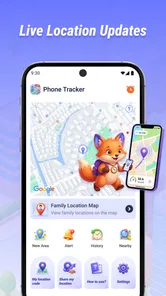
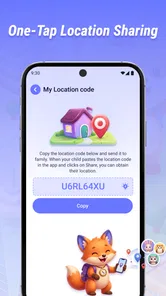
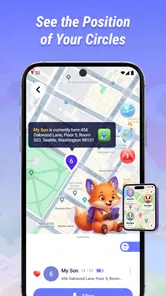
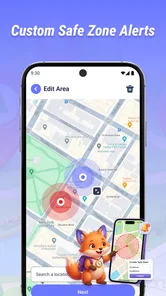
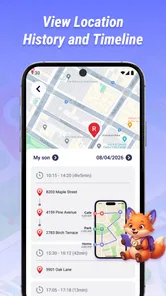
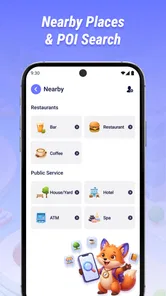
Analysis by Reviewed
I approach a phone-tracking app with one practical question: can the people involved get location sharing working clearly and keep it useful in ordinary life? Phone Tracker, from CV.Nanda Pratama Mandiri, is a free Maps & Navigation app built around real-time location sharing. That focused purpose can be handy when family members or friends want to coordinate, but it also means the experience depends on more than installing an app: the people sharing locations need to understand the setup and agree on how they will use it.
Choose a useful first test
For a realistic first outing, imagine two friends arriving separately at a crowded market. Rather than relying on the app as soon as one person gets lost in the crowd, they can set it up together beforehand, check that each understands who is sharing, and verify that the other can see a current position. If the map is unclear later, they still have a familiar fallback: agree on a specific entrance or send a message describing where to meet. That small bit of planning makes location sharing a support for coordination, not the whole plan.
This kind of trial also helps answer a practical question: does the group actually need a dedicated tracker? If the people involved already share locations in a messaging service they check regularly, a second app may add one more place to look without improving the outing. A separate tool is more compelling when the group wants location sharing to have its own clear role and everyone is willing to use it consistently.
Getting past the first setup hurdles
The first point I would clarify before trying Phone Tracker is who is meant to share a location with whom. A tracker is not useful just because it is installed on one phone; the people who need to see one another have to take part in the arrangement. Treat it as a mutual coordination tool, not as a way to locate someone without their knowledge or consent.
When location sharing does not appear to work, I would resist repeatedly tapping through the same screens. Start with simple checks: confirm that the relevant person is using the intended phone, that location services are enabled, and that the app is open and configured for the people involved. Then check that the phone has a working internet connection. These basics often explain why a location is unavailable or appears stale, without suggesting a problem with the app itself.
It also helps to agree on a small test before relying on the app for a time-sensitive plan. Have each person check whether the other can see a current location while they are together, then try again after moving a short distance. This catches mismatched expectations early: one person may believe sharing is active while the other expects an invitation or another setup step. I would do this before using it to coordinate a pickup or meet someone in an unfamiliar place.
Phone Tracker is listed for Everyone and is free, which makes it easy to consider for a household or small group. Still, a no-cost app is not automatically the right choice for every group. If a family already shares locations through a service they use every day, adding another app can create confusion about which map is current and which settings matter.
More From Our News Desk

Weather by Xiaomi Review: Clear at a Glance, Less Clear Up Close

X Under Pressure: Can It Recover When Posting Goes Wrong?

Clash of Clans Is Won Between the Battles

Android Auto Makes the Case for Quieter Car Software

MobiOffice: Transforming Mobile Productivity with Seamless Integration

EA SPORTS FC™ Mobile Soccer: Redefining Mobile Sports Gaming
Small checks that save time later
Before a trip, I would check that every participant knows which device is being shared. People often carry a personal phone and a work phone, or switch devices during the day. If the group is watching the wrong handset, the displayed position can be technically valid but practically misleading. A quick check-in at the start of the outing is more useful than trying to diagnose that mix-up after someone is waiting.
For a first use, keep the test simple: choose one person who will share and one who will view, establish that both understand the arrangement, and verify the result together. Add other participants only after that basic path is clear. This is not a hidden feature; it is a workflow tip that makes it easier to identify which part of the setup needs attention if sharing fails.
Phone Tracker’s current version is 1.2.0.0, and it supports Android 7.0 and later. I would check the Android version on each phone before planning a shared setup, especially when one person is using an older device. Compatibility is a practical first filter: there is little value in troubleshooting an installation on a phone that falls below the stated minimum.
Recovering a sharing workflow
If someone disappears from view, I would use a calm recovery sequence rather than assuming the tracker is broken. First, contact that person through an ordinary channel if possible. Ask them to check their connection and whether location services remain enabled. Next, have them reopen the app and confirm that they are still using the phone intended for sharing. If the location then updates, the issue was likely a temporary phone or connection condition rather than a lasting failure.
There is an important limit to what a map can tell you: a missing or old position does not explain why it is missing. A phone may be offline, left behind, or simply not set up as expected. I would not treat an unchanged location as proof that someone is still at that place. For plans where timing or safety matters, a direct message or call is a sensible backup, and the group should decide in advance which method to use if the map is not current.
Another useful habit is to end a tracking session when the original reason for sharing has passed. For example, after friends have met at a crowded venue, they can stop relying on the map and switch to a clear meeting point for the return trip. That keeps location sharing tied to a specific purpose instead of turning it into background monitoring. It also makes it easier for everyone to understand when the app is relevant and when it is not.
When the phone, not the app, is the bottleneck
Real-time location depends on the phone’s ability to determine and transmit its position. Indoor spaces, weak connectivity, a disabled location setting, or a handset that is not with its owner can all make a map less useful. Those are general constraints of phone-based location sharing, not evidence that Phone Tracker has a particular defect. If a result seems wrong, compare it with the person’s actual situation and check the device before drawing conclusions.
Battery management can also affect how people use any location-sharing tool. Someone who is trying to preserve power may limit background activity or avoid keeping apps open. Rather than promising that tracking will continue under every phone setting, I would plan around that possibility: keep the device charged before a long day out, agree on a fallback contact method, and check the map directly when coordination matters. This is especially sensible for a child’s outing or a late pickup, where an app should support communication rather than replace it.
Privacy is another reason to set expectations before installing. Everyone involved should know who can view a location and when sharing is intended to happen. I would skip Phone Tracker for covert monitoring, and I would not install it on another person’s device without their informed agreement. If a group cannot settle those boundaries, a different approach—such as agreeing on a meeting place and checking in by message—is more appropriate.
Where Phone Tracker fits among the alternatives
Compared with the location-sharing options already built into many phones or messaging services, a dedicated tracker can make sense when a group wants a separate place for this task. The trade-off is another app to install, learn, and remember to check. If your family already uses a familiar platform and everyone can find its sharing controls, staying with that may be simpler. I would choose Phone Tracker when its focused role is useful to the group, not merely because it is labeled as a tracker.
The app has an average rating of 3.7 from around 4,200 ratings, alongside roughly 32 written reviews, and it has passed over a million installs. Those figures suggest that it has reached a sizable audience, but they do not tell me whether it will suit a particular family’s phones or habits. I would put more weight on a short, consent-based test with the actual participants than on popularity alone.
Who is likely to find it useful
I can see the appeal for a household coordinating a pickup, relatives trying to time arrivals, or friends who want a shared view while moving through a busy public place. The strongest fit is a small group with a specific reason to share and enough trust to agree on when that sharing is appropriate. It is less convincing for people who want constant reassurance: a location display can be delayed or misleading, and repeatedly checking it may create more worry than useful information.
There is also a difference between knowing where a phone appears to be and knowing what its owner is doing. If a position stops changing, that does not establish whether the person is waiting, travelling, or simply unable to connect. I would use the map to help decide where to meet, then confirm plans directly when circumstances matter. That distinction is especially useful for parents: location sharing can support a pickup plan, but it should not replace an agreed check-in or conversation.
For someone who needs turn-by-turn guidance, route planning, or a broader trip-planning toolkit, a navigation app is the better fit. For a group that already relies on a familiar messaging service, its built-in sharing may be easier because there is no new routine to remember. Phone Tracker makes most sense between those options: a dedicated location-sharing choice for people who want that task kept separate, provided all participants can set it up and use it willingly.
A practical recommendation
My recommendation is to try Phone Tracker for a low-stakes outing first. Confirm the phones meet the Android requirement, agree on who is sharing, test that the other person can see a current position, and decide how you will communicate if the map stops updating. That one rehearsal answers the questions that matter most: whether the group can complete setup, whether the phones work well together, and whether everyone is comfortable with the arrangement.
CV.Nanda Pratama Mandiri has kept the app’s purpose narrow, which can be an advantage when all you need is a shared sense of where participating phones are. The friction is that real-time sharing is a group workflow, not a solo switch: each person, device, connection, and expectation has to line up. If your group is comfortable with that and wants a dedicated location-sharing app, it is a reasonable free option to test. If you need dependable navigation, discreet monitoring, or a service that works without everyone coordinating their setup, I would look elsewhere.
In short, I would treat Phone Tracker as a useful aid for agreed, everyday coordination rather than as a guarantee of someone’s whereabouts. A quick setup check, a clear privacy boundary, and a backup way to reach one another make it much more practical. The app is worth considering when those habits fit your group; if they do not, a familiar messaging service or a simple meeting plan may be the better choice.
Phone Tracker Frequently Asked Questions
What is Phone Tracker, and what can it be used for?
Phone Tracker is a location-sharing app designed to help people see the whereabouts of participating devices. Depending on the specific app and its features, it may support family check-ins, locating a misplaced phone, or coordinating with friends. Before installing, check the app listing carefully: several apps use the name Phone Tracker, and their features, developer, permissions, and subscription terms can differ.
Does Phone Tracker locate a phone without the owner knowing?
A legitimate location-tracking service should be used with the knowledge and consent of the person being tracked, and many services require an invitation or account approval before sharing begins. Do not assume the app can or should track someone secretly. Review its consent and sharing controls, and use the operating system’s built-in lost-device tools for your own missing phone where appropriate.
What permissions and settings might Phone Tracker need?
Location access is typically essential for reporting a device’s position; some versions may also request background location, notifications, or network access so updates and alerts can work when the app is not open. Grant only permissions that make sense for the feature you want, and check the app’s privacy policy and store listing. Restricting background access or battery use may reduce update frequency.
Can Phone Tracker show a phone’s exact, real-time location?
Location accuracy and update speed are not guaranteed. They can depend on GPS reception, Wi-Fi and mobile coverage, device settings, battery-saving restrictions, and whether location sharing is enabled. Indoors or in areas with weak connectivity, the app may show an approximate or outdated position. Treat map information as a helpful indication, not proof of someone’s precise location or immediate safety.
Is Phone Tracker free, and is it safe to download?
Pricing varies between apps with this name: some offer basic features at no cost, while others may include ads, in-app purchases, or recurring subscriptions. Check the current store listing and subscription details before signing up. For safer installation, download from the official Google Play Store or Apple App Store, verify the developer, review recent ratings, and read the privacy and data-handling information.
Pros
- Simple setup makes it accessible to users with little technical experience.
- Live location updates can help coordinate meetups and check-ins.
- Location history may help retrace recent trips or identify a lost device.
- Geofencing alerts can notify you when a tracked person enters or leaves an area.
- Useful for family safety when everyone involved has agreed to share their location.
Cons
- Location sharing requires a reliable internet connection and enabled GPS.
- Frequent tracking can drain battery life on the tracked phone.
- Background location access may raise privacy concerns.
- Location accuracy can drop indoors or in areas with a weak signal.
- Tracking another person without their consent can violate their privacy and local laws.











