Phone Tracker Live Locator
- 66.00
- 3.8
- Installs
- 1.00M
- Price
- Free

Screenshots
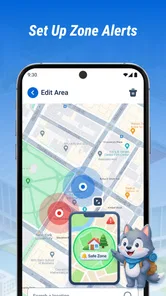
Analysis by Reviewed
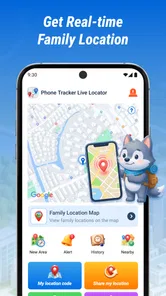
I judge a location-sharing app less by how reassuring its name sounds and more by what it lets a family do on an ordinary, slightly stressful day. Phone Tracker Live Locator is aimed at people who want to check where an older relative or child is in real time. That can be useful, but it also makes consent, phone settings, and realistic expectations part of the decision—not afterthoughts.
What free access is worth
The app is free to download, so trying it does not require an upfront purchase. That is a straightforward advantage for families who want to see whether a dedicated tracking app fits their routine before committing to one. I would still separate “free to start” from “everything a family might need is included”: the price is free, but that alone does not tell you what the ongoing experience or any optional purchase arrangements might be.
It is listed for Everyone, which makes sense for a utility intended to help adults keep track of children and older family members. That rating is about audience suitability, though; it should not be read as a promise that monitoring is appropriate in every relationship or situation. I would introduce the app openly to the person being located and agree on when checking their whereabouts is reasonable.
Phone Tracker Live Locator is in the Maps & Navigation category, and its central purpose is easy to understand: use a phone’s location to help a family member know where someone is. It is developed by ELIZABETH ANN BURDEN. The current version is 1.2.0.0, and it requires Android 9 or later, a practical point to check before asking a relative to install it. The stated release date is April 2, 2026.
Try it as a routine, not a rescue plan
Because there is no upfront cost, I would use the first trial to answer a practical question: does a shared location view actually make one agreed routine easier? Choose a familiar journey, such as the walk home from school, and decide beforehand when a check is useful. That gives the family a fair test without making the app responsible for an unfamiliar or urgent situation.
What free does—and does not—settle
Free access makes experimentation easier, but it should not be confused with a complete measure of value. A tool is worthwhile if it fits the family’s needs without creating more checking, arguments, or setup burden than it removes. I would make the decision after trying the routine together, rather than keeping it simply because downloading it cost nothing.
Where the location view can help
The value here is not that a map replaces a phone call. It is that a location check can answer a narrow question quickly: has my child reached the expected area, or is an older relative still on the route we discussed? For a family that otherwise calls repeatedly just to establish whereabouts, a shared location view may make those check-ins less disruptive.
More From Our News Desk

Weather by Xiaomi Review: Clear at a Glance, Less Clear Up Close

X Under Pressure: Can It Recover When Posting Goes Wrong?

Clash of Clans Is Won Between the Battles

Android Auto Makes the Case for Quieter Car Software

MobiOffice: Transforming Mobile Productivity with Seamless Integration

EA SPORTS FC™ Mobile Soccer: Redefining Mobile Sports Gaming
Consider a school pickup day when plans change. A parent waiting at the usual meeting point could check the child’s location before making another call, then decide whether to stay put or contact them. That only works as a sensible routine if the child knows the app is being used and can still reach the parent. I would treat the map as context for a conversation, not as proof that everything is fine.
The same distinction matters with an older adult. If someone is comfortable sharing their location while travelling to an appointment, a family member can check whether they appear to be progressing as expected. That may ease worry without asking for a status update at every turn. It is not a substitute for agreed plans, accessible contact details, or assistance when a person actually needs help.
A useful habit is to decide in advance what a location check should trigger. If the person is at the expected destination, there may be no need to call. If the location does not match the plan, a calm message or call is a better next step than assuming the worst. This turns tracking into a modest coordination aid rather than a source of constant surveillance.
Another practical trade-off is that a location reading is only as useful as the phone and the person carrying it. A map cannot help if the phone has been left behind, is unavailable, or is not reporting a useful position at that moment. For that reason, I would never make the app the only part of a safety plan. A charged phone, a clear meeting point, and a way to call remain more dependable basics.
Make the map part of a clear check-in plan
One useful detail to settle before relying on any map is what “arrived” means for that particular trip. A broad area may not tell you whether someone has reached the exact entrance, found the right pickup point, or entered an appointment. Agreeing on a place and a backup contact method prevents a location check from creating false certainty when the real question is about a specific meeting.
How it fits alongside familiar options
Many people already use built-in location-sharing tools or messaging apps to share where they are. Those options can be convenient when a family already uses the same phones and services, because there is less to introduce. Phone Tracker Live Locator has a more focused identity: its appeal is a dedicated phone-tracking app for families concerned about children or older relatives, rather than location sharing being one feature among many.
That focus may suit someone who wants a separate tool for this particular purpose. It may be less appealing if everyone already has a location-sharing arrangement that works and understands how to manage it. Before adding another app, I would ask whether it solves a real gap—such as making the family’s agreed check-in routine clearer—or simply creates another place to look.
One non-obvious point is that a dedicated tracker can change family behaviour even when it works as intended. If one person starts checking the map whenever they feel uneasy, ordinary delays can become a stream of alerts in their own mind. I would agree on reasonable check-in moments and what counts as a genuine concern before making location access part of daily life. That small conversation can matter more than the choice between two map screens.
Another useful workflow is to test the arrangement during a low-stakes outing rather than relying on it for the first time on a busy or unfamiliar day. Confirm that the person carrying the phone understands when it is being shared, and that the person checking knows how to contact them directly. If the location view is confusing or the family cannot agree on when to use it, that is a sign to pause and choose a simpler method.
Choose the least complicated option that works
For a family already comfortable with a phone’s built-in sharing or a messaging app, those familiar tools may be the better choice: fewer habits to learn and one less place to check. A dedicated tracker makes more sense when the family wants to keep this task distinct from everyday chats. The trade-off is not simply which map looks better; it is whether a separate routine will be easier for everyone to maintain.
Trade-offs that deserve attention
Real-time location sounds precise, but families should avoid treating it as a guarantee of continuous, perfect visibility. The phone has to be with the person, and the app needs a working opportunity to provide location information. A map point also says where a phone appears to be, not what its owner is doing or whether they are safe. This is why I would use it to guide a check-in rather than to make a high-stakes decision on its own.
There is also a relationship trade-off. For a young child, a parent may reasonably manage a safety arrangement, but an older child may want a clear explanation and more say in how it is used. An older adult should be treated as a participant in the decision, not simply as a dot on a screen. If a person does not agree to sharing, or if location checks would damage trust, this is not the right solution for that family.
Phone Tracker Live Locator has an average rating of 3.8 from around 6,200 ratings, alongside 66 written reviews. It has over one million installs, which suggests it has reached a substantial audience, but popularity does not establish that it will suit a particular family’s devices or habits. I would use the rating as one modest signal, not as a substitute for trying the app with clear expectations.
The Android requirement is another reason to check compatibility before building a routine around it. A family with an older device that does not meet Android 9 or later may need a different option. Likewise, if relatives use a mix of platforms, I would first confirm that the arrangement fits everyone’s phones rather than assuming that a shared family need means the same setup will work for each person.
Privacy deserves the same care as convenience. Location is sensitive, so I would keep access limited to the people who genuinely need it and explain when checks are expected. The practical question is not just “Can I see the phone?” but “Who should be able to see it, and why?” If a family cannot answer that comfortably, a call or voluntary check-in may be the better choice.
Check compatibility before involving the whole family
Before asking several relatives to build a habit around it, check the Android requirement on each phone and make sure the people involved are willing to participate. This is especially important in a family with different devices: a shared purpose does not automatically mean the same setup works for everyone. Finding a mismatch early is less frustrating than discovering it on the day a pickup plan changes.
Who is likely to get value from it
I can see the app being useful for a parent who wants a simple way to check a child’s whereabouts during agreed parts of the day, or for relatives coordinating with an older adult who is happy to share their location. It is most compelling when everyone understands the arrangement, the phone is normally carried, and the map is used to reduce unnecessary calls rather than to supervise every movement.
It is less suitable for someone who wants a guaranteed emergency-response system, a replacement for direct communication, or a way to track another adult without their knowledge. I would also skip it if a family’s existing phone or messaging tools already handle location sharing comfortably. In those cases, a separate tracker may add friction without adding meaningful reassurance.
For anyone considering it, I would start with a specific use case: one trip, one pickup routine, or one agreed journey to an appointment. Decide who can check the location and what they will do if it differs from the plan. If the app makes that routine calmer and clearer, it is delivering practical value. If it encourages constant checking or creates arguments about privacy, free access is not enough reason to keep using it.
A good fit depends on agreement, not just need
The strongest case is a family with a clear, limited reason to share location and a person carrying the phone who is comfortable with that arrangement. It is a weaker fit when someone expects tracking to guarantee safety, when the phone is not reliably carried, or when the family has not agreed on who can check. In those situations, a scheduled call or a familiar sharing option may be simpler and more respectful.
My verdict on Phone Tracker Live Locator
My recommendation is measured: Phone Tracker Live Locator is worth considering as a focused family location tool, especially when the people involved actively agree to share their whereabouts. Its free price lowers the barrier to trying it, and its purpose is clear. The value comes from making a sensible check-in easier—not from promising certainty or replacing a family’s other safety habits.
I would try it only after checking Android compatibility and talking through the boundaries with the person carrying the phone. If the goal is occasional reassurance for a child or an older relative who is comfortable with location sharing, it may be a useful addition. If you need a dependable emergency service, private tracking, or a feature your family’s existing tools already provide, I would choose another approach. In short, the app can support trust and coordination, but it cannot take the place of either.
My practical recommendation
Start with one ordinary journey and a shared understanding of what the location check is for. If that small test helps everyone coordinate without prompting constant monitoring, the free app may earn a place in the family routine. If it adds confusion, fails to fit the available phones, or makes someone uncomfortable, I would stop and use a simpler check-in method instead.
Phone Tracker Live Locator Frequently Asked Questions
What is Phone Tracker Live Locator used for?
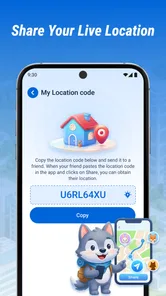
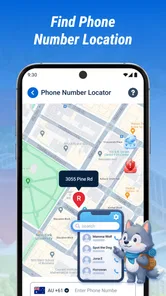
Phone Tracker Live Locator is designed to help users view and share location information, typically by showing a person or device on a map after location access and any required sharing permissions are enabled. Available features can vary by app version and platform, so check the current store listing before downloading. It should be used for legitimate coordination, such as keeping in touch with consenting family members or friends—not for secretly tracking someone.
Does Phone Tracker Live Locator track someone without their knowledge?
A location-tracking app should not be treated as a way to secretly monitor another person. Location sharing normally depends on device permissions, account or link setup, and the other person’s participation, though the exact process depends on the app version. Before using it, explain what information will be shared and for how long. Do not install tracking software on someone else’s device or access their location without their informed consent.
What permissions and settings does the app need?
Location access is generally necessary for a locator app to show a device’s position, and some functions may require background location access, an internet connection, or permission to send notifications. The precise requests depend on your phone and the app’s current version. Review each permission prompt carefully, choose the least access that supports your intended use, and check your operating system’s privacy settings to change or revoke access later.
Is Phone Tracker Live Locator free, and are there in-app purchases?
Pricing and included features can differ between the Android and iOS versions and may change over time. A listing may offer a free download while reserving certain features for a subscription, one-time purchase, or trial. Check the app store page for current prices, renewal terms, and cancellation instructions before signing up. If you start a trial, note its end date so you can cancel in time if you do not want to be charged.
How accurate is the location, and what should I check if it is not updating?
A location shown by Phone Tracker Live Locator may not be exact or immediate. Accuracy can be affected by GPS reception, indoor conditions, network availability, battery-saving settings, and whether location access is allowed in the background. If a position appears stale, check that the device is online and location services are enabled, then review the app’s permissions and refresh the view. Treat map results as estimates, not guaranteed real-time proof.
Pros
- Can help you locate a misplaced phone when location sharing is enabled.
- A map view makes shared locations easier to check at a glance.
- Useful for coordinating meetups with family or friends.
- Location updates can provide reassurance during trips.
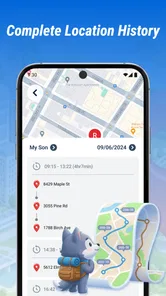
- May help users check whether someone has reached a destination.
Cons
- Accurate results depend on GPS
- network access
- and location permissions.
- Background location use can increase battery consumption.
- Location sharing requires other people’s consent and participation.
- A phone with no signal or a depleted battery may stop updating.
- Sharing precise location data raises privacy and security concerns.











