

Phone Cleaner Launcher
- 82.00
- 4.5
- Installs
- 50.00K
- Price
- Free

Screenshots
Analysis by Reviewed
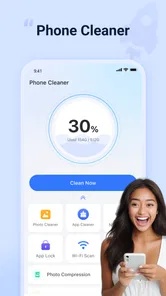
Phone storage rarely becomes a problem in one dramatic moment. It happens quietly: a few large videos remain after sharing, screenshots pile up, downloads are forgotten, and unused apps occupy space that you only notice when the phone warns you. Phone Cleaner Launcher is built around that recurring annoyance. It is a free tools app from XHDeveloper that brings junk cleaning, photo and file organization, and app locking into one place. After using it, I found its main value less about making a phone feel magically faster and more about reducing the small amount of maintenance that is easy to postpone.
The important distinction is that this is not just a storage cleaner. Its store summary also points to photos, files, and app lock, so the practical appeal is having several routine tasks together instead of jumping between the phone’s settings, gallery, file manager, and security options. That combination makes sense for people who want a simple control panel rather than a collection of separate utilities. My overall impression is positive, but I would still treat every suggested cleanup as something to review rather than approve blindly.
How Phone Cleaner Launcher fits into everyday phone maintenance
I find Phone Cleaner Launcher most useful as a small, repeatable maintenance stop rather than an emergency fix when storage is already tight. The key is to connect a quick review to a moment when I know what has become disposable, such as after sharing files or finishing a trip. That habit makes its combined tools easier to use thoughtfully, and it also helps clarify which parts of phone upkeep benefit from a single dashboard.
The first useful setup is a review, not a rush to clean
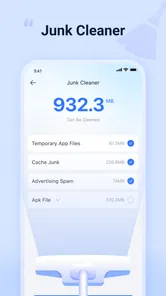
When I opened the app, the sensible way to approach it was to start with the areas that usually cause the most clutter: temporary junk, photos, and files. A cleaner is only useful when it helps me distinguish disposable material from something I may need later. I would not begin by selecting everything on a screen simply because the total looks large. The time saved comes from making the right decisions faster, not from deleting as much as possible.
The app is available at no cost, which lowers the barrier to trying it on a spare or everyday phone. It is aimed at Everyone, making its straightforward utility suitable for a broad audience. At the same time, a simple interface should not be confused with permission to ignore what is being removed. Photos and downloaded files can have personal or practical value even when their names look unimportant.
Phone Cleaner Launcher is currently at version 1.2.6 and requires Android 11 or later. That requirement matters before installation: owners of older Android phones should not plan around it. For compatible devices, I would first check how the app presents categories and how clearly it identifies files before using any cleanup action. This small pause is worthwhile because cleaning tools can save time only when their recommendations are understandable.
One useful habit is to clean in separate passes. I would handle obvious temporary material first, then inspect photos, and finally review files and apps. That order reduces the chance of mixing harmless clutter with documents or media that deserve a second look. It also makes it easier to notice whether the app is genuinely helping or merely presenting a large number that looks impressive.
More From Our News Desk

 Gmail
GmailGmail in a Busy Inbox: Who Benefits Most?
From first account to crowded workday, Gmail earns its place through dependable search and flexible sorting—but its best fit depends on how much inbox maintenance you can tolerate.

 Prime Video
Switching to Prime Video: What Changes in Your Viewing Routine
Prime Video can make a compelling second home for streaming, but switching means learning a different catalog, rental layer, and route from browsing to playback.

 Universal TV Remote Control
Universal TV Remote Control Works Best as a Reliable Backup
A phone remote earns its place through quick setup and reliable habits. Here is how to get more from Universal TV Remote Control—and where its limits show.

 Weather - By Xiaomi
Weather by Xiaomi Review: Clear at a Glance, Less Clear Up Close
Xiaomi’s weather app makes everyday forecasts quick to scan, but its calm surface can leave useful details and recovery paths harder to find than they should be.

 X
XX Under Pressure: Can It Recover When Posting Goes Wrong?
A resilience-focused review of X, examining setup, mistaken posts, interruptions, weak connections, and the gaps that matter when recovery needs to be dependable.

 Clash of Clans
Clash of Clans Is Won Between the Battles
Its raids are quick; its community is a long-term project of coordination, teaching, rivalry, and shared responsibility—with all the friction that entails.
Latest News



A realistic morning-after scenario
Imagine taking a weekend trip and returning with a phone full of screenshots, duplicate-looking images, downloaded menus, shared clips, and files received through messaging apps. The problem is not only that storage has been consumed. Finding the one document needed for work becomes slower because it sits among temporary material. In that situation, I would use the photo and file sections to separate personal media from leftovers, then use the junk-cleaning area for the less valuable residue.
The advantage is concentration. Instead of opening the gallery, searching the file manager, checking downloads, and then visiting app settings, I can begin from one utility. That does not remove the need for judgment, but it reduces the number of places I have to remember. For someone who regularly postpones housekeeping because it feels tedious, that reduction in friction is the strongest reason to keep the app installed.
A second practical case is a phone used by a family member who is not comfortable navigating Android settings. The combined layout can offer a more approachable route to basic maintenance. I would still explain what the cleanup categories mean before handing the phone over, especially if the person stores important photos or work documents locally. The app can simplify the path, but it cannot know the personal value of every file.
Photos and files need different decisions
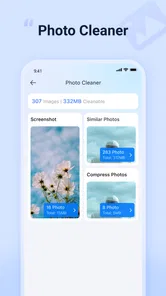
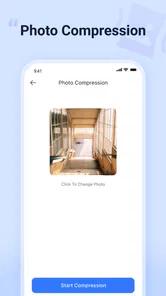
It is tempting to treat all storage as the same problem, but photos and files behave differently. A screenshot may be disposable, while a similar-looking image may be the only copy of a receipt. A downloaded file may be an old duplicate, or it may be a document needed during travel. I found the app more useful when I treated these areas as review tools rather than automatic deletion buttons.
My preferred workflow is to begin with items whose purpose is obvious, such as forgotten downloads or screenshots that no longer serve a purpose. I would leave ambiguous images alone until I had checked them in the normal gallery. This is one of the non-obvious trade-offs of using a combined cleaner: convenience improves when everything is in one place, but the broader the scan, the more important careful selection becomes.
Another helpful approach is to use the app after a specific event instead of waiting for storage to become critical. After moving photos, completing a trip, or finishing a project, I can recognize which temporary files are safe to examine. That context makes the cleanup more accurate than a random monthly sweep, because I remember why certain files were created.
App lock adds a different kind of usefulness
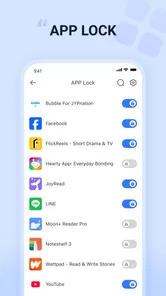
The app lock feature changes the product from a storage-focused tool into a small privacy utility as well. I would use it for apps that contain conversations, personal images, financial information, or other material I do not want casually opened by someone borrowing my phone. This is particularly useful on a shared household device or when handing a phone to a child for a quick task.
There is a trade-off here. An app lock introduces another step before access, so it is best reserved for genuinely sensitive apps rather than everything on the device. Locking too many ordinary apps can make the phone feel slower to use, especially when I am moving quickly between them. I would start with the smallest set that addresses the actual privacy concern and expand only if the routine remains comfortable.
I also see app lock as separate from storage cleaning in day-to-day use. One feature helps me remove material; the other helps me control access to material that remains. Keeping both in the same utility is convenient, but users should not assume that cleaning and privacy are interchangeable. A locked app still needs sensible account security, and a clean phone is not automatically a private phone.
Where it saves time compared with ordinary alternatives
Android already provides built-in storage settings, a gallery, a file manager, and options for securing parts of the phone. Those tools can be perfectly adequate, especially for someone who prefers maximum control and does not mind visiting several menus. The reason to choose Phone Cleaner Launcher is convenience: it gathers recurring maintenance tasks into a focused tools experience.
Compared with using only the system settings, the app feels more useful for a person who wants a guided starting point. Compared with a dedicated gallery cleaner, it offers a wider scope because files and app locking are part of the same package. Compared with a standalone privacy tool, its appeal is the combination rather than deep specialization in one area.
That comparison also explains who should skip it. If I already have a reliable file-management routine, rarely download anything, and prefer Android’s built-in controls, adding another utility may not save meaningful time. Likewise, users who want advanced duplicate-photo analysis, detailed automation, or highly granular storage diagnostics may be better served by a specialist application. Phone Cleaner Launcher is most convincing for ordinary maintenance, not for people who want a technical storage laboratory.
Small habits that make the cleaner more reliable
The first habit is to inspect the category before confirming a deletion. I would pay special attention to photos and files because their names alone may not reveal their importance. The second is to clean in short sessions. A quick review after a known clutter-producing activity is less tiring and usually more accurate than waiting until the phone is nearly full.
The third is to use app lock selectively. Protecting a few sensitive apps keeps the feature meaningful and avoids turning every normal action into a security checkpoint. The fourth is to remember the Android requirement before recommending the app to someone else. It is easy to focus on the free price and overlook compatibility, but an otherwise suitable utility is not useful on a device that cannot run it.
Finally, I would judge success by reduced effort, not by the biggest cleanup total. If the app helps me find and remove obvious leftovers in a few minutes, it is doing its job. A large number of identified items is not automatically a benefit if I must spend longer deciding what is safe to delete than I would have spent using the phone’s normal tools.
What feels smooth and what still requires caution
The strongest part of the experience is the unified purpose. Junk, photos, files, and app lock are all connected to the everyday question of keeping a phone manageable. I do not need to think of them as four unrelated maintenance projects. That makes the app approachable for people who want one place to begin, particularly when the phone feels cluttered but the cause is not obvious.
The main friction is the unavoidable need for personal judgment. No cleaner can understand the meaning of every image, download, or document from its location alone. The more valuable the phone’s contents are, the more carefully I would review recommendations. This is not a flaw unique to this app, but it limits how much of the process can safely be automated.
There is also a practical question about redundancy. Android’s built-in tools may already cover enough for users who are comfortable with them. Installing another app makes sense only if the combined workflow is easier than the existing one. I would keep it if the single-dashboard approach encouraged regular maintenance; I would remove it if I found myself opening it rarely or duplicating the same checks elsewhere.
Who should install it
I would recommend Phone Cleaner Launcher to Android users on compatible phones who regularly run out of space, lose track of downloads, or want a simpler way to review photos and files. It is also a reasonable fit for someone who wants app locking alongside basic cleaning instead of managing separate utilities. The free price makes experimentation easy, and the Everyone age rating keeps the intended audience broad.
I would be more cautious about recommending it to advanced users who demand highly detailed storage reports or specialist photo-management controls. Those users may prefer dedicated tools that expose more technical information. I would also avoid presenting it as a guaranteed speed booster. Its clearest benefit is housekeeping and access control; any improvement in responsiveness depends on what was occupying the device and how much useful space was recovered.
XHDeveloper has positioned the app as a practical tools utility rather than a complicated system-management suite. Its average rating is 4.5 from around 1.6 thousand ratings, and it has passed 50 thousand installs, which suggests that the simple all-in-one idea has found an audience. I see those figures as encouraging context, not a substitute for checking whether the workflow suits my own phone.
My final judgment after using the combined workflow
Phone Cleaner Launcher succeeds when I use it as a focused maintenance assistant. It reduces the repeated trip through separate Android menus, gives photos and files a dedicated review point, and adds app lock for a useful privacy layer. The time saved comes from organization and fewer steps, not from asking the app to make every deletion decision for me.
The best reason to keep it installed is the friction it removes from routine phone care. I would use it after travel, after a busy period of downloading files, or whenever screenshots and shared media start making the phone difficult to navigate. I would not use it as an excuse to delete quickly or as a replacement for backups and sensible account security.
In the end, Phone Cleaner Launcher is a good match for people who want an approachable, free utility that combines cleanup with app locking. Its limitations are equally clear: compatible Android versions are required, careful review remains essential, and users seeking specialist-level controls may find the built-in tools or a dedicated alternative more appropriate. For everyday clutter and a simpler maintenance routine, though, I would recommend giving it a careful trial.
Phone Cleaner Launcher Frequently Asked Questions
Will Phone Cleaner Launcher work on my Android phone?
Phone Cleaner Launcher is an Android app in the Tools category, and it requires Android 11 or later. Before downloading, check your device’s Android version in Settings to make sure it meets that requirement. If your phone is running an older version, the app may not be compatible. The app is free, so you can consider trying it if your device meets the minimum requirement.
What should I consider before making Phone Cleaner Launcher my everyday home screen?
Because Phone Cleaner Launcher combines cleaning tools with a home-screen launcher, consider whether you want both functions in one app or prefer to keep your current launcher and maintenance tools separate. Changing launchers can affect how you arrange and access apps, even though your installed apps remain on the phone. You can try the new layout and switch back through Android’s default-app settings if it does not suit you.
What is Phone Cleaner Launcher, and what does it do?
Phone Cleaner Launcher combines a home-screen launcher with basic phone-cleaning tools. During testing, its main purpose was to provide a simplified interface while offering shortcuts for removing unnecessary files, checking storage usage, and managing commonly used apps. It is aimed at users who want a cleaner-looking home screen and an easier way to access maintenance features without installing several separate utilities.
Can Phone Cleaner Launcher really improve my phone’s performance?
The app may help improve performance when your device is running low on storage or has many temporary files, but its results depend on the phone and the amount of removable data available. Cleaning cached or unused files can free space, while changing the launcher does not directly make the processor faster. Users should review suggested items carefully because deleting data from apps may sign you out or remove offline content.
Is Phone Cleaner Launcher safe to use?
Phone Cleaner Launcher can be safe when downloaded from a legitimate app store and granted only the permissions it genuinely needs. Before using its cleaning functions, check the requested access, privacy policy, developer information, and recent user reviews. Avoid approving accessibility, notification, contacts, or storage permissions without understanding why they are required, and do not assume every recommended file is safe to delete.
Pros
- Quickly removes junk files and frees up storage space
- Simple interface that is easy for first-time users
- Useful shortcuts for managing apps and device settings
- Can help identify large or unnecessary files
- Launcher tools provide convenient access to cleaning features
Cons
- Cleaning results may vary depending on the device and Android version
- Some features may require intrusive permissions to work properly
- Ads can interrupt navigation or make the interface feel cluttered
- Automatic cleaning may remove files you intended to keep
- Extra launcher features may consume additional battery or memory








