

Phone App For Android
- 17.00
- 3.9
- Installs
- 10.00K
- Price
- Free

Screenshots
Analysis by Reviewed
Phone calls are easy to underestimate until an unknown number interrupts dinner, a useful contact gets buried in a long call history, or a conversation ends and the next screen feels cluttered with decisions. I spent time using Phone App For Android as a communication tool rather than treating it as just another dialer, and its main appeal became clear: it tries to make the moments around a call more manageable.
That matters because calling is not only about connecting two people. It is also about deciding whether to answer, recognizing who is calling, recovering from an interruption, and returning to whatever you were doing afterward. This free communication app from NeonfzLLC combines calling with caller identification and an after-call blocker screen. The result is a more deliberate rhythm, although it is not automatically the best replacement for every phone app.
The app is available for everyone and supports Android 7.0 and later. Its current version is 2.1, and it has reached over ten thousand installs. Those figures suggest a modest but real user base rather than a huge, universally established service. I see that as a reason to approach it practically: install it, test how it fits your daily calls, and judge whether its handling of interruptions is better for you than the dialer already on your phone.
Why a separate phone app can change the way you communicate
The usual phone experience is built around speed. Tap a contact, answer a call, hang up, and move on. That is convenient, but it can also make every call feel equally urgent. A caller you know, a number you do not recognize, and a follow-up call you have been expecting may all arrive through nearly the same routine.
This app takes a slightly broader view. Caller ID gives the incoming call more context, while the after-call blocker screen creates a pause after the conversation. In my experience, that pause is more important than it first sounds. It can stop the automatic habit of immediately tapping through the next notification or accidentally engaging with a number you do not want to hear from again.
I found the concept especially useful for people who receive many calls during the day but do not want every call to control their attention. A freelancer waiting for a client, a parent coordinating several households, or someone managing appointments can benefit from seeing more context before answering. The app is less compelling for a person who makes only a few calls and already feels perfectly comfortable with the default phone application.
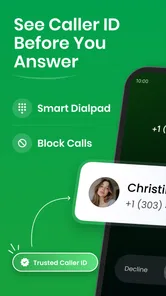
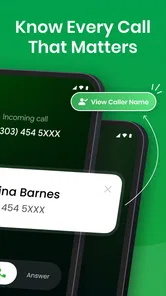
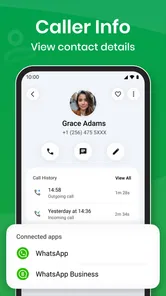
The presence of caller identification also changes the emotional temperature of an incoming call. Even when the identification does not settle every question, having an indication of who may be calling helps me choose between answering now, letting the call pass, or returning it later. That small decision is healthier than treating every ring as an emergency.
More From Our News Desk

 Gmail
GmailGmail in a Busy Inbox: Who Benefits Most?
From first account to crowded workday, Gmail earns its place through dependable search and flexible sorting—but its best fit depends on how much inbox maintenance you can tolerate.

 Prime Video
Switching to Prime Video: What Changes in Your Viewing Routine
Prime Video can make a compelling second home for streaming, but switching means learning a different catalog, rental layer, and route from browsing to playback.

 Universal TV Remote Control
Universal TV Remote Control Works Best as a Reliable Backup
A phone remote earns its place through quick setup and reliable habits. Here is how to get more from Universal TV Remote Control—and where its limits show.

 Weather - By Xiaomi
Weather by Xiaomi Review: Clear at a Glance, Less Clear Up Close
Xiaomi’s weather app makes everyday forecasts quick to scan, but its calm surface can leave useful details and recovery paths harder to find than they should be.

 X
XX Under Pressure: Can It Recover When Posting Goes Wrong?
A resilience-focused review of X, examining setup, mistaken posts, interruptions, weak connections, and the gaps that matter when recovery needs to be dependable.

 Clash of Clans
Clash of Clans Is Won Between the Battles
Its raids are quick; its community is a long-term project of coordination, teaching, rivalry, and shared responsibility—with all the friction that entails.
Latest News



Recognizing calls before they take over
Caller ID is most useful when it supports a decision rather than simply decorating the incoming screen. I use it as a quick filter: familiar person and expected timing usually means answer; unfamiliar number during focused work usually means wait; a call that arrives repeatedly deserves a more deliberate look rather than an instant reaction.
That workflow is one of the app's less obvious strengths. It encourages me to separate recognition from response. The phone can tell me something about the caller, but I still decide whether the conversation belongs in the current moment. For anyone trying to protect study time, work blocks, or family routines, that distinction is valuable.
There is also a trade-off. Caller identification can make the phone feel more informative, but it can never remove uncertainty from every incoming call. I would not treat it as a guarantee that every number will be perfectly explained. Its practical value is in improving the first glance, not in replacing judgment or turning every call into a fully documented event.
How the after-call screen affects conversation flow
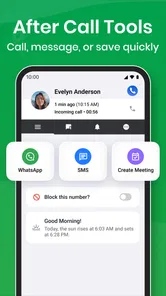
The after-call blocker screen is the feature that gives this app its clearest identity. Rather than ending a conversation and returning immediately to an ordinary stream of notifications, I get a dedicated moment to deal with the number that just called. That is useful when a call was unwanted, when I need to prevent another interruption, or when I want to avoid making a rushed decision while the conversation is still fresh.
I found this particularly helpful after short calls from unfamiliar numbers. Without an intentional follow-up step, it is easy to stare at the call history later and wonder which number was worth returning. A post-call screen puts that decision closer to the event itself. I can mentally classify the call while I still remember why it happened.
The same design can feel slower if you prefer an extremely fast dialer. People who regularly answer calls while walking, driving as a passenger, or moving between tasks may see the extra screen as friction. My advice is to judge it by the kind of calls you receive: if unwanted or ambiguous calls are common, the pause earns its place; if nearly every call is expected, the default phone app may feel more direct.
One practical habit makes the feature more useful: do not treat the after-call screen as an invitation to keep interacting with your phone. Use it as a closing ritual. Decide whether the caller belongs in your future conversations, then put the device down. That approach turns the screen into a boundary instead of another source of scrolling.
Attention costs during an ordinary day
A phone call has a larger cost than its duration. It breaks concentration before you answer, occupies mental space while you speak, and can leave a loose end afterward. This app does not make those costs disappear, but its caller information and post-call handling help me see them more clearly.
Imagine working on a report when an unfamiliar call arrives. The standard reaction is often to stop, look, answer or reject, and then wonder whether the number matters. With this app, the incoming context helps me make a more informed choice, while the after-call screen gives me a clear point at which to close the interaction. The communication itself may take the same time, but the surrounding uncertainty is reduced.
That is the strongest everyday use case I found: not faster calling, but fewer vague interruptions. The app is valuable when your attention is repeatedly pulled toward calls that do not deserve an immediate answer. It supports a rhythm in which communication is important without being allowed to dominate every minute.
Still, users should not expect the app to create discipline by itself. A caller ID screen cannot prevent someone from answering everything, and a blocker screen cannot replace a personal rule about when to be reachable. I get the best results when I pair the app with simple habits: silence nonessential notifications during focused work, return calls in batches, and avoid checking the call history every few minutes.
Setting healthier boundaries around unwanted calls
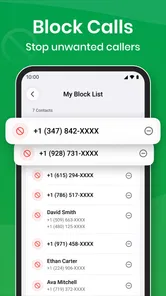
The blocking element is useful because unwanted communication often becomes a repeated attention problem rather than a single annoyance. If a number has already shown that it is not worth engaging with, being given a clear opportunity to block it after the call is more practical than relying on memory or searching through several menus later.
This is where the app feels more considerate than a bare dialer. It acknowledges that the end of a call is a decision point. I can ask myself whether I want this number to reach me again, instead of allowing the next call to force the question under pressure.
However, blocking should be used carefully. A number that looks unfamiliar may belong to a doctor, delivery service, school, workplace, or someone calling from a different line. I recommend pausing before blocking when the call could reasonably be important. The app gives you a convenient moment to set a boundary, but convenience should not become automatic rejection.
For families and shared responsibilities, this distinction matters. A person who is trying to reduce interruptions may want strong boundaries for repeated nuisance calls while remaining reachable for a small circle of contacts. The app works best when blocking is part of a considered contact strategy, not a reflex applied to every number that is not immediately recognized.
What daily calling feels like with it installed
After using the app, I noticed that calls felt more like separate conversations and less like random events scattered through the day. Before answering, I had a reason to assess the caller. After hanging up, I had a reason to complete the interaction. That simple beginning-and-ending structure made communication feel clearer.
A realistic example is a busy morning with several short calls. One is from a person I know, one is from an unknown number, and another arrives while I am already occupied. The caller identification helps me decide which deserves attention. The after-call blocker screen helps me deal with the unknown number while I still remember it. The occupied call can remain a missed communication rather than becoming a demand to stop everything immediately.
This is not a dramatic transformation, and I would not recommend it to someone looking for a feature-heavy replacement for every communication service. Its value is quieter. It improves the transitions around calls, which is exactly where many people lose time and clarity.
Where it compares well with the usual dialer
The default phone app generally wins on familiarity. It is already integrated into the device, and most people know where to find contacts, recent calls, and the keypad. If your priority is the shortest possible route from opening the phone to placing a call, changing applications may not be worthwhile.
Phone App For Android has a different advantage: it treats caller awareness and post-call decisions as central parts of the experience. Compared with a basic dialer, it gives more attention to the question of what happens before and after the conversation. That makes it a better fit for people who feel that calls interrupt their day even when the actual conversations are brief.
It also sits apart from messaging apps. Text-based services are excellent when you need an asynchronous reply, a searchable written record, or a group exchange that does not require everyone to be available at once. This app is for traditional phone communication, where a voice conversation is the right format but the surrounding interruptions need better handling. I would not install it expecting it to replace messaging, video calls, or an entire contact-management system.
The choice therefore depends on your communication style. Keep the usual dialer if simplicity and established habits matter most. Try this app if the real problem is not making calls but deciding which calls deserve your attention and what to do when they end.
Small workflow changes that make it more useful
I recommend starting with a short observation period rather than changing every calling habit at once. Notice which calls you answer automatically, which numbers you regret engaging with, and which conversations leave you uncertain about the next step. The app's caller identification and after-call screen are most useful when they address those specific moments.
Another helpful approach is to use the post-call decision consistently. Choose one of three outcomes: keep the number available, block it, or leave it for later review. This prevents the call history from becoming a pile of unresolved possibilities. The app cannot organize your priorities for you, but it gives you a timely place to make them.
I also suggest resisting the urge to block every unfamiliar caller immediately. A better boundary is selective: block repeated unwanted contact, but give potentially important calls a chance to be identified or followed up. This preserves availability without surrendering your attention to every ring.
Finally, remember that a communication tool should support your routine rather than make you monitor it more closely. If the extra screen causes you to spend more time inspecting every call, simplify your behavior. The best result comes when the app helps you finish a communication decision quickly and return to your real task.
Who should install it and who should skip it
I would recommend Phone App For Android to Android users who receive a mixture of known, unknown, and unwanted calls and want more control over the spaces around those conversations. It is also a sensible option for people who often finish calls with an unresolved question: should I keep this number, block it, or do nothing?
It is less suitable for someone who rarely receives calls, relies heavily on a manufacturer-specific dialer, or dislikes any additional step after hanging up. People who need advanced business calling, a large team workflow, or communication across several channels may be better served by a more specialized service. This app's strength is focused and everyday, not expansive.
The age rating of Everyone makes it broadly approachable, and the free price removes the financial barrier to testing it. I would still evaluate it by experience rather than by cost alone. A free app is not useful if it makes familiar tasks feel slower, while a small change in call handling can be worthwhile if it prevents repeated interruptions.
My verdict after living with the call rhythm
With an average rating of 4.0 from around one hundred ratings and a smaller collection of written reviews, the public response is positive but not overwhelming. That matches my impression: this is a focused phone utility with a clear idea, not a universal upgrade that everyone needs.
What I like most is the way it gives shape to communication. Caller identification helps me decide before answering, and the after-call blocker screen helps me close the loop afterward. Those details encourage better boundaries and make calls feel less like interruptions that happen to me.
What holds it back is the same thing that defines it. The extra attention around a call may feel unnecessary when the default dialer already works well. Users who want instant, minimal interaction may prefer the usual phone experience, while users who struggle with unknown calls and unfinished post-call decisions are more likely to notice the benefit.
My final recommendation is simple: try it if your phone regularly competes with your concentration. Give it a fair test during a normal week, especially on days when you receive several unexpected calls. If the added caller context and post-call decision point help you answer with more intention and return to your task faster, it has earned a place on your device. If they merely add another screen to dismiss, staying with the standard dialer is the clearer choice.
Phone App For Android Frequently Asked Questions
Can Phone App for Android show caller ID or display an after-call screen?
Its store summary highlights phone calls, caller ID, an after-call blocker screen, and other helpful features. These tools are intended to make it easier to recognize callers and take action after a call, such as blocking an unwanted number. The precise options available may depend on your device and app setup, so review the app’s settings and permissions before relying on a particular feature.
Who develops Phone App for Android, and what is its age rating?
Phone App for Android is developed by NeonfzLLC and is rated for Everyone. That rating can help families decide whether the app is suitable for their household, but it does not replace checking the permissions requested during setup. As with any communication app, consider who will use the device and review the app’s settings before making it the default way to handle calls.
What is Phone App for Android and what can I use it for?
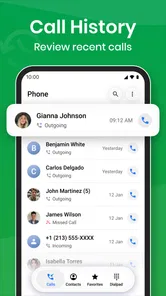
Phone App for Android is a calling and communication application designed to help users manage phone calls from their mobile devices. Depending on the version and device, it may provide features such as dialing contacts, viewing recent calls, answering or rejecting incoming calls, blocking unwanted numbers, and accessing basic call settings. It is mainly intended for users who want a convenient alternative to their phone’s default calling interface.
Is Phone App for Android free to download and use?
Phone App for Android is free to download. Standard mobile carrier charges may still apply when making calls through a cellular network. Before installing, users should check the Google Play listing for advertisements, optional purchases, subscription terms, and any limitations affecting advanced calling or customization features.
What permissions does Phone App for Android require?
A phone application commonly requests access to the phone, contacts, call history, and notifications so it can display incoming calls, identify saved contacts, show recent activity, and manage call-related alerts. Some versions may also request permission to appear over other apps or become the default phone application. Review each permission carefully and deny anything that seems unnecessary for the features you plan to use.
Pros
- Simple interface that is easy to navigate for first-time users.
- Runs smoothly on most modern Android smartphones.
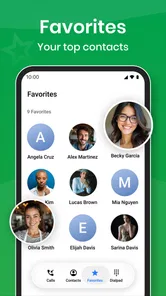
- Useful calling and contact tools are available in one place.
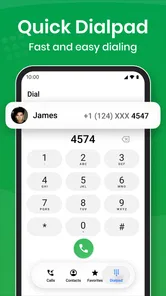
- Supports quick access to frequently used phone functions.
- Low learning curve makes it suitable for everyday use.
Cons
- Some features may vary depending on the Android device model.
- Older phones may experience slower performance or limited support.
- Advanced customization options are relatively limited.
- The app may require several permissions to work correctly.
- Occasional notifications can feel unnecessary for some users.











