Petlibro
- 1.02K
- 2.7
- Installs
- 100.00K
- Price
- Free

Screenshots
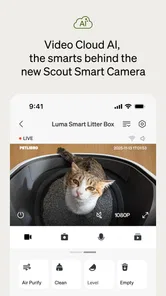
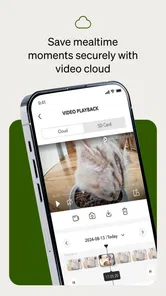
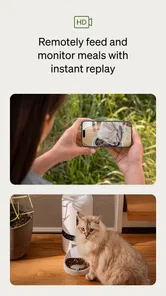
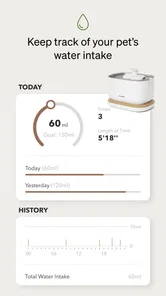
Analysis by Reviewed
Petlibro is the kind of lifestyle app I would consider only after deciding that a connected feeder or fountain genuinely fits my pet-care routine. Developed by DESIGNLIBRO INC, it is designed to work with Petlibro smart feeding and drinking devices rather than act as a general-purpose pet diary. In my experience, that makes its value very practical: the app matters most when it helps me manage a physical device at home, not when I am simply looking for advice about food, exercise, or veterinary care.
The central question is therefore not whether the app looks interesting on its own. It is whether connecting feeding and water equipment to a phone makes daily care easier for you. If you already own compatible Petlibro hardware, the app can become a useful control point. If you are comparing ordinary bowls, manual fountains, or another connected-pet ecosystem, the decision depends on how much convenience you want in exchange for setup, maintenance, and possible troubleshooting.
What I would decide before installing Petlibro
I would start with the physical routine I want to improve. A connected feeder can be helpful when meals need to happen at consistent times, when several people share responsibility for a pet, or when a busy day makes manual feeding easy to forget. A connected fountain is more relevant if encouraging regular drinking is a priority and I want a reminder to pay attention to water care. The app is not a replacement for checking the bowl, cleaning equipment, or observing an animal directly.
That distinction is important. Petlibro is listed as a free lifestyle app, but the useful experience depends on compatible hardware, and optional purchases are available inside the app. The listed purchase range runs from $5.99 to $199.99 per item, so I would not treat the free download as the complete cost of using the system. The larger expense is likely to be the device itself, while the app becomes part of the ongoing routine around it.
I also look at reliability differently with a pet-care app than with a casual lifestyle tool. If a music app has a small glitch, I can try again later. If a feeding schedule is involved, I want a clear way to check the device and confirm that the physical routine is still working. I would keep an eye on the actual food level, water level, power connection, and cleaning condition instead of assuming that a phone notification tells the whole story.
Petlibro has an Everyone content rating and supports Android devices starting with version 7.0. That makes it accessible to many Android users, although compatibility with the particular feeder or fountain remains the more important question. I would check the exact device model and the app version before buying hardware, especially if the phone is older or the household uses several different devices.
The everyday problem it solves best
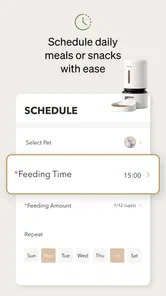
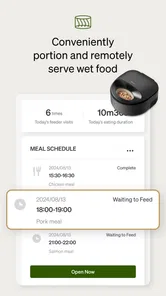
The strongest use case is a predictable household schedule. Imagine leaving home early, returning late, and having a cat that expects meals at regular times. With a manual bowl, the routine depends on someone being present and remembering the timing. With a connected feeder managed through Petlibro, the app can make that schedule easier to organize and adjust. I would still inspect the feeder before leaving for a long day, but I would not need to treat every meal as a separate manual task.
More From Our News Desk

Weather by Xiaomi Review: Clear at a Glance, Less Clear Up Close

X Under Pressure: Can It Recover When Posting Goes Wrong?

Clash of Clans Is Won Between the Battles

Android Auto Makes the Case for Quieter Car Software

MobiOffice: Transforming Mobile Productivity with Seamless Integration

EA SPORTS FC™ Mobile Soccer: Redefining Mobile Sports Gaming
A second useful situation is shared care. If two people feed the same pet, a connected setup can reduce the familiar problem of wondering whether a meal has already been given. The benefit is less about technology for its own sake and more about creating one visible routine instead of relying on memory or messages between family members. This is especially useful when work shifts, school schedules, or travel change from day to day.
For fountains, the app may be most useful as part of a broader hydration habit. I would use it to keep water equipment in my awareness, then confirm the important details physically: whether the reservoir is filled, whether the flow looks normal, and whether the fountain needs cleaning. A phone-based system can make care more organized, but it cannot notice every real-world problem as reliably as a person standing beside the device.
How I would set it up without creating extra work
I would install the app before arranging the device in its permanent location. That gives me a chance to understand the account and connection process while the feeder or fountain is easy to reach. I would also choose a location with a stable power connection and enough room to remove the container for cleaning. Hiding the device in a cramped corner may look tidy, but it can turn basic maintenance into an annoying chore.
When creating feeding schedules, I would begin with the routine my pet already follows rather than immediately making a complicated plan. A simple schedule is easier to verify during the first few days. After observing how the pet responds, I could make adjustments. This is a practical advantage of connected equipment: changes can be made without rewriting a paper note or relying on everyone in the household to remember the new arrangement.
One non-obvious trade-off is that automation can make people less attentive. I would use the app to support observation, not replace it. A pet that leaves food untouched, drinks much more than usual, or behaves differently still needs direct attention. The app can organize delivery and reminders, but it does not interpret appetite, discomfort, or changes in behavior with the judgment of an owner or veterinarian.
I would also test the routine at home before trusting it during travel. Run a few normal feeding cycles, inspect the result, and make sure every person responsible for the pet knows the manual backup plan. If the app, phone, network, or device needs attention, another person should know how to provide food and water without depending on the connected system.
Where Petlibro feels more useful than ordinary alternatives
The clearest advantage over a standard bowl is scheduling. A bowl is simple and dependable when someone is always available, but it does not help much with timed portions or shared responsibility. Petlibro is more appealing when I want feeding to be treated as a repeatable process rather than a task that depends entirely on memory.
Compared with a basic fountain, a connected Petlibro setup can make water care feel more visible in the household. That does not remove the need for washing and refilling, but it can keep the fountain from becoming an invisible object in the corner. For people who already use a phone for household routines, having pet equipment included in that routine may feel natural.
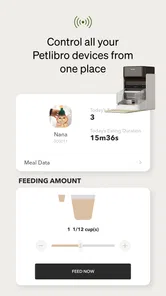
Another strength is the possibility of managing feeding and drinking equipment within one brand’s approach instead of combining unrelated devices. I prefer fewer separate apps when the household has more than one connected pet product. A unified routine can reduce the mental effort of remembering which app controls which device. That benefit becomes more noticeable when more than one family member helps with pet care.
The app is also a better fit for owners who want to adjust a routine without physically changing the device each time. A feeding plan may need to change during weekends, holidays, or a shift in working hours. A connected control layer makes those changes feel less permanent and less cumbersome than setting up a completely new manual habit.
Still, I would not call the app automatically better than a bowl or fountain. Simplicity has real value. A manual setup has fewer software steps, fewer account concerns, and fewer opportunities for a connection problem. If your pet eats reliably from a bowl and someone is always home to manage meals, Petlibro may add complexity without solving a meaningful problem.
Where another category may fit better
I would look at ordinary, non-connected equipment first for a pet with a very simple routine and an owner who values easy cleaning above remote management. A manual feeder or bowl can be the better choice when the main goal is low maintenance. It is also easier to hand over to a neighbor or sitter who does not want to learn an app.
A different connected-pet system may suit you better if your home already uses another brand and you want one established ecosystem. I would compare the process of adding a new app with the benefit of keeping pet devices together. Switching brands can be worthwhile when the existing routine is frustrating, but it can also mean replacing equipment that still works well.
For pets with medical feeding requirements, I would be cautious about treating any consumer feeder as the only safeguard. A scheduled device may help with consistency, but special diets, medication, unusual eating patterns, or frequent monitoring call for a plan designed with professional guidance. In those situations, a person checking the pet may be more important than remote convenience.
The average rating is 2.7 from around 3.1 thousand ratings, with about 1 thousand written reviews. I read that as a reason to keep expectations realistic. The app has a substantial user base, with over 100 thousand installs, but popularity does not guarantee that setup and daily operation will feel smooth on every phone or with every household arrangement. I would pay attention to how much troubleshooting I am willing to tolerate before committing to connected hardware.
The friction I would expect in daily use
Connected pet care introduces another layer between intention and outcome. A schedule may be correct in the app while the device still needs food, water, power, cleaning, or physical inspection. My practical rule would be to treat the app as a control and organization tool, not as proof that a meal reached the bowl or that a fountain is healthy for continued use.
There is also a learning curve for everyone who shares the home. One person may enjoy adjusting schedules from a phone, while another may prefer pressing a button or filling a bowl. If only one household member understands the app, the system can create dependence rather than convenience. I would show the basic routine to anyone who may care for the pet and leave clear instructions for manual feeding.
In-app purchases deserve attention as well. The free installation makes it easy to try the software, but I would review each purchase carefully before confirming it. I would not buy optional items simply because they appear during setup; I would first decide whether they solve a real problem in my pet’s routine. For a household that wants only basic control, extra spending may not be necessary.
The current version is 1.8.95, and I would keep the app updated when practical, particularly if the connected device depends on current software behavior. At the same time, I would avoid updating immediately before an important trip without testing the complete feeding routine afterward. A short verification period is a useful safeguard whenever an app controls something an animal depends on.
The hidden cost of switching to connected feeding
The cost of switching is not limited to buying a feeder or fountain. I would also account for learning the app, changing household habits, maintaining the device, and keeping a backup plan. The first week may require more attention than a manual bowl because I would be checking schedules, observing portions, and confirming that the pet accepts the new equipment.
Some pets adapt quickly, while others dislike a new sound, location, or feeding pattern. I would introduce the equipment gradually and avoid making several changes at once. If the pet refuses to use the fountain or becomes anxious around the feeder, the convenience of remote management is not worth forcing the issue. The animal’s comfort should decide whether the connected routine stays.
Travel is another area where expectations matter. I would use Petlibro to reduce repetitive tasks, but I would still arrange a person to check the pet and equipment. A sitter should know where spare food and water are kept, how to provide a manual meal, and what signs would require attention. This approach preserves the convenience of automation without pretending that a device can replace care.
For multi-pet homes, I would think carefully about whether one shared feeding arrangement matches the animals’ needs. Different pets may eat at different speeds or require separate diets. A connected app can organize a device, but it does not automatically solve competition, food stealing, or the need for individual supervision. A simpler setup with direct monitoring may be safer for some households.
Who should install it, and who should skip it
I would recommend Petlibro to an owner who already has, or is seriously considering, compatible Petlibro feeding or drinking equipment and wants a phone-based way to organize the routine. It makes the most sense for people who miss meals occasionally, share care with others, work irregular hours, or want a more structured approach to feeding and water management.
I would also consider it for a household that enjoys connected devices and is comfortable checking both the digital and physical sides of pet care. The app can be a helpful layer over an existing routine when the owner understands that notifications and schedules are aids, not guarantees.
I would skip it if the main goal is the fewest possible points of failure. A regular bowl or uncomplicated fountain may be better for someone who dislikes accounts, setup steps, app maintenance, or optional purchases. I would also hesitate if the pet has special medical needs that require close human supervision, or if no one can provide a backup when the connected system needs attention.
Before spending on hardware, I would ask myself three practical questions: Will scheduled feeding solve a problem I actually have? Will I remember to clean and inspect the device? Can another person care for my pet if the app or equipment is unavailable? If the answer to the first two is yes but the third is no, I would improve the backup plan before switching.
My recommendation after weighing convenience against control
Petlibro is best understood as a useful companion for compatible smart pet equipment, not as a complete pet-care solution by itself. I like the idea of using it to make feeding schedules more consistent, coordinate household responsibilities, and keep water equipment in view. Those benefits are concrete when daily life is busy or irregular.
My recommendation is conditional but positive: choose it when automation addresses a real routine problem and you are willing to keep checking the physical device. Start with a simple schedule, test it at home, involve every caregiver, and maintain a manual backup. That workflow gets the practical benefit without handing over too much responsibility to the app.
If your pet’s needs are simple and your current bowl works, I would not switch merely because connected feeding sounds modern. The extra layer is worthwhile only when it saves meaningful effort or improves consistency. For the right household, Petlibro turns feeding equipment into a more organized daily routine; for the wrong one, it may simply add another thing to manage.
Overall, I see Petlibro as a reasonable lifestyle choice for connected pet care, with its value tied closely to the hardware and the owner’s habits. I would try the free app when I already planned to use the brand’s equipment, but I would make the final decision based on reliability, maintenance, and the needs of my particular pet rather than on remote control alone.
Petlibro Frequently Asked Questions
Can multiple family members use the Petlibro app to help care for a pet?
Shared access can be useful when more than one person looks after a pet, since schedules and device status are easier to coordinate when everyone knows how the setup works. Petlibro’s available account and sharing options can depend on the device and app configuration. Before relying on shared control, check the app’s current settings and make sure each caregiver understands the feeding plan.
What should I check before setting up a Petlibro device through the app?
Before setup, identify the exact Petlibro feeder or fountain model and confirm that it is compatible with the app. Have your home Wi-Fi available, install the app on a supported phone, and follow the device’s setup instructions. It also helps to place the device where it will be used and have the necessary food or water ready, so you can test its operation after pairing.
What is Petlibro, and what can I use the app for?
Petlibro is a companion app for compatible Petlibro smart pet-care devices, including automatic feeders, water fountains, and related products. After connecting your device, you can usually manage feeding schedules, portion sizes, dispensing settings, and notifications from your phone. The available controls depend on the specific Petlibro model, so it is important to check compatibility before downloading or purchasing a device.
Is the Petlibro app compatible with both Android and iPhone?
Petlibro is designed for use on supported Android and iOS smartphones, but compatibility can depend on your phone’s operating-system version and the particular Petlibro product you own. Before installation, check the app-store requirements and confirm that your feeder or fountain appears on the supported-device list. Some older devices or outdated phones may not offer every feature or connect reliably.
Does Petlibro require Wi-Fi, and can I control my pet device remotely?
Most smart Petlibro products require a compatible Wi-Fi connection for app-based setup, remote control, scheduling changes, and alerts. Once connected, you may be able to manage feeding or monitor device status while away from home, depending on the model. If the internet connection fails, the device may continue its stored schedule, but remote access and real-time notifications can be unavailable.
Pros
- Smart feeding schedules help keep pets’ meals consistent.
- Portion control can support healthier eating habits.
- App notifications help track feeding activity remotely.
- Compatible feeders offer useful voice recording features.
- Modern designs fit neatly into most home interiors.
Cons
- Some features require purchasing a compatible Petlibro feeder.
- Wi-Fi setup may be frustrating on certain home networks.
- Portion accuracy can vary depending on food size and shape.
- The app may feel limited for households with many pets.
- Replacement parts and accessories can add to the long-term cost.











