PetDesk - Pet Health Reminders
- 13.43K
- 4.8
- Installs
- 1.00M
- Price
- Free

Screenshots
Analysis by Reviewed
When I decide whether to put a pet’s health details in an app, convenience is only part of the question. I also want to know what information I am choosing to enter, what I can check for myself, and whether the app is meant to support—not replace—the relationship with my veterinarian. That cautious approach is why I see PetDesk - Pet Health Reminders as a possible organizer for everyday care, not as a medical authority or an automatic record of everything that happens to a pet.
Trust begins with a clear role
PetDesk is a free lifestyle app developed by PetDesk. Its purpose is to bring pet-related organization into a phone routine, which can be useful when appointment dates, care notes, and ordinary personal reminders compete for attention. The app has an average rating of 4.8 from around 30,000 ratings and more than a million installs. That shows it has reached many owners, but popularity alone cannot tell me whether its approach to records or clinic coordination suits my household.
I would begin with a modest amount of information and judge the app by how it handles the tasks I actually need. A pet’s name and a future appointment are different in sensitivity from detailed notes about an ongoing health concern. Thinking about that distinction before entering information is a practical habit, not a reason to avoid digital organization altogether.
Choices worth checking before relying on it
The app is rated for Everyone, and its current version is 9.17.6, with Android 6.0 as the minimum operating system. It has been available since July 9, 2013, and has around 13,000 reviews. I would still make a decision based on the current experience on my own device rather than assuming that an established app automatically fits every person’s privacy expectations or clinic routine.
When setting up any account-based organizer, I recommend pausing at each visible choice instead of tapping through by habit. Enter only the details that help with a specific task, and look over the settings available in the app before making it part of a shared household routine. If another person uses the same phone or account, agree on who will maintain the information and who should see it. Those small boundaries make digital record-keeping more deliberate.
Using PetDesk carefully in everyday life
For a household with several pets, separate profiles can help keep notes and records from blending together. One useful habit is to add information soon after a visit, while details such as a care instruction or follow-up date are still fresh. Before an appointment, I would review the relevant profile and confirm that the records I want are actually there; that small check is more reliable than assuming every detail has been captured automatically.
Reminders need a human check
Appointment and medication reminders are most valuable when they turn a vague intention into a specific next step. For example, if I arrange a visit while on a lunch break, I can use a reminder to bring the date back to my attention instead of trusting myself to remember it weeks later. Medication schedules can serve the same purpose for recurring doses, especially when more than one person helps care for a pet.
More From Our News Desk

Weather by Xiaomi Review: Clear at a Glance, Less Clear Up Close

X Under Pressure: Can It Recover When Posting Goes Wrong?

Clash of Clans Is Won Between the Battles

Android Auto Makes the Case for Quieter Car Software

MobiOffice: Transforming Mobile Productivity with Seamless Integration

EA SPORTS FC™ Mobile Soccer: Redefining Mobile Sports Gaming
There is a practical trade-off: a reminder is only as dependable as the information entered and the way the phone handles notifications. I would check that an appointment or dose is recorded correctly, then keep following the veterinarian’s instructions rather than treating an app alert as medical guidance. For an urgent symptom or a change in treatment, contacting the clinic is the right next step.
Records, sharing, and the trust question
Having health notes and vaccination history together can make a vet visit less of a scavenger hunt through email, paper folders, and camera-roll photos. It can also help when another family member takes the pet in: a shared routine is easier to follow when the key details are organized in one place. I would still keep copies of especially important records somewhere I can reach independently, rather than making any single app my only archive.
Health information is personal, even when it belongs to a pet, and using a digital record means being deliberate about what I enter. I would review the app’s visible settings and choices, use only the details needed for my routine, and avoid adding sensitive notes casually. The app’s role as a record keeper is helpful, but it does not remove the need to think about who handles the phone or account in a shared household.
A low-risk way to try the workflow
Rather than moving every old document into a new system immediately, I would test the routine with one upcoming appointment and a small amount of relevant information. Then I would check whether I can find it quickly when preparing for the visit and whether the reminder arrives in a useful way. This gives me a practical sense of whether the app fits my habits without making it the only place important details live.
That trial also helps answer a common question: does a pet-care organizer remove the need for a separate calendar? It depends on what I want to manage. If I mainly need one date, my usual calendar may be faster; if I want a pet’s appointment to sit alongside that animal’s care information, a dedicated profile can offer helpful context. I would avoid entering the same task in several places unless there is a clear reason, since duplicated reminders can create their own confusion.
How it compares with familiar alternatives
Compared with a paper calendar or a general reminder app, PetDesk is tailored to pet care: profiles and health-related records give the information more context than a bare alert saying “appointment.” The trade-off is that a simple calendar may be quicker if all I need is one date, while a paper folder may feel more straightforward to someone who prefers not to manage records on a phone. I would choose PetDesk when I want reminders and pet details together, not just another notification list.
It is also a better fit for owners willing to maintain a digital routine than for someone who rarely opens organizational apps. If a clinic’s own process is what I rely on most, I would first see whether PetDesk complements that routine; I would not assume every provider or appointment can be handled the same way. The useful question is whether keeping the details together saves me effort without creating a second system I will neglect.
Who benefits from a dedicated pet organizer?
I can see it working well for people managing recurring medication, several upcoming visits, or care shared between family members. A realistic example: one person books a checkup, records the date and relevant notes, and another checks the pet’s profile before driving to the clinic. That does not make coordination automatic, but it gives everyone a common place to look instead of relying on memory or a string of messages.
On the other hand, owners with very occasional appointments and no ongoing care may find a standard calendar sufficient. Someone who dislikes entering information or wants a fully paper-based record may also be happier with a notebook and a phone alarm. PetDesk is most convincing when there is enough recurring care for its organization to earn a place in the daily routine.
Small habits that prevent avoidable mix-ups
For multi-pet households, I would make a point of checking the selected profile before adding a note or reviewing an upcoming task. It is an easy step to overlook when moving quickly, but it helps prevent information about one animal from being mentally assigned to another. A second useful habit is to use concise, practical notes: the date, the question to raise at the visit, or the instruction I need to remember is often more actionable than a long diary entry.
When care is shared, it also helps to decide who is responsible for updating the record after a visit. If everyone assumes someone else has entered the new date, the organizer can become stale even though each person is trying to help. I would treat the app as a shared reference only after agreeing on that small handoff; otherwise, a direct message or written note may be the safer immediate option.
My cautious verdict
In my experience, the strongest reason to try PetDesk is the combination of pet profiles, records, and reminders in a single routine. I would start by entering one upcoming appointment and one recurring task, then see whether the workflow feels natural before moving more information over. That test quickly shows whether the app reduces mental clutter or simply adds another place to check.
Overall, I recommend it to pet owners who want a dedicated organizer and are comfortable keeping its information up to date. I would not rely on it as a medical authority or as the sole home for important records, and I would choose a simpler calendar if my needs were limited to occasional alerts. Used with those limits in mind, it can make the ordinary logistics of caring for a pet easier to handle.
Simplifying Pet Care
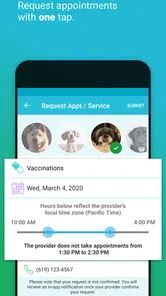
One of the features that really stands out is the ability to schedule appointments directly through the app. You can search for veterinarians and pet care services nearby, which is incredibly convenient. Plus, it sends you reminders so you never miss an appointment. It’s like having your very own pet secretary!
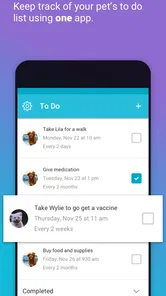
Another neat feature is the medication tracker. If your pet is on any medication, you can set up custom reminders to ensure they never miss a dose. This has been a lifesaver for my dog who needs regular meds. Trust me, it saves a lot of headaches!
Keeping Track of Everything
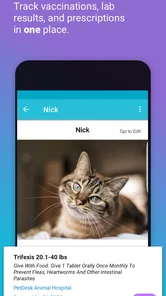
PetDesk also lets you keep all your pet’s information in one place. You can upload medical records, vaccination histories, and even keep notes on their health conditions. It’s a digital file cabinet just for your pet. This has made visits to the vet so much easier since I have all the information handy on my phone.
And if you’re someone who loves sharing photos of your pets, PetDesk lets you do that too! You can create profiles for each of your pets, complete with pictures and details. It’s a fun way to keep all their information organized and accessible.
Final Thoughts
All in all, I’d say PetDesk - Pet Health Reminders is a fantastic tool for any pet owner. It’s packed with features that make managing your pet’s health easy and stress-free. Whether you have a dog, cat, or something more exotic, this app caters to all kinds of pets. It’s like having a Swiss Army knife for pet care!
So, if you’re drowning in vet bills, lost in a sea of sticky notes, or just want a better way to keep track of your pet’s health, give PetDesk a try. Your furry (or scaly) friends will thank you, and honestly, you’ll wonder how you ever managed without it!
PetDesk - Pet Health Reminders Frequently Asked Questions
Is PetDesk free to download?
PetDesk is free to download, making it easy to try as a digital companion for organizing your pet’s care. It is a Lifestyle app from PetDesk, with a simple focus on keeping pet-related tasks alongside the rest of your daily routine. Before relying on it for ongoing care, explore its available tools and decide whether they suit the way you manage your pet’s needs.
What age group is PetDesk intended for?
PetDesk is rated for Everyone, so its content is considered suitable for a broad audience. The app is designed around managing a pet’s life and care, which may make it useful for adults and families who share responsibility for an animal. As with any app, the person setting it up should choose how pet-care information is organized and who in the household uses it.
Is PetDesk suitable for someone who wants to organize pet care in one place?
PetDesk is a Lifestyle app from PetDesk, presented as a way to manage your pet’s life on the same device where you manage yours. It is intended for pet owners who want a convenient place to keep up with care-related tasks. The app is free to download and is rated for Everyone.
What is PetDesk and how does it help pet owners?
PetDesk is a comprehensive app designed to assist pet owners in managing their pets' health and wellness. It provides features like appointment scheduling, vaccination reminders, and medication tracking. The app acts as a digital assistant, ensuring that pet owners never miss an important date or treatment, ultimately facilitating better pet care.
Is PetDesk free to use, or does it require a subscription?
PetDesk offers a free version with basic functionalities, such as appointment reminders and health tracking. However, for more advanced features like detailed health records or premium support, there may be subscription options available. It's advisable to check the app's pricing details to understand the cost involved for premium features.
Pros
- Intuitive interface for easy navigation
- Comprehensive pet health tracking tools
- Customizable reminders for vet visits
- Pet profiles with medical history
- Secure data storage
Cons
- Limited free features without subscription
- Occasional sync issues with vet records
- Requires internet for full functionality
- Can be overwhelming for new users
- Ads in free version can be intrusive











