

Penn Station Sandwiches
- 106.00
- 4.5
- Installs
- 50.00K
- Price
- Free

Screenshots
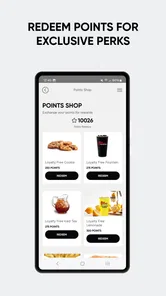
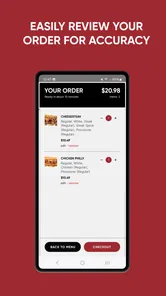
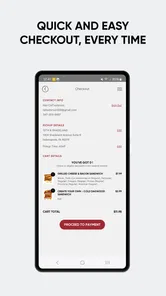
Analysis by Reviewed
Ordering a grilled sub sounds simple, but the difference between a useful restaurant app and a disposable shortcut becomes clear after the first few visits. I tested Penn Station East Coast Subs as a Food & Drink app and found that its main appeal is practical rather than flashy: it puts the Penn Station ordering process in one place for people who already enjoy the restaurant and want an easier way to arrange a meal.
The app is free, aimed at Everyone, and comes from Penn Station East Coast Subs, the same developer associated with the restaurant brand. Its store summary centers on grilled subs, dine-in visits, pickup, and delivery, so the purpose is immediately clear. This is not a general restaurant discovery tool or a meal-planning service. It is a focused companion for deciding what to order and choosing how to receive it.
My overall impression is positive, especially for regular customers. The app has a 4.6 average from around 844 ratings, with roughly 103 written reviews and over 50 thousand installs. Those figures suggest that it has found a real audience, although they do not make it universally useful. The important question is whether it remains convenient once the excitement of installing it wears off.
What the first week feels like
I find the first week most useful when I treat the app as a way to learn a dependable ordering routine, rather than expecting a stream of new features. I would pay attention to which steps are easiest to do on my phone and where I naturally pause to check a choice; that personal map makes the next order calmer and leads into the longer-term question of whether the routine keeps earning its place.
A focused start instead of a crowded food marketplace
The first thing I appreciated was the narrow focus. Many food apps place restaurant search, promotions, delivery choices, account management, and recommendations into one busy interface. Penn Station’s app has a more direct job: help me get a Penn Station meal. That makes it easier to understand for someone who already knows the brand and does not want to browse dozens of unrelated restaurants.
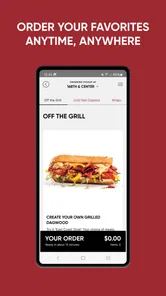
For a first order, I would approach it in a deliberate sequence. I would check the available location, decide whether pickup or delivery suits the occasion, then review the menu before committing. That order matters because a quick lunch and a family meal have different practical needs. Pickup may make more sense when I am already passing a restaurant, while delivery is more useful when leaving the house would interrupt work or evening plans.
The app’s strongest first-week quality is reduced friction around a familiar choice. If I already want a grilled sub, I do not need to open a broad delivery platform, search for the restaurant, compare duplicate listings, and work through a marketplace interface. A dedicated app can feel calmer because the decision is limited to the Penn Station menu and ordering route.
More From Our News Desk

 Gmail
GmailGmail in a Busy Inbox: Who Benefits Most?
From first account to crowded workday, Gmail earns its place through dependable search and flexible sorting—but its best fit depends on how much inbox maintenance you can tolerate.

 Prime Video
Switching to Prime Video: What Changes in Your Viewing Routine
Prime Video can make a compelling second home for streaming, but switching means learning a different catalog, rental layer, and route from browsing to playback.

 Universal TV Remote Control
Universal TV Remote Control Works Best as a Reliable Backup
A phone remote earns its place through quick setup and reliable habits. Here is how to get more from Universal TV Remote Control—and where its limits show.

 Weather - By Xiaomi
Weather by Xiaomi Review: Clear at a Glance, Less Clear Up Close
Xiaomi’s weather app makes everyday forecasts quick to scan, but its calm surface can leave useful details and recovery paths harder to find than they should be.

 X
XX Under Pressure: Can It Recover When Posting Goes Wrong?
A resilience-focused review of X, examining setup, mistaken posts, interruptions, weak connections, and the gaps that matter when recovery needs to be dependable.

 Clash of Clans
Clash of Clans Is Won Between the Battles
Its raids are quick; its community is a long-term project of coordination, teaching, rivalry, and shared responsibility—with all the friction that entails.
Latest News



Useful for planned meals, not just impulse orders
I can see the app fitting naturally into a weekday routine. Imagine finishing work later than expected and needing dinner without turning the decision into a long search. I would open the app, choose the nearest practical location, select pickup or delivery, and place the order while handling another task. The value is not that it invents a meal idea; it is that it shortens the path from “I want Penn Station” to “the order is arranged.”
It also suits group decisions better than calling when everyone wants something slightly different. One person can review the menu while another checks whether pickup is more convenient than delivery. That shared planning is especially helpful when the order is being placed from a phone in a noisy office, car park, or busy home.
Still, I would not install it merely to discover new restaurants. A broad food marketplace is better for comparing cuisines, finding unfamiliar places, or checking several nearby options at once. Penn Station’s app earns its place when the restaurant itself is already part of the decision.
What to check before relying on it
A dedicated ordering app can make a brand feel more consistent, but the final experience still depends on the selected restaurant and the chosen fulfillment method. I would double-check the location before submitting an order, particularly if several Penn Station restaurants are convenient from the same area. That small pause can prevent choosing the wrong branch for pickup or sending delivery to an unsuitable address.
I would also review the complete order rather than assuming that the last meal I remember will appear exactly as expected. Menus, availability, and preparation choices can matter more than the basic act of ordering. The app is most helpful when I use it as a confirmation tool: check the restaurant, check the food, check the receiving method, then submit.
One non-obvious advantage is that the app encourages a distinction between restaurant loyalty and delivery-platform convenience. If Penn Station is already my preferred sub stop, I can use the dedicated route for repeat visits instead of repeatedly searching through a marketplace. The trade-off is equally important: I give up the ability to compare that order with competing restaurants in the same screen.
Month-to-month value after the novelty fades
After the novelty fades, I judge the app by whether it still saves effort on the occasions when Penn Station is already my choice. A useful way to assess that is to compare the whole task—not just checkout—with calling or starting over in a broader food app, including how much decision-making each route adds. That recurring convenience is the real measure of its value from one month to the next.
Where recurring value comes from
After the first few uses, the app’s value depends almost entirely on frequency. Someone who orders from Penn Station once every few months may find the app unnecessary, while a customer who regularly buys grilled subs can benefit from having the ordering route ready. The experience becomes less about discovering features and more about removing small repeated decisions.
That is a healthy kind of recurring value. I do not need an app to entertain me every day. I need it to be available when a familiar meal fits my schedule. If it helps me move through a repeat order without opening a browser or searching a marketplace, it has done enough to justify remaining on my phone.
The app is also useful for separating occasions. A quick pickup order can be handled differently from a delivery order for a group. I might use it for a solo lunch when time is tight, then return to it later when arranging dinner for several people. That flexibility makes it more durable than an app designed around one narrow eating situation.
The habit test for regular customers
For me, a restaurant app earns long-term space when I can remember why I installed it. Here, the reason is straightforward: I want a direct way to order Penn Station food. There is no need to invent a daily habit or check the app without a specific meal in mind. It works better as a quiet utility than as a destination.
That distinction helps set realistic expectations. The app will not replace a grocery list, nutrition tracker, restaurant finder, or general delivery service. It becomes valuable at the moment a Penn Station order is likely. If that moment happens often enough, the app can save time over repeated searches. If it rarely happens, removing it and reinstalling it later would not be a major loss.
A practical tip is to decide in advance whether the app is serving convenience or comparison. If convenience is the goal, use the dedicated app and keep the order focused. If comparison is the goal, start with a broader food service instead. Switching between those two mindsets prevents disappointment and makes the app feel more useful for what it actually does.
How it compares with the usual alternatives
The closest alternatives are calling the restaurant, using a web browser, or ordering through a general delivery platform. Calling can be effective when I have a complicated question or need to speak with someone, but it is less convenient when I want to review an order quietly. A browser may be perfectly adequate for occasional use, although opening a site and navigating from scratch can feel slower than using a dedicated app.
A marketplace usually wins on breadth. It lets me compare Penn Station with other restaurants, inspect different cuisines, and sometimes manage several orders from one account. The dedicated app wins on focus. I am less likely to get distracted by unrelated choices, and the ordering journey is built around one restaurant rather than a whole local food catalog.
That trade-off is central to the review. This is not automatically the best ordering tool for every Penn Station customer. It is the better option when brand loyalty matters more than restaurant comparison. For someone who orders from many places and wants one universal checkout, a marketplace may remain more convenient.
Who should keep it installed
I would recommend keeping it installed if Penn Station is a recurring lunch or dinner choice, especially when pickup and delivery are both useful in different situations. It is also a sensible fit for people who dislike phone calls, want to review their choices before submitting, or prefer a dedicated restaurant experience over a crowded marketplace.
I would be more cautious for occasional visitors, people who are still deciding what kind of food they want, and customers whose preferred restaurant is not Penn Station. In those cases, the app may add another icon without solving a regular problem. The free price removes the financial risk, but phone space and attention still have value.
Maintenance, friction, and reasons it may become tiring
I would expect the main sources of tiredness to be repetition and the need to make careful choices when I am in a hurry. Before an order, I would settle the location and pickup-versus-delivery decision first, then review the basket once; that small routine reduces avoidable backtracking without pretending the app can make every meal fit every situation. The remaining question is how those everyday demands affect people with different access needs.
The upkeep is light, but not invisible
The app runs on Android 7.0 or later, which makes it accessible to many older Android phones as well as newer devices. Its current version is 3.35.5, so I would keep it updated through the normal app-store process rather than treating installation as a one-time event. Restaurant ordering depends on current menus and operating details, and an outdated app is more likely to create avoidable friction than a simple static reference tool.
Maintenance is not demanding in the way a social network or subscription service can be. I do not need to check it constantly, build a profile of interests, or return for daily content. The main upkeep is remembering to update it and reviewing order details each time. That low burden supports its role as a utility.
There is one practical limitation to dedicated apps: they can become redundant if I already have a preferred ordering method. Keeping both this app and a delivery marketplace may be worthwhile when their available options differ, but it can also make the process less clear. I would choose one primary route for normal orders and use the other only when it offers a specific advantage.
Where fatigue can appear
The first source of fatigue is repetition. If every visit is essentially the same, the app may stop feeling like a convenience and start feeling like an extra step before a familiar purchase. That is not necessarily a design failure; it is the natural limit of a focused restaurant app. Once I know what I want, there is less for the interface to add.
The second is choice restriction. A dedicated Penn Station experience cannot help me compare prices, menus, or availability across unrelated restaurants in the same way a marketplace can. When I am hungry but undecided, opening this app may remind me that I have chosen a brand before choosing a meal. In that situation, a broader service is more useful.
The third is the difference between digital convenience and real-world fulfillment. The app can make placing an order easier, but it cannot remove the need to select the correct location, choose an appropriate receiving method, or allow enough time for the meal. I would not treat a smooth checkout as a guarantee that every order will fit a changing schedule.
Small habits that make it work better
I get more from the app when I decide the logistics before browsing deeply. First I think about where I will be when the food is needed, then whether pickup or delivery is realistic, and only then do I build the order. This avoids choosing food first and discovering that the selected location or receiving method does not suit the occasion.
For group meals, I would review the entire basket once with everyone involved before submitting. That is more reliable than assuming each person remembers what they requested. For a solo order, I would use the final review to confirm the restaurant and delivery or pickup choice, especially when ordering from a place I have not visited recently.
Another useful trade-off is speed versus certainty. A repeat customer may be tempted to move quickly because the meal is familiar, but taking a few extra seconds to inspect the order is worthwhile when the app is being used under pressure. The best workflow is not simply the fastest one; it is the fastest process that still leaves room to catch a location or fulfillment mistake.
My long-term verdict on Penn Station East Coast Subs
After the novelty fades, I think Penn Station East Coast Subs earns lasting space for the right customer, not for everyone. Its strength is clear purpose: it gives Penn Station regulars a direct way to arrange grilled subs for dine-in plans, pickup, or delivery. The free download and Everyone rating make it easy to try, while the solid 4.6 average indicates that many users find the experience worthwhile.
I would recommend it to someone who already chooses Penn Station often and wants a repeatable ordering routine. It is particularly suitable for busy lunches, planned dinners, and situations where calling is inconvenient. The app can also be a better fit than a general marketplace when I have already made the restaurant decision and do not need more options.
I would skip it if my main goal is restaurant discovery, cross-platform ordering, or comparing several local food choices at once. A browser or marketplace may be better for occasional Penn Station visits, especially when I do not want another dedicated app. The app’s focus is its advantage, but that same focus limits its usefulness outside the brand.
My final judgment is that this is a practical utility rather than an app I would open for entertainment. Its long-term value comes from repeated convenience, not constant novelty. As long as Penn Station remains part of my regular meal routine, I would keep it installed, update it normally, and use a simple habit of checking the location, order, and fulfillment method before confirming.
Best for regular Penn Station customers who value a direct ordering route; less suitable for anyone looking for a complete, multi-restaurant food service. That is a modest promise, but the app meets it well enough to remain useful after the first week.
Penn Station Sandwiches Frequently Asked Questions
Is the Penn Station East Coast Subs app free, and what devices can run it?
The app is free to download and is intended for food and drink ordering from Penn Station East Coast Subs. It requires Android 7.0 or later, so it is worth checking your device’s operating system before installing. The app is rated for Everyone, making its content suitable for a general audience. Any food purchase or delivery charges are separate from downloading the app.
Do I need an account to place an order?
An account may be useful for saving favorite orders and accessing features such as rewards or promotional offers, but the ordering options can depend on the participating restaurant and the app experience available in your area. Start by selecting a location and reviewing the checkout steps to see what is required. If you create an account, check that your contact and order details are accurate before submitting.
What is the Penn Station East Coast Subs app used for?
The Penn Station East Coast Subs app is designed to make ordering from participating restaurants more convenient. Depending on your location, you may be able to browse the menu, customize subs and other items, choose pickup or delivery, save favorite orders, and complete payment through the app. Available features can vary by restaurant and region, so some locations may offer more options than others.
Can I customize my sub and other menu items in the app?
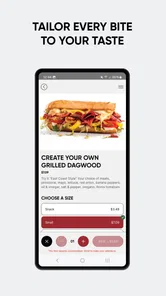
Yes, the ordering experience generally allows you to personalize menu items before adding them to your cart. You can usually select ingredients, toppings, sauces, bread choices, and other available modifications. The exact customization options depend on the selected restaurant and item. Before placing an order, carefully review the summary to confirm that all requested changes and special instructions are included.
Does Penn Station East Coast Subs offer delivery through the app?
Delivery availability depends on the restaurant, your address, operating hours, and the ordering services supported in your area. Some locations may provide delivery directly, while others may rely on a third-party delivery partner or offer pickup only. Entering your address or selecting a store should show the options currently available, along with any applicable fees, minimums, and estimated times.
Pros
- Generous portions make many menu items filling for the price.
- Several sandwich combinations offer variety beyond standard deli choices.
- Convenient locations can make quick pickup easy for nearby customers.
- Customizable toppings help accommodate different taste preferences.
- Sides and drinks provide simple options for building a complete meal.
Cons
- Quality and portion sizes may vary between individual restaurant locations.
- Some sandwiches can become messy to eat because of generous fillings.
- Healthier choices may be limited compared with lighter fast-casual menus.
- Popular lunch hours can mean longer waits and crowded dining areas.
- Prices may feel high when adding sides
- drinks
- and extra toppings.











