

PDF Master
- 6.00
- 3.3
- Installs
- 10.00K
- Price
- Free
Screenshots
Analysis by Reviewed
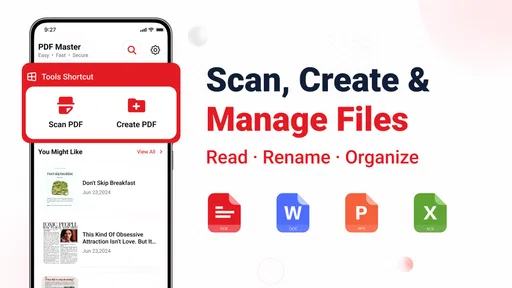
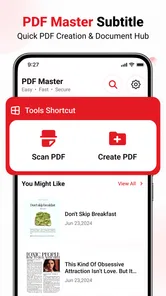
I can see the appeal of a single place for opening PDFs, scanning paper, making new PDF files, and locating documents again. That mix is exactly what makes a utility feel useful in its first few days: it can step in when a form arrives by email, a receipt needs keeping, or a paper page has to become something shareable. In my view, PDF Master makes sense as a practical toolbox for those small, recurring tasks rather than as a full document-management system.
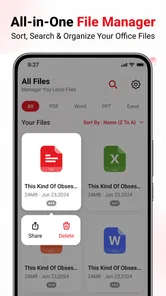
It is a free tools app from Bang Jorghy Dev, with a straightforward purpose: help you work with PDF documents on your phone. The balance of reading, scanning, creation, and file finding is more interesting than a reader alone, because it gives the app a chance to become part of a repeatable routine. Whether it earns lasting space depends on how often those tasks actually come up for you—and whether its all-in-one approach feels simpler than using the document tools already on your device.
From a promising first week to a dependable routine
I’d judge PDF Master by what happens after the first few convenient scans: whether it earns a regular place in the small document routines that come around again. In the sections ahead, I focus on the habits that could make its mix of reading, scanning, creating, and finding PDFs useful over time—and the points where that convenience may stop paying off.
Why the first few uses feel worthwhile
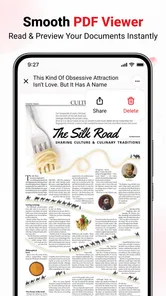
The strongest early use case is replacing a string of small workarounds. Instead of taking a photo of a paper and leaving it buried in the camera roll, you can use a scanning workflow to turn it into a document. Instead of hunting through unrelated folders when someone asks for a PDF, the app’s file-finding role gives you a reason to keep your documents in view. And when a PDF lands on your phone, reading it in the same utility keeps the task from becoming a search for another app.
That convenience is especially useful for occasional paperwork: a school notice, a signed page, a bill you need to refer to, or a document you want to send while away from a computer. The value is not that every phone owner needs a specialist PDF tool every day. It is that several common document jobs can be handled from one place when they do arise. I would try it first with an ordinary, non-sensitive page and a PDF I already know, so I could judge the scan and reading experience before making it part of an important workflow.
One practical habit can make the app more useful from the start: decide on a simple naming pattern before saving anything. A name such as “travel receipt” or “school form” is easier to recognize later than a vague label. This is a small point, but it matters more in a tool that combines scanning and file discovery; an easy-to-find document is only helpful if you can tell which result is the one you need.
The app is currently at version 1.0.3, and the listed minimum operating-system requirement is 8.0. Its audience is rated Everyone, which makes the basic document tasks approachable for a broad range of users. The average rating is 3.3 from 81 ratings, with 6 written reviews, so the public response is modest rather than an overwhelming endorsement. I would treat that as a reason to test it against your own documents, not as a verdict that it will or will not suit you.
More From Our News Desk

 Gmail
GmailGmail in a Busy Inbox: Who Benefits Most?
From first account to crowded workday, Gmail earns its place through dependable search and flexible sorting—but its best fit depends on how much inbox maintenance you can tolerate.

 Prime Video
Switching to Prime Video: What Changes in Your Viewing Routine
Prime Video can make a compelling second home for streaming, but switching means learning a different catalog, rental layer, and route from browsing to playback.

 Universal TV Remote Control
Universal TV Remote Control Works Best as a Reliable Backup
A phone remote earns its place through quick setup and reliable habits. Here is how to get more from Universal TV Remote Control—and where its limits show.

 Weather - By Xiaomi
Weather by Xiaomi Review: Clear at a Glance, Less Clear Up Close
Xiaomi’s weather app makes everyday forecasts quick to scan, but its calm surface can leave useful details and recovery paths harder to find than they should be.

 X
XX Under Pressure: Can It Recover When Posting Goes Wrong?
A resilience-focused review of X, examining setup, mistaken posts, interruptions, weak connections, and the gaps that matter when recovery needs to be dependable.

 Clash of Clans
Clash of Clans Is Won Between the Battles
Its raids are quick; its community is a long-term project of coordination, teaching, rivalry, and shared responsibility—with all the friction that entails.
Latest News



What gives it a chance to last beyond novelty
A scan button can feel impressive on the first day, but novelty is not a routine. The more durable benefit here is the possibility of making the app a predictable handoff point: paper becomes a PDF, the PDF is read or created, and the resulting file can be found when it is needed again. That sequence is a real advantage over keeping scans as photos and PDFs in several unrelated places.
For recurring personal paperwork, I would use a short workflow rather than treating the app as an archive for everything. Scan or create the document, give it a clear name, and move on. When the same kind of file comes up again, follow the same pattern. Keeping the habit narrow avoids the common trap of dumping every download into a new app and later having to organize an unmanageable collection.
A useful trade-off to keep in mind is that an all-in-one tool can reduce app switching, but it is not automatically better at each individual task than a dedicated alternative. If you only read PDFs, your phone’s built-in viewer may already be enough. If you regularly edit complex documents, you may prefer an established editor built around detailed annotation or collaboration. PDF Master is most compelling when your needs are varied but light: a little reading, an occasional scan, a simple PDF to create, and a need to locate files without juggling several tools.
Maintenance that keeps document work manageable
The maintenance burden is likely to come less from opening the app than from the files you accumulate. Scans, downloads, and newly created PDFs can become confusing if everything is saved with an unhelpful name or left in a single catch-all area. I would review the documents I actually need to keep and remove duplicates or temporary copies, rather than expecting a file-finding feature to solve an untidy collection by itself.
For a household or small personal workflow, a simple naming rule is often enough. Put the subject first, then a detail that distinguishes it: “insurance renewal” or “receipt — repair.” If you handle documents for more than one person, include that person or context in the name. This makes later searching more reliable and also reduces the risk of opening the wrong version when several similar forms are present.
There is another useful precaution: keep a second copy of important documents somewhere you already trust. A phone utility can make daily handling convenient, but I would not make any single app the only home for a passport scan, signed agreement, or tax-related file. This is sensible document hygiene, not a criticism specific to this app. It also gives you room to try PDF Master without committing your entire archive before you know whether its workflow fits.
When scanning, check the result before sharing it. A page that looks readable on screen may still have a clipped edge, a shadow, or a faint line that matters on a printed form. That quick review is a better safeguard than assuming every scan is ready just because it has been turned into a PDF. For a multi-page document, confirming that the pages appear in the intended order can prevent an avoidable second scan or an awkward follow-up message.
Where everyday fatigue can set in
The main risk is overlap. Most people already encounter PDFs through email, a browser, a messaging app, or a built-in file viewer. If those tools already cover reading and locating documents reliably, adding another app may create one more place to check rather than reducing friction. The same is true of scanning: a dedicated camera or scanning tool may suit someone who needs precise control and scans frequently.
There is also a difference between creating a PDF and managing a document project. A person who needs to annotate long reports, compare versions, work with signatures, or coordinate files with a team should choose a tool specifically suited to those demands. I would not pick PDF Master on the assumption that its broad task list means it replaces every specialist PDF workflow. Its practical appeal is breadth across everyday basics, not a promise of advanced document production.
Some users may also find that file-finding only pays off when they consistently save files in the same place and use sensible names. If you download a document, scan a copy, and then share a renamed version through several apps, it is easy to lose track of which one is current. A little discipline helps, but people who dislike organizing files may prefer a system that integrates naturally with the file manager they already use.
That makes the best trial fairly simple. Use it for a week with a few real but low-stakes tasks: read one PDF, scan one sheet, create a document, and try to retrieve each file later. Notice whether the app saves time after the first use or merely adds another stop. If you find yourself returning to it without thinking, that is a better sign of long-term value than the novelty of having several tools together.
Who should keep it installed
I would recommend giving PDF Master a try if you handle occasional paperwork on your phone and want scanning, reading, basic PDF creation, and file discovery gathered in one utility. It is a reasonable fit for students keeping handouts, people who need to send a quick scan, and anyone who would rather not switch between several apps for straightforward document chores. With 10K+ installs and a free price, it is easy to test without making a purchase decision first.
I would skip it if your current viewer and scanner already feel effortless, or if your work depends on advanced PDF editing and a carefully integrated team process. In those cases, a built-in document app or a dedicated specialist may be a cleaner choice. The useful question is not whether PDF Master can do several things, but whether having those tasks together changes your routine for the better.
A measured long-term verdict
After the first-week appeal fades, the app’s case rests on repetition: do you scan paper often enough, create PDFs often enough, and need to retrieve them often enough for a shared toolbox to matter? If the answer is yes, its combination of tasks can earn a regular place on your phone. If PDF work is rare, it may be more sensible to keep using tools already built into your device.
My recommendation is cautious but positive for people with recurring, uncomplicated document needs. Start with a small set of files, use clear names, check scans before sending them, and keep important records backed up elsewhere. That approach lets you judge the app on convenience rather than on a pile of accumulated documents. PDF Master is worth keeping when it becomes a reliable shortcut, not simply because it promises several PDF jobs in one app.
A useful everyday test
Imagine you receive a paper notice just before leaving home and need to send it to someone later that day. A practical trial is to scan it, inspect the edges and page order, save it with a name you will recognize, then close the app and see whether you can find it again without relying on memory. This tests the whole chain rather than just the initial scan. If the handoff feels straightforward, the combined workflow may genuinely reduce small delays in your day.
For students, the same approach can help separate a handout that must be shared from general photos in the camera roll. For someone handling household bills, a descriptive filename can make a past document easier to retrieve when a question comes up. I would still keep original paperwork when it matters; a convenient scan is useful for access and sharing, but it should not automatically replace a document that needs to be retained in physical form.
Choosing the right place for it
One question worth settling early is where this app fits alongside your existing file manager. Rather than moving a whole archive at once, try a small group of new scans and PDFs and notice whether you can identify the latest copy later. If you already depend on a cloud drive or another established filing routine, keep that as your main record and use PDF Master as a working tool only if it makes the steps from paper to shareable file easier.
That distinction also helps answer whether the app can replace a dedicated scanner or PDF editor. For light, mixed tasks, one general-purpose utility can be less cumbersome than opening separate apps. For frequent high-quality scanning, detailed markup, or collaborative review, the specialized tool is usually the more sensible home for that work. I would choose based on the task that causes the most friction, not on the number of functions gathered into one screen.
PDF Master Frequently Asked Questions
What is PDF Master used for?
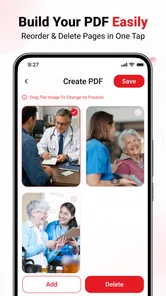
PDF Master is designed to help users work with PDF documents on a phone or tablet. Depending on the version available for your device, its tools may include viewing files, organizing pages, converting documents, adding annotations, or combining PDFs. Check the app’s store listing before downloading, because features and supported file formats can vary between versions.
Is PDF Master free to download and use?
PDF Master may be available as a free download, but that does not necessarily mean every feature is free. Some versions include advertisements, in-app purchases, or a subscription for advanced tools or reduced usage limits. Review the current pricing details and purchase terms on the Google Play Store or Apple App Store before starting a trial or subscribing.
Can I use PDF Master without an internet connection?
Basic tasks such as opening or reading a PDF may work offline if the document is already stored on your device. However, some functions—particularly cloud storage, online conversion, account syncing, or sharing through connected services—may require internet access. Download the files you need in advance and check the app’s description or settings to confirm which tools are available offline.
Is PDF Master safe for handling private documents?
Before using PDF Master for sensitive files, read its privacy policy and check the permissions it requests. Consider whether documents are processed on your device or uploaded to an online service, and avoid granting access that is not needed for the features you use. For confidential material, review the app’s security information and your device’s privacy settings before importing files.
Which devices and file sources does PDF Master support?
Compatibility depends on the specific PDF Master listing and the operating system version installed on your device. The app may let you open PDFs from local storage, downloads, or connected cloud services, but available sources can differ by platform. Check the store page for supported Android or iOS versions, and verify that your files can be accessed before relying on the app.
Pros
- Combines PDF viewing and basic document tools in one app.
- Useful for opening PDFs received through email or messaging apps.
- Can help reduce the need to switch between separate PDF utilities.
- Provides a mobile-friendly way to handle documents on the go.
- Straightforward option for users who need everyday PDF features.
Cons
- Some tools or features may require a paid upgrade.
- The free experience may include advertisements.
- Editing options may be limited compared with desktop PDF software.
- Large or image-heavy PDFs can be slower to load on older devices.
- Feature availability may vary between Android and iOS versions.








