

Pawfex AI-AI Video Generation
- 207.00
- 4.6
- Installs
- 50.00K
- Price
- Free

Screenshots
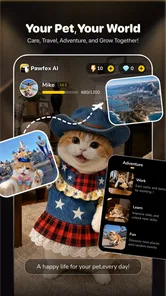
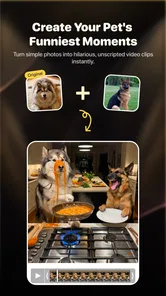
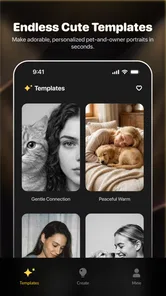
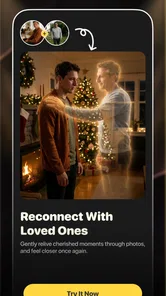

Analysis by Reviewed
I tried Pawfex AI as a lightweight way to turn pet photos into short creative videos and images, and my first impression was that it is aimed at people who want a playful result without learning a complicated editing program. The app sits in the tools category, but its purpose is much more specific than a general photo editor: it uses AI to reinterpret pictures of pets and produce shareable visual variations. That focus makes it easy to understand, although it also means the experience depends heavily on the quality and suitability of the photo you start with.
The app is free to install, with optional in-app purchases ranging from $0.99 to $39.99 per item. It is developed by SINGAPORE BAOLU TECHNOLOGY PTE. LTD and is suitable for everyone. On the store, it appears as Pawfex AI, while its longer description presents it as an AI pet video and photo generator. The current version is 1.6.6, and it requires Android 7.0 or later. Its average rating is 4.6 from around 2.2 thousand ratings, with more than 50 thousand installs, so it has already attracted a noticeable audience without feeling like a huge, anonymous platform.
How I use Pawfex AI from a normal pet photo
My preferred starting point is a clear image in which the animal is easy to recognize. A front-facing portrait with decent light gives the AI more useful visual information than a dark snapshot, a crowded room, or a picture where the pet is partly hidden behind a blanket. This sounds obvious, but it makes a bigger difference here than endlessly retrying the same weak source image. When the original photo is clean, the generated result has a better chance of preserving the animal’s face, coat pattern, and general character.
I normally begin by choosing one photo rather than uploading a large collection at once. That keeps the process easier to judge. If the first result looks odd, I can decide whether the problem came from the source image or from the selected creative treatment. This is a useful habit with AI tools because changing several things simultaneously makes it difficult to understand what actually improved the outcome.
The basic workflow feels approachable: select a pet image, choose the kind of transformation available in the app, and wait for the generated result. I treat the first output as a draft, not a finished piece. AI can create an amusing movement or visual style, but it may also alter small details that matter to an owner, such as the shape of an ear, the direction of the eyes, or the markings on the fur. For casual sharing, those imperfections can be part of the fun. For a keepsake, I would inspect the result more carefully before saving or showing it to family.
A realistic everyday use is making a quick birthday message for someone who loves their dog. I would choose a well-lit portrait, generate a playful version, and send the result privately rather than trying to build a full social campaign around it. Another good use is turning a favorite cat photo into a few different visual ideas for a chat group. The app is strongest in these small, low-pressure moments where personality matters more than technical perfection.
I would not use it as my only tool for serious video editing. It is not a replacement for an editor where I need precise timing, several clips, manual captions, detailed sound control, or a carefully arranged sequence. Pawfex AI is more useful at the idea and novelty stage: it helps create a pet-centered visual that would take more effort to design manually.
More From Our News Desk

 Gmail
GmailGmail in a Busy Inbox: Who Benefits Most?
From first account to crowded workday, Gmail earns its place through dependable search and flexible sorting—but its best fit depends on how much inbox maintenance you can tolerate.

 Prime Video
Switching to Prime Video: What Changes in Your Viewing Routine
Prime Video can make a compelling second home for streaming, but switching means learning a different catalog, rental layer, and route from browsing to playback.

 Universal TV Remote Control
Universal TV Remote Control Works Best as a Reliable Backup
A phone remote earns its place through quick setup and reliable habits. Here is how to get more from Universal TV Remote Control—and where its limits show.

 Weather - By Xiaomi
Weather by Xiaomi Review: Clear at a Glance, Less Clear Up Close
Xiaomi’s weather app makes everyday forecasts quick to scan, but its calm surface can leave useful details and recovery paths harder to find than they should be.

 X
XX Under Pressure: Can It Recover When Posting Goes Wrong?
A resilience-focused review of X, examining setup, mistaken posts, interruptions, weak connections, and the gaps that matter when recovery needs to be dependable.

 Clash of Clans
Clash of Clans Is Won Between the Battles
Its raids are quick; its community is a long-term project of coordination, teaching, rivalry, and shared responsibility—with all the friction that entails.
Latest News



The source photo matters more than most beginners expect
One of the most practical lessons from using this kind of app is to prepare the image before asking for a transformation. I look for a single visible subject, avoid strong motion blur, and choose a crop that leaves enough room around the head and body. If the pet is cut off at the ears or paws, an AI effect may produce an awkward boundary. A simple portrait often works better than a technically impressive photograph with a complicated background.
I also keep a small set of different source images instead of repeatedly forcing one favorite picture to work. A side profile may suit one effect, while a front-facing pose may be better for another. This gives me more control without pretending that the app offers professional masking or manual retouching. The useful insight is that the workflow is partly photographic: the better the input, the less I need to rely on luck.
For pets with similar coloring to their surroundings, I first choose a brighter image or one with stronger separation between the animal and the background. This is not a special button inside the app; it is a preparation habit that improves the material I give it. It also saves time because I am not judging a poor result as if it were entirely the generator’s fault.
Settings and choices worth checking before generating
I recommend slowing down for a moment before pressing the generation control. Look at the available creative choices and decide what you want the image or clip to communicate. A gentle, recognizable treatment is usually better for a family memory, while a more exaggerated style may be ideal for a joke. If the result is meant to be shared publicly, I prefer a concept that keeps the pet recognizable rather than one that changes every visual feature.
It is also worth checking the selected source image at full size before starting. A thumbnail can hide a soft focus problem or an unwanted person in the background. If I am creating something for a particular recipient, I consider whether the pet’s face is visible enough to make the result feel personal. That small check is more valuable than generating several versions blindly.
Because optional purchases are part of the app, I pay attention to any point where the app presents a paid choice. The free entry point makes it easy to experiment, but I would not assume that every creative possibility is available without cost. My advice is simple: decide what you are trying to make first, then consider whether a paid item is worth it for that one result. A novelty clip is rarely worth an impulsive purchase if the source photo itself is weak.
The listed purchase range runs from less than a dollar to nearly forty dollars per item. That is a wide enough spread that I would read each purchase screen carefully rather than treating all options as equivalent. For someone who only wants occasional pet images, the free experience may be sufficient. A frequent creator should keep track of spending and avoid generating repeatedly just because the process feels effortless.
Repeatable habits that make the process faster
My fastest pattern is to prepare a few suitable photos before opening the app. I keep one close portrait, one full-body image, and one relaxed candid shot available. This lets me match the photo to the idea instead of interrupting the creative process to search through a crowded gallery. It also makes comparisons fairer because I am testing different treatments with images that are already usable.
I use a two-pass approach. In the first pass, I generate one result to see whether the chosen direction suits the pet. In the second, I make a deliberate change: I switch the source, choose another style, or simplify the concept. I avoid making many random attempts. This habit produces clearer decisions and reduces the temptation to spend money chasing a perfect output that may not be possible from the original photo.
Another useful pattern is to save the successful source images separately. If one picture consistently produces a recognizable face, I treat it as a reliable starting point for future occasions. That creates a personal mini-library without needing complicated project management. I can return to a known-good portrait when I need a quick greeting, a family message, or a humorous post.
I also recommend naming or organizing saved results outside the generation process, especially if you create several versions. A simple distinction such as “birthday,” “funny,” or “portrait” makes it easier to find the version you actually wanted later. Pawfex AI is designed around quick creative output, so a little organization around it prevents the gallery from becoming a pile of nearly identical experiments.
For sharing, I inspect the final frame rather than trusting the preview alone. I look for strange eyes, duplicated features, warped paws, or a background detail that has changed in an distracting way. These flaws may be harmless in a private joke, but they can look careless in a public post. The app makes generation accessible; the final quality check still belongs to me.
Where the AI approach works well
The main strength is immediacy. I do not need to understand layers, keyframes, masks, or animation timelines to get a playful pet-focused result. That makes the app approachable for someone who has never used a conventional editor. The narrow subject focus is also helpful: I am not searching through a huge collection of unrelated tools before reaching the pet transformation I wanted.
It is especially enjoyable for people who already take many pet photos but rarely do anything with them. A normal gallery can contain hundreds of pictures that are viewed once and forgotten. A tool like this gives those images a second life by turning a familiar portrait into something that invites a reaction. The best results are not necessarily the most realistic ones; they are the ones that preserve enough identity to feel like the user’s own animal.
The app can also help with creative hesitation. If I have an idea for a pet-themed greeting but cannot imagine how to present it, generating a visual variation gives me a starting point. I may use the result directly, or simply discover a direction for a manually edited post. In that sense, its value is not limited to the final file. It can act as a quick sketchbook for pet-related content.
Compared with a standard photo editor, Pawfex AI asks me to make fewer technical decisions. A manual editor gives stronger control over cropping, color, text, and composition, but it requires more time and skill. Compared with a general video editor, this app is much more focused and less suitable for assembling a complete story. Compared with ordinary social media filters, the pet-centered generation feels more intentional, although it can also be less predictable because the AI may reinterpret details rather than simply apply a fixed overlay.
Limits I would keep in mind
The biggest limitation is control. When I want a precise result, I prefer a conventional editor because I can decide exactly where an effect begins, what remains unchanged, and how the final sequence is timed. With AI generation, the app may produce a charming surprise, but surprise is not the same as consistency. Two attempts can feel different even when I am aiming for the same general idea.
Recognition is another trade-off. A pet with a distinctive face and a clean background has a better chance of remaining convincing than a group photo with several animals. If the purpose is to show a particular pet clearly, I would avoid images where the subject is tiny or partly obscured. The app is not the right choice when exact visual identity is more important than playful interpretation.
There is also a practical question about patience. A quick generator is convenient, but the process may involve waiting, reviewing, and trying again. If I need a finished clip immediately for a time-sensitive post, I would prepare a simple manual alternative rather than depending entirely on an AI result. The app works best when I have room for one or two creative attempts instead of a strict production deadline.
Privacy is worth considering whenever personal photos are used in any online generation service. I would choose images thoughtfully, avoid including unrelated people when possible, and review the app’s own prompts and permissions before using it regularly. I would be particularly cautious with photos of children, identifiable locations, or anything I would not normally share outside my private gallery.
The everyone age rating makes the app approachable for a broad audience, but younger users may still need help understanding optional purchases and deciding what images are appropriate to upload. The tool is simple enough for family use, yet an adult should guide spending and sharing habits rather than assuming that a playful interface removes those responsibilities.
Who will enjoy it, and who should choose another tool
I think Pawfex AI is a good fit for pet owners who want quick, amusing transformations without learning a full editing workflow. It is also suitable for casual creators who need an occasional visual for a message, a celebration, or a private group. People who enjoy experimenting with the same photo in different creative directions will get more from it than users who expect one perfectly finished result every time.
I would steer professional editors, social media managers with strict brand requirements, and anyone producing longer narrative videos toward a more controllable tool. They may appreciate Pawfex AI for brainstorming, but they will probably need another app for the final assembly. The same applies to users who want detailed retouching, exact typography, advanced audio work, or frame-by-frame adjustments.
It is also not ideal if your main goal is simple photo correction. If you only want to remove a blemish, adjust exposure, or crop a picture, a traditional photo editor is faster and more predictable. Pawfex AI makes sense when the desired outcome is a creative reinterpretation, not a technically faithful correction.
My verdict after building a practical routine
I see Pawfex AI as a focused creative companion rather than an all-purpose editor. Its strongest quality is the low barrier between a pet photo and a playful generated result. I can open it with a clear idea, choose a suitable image, test one direction, and decide quickly whether the output is worth keeping. That simplicity is more valuable than a long feature list for people who want a little personality in their everyday photos.
My recommended routine is to start with a clean, single-pet image, make one intentional generation, inspect the details, and only then try a second source or treatment. Keep successful photos organized, watch the purchase prompts, and save the best results rather than every attempt. Those habits make the experience more efficient and help separate genuine creative value from random novelty.
The app’s rating of 4.6 and its growing install base suggest that many users enjoy this kind of focused pet content, and I understand why. Still, I would judge it by the situation rather than by the number alone. It is excellent for quick, affectionate, sometimes silly pet visuals; it is less convincing when I need exact control, professional consistency, or a complete editing suite.
After using it, I would recommend Pawfex AI to a friend who wants to make their pet photos more expressive and does not want to wrestle with a complicated editor. I would describe it honestly as a playful generator with real convenience and equally real limits. Use it as a fast creative starting point, not as a substitute for careful editing. With that expectation, the app is easy to enjoy and capable of turning an ordinary pet snapshot into something worth sharing.
Pawfex AI-AI Video Generation Frequently Asked Questions
What devices and operating systems can run Pawfex AI-AI Video Generation?
Pawfex AI-AI Video Generation is an app for creating AI-generated pet videos and photos. On Android, it requires version 7.0 or later, so check your device’s software before downloading. The app is free to install, and its content rating is Everyone. If you use an iPhone or iPad, check the relevant app store for device compatibility before proceeding.
Who makes Pawfex AI-AI Video Generation, and what do users think of it?
Pawfex AI-AI Video Generation is developed by SINGAPORE BAOLU TECHNOLOGY PTE. LTD. It has an average rating of 4.6 from around 2,200 ratings, with over 200 written reviews and more than 50,000 installs. Those figures offer a general sense of user interest, but ratings can reflect different expectations, devices, and experiences, so it is worth reading recent feedback as well.
What is Pawfex AI-AI Video Generation and what can it do?
Pawfex AI-AI Video Generation is an artificial intelligence video-creation app designed to turn written prompts, images, or creative instructions into short videos. It can be useful for generating social media clips, animated concepts, visual stories, promotional ideas, and experimental content without requiring advanced editing skills. Results depend heavily on the quality and detail of the prompt provided.
Is Pawfex AI-AI Video Generation free to use?
Pawfex AI-AI Video Generation is free to download, but it also offers in-app purchases priced from $0.99 to $39.99 per item. Paid options may unlock features or additional use, so check the purchase details in the app before committing. If you plan to use it regularly, review the current terms for any purchase you consider and make sure they fit your budget.
Does Pawfex AI-AI Video Generation require an internet connection?
Yes, users should expect Pawfex AI-AI Video Generation to require a stable internet connection for most or all video-generation features. The processing is generally performed on remote servers rather than entirely on the phone, so generation speed can vary according to connection quality, server demand, and video complexity. Offline access may be limited to viewing or managing previously saved projects.
Pros
- Creates engaging pet videos from simple text prompts.
- AI effects can make ordinary photos feel more dynamic and playful.
- Useful for social media posts
- stories
- and short-form content.
- No advanced video-editing skills are required to get started.
- A fun way to experiment with different pet-themed visual styles.
Cons
- Results may vary noticeably depending on the quality of the input image.
- Some generated movements can look unnatural or inconsistent.
- Advanced features may require in-app purchases or a subscription.
- Processing times can increase when demand for AI generation is high.
- Uploading pet photos may raise privacy concerns for some users.








