Passport Parking
- 5.91K
- 2.6
- Installs
- 1.00M
- Price
- Free

Screenshots
Analysis by Reviewed
When I share a car or phone with someone, parking gets complicated for a surprisingly ordinary reason: the person who parks may not be the person who remembers when the meter runs out. Passport Parking is a mobile parking app from Passport Labs, Inc., and I see its main value as making payment and session management less dependent on carrying coins or returning to the car. That can help on a quick city errand, but it works best when the driver understands which account and vehicle details they are using.
A useful routine for shared cars
Picture one person taking the family car to an appointment while another is expecting to use it later. The driver can handle the parking session on their own phone, then tell the other person when the car should be moved or when the session needs attention. Remote extension can be especially useful if an appointment runs late, though I would not treat it as a substitute for checking the local parking rules or making sure an extension is allowed.
That distinction matters: the app can help with paying and managing a session, but it does not solve every coordination problem around a shared vehicle. Before handing over the keys, I would agree on who is responsible for starting the session, keeping an eye on its end time, and passing along any change of plan. A short message is more dependable than assuming the other driver will see a reminder on your phone.
Accounts, devices, and practical boundaries
For a household, I would avoid treating one signed-in phone as a universal parking remote. The person using the app should check the selected vehicle and parking details before paying, especially if several people share a car or one phone is used for more than one vehicle. Those small checks reduce the chance of managing a session for the wrong car or leaving another driver unsure about what has already been paid.
If a child or teenager is learning to drive, I would keep the payment decision with the adult account holder unless the family has agreed on a clear arrangement. The app is designed for parking tasks, not as a family coordination or supervision tool. A young driver can learn to read signs, identify the right parking area, and report the session details without being given access to someone else’s account.
Getting Started with Ease
First things first, downloading the Passport Parking app is as smooth as butter. It’s available for both Android and iOS, so no matter your device, you’re covered. Once installed, signing up is a piece of cake. All you need is your email, phone number, and vehicle information. Bam! You’re ready to roll.
How Does It Work?
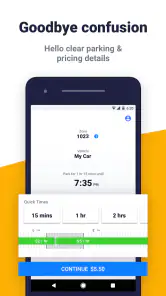
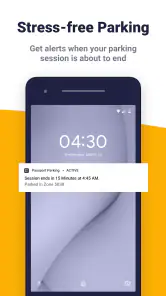
So, how does this nifty app actually work? It’s pretty straightforward. The app uses your location to find nearby parking spots, and you can even pay for parking directly through the app. No more digging through your car for loose change or wrestling with those archaic parking meters. Plus, it sends you reminders when your parking session is about to expire, saving you from those dreaded parking tickets.
More From Our News Desk

Clash of Clans Is Won Between the Battles

Android Auto Makes the Case for Quieter Car Software

MobiOffice: Transforming Mobile Productivity with Seamless Integration

EA SPORTS FC™ Mobile Soccer: Redefining Mobile Sports Gaming

How Microsoft OneDrive Became a Mobile Productivity Giant

How Google Translate Breaks Language Barriers Effortlessly
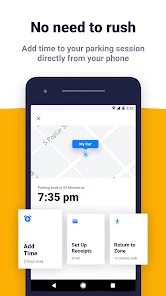
One of the coolest features is the ability to extend your parking session remotely. Imagine you’re in a meeting that’s running over time or enjoying a leisurely brunch – just a few taps, and you’re all set without having to dash back to your car.
User Experience
The user interface is clean and intuitive, making it super easy to navigate even for the less tech-savvy among us. The map feature is particularly handy, showing you a bird’s eye view of available parking spots in real-time. It’s like having a personal parking assistant who knows all the best spots in town.
However, like all apps, it’s not without its quirks. Occasionally, the location services can be a bit off, placing you a few meters away from your actual location. But let’s be real, no app is perfect, right?
Choosing it over the usual alternatives
I would reach for a parking app when I want to pay and keep track of a session from my phone, rather than hunting for coins or walking back to a meter. A physical meter or posted sign still matters: the app does not replace reading restrictions, checking the space, or confirming that the location shown on screen matches where the car is parked. If you are in an area where the app does not handle the space you need, the traditional payment method is the sensible fallback.
For navigation, a general map app may be better at planning a route to an address, while this app’s value is focused on the parking transaction and session. I would use them for different jobs rather than expect one to replace the other. When arriving somewhere unfamiliar, I check the street signs first, then use the parking app to manage the session once I know I am in the correct place.
Who should rely on it, and when?
It is most appealing to drivers who often park in busy areas and prefer handling payment on a phone. It can also suit someone who wants a reminder while attending an appointment or meeting. I would be more cautious if you rarely park in places supported by app-based payment, dislike managing accounts on a phone, or need certainty that a session can be extended in every situation. Rules and limits still depend on the place where you park.
A practical habit is to check the zone or space details before confirming, then note the session end time rather than relying entirely on a notification. That is useful if the phone is on silent, the battery is low, or another person is coordinating the return trip. If an extension is not available or the rules require moving the vehicle, going back to the car remains necessary.
Age, trust, and household expectations
The app has an Everyone age rating, but I would still treat payment and vehicle information as adult responsibilities in a shared household. An age label does not mean every family member should share one login or make payment decisions without agreement. Decide who owns the account, who can use it, and how drivers will communicate when a session is started or changed.
It is free to download, and its long presence in the parking category is reflected in a release date of March 31, 2012. The current version is 9.6.2 and it supports Android 5.0 or later. Those details may help when checking an older household phone, but the everyday test is whether the app works smoothly on the device and in the places where you actually park.
What the rating suggests
Passport Parking has an average rating of 2.6 from around 15,000 ratings, alongside roughly 5,900 written reviews and over 1 million installs. I would not use that score alone to decide whether it suits me, but it is a reason to keep expectations practical: parking apps are tied to local spaces and rules, so a convenient experience in one place does not guarantee the same one everywhere. I would try it on a straightforward parking stop before depending on it during a tight schedule.
Why You’ll Love It
If you’re someone who frequently ventures into busy city centers or crowded event areas, Passport Parking is a game-changer. It not only saves time but also reduces the stress of finding and paying for parking. And let’s not forget, it’s eco-friendly too. By reducing the time spent idling while searching for parking, you’re also cutting down on emissions. It’s a win-win!
So, if you’re ready to take the hassle out of parking, give Passport Parking a whirl. It’s like having a magic wand for parking woes, and honestly, who wouldn’t want that?
My household verdict
For a household that shares a car, I see this as a useful payment and reminder tool, not a substitute for clear communication or careful sign-reading. It is worth trying if your regular parking routine suits app-based payment; keep a meter or other accepted option in mind when it does not. I would recommend it to a friend who wants fewer parking errands, while advising them to double-check the space, vehicle, and session time every time.
Making a first parking session low-risk
I would introduce the app on an ordinary outing rather than the day I am already late. On the first use, I would arrive with enough time to read the signs, identify the correct parking area, and compare its details with what appears on the screen. That lets me learn the basic flow without turning a confusing curbside moment into a rushed payment decision. If the app and the posted instructions do not seem to match, I would pause and use the accepted option shown at the location instead.
This is also a useful way to judge whether the app fits your routine. A quick stop in a familiar area tells you whether locating the right place and confirming a session feel manageable on your phone. It does not prove that every other district will work the same way, so I would keep the habit of checking each new location independently rather than assuming a previous success settles the question.
What to do when plans change
A late appointment is where a phone-based session can be handy, but I would build a small buffer into the plan. If I notice that I may need more time, I would check the session while I still have time to act, not wait until the final moment. An extension may help where it is permitted and available; it cannot override a posted time limit or a rule requiring the vehicle to move. That distinction is easy to forget when a meeting runs over and the app makes payment feel effortless.
For shared errands, I would send the other driver a simple note with the car’s location and the time the session ends. That message is more useful than merely saying “I paid,” because it gives the next person something actionable if plans shift. It also avoids confusion when one person assumes the other will monitor an alert they may never see.
Phone dependence and sensible backups
Paying by phone trades one kind of inconvenience for another. I no longer need to search for coins or return to a meter just to handle a supported session, but I do need a working phone and enough time to complete the steps. A low battery, poor connectivity, or a location that is hard to identify can make a physical meter or another accepted payment method the better choice. I would not arrive at an unfamiliar space assuming the app is the only route to payment.
Notifications are helpful, but they are not a complete parking plan. A phone can be muted, left in another room, or used by someone else while the driver is away. Checking the end time and sharing it with the person responsible for the car gives the reminder a backup. That small bit of preparation matters most when the driver is occupied, such as during an appointment, a meal, or a long visit.
Where the trade-off is worth it
Compared with paying at a meter, the app is most useful when I expect to be away from the car and want to manage the session from a phone. Compared with a general navigation app, it addresses a narrower need: handling parking rather than planning an entire trip. Neither comparison makes it a universal replacement. A meter may be simpler for a one-off stop, while a map app remains the tool I would use to find an address; the parking app earns its place when its payment and session options match the space I am actually using.
I would skip it if my usual destinations rely on payment methods I do not want to manage through an app, or if I am uncomfortable entering and maintaining account and vehicle details on a phone. It is also not the right answer for someone expecting it to find a guaranteed open space or settle questions about local restrictions. Its value is practical and specific: it can make a supported parking session easier to pay for and keep track of, while the driver remains responsible for choosing a lawful space.
Using it with more than one driver
When several people take turns with one car, decide on a routine before the first trip: who starts the session, who checks the end time, and how the information reaches the next driver. I would avoid passing a phone around without saying whether a session is active or which vehicle details were selected. A short handoff reduces uncertainty without treating the app as a shared household calendar or assuming that everyone can see the same alerts.
For a family teaching a new driver, the adult can explain how to read the parking signs and verify the location before handling payment. That teaches the important judgment rather than turning the process into a blind tap. If the driver is using an adult’s phone, I would make sure they know what to report afterward and would not assume that the app itself provides supervision or family controls.
My recommendation for a household
Overall, I would consider Passport Parking for a household that regularly encounters app-supported parking and is comfortable assigning clear responsibility for each session. Its strengths are most relevant when a driver wants to pay from the phone, keep track of time, or handle a permitted extension without returning to the car. Its limits show up when the location is unclear, the rules are restrictive, or the household expects one account or notification to coordinate everyone automatically.
Passport Parking Frequently Asked Questions
Can I use Passport Parking without creating an account?
Before downloading, consider whether you are comfortable setting up an account to manage parking payments and sessions. Passport Parking is designed to let drivers handle these tasks from a phone, so having your account details and payment information ready can make a first visit smoother. Follow the app’s sign-in and setup instructions, and check the parking signs before starting a session.
What should I do if I enter the wrong parking zone or session details?
Take care when entering the zone and reviewing your session, since the selected details determine where and how your parking payment applies. Check the zone number against the nearby sign and confirm the duration and payment before completing the transaction. If you notice a mistake after paying, review the active session in the app and follow its available guidance; parking rules and enforcement remain local.
Can I use Passport Parking for every type of parking space?
Passport Parking is intended for parking locations that support the service, rather than every space or meter. Look for the app name or other instructions on nearby signage before using it, and make sure the displayed zone matches your space. If the signs direct you to a different payment method, follow those instructions instead so your payment is applied correctly.
What should I check before using Passport Parking at a meter?
Before relying on the app, check the parking signs around the space and make sure the location supports Passport Parking. The zone number shown on the signage is important because it identifies where your session applies. Enter it carefully, then confirm the selected parking duration and payment details before completing the transaction.
What is Passport Parking and how does it work?
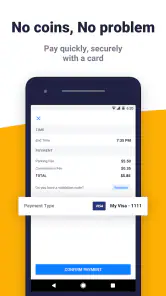
Passport Parking is a convenient mobile app that allows users to pay for parking directly from their smartphones. By entering the parking zone number displayed on signage, users can select their parking duration and pay using the app, eliminating the need for cash or physical parking meters. It also offers features like extending parking sessions remotely if time runs out.
Pros
- Easy to locate parking spots.
- Integration with multiple city parking systems.
- Quick payments with saved card.
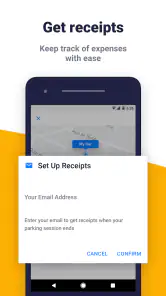
- Receipts and parking history available.
- Extend parking time remotely.
Cons
- Limited cities supported.
- Occasional GPS inaccuracies.
- App can crash unexpectedly.
- Customer support response time varies.
- Fees may apply for transactions.
- Category
- Maps & Navigation
- Version
- 9.6.2











