Partiful: Party Invite Maker
- 1.08K
- 4.9
- Installs
- 500.00K
- Price
- Free

Screenshots
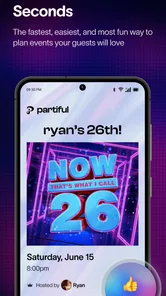
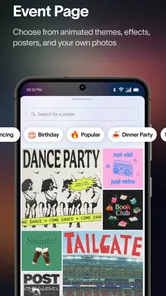
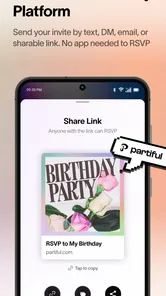
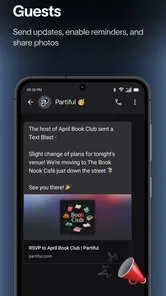




Analysis by Reviewed
When I need to organize a birthday, dinner, house gathering, or last-minute night out, the hardest part is rarely choosing the event. It is getting everyone to agree on the basics without turning a simple plan into a long message thread. Partiful: Party Invite Maker takes a focused approach to that problem: it gives social events a dedicated place instead of making the invitation compete with unrelated conversations.
I reviewed it as a lifestyle app from Partiful, and my first impression was that it is aimed at people who want an event to feel more deliberate than a casual text, but less formal than a traditional invitation service. The free download makes it easy to try, while optional in-app purchases range from $1.99 to $9.90 per item. Its Everyone age rating also makes it broadly approachable, although the kinds of events people create still require ordinary judgment from adults and families.
How Partiful fits into real household planning
The most useful way to understand this app is through a shared household example. Imagine one person is arranging a weekend dinner, another family member needs to know when guests will arrive, and someone else is trying to avoid scheduling a conflicting activity. A normal group chat can handle the conversation, but important details quickly disappear between jokes, replies, and unrelated messages. A dedicated party page gives the plan a clearer home.
I can see this being especially handy when several people in a household contribute to the same event. One person may know the guest list, another may know the practical details, and a third may simply need the final time and place. Instead of asking everyone to reconstruct the plan from separate messages, the organizer can point people toward one event-centered destination.
That does not mean it replaces every communication tool. If the gathering involves complicated travel, private family information, or a long-running project with many documents, a calendar, email thread, or messaging group may still be better. Partiful is strongest when the main job is making a social invitation understandable and easy to follow.
My advice is to decide who the actual organizer is before creating the event. On a shared device, several people may be tempted to start editing or building separate versions of the same plan. A quick household agreement about ownership prevents duplicated invitations and avoids the awkward situation where guests receive conflicting details.
What the setup feels like in practice
The appeal of a party invitation app is speed, but speed only helps if the setup stays clear. I would approach the first event by preparing the essentials before inviting anyone: the occasion, the date, the location, and the audience. That simple order matters because an attractive invitation cannot compensate for a missing or confusing practical detail.
More From Our News Desk

Weather by Xiaomi Review: Clear at a Glance, Less Clear Up Close

X Under Pressure: Can It Recover When Posting Goes Wrong?

Clash of Clans Is Won Between the Battles

Android Auto Makes the Case for Quieter Car Software

MobiOffice: Transforming Mobile Productivity with Seamless Integration

EA SPORTS FC™ Mobile Soccer: Redefining Mobile Sports Gaming
For shared-device use, account boundaries deserve attention. I would not casually leave one person’s account open on a tablet or phone that everyone uses, particularly if the device also contains personal conversations or event information. The app is designed for social planning, but a household still needs to separate personal responsibility from shared access.
This is also where the app may not suit every family. If different household members need completely independent event identities, or if several organizers regularly manage unrelated groups, a conventional calendar system with clearly separated accounts may offer more predictable organization. Partiful feels more natural for a specific social occasion than for acting as the household’s complete scheduling system.
One practical workflow is to create the event only after the household has agreed on the wording guests should see. That reduces later changes and makes the invitation feel intentional. I would also keep the public-facing description concise, then use direct conversation for anything sensitive or unusually complicated. The dedicated event should clarify the gathering, not become a storage place for private household details.
Coordination is where the app earns its place
The central strength here is coordination. A party invitation is not merely a decorative card; it is a shared reference point. When people are deciding whether they can attend, they need enough context to make a useful response. Keeping the event details together is more efficient than repeating the same explanation to each person.
I find this particularly valuable for plans that sit between informal and formal. A spontaneous coffee meetup may need nothing more than a message, while a larger birthday gathering benefits from a recognizable invitation. Partiful occupies that middle ground well: it adds structure without making the event feel like an administrative appointment.
There is a subtle trade-off, though. A dedicated invitation can create the expectation that the information is complete and current. If the organizer changes the plan in several different places, guests may still become confused. My recommendation is to treat the event page as the source of truth and avoid scattering important updates across multiple chats. If a change matters, update the main event and repeat it clearly to the people affected.
Another useful habit is separating confirmed information from tentative ideas. If the location is not final, I would avoid presenting it as settled. This is not a special feature claim; it is simply good event management. The app can make a plan easier to see, but it cannot decide which details are reliable or resolve disagreements between organizers.
For a household event, I would also assign practical jobs outside the invitation itself. One person can monitor responses, another can handle food, and another can answer questions from guests. That division keeps the organizer from becoming the only communication channel. Partiful helps people gather around the same event, but a smooth evening still depends on people knowing what they are responsible for.
Where it differs from group chats and calendars
Compared with a regular messaging app, Partiful gives the occasion a stronger identity. A group chat is excellent for quick back-and-forth discussion, especially when plans are still changing. Its weakness is discoverability: the important time, place, and invitation context can be buried. Partiful is the better choice when the event itself should remain easy to find.
Compared with a calendar, the emphasis is different. Calendars are built around time management, recurring commitments, and personal schedules. They are ideal for remembering an appointment or checking availability. Partiful is more socially expressive and event-centered. I would use a calendar to protect the time and this app to present the gathering to guests.
Traditional invitation services may be preferable for formal celebrations where visual stationery, printed materials, or a more ceremonial tone matter most. Partiful feels better suited to contemporary social plans where the invitation needs to be shared quickly and understood by a mixed group of friends, relatives, or acquaintances.
The trade-off is that a focused party tool may feel unnecessary for a tiny plan. If two people are meeting for lunch, a message is probably faster. If an event involves a large schedule, payments, travel bookings, or detailed task management, a combination of calendar, spreadsheet, and group communication may be more capable. The app makes the most sense when the invitation and the social coordination are the main problem.
Age, trust, and shared-device judgment
The Everyone rating means the app is presented as suitable for a broad audience, but that should not be mistaken for a guarantee that every event or interaction is appropriate for every person. A household should still consider who is organizing, who is being invited, and what information is being shared. Younger users may need an adult to review the event details and the guest context before anything is distributed.
I would be particularly careful with location information. A public gathering may require a clear meeting place, but a private home address should be shared thoughtfully and only with people who genuinely need it. The best invitation is not necessarily the one containing the most detail; it is the one that gives guests enough information without exposing more than necessary.
This is also why I would avoid treating a shared family phone as a neutral workspace. If multiple people can open the app, they may see event information intended for someone else or accidentally act on an invitation they do not own. Keeping personal accounts separate, locking the device when appropriate, and agreeing on who manages each event are sensible boundaries.
For teenagers, the app could be useful for organizing a supervised birthday or school-adjacent social gathering, but an adult should remain involved when the event includes unfamiliar guests, transportation, or a private residence. The age rating describes the app’s general content classification; it does not replace a parent or guardian’s decision about a particular plan.
Trust also matters among adults. An invitation can make a gathering feel official, but it does not independently verify attendees or guarantee that everyone will behave responsibly. I would use the app to coordinate people I already understand, and I would be cautious about treating an online response as proof of identity or reliability.
Useful habits that make the experience smoother
My first concrete tip is to write the invitation for someone who knows nothing about the plan. Include the occasion, the expected timing, the general setting, and any detail that changes whether a guest can attend. Avoid relying on inside knowledge from a family chat. This small test catches the most common coordination mistake: assuming everyone has seen the same conversation.
My second tip is to create a single “official” event rather than making a new one every time the plan changes. Rebuilding an invitation can split responses and leave some guests looking at an outdated version. Keeping one central event reduces that risk and gives the household a clear reference point.
My third tip is to use the app for the invitation layer, not for every layer of planning. If guests need travel directions, dietary coordination, or a detailed division of chores, keep those discussions organized separately and summarize only the necessary information in the event. This prevents the invitation from becoming cluttered while preserving a practical plan.
A fourth insight is that the organizer should perform a “guest perspective” check before sharing. Look at the invitation as if you had just received it: Is it obvious what the event is? Would you know whether you are expected to bring anything? Could you tell whom to contact with a question? This review is more valuable than spending extra time polishing wording that does not answer practical questions.
Finally, I would review the event after any major change and tell the household which version is current. This sounds obvious, but shared planning often fails because one person updates the time while another continues using the old message. A central invitation helps only when everyone treats it as the current reference.
Performance, cost, and expectations
The app is free to download, which lowers the barrier for trying it with one event before committing to a new planning habit. Optional purchases are listed between $1.99 and $9.90 per item, so I would check what an item does and whether it is genuinely useful for the occasion before paying. For a simple family dinner, I would expect the free experience to be the first thing worth evaluating.
Its current version is 3.8.14, and the listed minimum operating system is 7.0. Those requirements make it accessible to a wide range of devices, although real-world comfort still depends on the phone or tablet being used and on how familiar the household is with app-based invitations.
The public response is notably positive, with a 4.9 average from around 23,000 ratings and roughly 1,100 written reviews. It has also passed 500,000 installs. Those figures suggest that the concept resonates with many users, but they should not decide the choice by themselves. A highly rated invitation app can still be the wrong tool for someone who prefers paper invitations, avoids account-based services, or needs advanced scheduling rather than social presentation.
I also would not confuse popularity with universal simplicity. Guests may have different comfort levels with opening event invitations, responding digitally, or keeping up with updates. If the event includes people who rarely use apps, the organizer should be ready to communicate the essential details another way. The best tool is the one that leaves no important guest behind.
Who will appreciate it, and who should skip it
I would recommend Partiful to someone who regularly organizes birthdays, dinners, casual celebrations, or group outings and wants more structure than a message without the formality of a traditional invitation. It is especially appealing when several people need the same event details and the organizer wants the plan to feel like one coherent occasion.
It is also a good fit for households that share planning duties, provided they establish clear account and organizer boundaries first. The app can reduce repeated explanations and make the social side of an event easier to present. Its value increases when the guest list is large enough for a chat to become noisy but not so complex that the event requires a full project-management system.
I would skip it for a two-person plan, a highly formal ceremony, or an event that depends mainly on detailed logistics. I would also look elsewhere if the household needs a comprehensive shared calendar, recurring reminders, document storage, or strict separation between multiple organizers. Partiful is a party invitation tool, not a replacement for every system a family may use.
People who are uncomfortable sharing event information digitally should think carefully before adopting it. The app may make coordination easier, but the organizer remains responsible for deciding what to publish, who receives it, and how sensitive details are handled. That responsibility is manageable, but it should be part of the decision rather than an afterthought.
My household verdict
After looking at the app through the lens of everyday shared planning, I see a clear purpose: it gives a social event a home that is easier to recognize than a scattered conversation. That makes it useful for the moment when a casual idea becomes a real gathering and several people need the same information.
My main reservation is not about the invitation concept itself; it is about expectations. The app cannot replace careful communication, thoughtful privacy choices, or a proper calendar when scheduling becomes complicated. A household should decide who owns the event, keep the main details current, and avoid assuming that every guest has the same level of digital comfort.
For me, the strongest use case is a shared celebration where one person creates the invitation, another helps coordinate the practical details, and guests need a clear place to understand the plan. In that setting, the focused design feels more useful than a long chat and more personal than a bare calendar entry. If your goal is to make a social gathering easier to organize without making it feel overly formal, this is a recommendation I can stand behind.
Partiful is free to start, broadly age-rated, and developed by Partiful, with enough flexibility to fit ordinary household events while still leaving room for personal judgment. I would not install it as the only planning tool in a family’s digital life, but I would gladly use it for the right kind of gathering: one event, one clear source of details, and a group of guests who benefit from seeing the same plan.
Partiful: Party Invite Maker Frequently Asked Questions
Can I use Partiful to organize a casual get-together as well as a party?
Yes. Partiful is made for social events, so it can work for gatherings beyond a formal party. You can create an event page, add the key details, and share an invitation link with the people you want to invite. It is most useful when you want guests to find the event information and RSVP in one place rather than piecing details together across separate messages.
Can I edit an event after sharing its invitation?
You can manage event information after creating an invitation, which is useful if plans change or you need to clarify something for guests. Review the event page and any available editing controls, then share an update so invitees know what has changed. It is still a good idea to double-check important details before sending the original invitation, especially the date and location.
Does Partiful help me keep track of who is coming?
Yes. Partiful includes RSVP tracking, giving hosts a way to see guest responses through the event. This can make it easier to understand who plans to attend and to share relevant updates with invitees. Ask guests to respond through the invitation so their answers are easier to follow, and check the event page as plans develop rather than relying only on separate conversations.
Can I create an invitation before deciding how to share it?
Yes. You can set up an event and add its details before sending the invitation, then share it through a link or supported messaging platforms when you are ready. This lets you prepare the event page first and review the information you have entered. Take a moment to check the date, location, and description before sharing, since guests will use those details to plan.
What devices can run Partiful: Party Invite Maker?
Partiful is available for Android and iOS users, so it can suit hosts and guests using either mobile platform. The Android version requires Android 7.0 or later. If you are planning to use the app on a particular device, check that it meets the platform requirement before downloading; guests may also be able to open an invitation link in a mobile browser, depending on the invitation flow.
Pros
- Quickly create stylish digital invitations with customizable event details.
- Guests can RSVP easily without needing a printed invitation.
- Built-in event updates keep attendees informed in one place.
- Useful tools for sharing events through messages and social platforms.
- Interactive features can make party planning feel more engaging.
Cons
- Some advanced options may require account creation or personal information.
- The app is less useful for guests who prefer traditional invitations.
- Event visibility and sharing settings need careful review for privacy.
- Heavy image and social features may use significant mobile data.
- Availability of certain features can vary by region or device.











