

ParkChicago®
- 5.75K
- 4.6
- Installs
- 1.00M
- Price
- Free

Screenshots
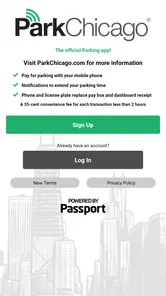
Analysis by Reviewed
The first time I use ParkChicago®, the appeal is easy to understand: I can pay for Chicago parking from my phone rather than search for change at the curb. That small convenience matters most when I have arrived late, the weather is unpleasant, or I need to get moving quickly. The app is free, and Chicago Parking Meters, LLC. develops it as a focused tool for drivers dealing with city parking.
Why it feels useful in the first week
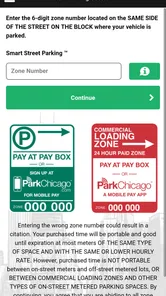
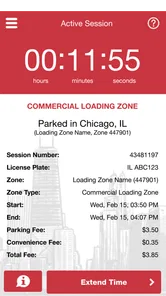
The routine is straightforward: check the parking zone, enter its number, choose a duration, and complete payment in the app. I would still pause to confirm the zone shown at the meter or on nearby signage; entering the wrong one can undermine the convenience. That quick double-check is a good habit, especially on unfamiliar blocks where it is easy to focus on traffic and overlook a sign.
For a first visit, the practical benefit is less about discovering a clever feature and more about removing a curbside chore. If I pull into a space before a meeting, I can handle payment without walking back to a meter. A reminder near the end of a session can also help me plan a return trip instead of relying on memory. It is a useful nudge, not a guarantee that I can stay longer: I still need to follow the posted rules and any limits that apply to the space.
A less rushed arrival makes a difference
I would set up the app before driving into a busy area, rather than trying to learn its steps with traffic behind me. On a first visit, it helps to know where I will find the zone number and to keep the car safely parked before handling payment. That little bit of preparation turns the phone from one more distraction into a practical alternative to walking back to a meter.
For a visitor who is unfamiliar with Chicago’s streets, the useful habit is to separate finding a space from paying for it. I would first choose a legal spot and read the nearby signs, then use the app to handle the payment. Treating those as two distinct decisions reduces the risk of rushing through the zone check simply because I am eager to get to an appointment.
The ParkChicago® Experience
Picture this: you're cruising down Michigan Avenue, and suddenly you spot a parking space. Instead of rummaging through your pockets for change or struggling with an outdated meter, you whip out the ParkChicago® app, and boom! You’ve snagged that spot faster than you can say "deep dish pizza." The app allows you to pay for parking from your phone, saving you from the hassle of carrying coins or cards.
Simple and User-Friendly
The interface is as smooth as a jazz tune at the Green Mill. It's designed with simplicity in mind, making it easy even for those who aren't tech-savvy. You just punch in your zone number, set your parking duration, and you're good to go. Plus, the app sends you reminders when your time is about to expire, so you can avoid those pesky parking tickets.
More From Our News Desk

 Weather - By Xiaomi
Weather by Xiaomi Review: Clear at a Glance, Less Clear Up Close
Xiaomi’s weather app makes everyday forecasts quick to scan, but its calm surface can leave useful details and recovery paths harder to find than they should be.

 X
XX Under Pressure: Can It Recover When Posting Goes Wrong?
A resilience-focused review of X, examining setup, mistaken posts, interruptions, weak connections, and the gaps that matter when recovery needs to be dependable.

 Clash of Clans
Clash of Clans Is Won Between the Battles
Its raids are quick; its community is a long-term project of coordination, teaching, rivalry, and shared responsibility—with all the friction that entails.

 Android Auto
Android Auto Makes the Case for Quieter Car Software
The car interface is no longer judged by how much it can do, but by how quietly it helps. Android Auto shows what drivers now expect—and what still gets in the way.

 MobiOffice: Word, Sheets, PDF
MobiOffice: Transforming Mobile Productivity with Seamless Integration
MobiOffice: Word, Sheets, PDF is redefining mobile productivity with a surprising blend of functionality and innovation.

 EA SPORTS FC Soccer Mobile 26
EA SPORTS FC™ Mobile Soccer: Redefining Mobile Sports Gaming
Dive into EA SPORTS FC™ Mobile Soccer, where immersive gameplay and strategic depth transform mobile sports gaming.
Latest News



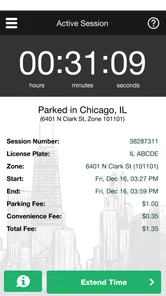
A realistic use case is a short errand that turns into an unexpectedly long stop. If I have enough time left and the space allows it, being able to extend a session from my phone is more convenient than returning to the curb. But I would not treat that as permission to outstay a posted restriction. Before relying on an extension, I would check the signs and the app’s available choices; a phone payment cannot change the rules for that location.
Real-Time Updates and Features
One of the features that I absolutely love is the real-time updates. It’s like having a parking assistant in your pocket. The app informs you about parking availability in different areas, so you can plan ahead and save precious minutes. It even offers a map view, showing you all the available parking zones around you.
That map is most helpful as a planning aid, not a promise that a convenient space will be waiting when I arrive. Street parking changes quickly, and I would use the view to orient myself around zones rather than circle a block expecting a guaranteed opening. Compared with a general navigation app, ParkChicago is more directly about handling city parking payments; a broader map or navigation tool is still the better companion for routing a full trip or comparing ways to get across town.
Using the map without overrelying on it
When I am deciding where to park, I would use the map to get a sense of nearby zones, then make the final choice from what I can actually see on the street. A mapped zone can help me plan a short walk from the car to a destination, but it cannot tell me that a particular curb space is open when I arrive. This distinction matters most during a tight schedule: I would allow time to find a legal space instead of treating the map as a live reservation.
There is also a useful trade-off between convenience and attention. The app can simplify payment once I have parked, but it does not remove the need to read signs, notice restrictions, or judge whether a spot works for my plans. I see that as a sensible boundary for a parking-payment tool, not a failure—but anyone expecting an app to choose a legal space and manage every part of parking should look elsewhere for that broader help.
Convenience at Its Best
But wait, there’s more! The app keeps a record of your parking history, which is super handy for business folks who need to keep track of their expenses. You can even save your favorite zones for quick access the next time you’re in the area. It’s a small feature, but it saves a ton of time and effort.
The saved-zone option becomes more valuable after the novelty wears off. If I repeatedly park near the same workplace, appointment, or family destination, a familiar zone can make the next payment quicker. I would still verify the number each time, since a favorite is a shortcut rather than proof that I have parked in the same zone. For someone who drives into Chicago only occasionally, that benefit may be modest; a meter payment may be simpler than adding another app to an already crowded phone.
Who gets the most from recurring use
The best fit is not necessarily someone who drives every day. It is someone whose trips often involve Chicago street parking and whose usual destinations repeat enough for the basic routine to become familiar. A person visiting several times for appointments, errands, or work can benefit from having payment history and familiar zones in one place, even if each individual visit is short.
By contrast, if I were in town for one quick stop and had easy access to a meter, I might choose the curbside option rather than install and set up an app I may not use again. The choice is less about which method is universally better and more about how often the same parking task comes around. ParkChicago earns its place through repetition, not through a need to explore it for entertainment.
What the routine asks of you
Like any payment app, it works best when I have my phone ready and can complete the steps calmly. If the battery is low, the connection is unreliable, or I am juggling bags and passengers, the curbside process can feel less convenient than it sounds. I would set up the app before a busy arrival, rather than trying to learn it while blocking traffic or standing in a hurry. Keeping the meter as a fallback is sensible, particularly when a phone issue could otherwise leave me uncertain about payment.
There is a maintenance habit here, though it is a light one: keep the app available, make sure the phone is usable, and avoid waiting until the last moment to sort out payment. I would also take a moment after completing a payment to make sure the session details match the space I chose. That check costs little time and is more useful than assuming a familiar routine makes errors impossible.
For a longer day with several stops, I would treat each parking session as its own task rather than assume the previous choice carries over. At every new space, I would recheck the posted information and zone before paying. This is especially worthwhile when moving between nearby streets, where a short drive does not necessarily mean the parking details are unchanged.
Where another tool may be better
ParkChicago has a narrower job than a general navigation app. If I am planning a route, comparing travel options, or trying to understand how to reach several stops, I would use a broader map or navigation tool for that work. Once I have found an appropriate parking space in Chicago, this app makes more sense as the focused payment companion. Using both is not redundant if I need directions as well as a way to pay.
Someone who prefers not to rely on a phone for curbside tasks may be more comfortable using a meter when that option suits the location. And a driver who rarely parks in Chicago may not get enough repeat value to make a dedicated app feel worthwhile. The focused design is an advantage for regular local parking, but it also means this is not a universal parking assistant for trips beyond its purpose.
ParkChicago is most useful for people who park in Chicago often enough to build a routine: commuters, regular visitors, and anyone making repeated appointments across the city. It is less compelling for someone who rarely drives there, prefers cash, or wants one app to plan every part of a journey. Its narrow focus is also its strength: it can streamline parking payment, but it does not replace careful sign-reading, route planning, or the judgment needed to choose a legal space.
When the day does not go to plan
Suppose I park before an appointment that may run over. The reminder can prompt me to check my situation, and an available extension may help when the space and its rules allow it. I would still make the decision based on the signs and the options shown for that session, not on the assumption that the app can override a time limit. If a stop becomes unpredictable, the tool can help me respond, but it cannot make the schedule or the parking rules more flexible.
That is why I would not rely on a reminder as my only plan for a day with back-to-back commitments. I would keep an eye on the time myself and leave room to return to the car or make another arrangement if needed. The reminder is a useful backup to attention, not a substitute for it.
Now, I know what some of you might be thinking: "Do I really need another app on my phone?" Trust me, if you drive in Chicago, the answer is a resounding yes. It’s not just about parking; it’s about reclaiming your time and sanity in a city that’s always on the move.
What may become tiring over time
The repeated zone check is the main source of friction I would expect from regular use. Familiar places make payment faster, but they can also tempt me to skip the confirmation that keeps a favorite zone from becoming a careless default. The other small burden is having the phone ready whenever I arrive. Neither issue is unusual for a phone-based payment routine, but they matter if I want the convenience to remain dependable rather than automatic in the wrong way.
I also would not judge the app by whether it makes every parking trip effortless. Finding a space, understanding the signs, and deciding how long I can stay remain the parts that take attention. The app’s value is narrower and more practical: it can make payment less of a curbside chore once I have made those decisions. If that is the part I want to simplify, the routine can stay useful; if I expect it to remove the uncertainty of city parking, frustration is more likely.
Does it earn a lasting place?
My verdict is that it can, provided Chicago street parking is part of your regular routine. The app has a 4.6 average from around 20,000 ratings, and more than a million installs suggest it has found a broad audience. It is rated for Everyone, runs on Android 4.4 or later, and version 7.1.1 is the current release. Those details make it accessible to many Android users, though I would check compatibility on an older phone before depending on it for a trip.
What keeps it useful month to month is repetition: payment, reminders, and familiar zones can make recurring stops less of a hassle. What can wear thin is the need to pay attention at the curb and keep the phone available. I would keep it if I regularly park in Chicago, but I would not install it just for a single visit unless phone payment is especially important to me. The lasting value is practical rather than exciting—and for a parking app, that is a fair standard to meet.
For me, that is the right way to judge whether it deserves space on a phone: not by the first convenient payment alone, but by whether the next several Chicago parking trips feel easier without making me careless. If the same payment task keeps returning, the familiar workflow and history can justify keeping it installed. If those trips are rare, a meter or a general navigation app for the wider journey may be enough. I would choose it for a recurring local routine, while keeping the street signs—not the app—as the final authority on where and how long I can park.
ParkChicago® Frequently Asked Questions
What should I check before installing ParkChicago® on my phone?
ParkChicago® is a Maps & Navigation app for managing metered parking in Chicago. Before downloading, check that your phone’s operating system is compatible: the Android version listed for the app requires Android 4.4 or later. The app is free to download and is rated for Everyone, so the main practical consideration is whether you want a phone-based option for handling Chicago parking.
Do I need an account or payment method to use ParkChicago®?
ParkChicago® is designed to let drivers pay for metered parking from a smartphone, so using it for parking payments involves providing payment details through the app. You may also need to complete the app’s setup steps before managing a parking session. Review the prompts and payment information carefully as you set it up, and make sure you are comfortable with the details requested before proceeding.
Can ParkChicago® be used outside Chicago?
ParkChicago® is focused on metered parking in Chicago, rather than serving as a general parking-payment app for every city. Its purpose is to help users manage parking sessions associated with Chicago parking. If you are planning to park elsewhere, check the local parking options and rules instead of assuming ParkChicago® will handle payment there.
Is ParkChicago® free to download, and what should I know about parking costs?
ParkChicago® is free to download, and its age rating is Everyone. The app itself being free does not mean parking is free: users pay for metered parking through the app, and convenience fees may apply to certain transactions. Before confirming a payment, review the amount and any applicable charges shown in the app so you know what you are paying.
What is ParkChicago® and how does it work?
ParkChicago® is a convenient mobile application designed to simplify parking in the city of Chicago. It allows users to pay for metered parking directly from their smartphones. After downloading the app, users can easily locate parking spots, manage their parking sessions, and extend time remotely without the need for cash or physical parking meters.
Pros
- User-friendly interface for easy parking management.
- Real-time parking availability updates.
- Secure payment options via the app.
- Offers reminders for parking expiration.
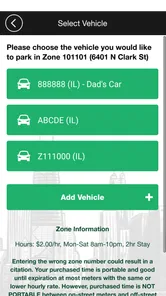
- Supports multiple vehicle profiles.
Cons
- Limited to Chicago area only.
- Occasional app crashes reported.
- In-app ads can be intrusive.
- Requires internet for full functionality.
- Account setup can be time-consuming.











