

Pango Parking
- 527.00
- 3.2
- Installs
- 100.00K
- Price
- Free

Screenshots
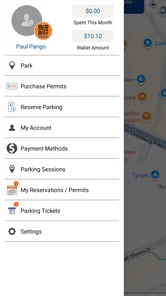
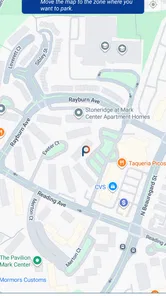
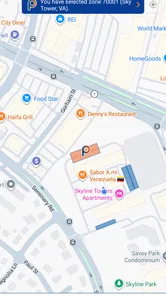
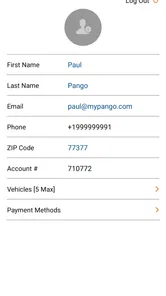
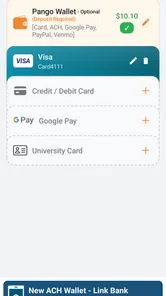
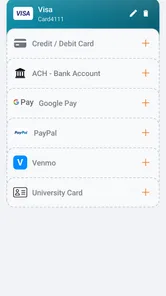
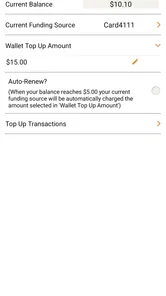
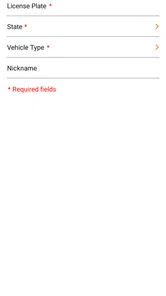
Analysis by Reviewed
Parking apps are useful only when they reduce stress at the exact moment I need them. I do not want to circle a busy street, guess whether a meter accepts my card, and then hurry back before time runs out. After trying Pango Parking, I found a focused Maps & Navigation app built around paying for parking rather than replacing a full navigation service. That narrow purpose is also its main strength: when the location supports Pango, the app can make the payment part of parking much less awkward.
The app comes from Mobile Smart City Corp and is free to use. It is rated for Everyone, runs on Android 7.0 or later, and the current version is 6.4.6. Its average rating sits at 3.2 from around 856 ratings, while the download count has passed 100K. Those figures suggest a useful but not universally loved service, and that matches my impression: the experience depends heavily on whether the parking area around me is part of the Pango system and whether I am comfortable managing the session from my phone.
How Pango Parking feels in everyday use
I find Pango Parking most useful when a car is shared and the person driving needs to handle a parking session without relying on whoever usually manages the household’s errands. In this section, I’ll focus on the small checks that make that arrangement less error-prone, especially when more than one vehicle or driver is involved. That naturally raises a separate question: whose account and payment details should be used?
A focused tool rather than a complete city guide
The first thing I noticed is that Pango Parking is not trying to be Google Maps, Apple Maps, or a general travel planner. I would not open it to compare walking routes, inspect traffic, or plan a long drive. I use it at the final stage of a trip, when the car is already near a parking space and I need to handle payment.
That distinction matters. People sometimes expect a parking app to locate every available space, guarantee an open spot, and guide them door to door. Pango Parking should be judged more modestly. Its practical job is to connect a driver with supported parking payment, so the value appears after I have found somewhere to leave the car.
In a realistic weekday situation, I might arrive downtown for a short appointment. Instead of searching for coins or standing beside a meter while holding a bag, I can check whether the location works with Pango, enter the parking details, and start the session. The benefit is not dramatic technology; it is avoiding a small chain of interruptions when I am already in a hurry.
The setup habits that make the biggest difference
I recommend preparing the app before arriving at a busy curb. Creating or checking an account, reviewing the payment details, and becoming familiar with the parking-area selection are much easier while sitting at home than beside traffic. This is one of the less obvious trade-offs: the app can simplify the final payment, but only if I do the administrative work before the stressful moment.
More From Our News Desk

 Weather - By Xiaomi
Weather by Xiaomi Review: Clear at a Glance, Less Clear Up Close
Xiaomi’s weather app makes everyday forecasts quick to scan, but its calm surface can leave useful details and recovery paths harder to find than they should be.

 X
XX Under Pressure: Can It Recover When Posting Goes Wrong?
A resilience-focused review of X, examining setup, mistaken posts, interruptions, weak connections, and the gaps that matter when recovery needs to be dependable.

 Clash of Clans
Clash of Clans Is Won Between the Battles
Its raids are quick; its community is a long-term project of coordination, teaching, rivalry, and shared responsibility—with all the friction that entails.

 Android Auto
Android Auto Makes the Case for Quieter Car Software
The car interface is no longer judged by how much it can do, but by how quietly it helps. Android Auto shows what drivers now expect—and what still gets in the way.

 MobiOffice: Word, Sheets, PDF
MobiOffice: Transforming Mobile Productivity with Seamless Integration
MobiOffice: Word, Sheets, PDF is redefining mobile productivity with a surprising blend of functionality and innovation.

 EA SPORTS FC Soccer Mobile 26
EA SPORTS FC™ Mobile Soccer: Redefining Mobile Sports Gaming
Dive into EA SPORTS FC™ Mobile Soccer, where immersive gameplay and strategic depth transform mobile sports gaming.
Latest News



I also keep the vehicle information and the location details close at hand. A rushed entry is where mistakes become expensive or inconvenient. If several nearby streets use different parking areas, I slow down and verify the exact zone rather than choosing the first matching name. A parking app is only as helpful as the location selected inside it.
My best practical tip is to treat the first use as a setup task, not an emergency tool. Open it at home, understand the screens, and make sure the account is ready. That preparation makes the app feel far more convenient than downloading it for the first time after pulling into a crowded street.
Starting and managing a parking session
The central workflow is straightforward in concept: identify the supported parking location, begin payment, and keep track of the active session. I like the idea of managing time from the phone because it removes the need to return to a physical meter simply to extend a stay. That can be especially helpful during a meeting, a meal, or an appointment that runs longer than expected.
Still, I do not treat a phone-based session as permission to forget about parking completely. I check the selected area, the vehicle details, and the end time before walking away. If I am near the end of a session, I look at the app rather than relying on memory. The convenience is real, but it shifts responsibility from watching a meter to monitoring a digital record.
This is also where Pango Parking differs from paying at a traditional machine. A meter gives me a physical display and a familiar stop point. Pango gives me more flexibility, but the confirmation is inside the phone. Anyone who regularly ignores notifications or leaves the phone battery low may find the old-fashioned method more dependable for simple, short stops.
What the current version tells me about its direction
The current version, 6.4.6, shows that the app has continued through multiple iterations since its release on October 17, 2016. That history is relevant because parking payment is a service where small interface changes can affect confidence: clearer location selection, smoother session handling, and fewer confusing steps matter more than flashy design.
I see the present release as a mature continuation of a focused parking utility rather than a reinvention of the category. Existing users who already understand the workflow are likely to value stability and familiarity. New users may need a little patience while learning the app’s terminology and deciding when the digital process is preferable to a meter or a payment kiosk.
I would not assume that a newer version automatically solves every local parking problem. An update can improve the product experience, but it cannot make an unsupported street part of the system. The most important evidence for me remains what happens at the specific destination where I intend to park.
How it compares with the usual alternatives
Compared with a physical meter, Pango Parking is more convenient when I need to extend a session without walking back to the car. It is less convenient when my phone is nearly dead, my connection is unreliable, or I prefer a visible paper or machine receipt. The choice is not about which method is universally better; it depends on how much flexibility I need.
Compared with a general mapping app, Pango is more specialized. A mapping app is better for finding the destination, estimating travel time, and understanding the surrounding streets. Pango is better suited to the payment step when the parking location supports it. I often see them as complementary rather than competing tools: one helps me arrive, and the other handles the parking transaction.
Compared with a city-specific parking service, Pango may be attractive to someone who visits several places using the same system. On the other hand, a local municipal app can be the better choice when a particular city builds its parking rules, permits, or enforcement information around that service. I would check the accepted payment method and the exact parking operator before deciding which app deserves space on my phone.
Who will get the most value from it
Pango Parking makes the most sense for drivers who regularly park in supported areas and dislike returning to a meter. It is also useful for people who want to handle a parking session from their phone during a meeting or appointment. Visitors who make repeated trips to the same participating area may appreciate having a familiar process instead of learning a new machine each time.
The app is less convincing for someone who rarely drives, parks mostly in private garages with their own payment systems, or expects one application to show every parking option in a city. It is also not my first recommendation for a person who does not want to create a digital routine around parking. In that case, a meter or kiosk can be simpler, provided one is available and accepts the preferred payment method.
Families and shared-car users should think carefully about vehicle selection before starting a session. The convenience of remote management can become a weakness if the wrong car is attached to the payment. I would build a quick check into the routine: confirm the vehicle, confirm the area, then confirm the duration. That extra pause is more valuable than rushing through the screens.
Small frictions that affect trust
The average score of 3.2 tells me that the app experience is mixed for a meaningful portion of users. I do not read that as proof that the service is poor everywhere, because parking systems vary by location and local rules can shape the experience. I do read it as a reason to test Pango before depending on it for an important appointment.
My main concern is the dependency chain. The phone must be available, the account must be ready, the correct location must be selected, and the parking area must support the service. If any link fails, I still need a backup plan. I would not arrive at an unfamiliar hospital, airport, or time-sensitive event assuming that a parking app alone will solve the entire problem.
Another limitation is mental rather than technical: digital payment can make parking feel invisible. With a physical meter, I see the time and the amount directly. In an app, I have to make a deliberate habit of checking the active session and its end point. For me, that means reviewing the session immediately after starting it and again before leaving the venue.
What I would like existing users to watch
People who already use Pango Parking should pay attention to how the current version handles their established routine. After an update, I would personally verify that the vehicle information, payment setup, and familiar parking locations still appear as expected before relying on the app in a crowded area. This is a sensible check for any payment-related application, especially one used under time pressure.
I would also watch for changes in how clearly the app presents location and session status. Those are the details that affect real-world confidence. A new visual style matters less to me than knowing whether I am paying for the right area and whether I can tell when the session ends.
For new users, I would start with a low-pressure parking trip. That lets me learn the process without risking a missed appointment or an unfamiliar enforcement area. Once the workflow feels natural, the app becomes more useful for longer visits where the ability to manage parking remotely is genuinely valuable.
My overall recommendation
I see Pango Parking as a practical specialist, not an all-purpose driving companion. When I am in a supported parking area, already have the account prepared, and want to manage payment from my phone, it can remove several annoying steps from the day. Its free price and Everyone age rating make it easy to try, while the Android 7.0 requirement keeps it accessible to many older devices.
I would recommend it to regular users of participating parking locations, especially those who often need to extend a session without returning to the car. I would skip it if I expected universal coverage, detailed navigation, guaranteed parking availability, or a completely hands-off experience. A traditional meter, a garage’s own system, or a general map app may be better in those situations.
My final view is cautiously positive. The app’s value comes from a very specific moment: turning a parking stop into a manageable phone task. That is enough to make it worthwhile for the right driver, but not enough to replace every parking method. I would install it, prepare it before the first important trip, and keep a simple backup habit. Used that way, Pango Parking feels like a useful convenience rather than something I would trust blindly.
Pango Parking Frequently Asked Questions
Is Pango Parking free to download, and which devices can run it?
Pango Parking is free to download and is designed for phones running Android 7.0 or later. It is a Maps & Navigation app from Mobile Smart City Corp, intended to make parking payments easier to manage from a smartphone. Before installing, check that your device’s operating system meets the minimum requirement and that the app is available for your device.
Is Pango Parking suitable for all ages, and what do users think of it?
Pango Parking has an Everyone content rating, so it is considered suitable for a broad audience. Its average rating is 3.2 from around 856 ratings, with 527 reviews, which gives prospective users a sense of the range of feedback. Experiences can differ by city and parking operator, so consider whether the service supports the places where you usually park.
What is Pango Parking and how does it work?
Pango Parking is a mobile parking service that helps drivers find, pay for, and manage parking through their smartphone. Depending on the location, you can enter a zone or space number, choose how long you want to stay, and complete payment in the app. Availability and features may vary between cities and participating parking operators.
Is Pango Parking available in every city or parking lot?
No. Pango Parking is only available in participating cities, streets, garages, and parking facilities. Before relying on the app, check whether your destination is supported and confirm that the displayed zone or location matches the place where you are parked. Local parking signs and regulations always take priority over information shown in the application.
How do payments and parking extensions work in Pango Parking?
Pango Parking generally allows users to pay for parking with a supported payment method saved to their account. After selecting the correct location and duration, the app displays the expected charge before confirmation. In supported areas, you may extend your session remotely, but extensions are subject to maximum time limits, local rules, and available payment options.
Pros
- Shows nearby parking options with clear location details.
- Useful for comparing parking availability before starting a trip.
- Can reduce time spent searching for a space in busy areas.
- Convenient for drivers who regularly park in unfamiliar locations.
- Simple interface makes essential parking information easy to find.
Cons
- Coverage may vary significantly between cities and parking providers.
- Availability information may not always update in real time.
- Some features or bookings may require an account or extra fees.
- Navigation depends on accurate GPS and a stable internet connection.
- Parking rules
- prices
- and restrictions can change after listing updates.











