

OxideSieve - DustClear
- 3.00
- 4.2
- Installs
- 10.00K
- Price
- Free

Screenshots
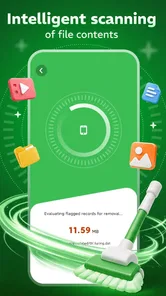
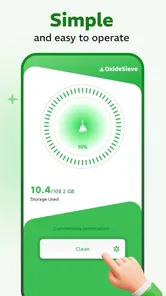
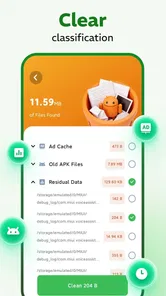
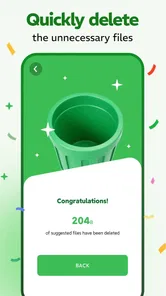
Analysis by Reviewed
I approached OxideSieve - DustClear as a practical tools app rather than something designed to keep me entertained. Its purpose is presented as storage refinement and filtration, which immediately puts it in the category of utilities I would open when my phone feels cluttered or when I want a more orderly view of what is taking up space. That narrow focus is useful: I do not have to sort through unrelated features before getting to the storage task.
What makes the app worth considering is not simply that it is free. The more important question is whether its way of presenting storage information works for the person holding the phone. In my experience, a cleanup utility can be technically capable and still frustrating if its labels are cramped, its actions are unclear, or it expects fast, precise taps. I therefore paid close attention to how approachable the experience feels for different abilities, screen sizes, and everyday situations.
How OxideSieve - DustClear feels to use across different needs
I find OxideSieve - DustClear easiest to judge by the way its focused storage-filtering purpose can fit different routines, rather than by expecting it to replace every phone-maintenance tool. In this section, I would consider how a user can make a careful review more manageable by setting a small goal and choosing a calm moment. That approach also helps clarify when a broader or more familiar alternative may be a better fit.
A focused starting point helps readability
The short name, OxideSieve, does not explain much by itself, but the DustClear identity gives the app a more understandable direction: it suggests removing unwanted digital residue rather than managing every part of a phone. That distinction matters for readability because a focused tool is easier to explain to a family member or less confident phone user than a broad “optimization” app filled with technical language.
I would describe the app to a new user as a storage inspection and filtering utility. That plain explanation is more useful than promising that it will make a phone magically faster. People who need a simple reason to open an app can understand the basic job without learning specialist terms first.
The strongest accessibility advantage here is the limited scope. A person who has difficulty remembering multi-step procedures may find a dedicated storage tool easier to revisit than a collection of unrelated maintenance controls. It also reduces the mental effort involved in deciding where to begin. When I am troubleshooting a nearly full phone, I want the app to keep my attention on identifying removable material, not on comparing a long list of vaguely named modes.
At the same time, storage work is naturally information-heavy. Files, categories, filters, and cleanup decisions can become confusing when the screen presents too much at once. I would take time to read each label before confirming an action, especially if I were helping someone with limited technical confidence. A clean-looking screen is not enough on its own; the wording needs to distinguish inspection from deletion clearly.
More From Our News Desk

 Gmail
GmailGmail in a Busy Inbox: Who Benefits Most?
From first account to crowded workday, Gmail earns its place through dependable search and flexible sorting—but its best fit depends on how much inbox maintenance you can tolerate.

 Prime Video
Switching to Prime Video: What Changes in Your Viewing Routine
Prime Video can make a compelling second home for streaming, but switching means learning a different catalog, rental layer, and route from browsing to playback.

 Universal TV Remote Control
Universal TV Remote Control Works Best as a Reliable Backup
A phone remote earns its place through quick setup and reliable habits. Here is how to get more from Universal TV Remote Control—and where its limits show.

 Weather - By Xiaomi
Weather by Xiaomi Review: Clear at a Glance, Less Clear Up Close
Xiaomi’s weather app makes everyday forecasts quick to scan, but its calm surface can leave useful details and recovery paths harder to find than they should be.

 X
XX Under Pressure: Can It Recover When Posting Goes Wrong?
A resilience-focused review of X, examining setup, mistaken posts, interruptions, weak connections, and the gaps that matter when recovery needs to be dependable.

 Clash of Clans
Clash of Clans Is Won Between the Battles
Its raids are quick; its community is a long-term project of coordination, teaching, rivalry, and shared responsibility—with all the friction that entails.
Latest News



For users with reduced vision, I would use the phone’s own display enlargement and text-size settings where available, then check whether the app remains comfortable to scan. A utility based on lists or categories should be judged by whether important distinctions remain understandable when text is enlarged. I would not rely on color alone to identify a safe choice, a filtered result, or an item selected for removal.
That is also good practice for users with color-vision differences. Storage tools should communicate meaning through words, position, or recognizable controls rather than expecting the user to interpret a red-versus-green signal instantly. If a person has to zoom in or reread a label, that is a small but worthwhile pause before making an irreversible decision.
Navigation and decision-making need patience
I found the app’s value easiest to understand when I treated it as a review step rather than an automatic cleaner. I would open it, examine what it identifies, narrow the view to the material I actually recognize, and only then decide what deserves attention. That workflow is more inclusive than rushing through a single large cleanup command because it gives users time to process each choice.
This slower approach is especially helpful for people who use screen readers, alternative input methods, or magnification. Moving through a long result set can take more time with spoken feedback or switch access than it does with direct tapping. A user should not feel pressured to act quickly simply because the app is designed around storage maintenance.
One practical tip is to avoid using the tool while distracted. If I am standing on public transport, walking between appointments, or answering messages at the same time, I am more likely to misread a filename or select something I wanted to keep. The app is better suited to a calm review session where I can pause, inspect, and return to the previous screen when necessary.
Another useful habit is to begin with familiar clutter. Instead of trying to understand every category immediately, I would start by looking for items I already know are disposable, such as material created for a temporary task. This gives a cautious user a way to learn the app’s presentation without making a large decision at once. It also reduces the risk that an unfamiliar label will be mistaken for an unimportant file.
I would not hand the phone to a child and ask them to “clean it up” without supervision. The app has an Everyone content rating, but that describes suitability of content, not the ability to make safe storage decisions. A young user may understand the buttons perfectly and still not know which files matter.
Motor and sensory considerations in real use
Storage utilities can be demanding for users with tremors, limited dexterity, joint pain, or difficulty performing repeated taps. A process that requires selecting many small rows may become tiring even when the underlying idea is simple. My recommendation would be to use the app in short sessions and review a manageable group at a time rather than attempting a complete phone audit in one sitting.
A stylus can help someone who struggles with finger accuracy, provided the phone and the person’s usual setup support one comfortably. Voice control may also help with navigation at the operating-system level, although I would not assume that every in-app action can be completed by voice. The safest expectation is that some confirmation or selection steps may still require touch.
Users with photosensitivity or sensory sensitivity may prefer a lower-distraction environment, such as a dim room with the phone’s brightness adjusted to a comfortable level. I would also avoid interpreting motion, color changes, or visual emphasis as the only confirmation that an action worked. A clear textual result is more dependable for people who do not process visual cues quickly.
For someone with cognitive fatigue, the most useful strategy is to define a small goal before opening the app. I might decide to inspect only one type of storage residue, then stop and check the result. This turns a potentially overwhelming maintenance task into a short routine. The trade-off is that it takes longer overall, but the deliberate pace is safer and easier to remember.
People who use hearing aids or who cannot rely on sound should be comfortable treating the app as a visual tool. I would not base an important cleanup decision on an alert sound alone. Conversely, users who benefit from spoken feedback should keep their device’s accessibility features active and check whether the app’s labels are announced in an understandable order.
Situational access: where this tool fits best
The clearest everyday scenario is a phone that has accumulated temporary downloads, leftover material from past tasks, or other storage clutter. Imagine preparing for a trip and discovering that the device has little room for new photos. I would use OxideSieve - DustClear before the journey, when I still have time to inspect results carefully, rather than waiting until the camera refuses to save an important moment.
That timing is important for accessibility too. A person with limited stamina may need breaks, and someone who depends on assistance may need another person available to explain an unfamiliar item. Running the review early leaves room for those pauses. It also avoids the pressure of making storage decisions while standing in a queue, sitting in a noisy station, or dealing with a low-battery warning.
The app may also suit a shared-support arrangement. A relative, carer, or technically confident friend can sit beside the phone owner and discuss each category without taking over the entire device. I prefer this collaborative approach to silently deleting material on someone else’s behalf, because the owner remains involved in deciding what is useful.
For older phones, the minimum operating-system requirement is Android 8.0, so compatibility is relevant before anyone plans a cleanup session. A person using an older device should check that basic requirement first. The app is free, which removes a purchase barrier for users who need a straightforward utility without adding another expense to a tight household budget.
The developer is SAVOY SL, and the current release is version 1.0.2. Those details are useful when a user is checking that they have the intended app and not a similarly named tool. I would also keep the app updated through the normal store process when possible, since maintenance utilities need to remain compatible with the phone’s storage behavior and operating system.
With over ten thousand installs and a 4.3 average from around forty ratings, the app has enough early use to suggest that people are finding value in it, while the relatively small review volume tells me to keep expectations measured. I would try it on a non-critical cleanup task first instead of making it the only method for an urgent storage problem.
Where the usual alternatives may be better
The built-in storage screen on many Android phones remains the better first choice for users who want the most direct connection to system settings. It is already part of the device, usually follows the phone maker’s navigation conventions, and may be more familiar to someone who relies on established accessibility gestures. If a user only needs to see broad storage usage, installing a separate utility may add unnecessary complexity.
A file manager is preferable when the main task is moving, renaming, copying, or organizing individual files. That kind of tool gives more manual control, which can be valuable for a careful user who wants to preserve a folder structure. The trade-off is that file managers can expose more technical detail and demand more decisions. OxideSieve - DustClear is more appealing when the user wants refinement and filtering rather than full file administration.
Automatic cleaner apps can be faster for people who prioritize convenience, but speed is not always the same as clarity. I would choose this app over an aggressive cleaner when I want to understand what I am reviewing before acting. On the other hand, a user who needs a one-tap routine, cloud backup integration, duplicate-photo handling, or a broader device-management suite may be better served by another category of tool.
There is also a privacy and trust consideration with every storage utility: the app is being used around personal files. I would read each permission prompt and avoid granting access that does not make sense for the task. I would not assume that a storage-focused name automatically means every cleanup suggestion is safe. The responsible workflow is still to inspect, confirm, and keep a backup of anything important.
Remaining barriers before I would recommend it widely
The biggest barrier is the possibility of uncertainty at the moment of deletion or refinement. A user with limited vision, limited dexterity, or cognitive fatigue needs controls that are easy to distinguish and confirmations that are impossible to misunderstand. If the app presents dense lists or relies heavily on small touch targets, the experience may become tiring even though the task itself is useful.
Another barrier is the gap between a tool’s narrow purpose and a user’s broader expectations. Someone may install it hoping to solve slow performance, battery drain, duplicate images, or application management all at once. I would set expectations carefully: this is a storage refinement utility, not a complete answer to every phone-maintenance problem. That clarity prevents frustration and helps users choose the right tool for the actual issue.
Users who need extensive hands-free control should test the navigation with their preferred accessibility setup before depending on it. The same applies to people who need very large text, strong contrast, or a highly predictable focus order. These users should not be expected to compromise safety just to complete a cleanup task; if the app does not fit their interaction style, the phone’s built-in storage controls may be the more practical option.
I would also avoid using it during an emergency. If a person needs space immediately for a medical recording, a work file, or a critical photo, manual removal of a clearly identified item may be safer than beginning an unfamiliar filtering process. OxideSieve - DustClear makes more sense as part of regular maintenance, when the user can work slowly and verify the result.
My inclusive verdict
I see OxideSieve - DustClear as a focused, approachable option for Android users who want help reviewing storage without committing to a large maintenance suite. Its free price and Everyone rating make it easy to consider, while its storage-specific purpose gives it a clearer starting point than many overloaded utility apps. I especially like the idea of using it as a deliberate inspection tool rather than treating cleanup as an automatic command.
For me, the best audience is someone who has a specific storage problem, prefers guided filtering to manual folder management, and is willing to check results before confirming an action. It can also work well in a supported session with a family member or carer, provided the phone owner remains part of every decision.
I would skip it in favor of built-in Android storage controls if familiarity, screen-reader predictability, or minimum interaction is the priority. I would choose a full file manager when I need detailed organization, and a broader maintenance suite when storage is only one part of a larger problem. Those are not failures of this app; they are signs that its focused role should be respected.
My final advice is to start with a low-risk review, use the device’s accessibility settings to improve readability, enlarge the display if needed, and work in a quiet moment rather than under pressure. The most inclusive way to use this app is to make every cleanup decision visible, understandable, and reversible whenever possible. With that cautious approach, OxideSieve - DustClear is a sensible free tool for people who want a more manageable path through storage clutter, although users with demanding hands-free or high-contrast needs should compare it with the phone’s own controls before making it part of their routine.
OxideSieve - DustClear Frequently Asked Questions
Which devices can run OxideSieve - DustClear?
OxideSieve - DustClear is a tools app for Android, and it requires Android 8.0 or later. Check your phone or tablet’s system version before installing so you can avoid compatibility issues. If your device meets the requirement, you can consider whether its storage-management purpose fits your needs and review the app’s available features before using it.
Who makes OxideSieve - DustClear, and how widely is it used?
The app is developed by SAVOY SL. It has reached over 10,000 installs and has an average rating of 4.3 from 38 ratings, offering a helpful snapshot of its store presence. User feedback can still vary, so it is worth reading recent reviews and considering whether the app’s approach to storage management matches what you want before downloading.
What is OxideSieve - DustClear, and what does it do?
OxideSieve - DustClear is a free tools app described as a storage refinement and filtration utility. It appears focused on helping users identify and manage unwanted files, temporary data, or other items that may contribute to clutter on a device. Before downloading, review the app’s feature list so you understand what it scans, removes, or helps organize.
Is OxideSieve - DustClear safe to install and use?
As with any device-cleaning or optimization app, safety depends on the permissions it requests, its developer, update history, and download source. Check the official store listing, privacy policy, user reviews, and requested access before installation. Avoid granting permissions that seem unrelated to cleaning, and create a backup before allowing the app to remove files or change system settings.
Can OxideSieve - DustClear delete important files or personal data?
Potentially, depending on how its scanning and cleanup functions are designed. Users should carefully inspect scan results rather than approving every suggested deletion automatically. Pay particular attention to photos, documents, downloads, messaging attachments, application data, and files stored in shared folders. If the app provides exclusions, recovery, or confirmation options, configure them before performing a cleanup.
Pros
- Helps identify and remove unnecessary files with minimal user effort.
- Clear cleanup categories make storage management easy to understand.
- Useful for users who want a quick overview of available device space.
- Lightweight design should have little impact on everyday device performance.
- Simple interface is approachable for users with limited technical experience.
Cons
- Results may include files you still want
- so review items before deleting them.
- Cleanup benefits depend on how much removable data is stored on your device.
- Some features may require extra permissions to scan storage effectively.
- Aggressive cleaning can remove cached data that apps may need to rebuild.
- Performance and available tools may vary between Android and iOS devices.








