OnStar Guardian: Safety App
- 2.16K
- 4.4
- Installs
- 1.00M
- Price
- Free

Screenshots
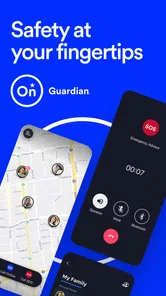
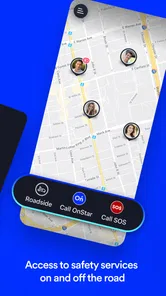
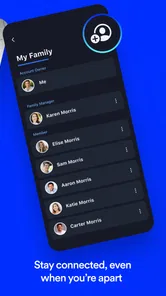
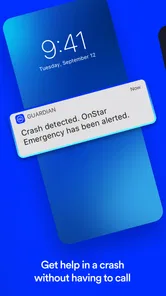
Analysis by Reviewed
I tend to judge a safety app less by how reassuring its name sounds and more by whether I would know what to do with it under pressure. OnStar Guardian is a lifestyle app from OnStar, LLC, built around bringing OnStar safety services to a phone. That makes it a different proposition from a map that only shows where someone is: its appeal is having a route to assistance as well as a way to stay connected with family.
Trust starts with a clear routine
When I consider a safety app, I want to know not only what it promises but also who will use it, when they will reach for it, and what information they are comfortable sharing. Guardian makes the most sense when those expectations are discussed in advance. A household can decide whether location sharing is for a particular trip, a regular check-in, or something else, instead of treating access to someone’s whereabouts as an automatic family entitlement.
I would also separate trust in the idea from trust in the specific setup. Before depending on any app for help, I would look at the permissions requested on my phone, read the choices shown during setup, and decide whether they fit the way I plan to use it. App permissions and location sharing are not abstract privacy details here: they affect whether the people involved feel comfortable using the service at all.
Who benefits from having assistance and location together
The practical value depends on how you travel and who you want to stay in touch with. If you often drive alone, take unfamiliar routes, or want relatives to know where you are on a longer trip, combining assistance and location sharing can make more sense than juggling separate apps. I would treat it as one part of a sensible plan, though, not a guarantee that every problem will be solved automatically. A charged phone, a clear idea of whom to contact, and ordinary road-safety habits still matter.
For a realistic example, imagine a family member driving home after dark and stopping because the car has a problem. A familiar app for seeking help and sharing location may make it easier to explain where they are and keep others informed. The useful step is to discuss that routine before anyone is stressed: who will check a shared location, who should be contacted, and what to do if the phone has poor service or runs out of power. That preparation is less exciting than downloading an app, but it is what makes a digital safety tool easier to use when it counts.
The app is free, rated for Everyone, and has a 4.5 average from around 11,000 ratings. It has passed a million installs, which suggests it has found an audience, but popularity alone is not a reason to trust any service with sensitive information. I would focus on the actual choices shown in the app and the permissions requested on my device rather than assume that a safety label tells the whole privacy story.
How Guardian Fits Into Everyday Safety
First off, let's talk about features. The OnStar Guardian app is equipped with a suite of tools designed to keep you and your family safe on the road and beyond. Imagine having access to roadside assistance, emergency services, and location sharing all in one app. It's like carrying a safety toolkit in your pocket.
More From Our News Desk

Weather by Xiaomi Review: Clear at a Glance, Less Clear Up Close

X Under Pressure: Can It Recover When Posting Goes Wrong?

Clash of Clans Is Won Between the Battles

Android Auto Makes the Case for Quieter Car Software

MobiOffice: Transforming Mobile Productivity with Seamless Integration

EA SPORTS FC™ Mobile Soccer: Redefining Mobile Sports Gaming
Safety services and what to expect from them
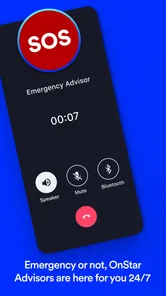
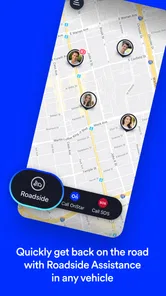
So here's the deal: you get access to OnStar's renowned roadside assistance, which means help is just a tap away if your car breaks down or you find yourself in a bind. Plus, the app offers emergency services, connecting you to trained advisors who can assess your situation and send help if needed. It's like having a dedicated hotline for emergencies.
That service-led approach is useful when the problem is more than finding an address. A map can help me work out where I am, but it does not play the same role as a route to an advisor or roadside support. I would still make sure I know how to reach ordinary emergency services on my phone, too. In a stressful moment, a familiar option is valuable, but it is sensible not to assume one app will cover every circumstance.
Location sharing works best with agreed boundaries
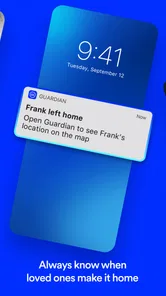
One of my favorite features is the location sharing capability. You can share your real-time location with family members, ensuring everyone knows where you are, especially during long trips. It's peace of mind delivered straight to your phone. Plus, with the family locator feature, you can keep tabs on your loved ones, ensuring they're safe and sound.
Oh, and did I mention it's super user-friendly? The app’s interface is intuitive, making it easy for anyone to navigate, regardless of their tech-savviness. From setting up emergency contacts to using the various features, it’s all straightforward and seamless.
Even when an interface feels straightforward, I would not leave the first setup until I am already on the road. I would open the app at home, find the sharing controls, and agree with the other person on what a normal check-in looks like. One practical detail is to decide how to handle a missed update: a delayed location should prompt a call or message, not an immediate assumption that something is wrong. This keeps a helpful feature from creating unnecessary worry.
Using it without a connected car
For someone deciding whether a vehicle is required, the app's phone-based use is a meaningful distinction: it can function independently of an OnStar-equipped vehicle. That makes it worth considering for a household with different cars, or for a person who wants safety support while travelling as a passenger. I would still check that the services available in my situation match what I expect before relying on them, and keep another way to call for help in mind.
Location sharing also deserves a little planning. Before a trip, I would agree with family on when sharing is useful and who actually needs to see the location, rather than leave everyone guessing or monitoring it casually. That small boundary-setting step helps turn location tools into a practical check-in instead of a source of pressure. It is also sensible to review the phone's location permission and the app's visible sharing controls, especially if you share a device or change who is included in a family routine.
Choosing between Guardian and simpler alternatives
Compared with a standard map app, Guardian’s distinguishing idea is pairing location-related use with OnStar assistance rather than focusing mainly on navigation. Compared with a simple location-sharing tool, it offers a more service-oriented approach for roadside or emergency situations. Those differences matter most to people who would use both sides of that combination. If all you need is turn-by-turn directions, a map app is the more direct choice; if you only want an occasional check-in, a basic location-sharing option may be simpler. I see Guardian as a better fit when the added assistance is part of the reason for installing it.
There are trade-offs. Location sharing is personal information, and any safety app is only useful when the phone is available and the user can reach the relevant controls. I would not install it for another adult without discussing what sharing means to them, and I would avoid treating a family locator as a substitute for asking someone directly whether they are okay. The app should support a trusted routine, not quietly become a way to track people who have not agreed to it.
For a household comparing options, I would start with the job each person actually needs done. If the main concern is navigation, a familiar map app keeps the task focused. If the aim is only to say “I arrived,” a message or call may be enough and involves less ongoing location sharing. Guardian is more compelling when roadside help and location-based family awareness are both useful, rather than when one of those needs is merely hypothetical.
Make the first use a calm practice run
One low-pressure way to decide whether it belongs in a routine is to try the setup before a trip, then talk through a simple scenario without pretending it is an emergency. For example, a passenger can learn where the assistance option is while the driver stays focused on the road; later, the family can decide whether sharing is worth enabling for that journey. This tests whether the app fits the group’s habits without turning a real breakdown into the first lesson.
I would also think about the phone itself as part of the plan. A safety tool on a device that is left at home, has little battery, or is inaccessible to the person who needs it cannot help in the way the household expects. That is why I would keep a charger available on longer drives and make sure everyone knows the fallback plan is a direct call for help, not simply waiting for a location to change.
Who may prefer another option
The app is not a natural fit for everyone. Someone who rarely travels, does not want to share location, or already has a clear and trusted way to arrange roadside help may find that a dedicated map, phone call, or existing service is enough. Likewise, a person who expects a safety app to work as a complete substitute for judgment, phone access, or direct communication is asking too much of it.
It may also be the wrong choice for a family if members disagree about tracking. I would not try to resolve that disagreement by turning on sharing first and discussing it later. A clear opt-in and a shared understanding of when location is visible are more important than adding another tool to the phone. If people are not comfortable with that arrangement, ordinary check-ins can be a better choice.
A cautious recommendation for the right routine
In a world where safety concerns are ever-present, the OnStar Guardian app provides a sense of security that's hard to come by. It’s perfect for families, solo travelers, or anyone who wants an extra layer of protection.
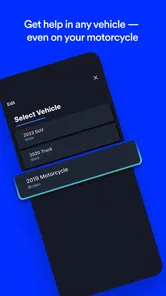
Plus, the app's ability to function independently of OnStar-equipped vehicles broadens its appeal. You don't need a fancy car to enjoy these top-notch safety features—all you need is your smartphone.
For a cautious first run, I would install it well before a journey, explore the emergency and sharing options while I am calm, and make sure the people I expect to contact know how we plan to use them. The current version is 3.6.4 and it supports Android 8.0 or later, so compatibility is worth checking before making it part of a household routine. It was released on November 12, 2019, and has around 1,900 written reviews alongside its ratings. Those details give a sense of its place as an established app, but my decision would still come down to whether its services suit my travel habits and whether everyone involved is comfortable with the sharing arrangement.
For a reader wondering whether it is worth trying, I would say yes if the combination of assistance and location sharing solves a real problem in your routine. It is less persuasive if you only want directions or have no interest in location features. The useful next step is not to enable every option reflexively; it is to review the choices, involve the people who may be included, and keep only the parts that everyone understands and wants to use.
To wrap things up, if you're someone who values peace of mind and wants to stay connected with loved ones, give the OnStar Guardian app a whirl. It's like having a personal security team in your pocket, ready to jump into action whenever you need them.
So go ahead and download it today. Trust me, you’ll wonder how you ever lived without it!
OnStar Guardian: Safety App Frequently Asked Questions
Who makes OnStar Guardian, and what kind of app is it?
OnStar Guardian is a lifestyle safety app developed by OnStar, LLC. It brings key safety services to your smartphone, so the app is intended for people who want access to OnStar support beyond a vehicle. It is rated for Everyone and is free to download. Its focus is personal safety rather than entertainment or vehicle ownership alone.
What devices can run OnStar Guardian?
OnStar Guardian is available for Android and iOS smartphones. On Android, the app requires version 8.0 or later, so check your device’s operating system before downloading. The app uses your phone as the way to access its safety services, making a compatible smartphone the essential starting point. You can find it by searching for OnStar Guardian in your device’s app store.
What is OnStar Guardian and how does it work?
OnStar Guardian is a mobile safety app that extends the services of OnStar beyond vehicles, available for both Android and iOS. It provides users with features such as roadside assistance, location tracking, and emergency services directly from their smartphone. The app uses your phone's GPS and network to connect you with OnStar's support team in case of emergencies.
How can I download the OnStar Guardian app?
You can download the OnStar Guardian app from the Google Play Store for Android devices and the Apple App Store for iOS devices. Simply search for 'OnStar Guardian' in your respective app store and follow the instructions to install it on your device. Make sure your device meets the app's compatibility requirements before downloading.
Is OnStar Guardian free to use?
The OnStar Guardian app requires a subscription to access its full range of features. While the app itself is free to download, you will need to subscribe to one of OnStar's plans to utilize services like emergency assistance and location sharing. Check the app for current pricing and subscription options.
Pros
- Comprehensive roadside assistance.
- Real-time location sharing.
- Crash detection feature.
- 24/7 emergency support.
- User-friendly interface.
Cons
- Limited to OnStar subscribers.
- Requires stable internet connection.
- High battery usage during tracking.
- No free trial available.
- Limited international coverage.











