

OnlyDrams
- 219.00
- 4.8
- Installs
- 10.00K
- Price
- Free

Screenshots
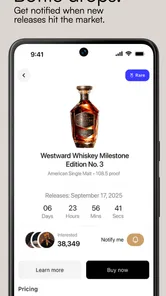
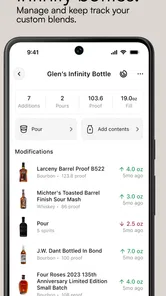
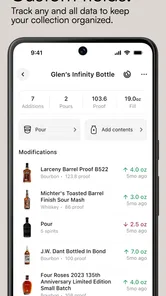
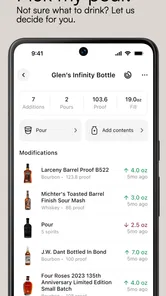
Analysis by Reviewed
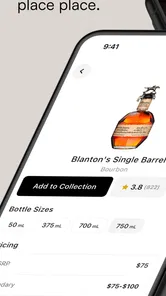
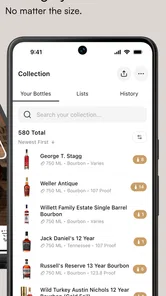
I approached OnlyDrams as a practical companion for people who want to keep track of bottles, rather than as another app that simply recommends drinks. It is a Food & Drink app from OnlyDrams, aimed at managing a spirits collection whether that collection is a few special bottles or a much larger home bar. That focus gives it a clearer purpose than a general recipe app, but it also means its value depends heavily on how comfortably you can record, read, and revisit your collection.
The app is free to download, carries a Mature 17+ age rating, and has built a solid early audience with a 4.8 average from around 2.6 thousand ratings and more than 10 thousand installs. The current version is 3.11.10, and it runs on Android 8.0 or later. Optional purchases range from $0.99 to $99.99 per item, so I would treat the free entry point as a chance to test the workflow before spending money on extras.
How OnlyDrams feels when you use it to manage a collection
I find the most useful way to judge OnlyDrams is to look beyond the act of entering bottles and ask whether a collection record can make everyday decisions easier. In this section, I focus on how a spirits inventory can help with remembering what is on hand, planning a purchase, and keeping a shared cabinet understandable. That practical test also makes it easier to see where the app’s focused approach pays off—and where another tool may suit you better.
Readability and navigation matter more than flashy presentation
The most important question here is not whether the app looks impressive at first glance. It is whether I can open it after buying a bottle, record the useful details without hesitation, and later find that bottle when I need it. A collection tool succeeds when it reduces mental effort. I should not have to remember where a bottle is stored, when I opened it, or whether I already own a similar expression.
That makes the app a better fit for deliberate cataloguing than for casual browsing. If you enjoy building a personal record of whisky, rum, gin, brandy, or other spirits, the central idea is immediately useful. I can imagine opening it while unpacking a delivery, during a home-bar tidy-up, or before visiting a shop to avoid buying a duplicate. The benefit grows as the collection becomes harder to remember.
For readability, I would use it with the phone held at a comfortable distance and keep the task focused. Collection apps can become tiring when every bottle requires several decisions, especially for someone with reduced vision, dyslexia, or limited attention. A sensible habit is to enter only the information that will genuinely help later, rather than trying to create a perfect record for every bottle on the first pass. A short, consistent entry is more useful than an unfinished catalogue.
The app’s purpose also makes navigation easier to understand than that of a broad drinks platform. I am not moving between recipes, social feeds, shopping pages, and cocktail tutorials before reaching the collection. That narrower role should help users who prefer a predictable task. On the other hand, anyone expecting a lively discovery experience may find a management-first tool less stimulating.
More From Our News Desk

 Gmail
GmailGmail in a Busy Inbox: Who Benefits Most?
From first account to crowded workday, Gmail earns its place through dependable search and flexible sorting—but its best fit depends on how much inbox maintenance you can tolerate.

 Prime Video
Switching to Prime Video: What Changes in Your Viewing Routine
Prime Video can make a compelling second home for streaming, but switching means learning a different catalog, rental layer, and route from browsing to playback.

 Universal TV Remote Control
Universal TV Remote Control Works Best as a Reliable Backup
A phone remote earns its place through quick setup and reliable habits. Here is how to get more from Universal TV Remote Control—and where its limits show.

 Weather - By Xiaomi
Weather by Xiaomi Review: Clear at a Glance, Less Clear Up Close
Xiaomi’s weather app makes everyday forecasts quick to scan, but its calm surface can leave useful details and recovery paths harder to find than they should be.

 X
XX Under Pressure: Can It Recover When Posting Goes Wrong?
A resilience-focused review of X, examining setup, mistaken posts, interruptions, weak connections, and the gaps that matter when recovery needs to be dependable.

 Clash of Clans
Clash of Clans Is Won Between the Battles
Its raids are quick; its community is a long-term project of coordination, teaching, rivalry, and shared responsibility—with all the friction that entails.
Latest News



The strongest accessibility advantage is conceptual clarity: the app is built around one personal inventory instead of asking the user to learn several unrelated systems. That does not guarantee that every screen will suit every person, but it gives the product a sensible foundation for people who value a calm, focused workflow.
Motor and sensory considerations during bottle entry
Adding a bottle can be a surprisingly physical task. It may involve tapping small controls, switching between fields, correcting spelling, and looking closely at labels. Users with tremors, arthritis, reduced dexterity, or fatigue may find repeated data entry more demanding than the collection concept suggests. I would avoid cataloguing an entire cabinet in one session. Entering a handful of bottles, taking a break, and checking the results is a more comfortable approach.
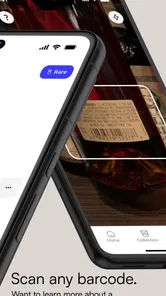
There is also a sensory issue that is easy to overlook: spirits labels are often visually busy. They use decorative type, low-contrast lettering, unusual bottle shapes, and information placed around curved glass. If the app expects me to identify a bottle from its label, I would not rely on a quick glance in poor lighting. A well-lit table and a simple naming convention can make the process much less frustrating.
For people who are sensitive to visual clutter, a collection can become difficult to scan once it grows. I recommend choosing a consistent way to name bottles from the beginning. For example, I might start with the producer, then the spirit, then the expression, using the same order every time. That small discipline reduces the need to interpret decorative label wording later and makes searching by memory more reliable.
Users with hearing-related access needs are unlikely to depend on spoken interaction for the core purpose of a collection manager, which is helpful. The main work is visual and text-based. Still, that means the app is not automatically ideal for someone who cannot comfortably read a phone screen or type repeated entries. A screen reader, display magnification, or system text settings may help where supported by the device, but I would test the actual experience with a small collection before committing to a large catalogue.
Another practical point is alcohol-related context. The app is intended for adults, reflected in its Mature 17+ rating, and it is not something I would hand to a child as a general household inventory tool without supervision. More importantly, I would never try to update a collection while drinking. Accurate cataloguing requires attention, and using the app before or after a tasting is safer and more dependable than entering details during one.
Situational access: where the app earns its place
The best everyday scenario is a home bar that has outgrown memory. Imagine buying a bottle at a specialist shop, returning home, and discovering that a similar bottle is already behind another row. With OnlyDrams, I can make the new entry while the purchase is still fresh in my mind. Later, before shopping again, I can check the collection instead of relying on a vague recollection of labels and bottle shapes.
It can also help when several people share a collection. A partner or housemate may know that a bottle exists but not where it is or whether it has already been opened. A well-maintained record gives everyone a common reference point. This is especially useful when the physical storage is separated into shelves, cabinets, or rooms, although the usefulness depends on how consistently the owner records those details.
Collectors who taste spirits regularly can use the app as a pause between acquisition and enjoyment. I would add a bottle when it arrives, then update my personal record after tasting rather than attempting to capture every impression immediately. This creates a simple two-stage routine: inventory first, reflection later. It is less demanding than trying to document a bottle, a tasting, and a purchase decision all at once.
The app may also suit people who are downsizing or reorganising. Before moving house, I could review what I own and decide which bottles deserve careful packing, which are open, and which have been forgotten. For someone managing a large collection, the value is not just knowing the total; it is reducing the number of decisions made from memory.
Situational access is less convincing when I am in a noisy shop, in dim storage conditions, or using the phone with one hand while carrying bottles. I would not expect a collection manager to replace a quick note or a photograph in those moments. A useful compromise is to capture the minimum information at the point of purchase and complete the record later in a comfortable setting.
Useful workflows that are easy to miss
One of the most useful habits is to treat the catalogue as a decision aid, not merely a museum of bottles. Before shopping, I would review the collection with one question in mind: what am I actually missing? That might mean a style, a bottle for a particular occasion, or simply an unopened option for guests. This prevents the common mistake of buying another attractive label that fills the same role as something already owned.
A second workflow is to separate “owned” from “interesting.” If I use the app to record every bottle I admire, the collection can stop reflecting what is physically available. I would keep the record tied to bottles I really possess and use another personal note for wish-list ideas if needed. That distinction protects the app’s main strength: giving me a dependable view of my real cabinet.
A third insight is that consistency beats detail. It is tempting to enter long tasting notes, purchase memories, or every piece of label text. But if that slows me down, the catalogue becomes incomplete. I would establish a small core of information that I can enter for every bottle, then add richer notes only to bottles I revisit often. This approach is particularly helpful for users with limited energy, concentration, or dexterity.
A fourth practical use is preparing for shared tastings. I could review the collection beforehand and choose bottles that are genuinely available, rather than discovering at the last minute that a supposedly suitable bottle was finished months ago. The app does not need to become a formal event planner to be useful; a reliable inventory is already enough to improve preparation.
Where the experience may still create barriers
The biggest limitation is inherent in the category: a digital collection is only as accurate as the person maintaining it. If I forget to add purchases, remove empty bottles, or update opened items, the app can create false confidence. That is not a flaw unique to OnlyDrams, but it matters because the whole point is to replace unreliable memory with a reliable record.
There is also a possible time cost for large collections. A person with hundreds of bottles may appreciate the final result but dislike the initial setup. I would not recommend starting with a full audit unless the project itself sounds enjoyable. Begin with the bottles you buy most often, the ones stored in difficult-to-remember places, or the ones that are expensive enough to avoid duplicating. That gives the app a useful purpose immediately.
People who prefer pen and paper may also find the digital workflow unnecessary. A notebook can be faster for a small, stable collection and may be easier to use in a cellar or cupboard where the phone is inconvenient. Likewise, a spreadsheet can appeal to users who want complete control over columns, sorting, and custom formulas. OnlyDrams makes more sense when I want a dedicated spirits-focused environment rather than a blank document.
Cost deserves a careful look as well. The app is free to start, but the presence of in-app purchases means I would not assume every useful capability is included without checking the purchase screen. The broad range, from $0.99 to $99.99 per item, makes it especially important to understand what any optional payment unlocks before confirming it. For me, that is not a reason to reject the app, but it is a reason to explore the free experience patiently.
Platform compatibility is another practical checkpoint. The stated minimum is Android 8.0, so owners of older Android devices should check compatibility before planning a major catalogue project. People using newer phones should still consider screen size and input comfort. A compact phone may be perfectly adequate for occasional updates but less comfortable for a long initial session.
Who should use it, and who should choose something else?
I would recommend OnlyDrams to someone who owns enough spirits that duplicates, forgotten bottles, or uncertain storage locations have become annoying. It is also a good match for a collector who enjoys organising information and wants a purpose-built place for a home bar. The app’s Food & Drink category is relevant without making it feel like a general-purpose lifestyle platform, and the strong average rating suggests that the basic idea is resonating with many users.
I would be more cautious about recommending it to someone who only owns a few bottles and rarely buys spirits. In that situation, the maintenance may outweigh the benefit. A simple note on the phone could be quicker. I would also steer a user toward a more flexible spreadsheet if they need unusual fields, complex financial tracking, or a highly customised inventory structure.
It may not be the best choice for someone seeking cocktail recipes, social conversation, or detailed education about spirits as the main experience. Its appeal is strongest when the collection itself is the subject. If discovery and learning matter more than ownership records, another kind of drinks app may feel more rewarding.
My inclusive verdict after looking at everyday use
OnlyDrams has a sensible, focused purpose: helping me turn a physical spirits collection into something I can review before shopping, organise during a tidy-up, and share as a reference with people at home. Its accessibility story is strongest in its straightforward concept and practical use cases. It can support different routines, but the comfort of the experience still depends on screen readability, typing effort, lighting, and how much information the user chooses to enter.
I like the fact that I can approach it gradually. Someone with limited energy can catalogue a few priority bottles instead of facing the pressure of a complete inventory. Someone with memory difficulties can use consistent naming and regular updates to make the collection easier to trust. Someone with reduced dexterity can keep entries brief and avoid long sessions. Those are not special modes or guaranteed accommodations; they are realistic ways to shape the workflow around personal needs.
My main reservation is that the app cannot remove the work involved in maintaining accurate records. It also may not suit people who want a completely custom database or who prefer a paper list. Still, for a spirits enthusiast who wants a dedicated collection manager and is willing to build a manageable routine, it offers a more purposeful solution than scattered notes or trying to remember every bottle.
Overall, I see OnlyDrams as a useful specialist tool rather than an essential app for every drinker. I would start with the free version, enter a small group of bottles, and test whether the process feels comfortable on my device. If the catalogue helps me make better buying decisions and find information without frustration, the app has earned its place. If entering and maintaining records feels like another chore, a simpler alternative will probably be the more inclusive choice.
OnlyDrams Frequently Asked Questions
What does OnlyDrams help me keep track of?
OnlyDrams is designed to help you manage your collection of spirits, whether it is small or extensive. Its focus is collection management rather than short-form videos or creator content. If you enjoy keeping a spirits collection organized, the app offers a dedicated place to work with it. The app is free to download, with optional in-app purchases available.
What is OnlyDrams and what can I do with it?
OnlyDrams is an entertainment-focused platform built around short-form video and creator content. After installing it, users can browse available posts, discover different creators, and interact with content through the app’s viewing and social features. The exact experience may depend on the current version, region, and creator availability, so it is worth checking the store listing and the app’s terms before creating an account or subscribing to anything.
Is OnlyDrams free to download and use?
The app may be free to download, but some content, creator interactions, or premium features can require payment. During testing, users should pay close attention to labels such as subscription, unlock, purchase, or tip before confirming a transaction. Pricing and available plans may differ between Android and iOS, and subscriptions can renew automatically unless they are canceled through the relevant Google Play or App Store settings.
Do I need to create an account to use OnlyDrams?
An account may not be necessary for every browsing function, but registering is generally required for features such as following creators, saving preferences, commenting, messaging, or accessing personalized content. New users should review the information requested during sign-up and choose a strong, unique password. It is also advisable to read the privacy policy so you understand how profile details and activity may be handled.
Is OnlyDrams safe and appropriate for all users?
OnlyDrams may include mature, user-generated, or creator-published material, meaning it may not be suitable for children or every audience. Before downloading, check the official age rating and content description shown in your app store. Use the available reporting and blocking tools if you encounter inappropriate behavior, and avoid sharing sensitive personal information with creators or other users. Parents should also use device-level controls where appropriate.
Pros
- Simple interface makes browsing creator content quick and straightforward.
- Supports direct interaction with creators through the platform.
- Convenient mobile access for viewing content wherever you are.
- Subscription-based access can offer exclusive material from creators.
- Easy way for fans to support independent content creators.
Cons
- Some content may require recurring payments or additional purchases.
- Availability of creators and features can vary by region.
- Adult-oriented material may not be suitable for all users.
- Privacy depends on how carefully users manage account and payment details.
- Content quality and posting frequency can differ significantly between creators.











