One Tap Away
- 941.00
- 4.6
- Installs
- 100.00K
- Price
- Free

Screenshots

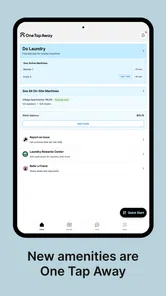
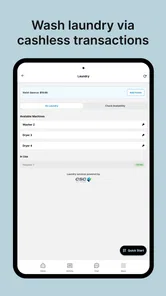

Analysis by Reviewed
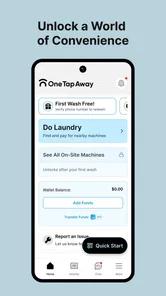
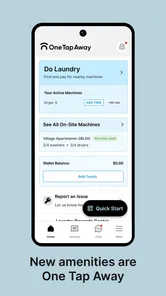
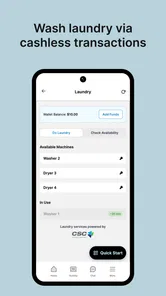
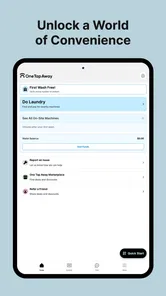
I found One Tap Away most useful when laundry is part of a shared routine rather than a private household chore. It is a free lifestyle app from CSC ServiceWorks, built around the company’s laundry services, and its appeal is easy to understand: it aims to reduce the small amount of searching, waiting, and uncertainty that can make a shared laundry room frustrating. My overall view is positive, but with an important qualification. This is a practical companion for people whose laundry facilities are connected to CSC ServiceWorks, not a general household organizer or a replacement for every laundry-related task.
The app’s store summary, “CSC Laundry and More,” gives a better idea of its scope than a broad label such as lifestyle. I approached it as a utility for everyday laundry decisions: finding the right service context, checking what is available through the app, and making a shared laundry routine less dependent on guesswork. That focus is also why I would not recommend installing it simply because you want a washing-machine timer, stain-removal advice, or a way to manage appliances that are unrelated to CSC ServiceWorks.
What using One Tap Away feels like in daily life
The strongest part of the experience is its narrow purpose. Many apps try to become dashboards for everything, but a laundry companion can be more helpful when it keeps attention on the moment you actually need it. If I were living in an apartment, student residence, or another building with communal machines, I would open it when planning a wash, checking the available service options, or trying to avoid an unnecessary trip to the laundry room.
That sounds modest, but shared laundry has a particular kind of friction. You may carry a full basket downstairs only to discover that the machines are occupied. You may forget how the room handles payment or lose time working out which machine is relevant. One Tap Away is valuable when it turns those questions into an app-based step before I commit time and effort to the trip.
A realistic example is a weekday evening after work. I have one load ready, limited time, and no desire to stand in a laundry room waiting for a machine. Instead of treating the app as something I open only after arriving, I would use it as part of the planning stage. I would check the service information available for my laundry setup, decide whether the trip makes sense, and keep the app available while handling the load. That workflow is more useful than simply having another icon on the phone.
There is also a practical advantage for people who share responsibility for laundry. In a household or residence where several people use the same facilities, the app can act as a common reference point. Rather than explaining the process repeatedly, one person can point another toward the same service. I would still keep a backup plan for a busy laundry room, but the app can reduce the amount of informal coordination needed.
The best reason to install it
My clearest recommendation is for users who already encounter CSC ServiceWorks in their building or local laundry environment. For them, the app has a direct connection to a real task. It is not an abstract lifestyle download; it supports something they already need to do. The free price also removes the usual hesitation about testing a utility app, especially when the decision is whether it will make a recurring chore easier.
More From Our News Desk

Weather by Xiaomi Review: Clear at a Glance, Less Clear Up Close

X Under Pressure: Can It Recover When Posting Goes Wrong?

Clash of Clans Is Won Between the Battles

Android Auto Makes the Case for Quieter Car Software

MobiOffice: Transforming Mobile Productivity with Seamless Integration

EA SPORTS FC™ Mobile Soccer: Redefining Mobile Sports Gaming
The audience size appears meaningful without making the app feel like a niche experiment. It has passed one hundred thousand installs and holds a 4.6 average from around 6,100 ratings, with roughly 934 written reviews. Those figures do not prove that it will work equally well in every building, but they do suggest that many people find the basic concept useful enough to keep using and evaluate positively.
I would treat those ratings as a reason to try the app, not as a guarantee. A laundry app depends heavily on the service environment around it. The same interface can feel convenient in one residence and less useful in another if the machines, available services, or building arrangements differ. That is an important trade-off: the app’s relevance is stronger when CSC ServiceWorks is already part of the user’s laundry routine.
Small workflow choices that make a difference
One useful habit is to open the app before leaving for the laundry room, not after arriving. This changes the app from a passive reference into a planning tool. If the information you need is already visible, you can decide whether to bring one load or several, whether to wait, and whether another time would be more sensible. I would also avoid assuming that checking once means the situation will remain unchanged; shared machines can become occupied quickly.
A second tip is to use the app alongside a simple personal routine rather than expecting it to remember every detail of your laundry life. I would keep a note of the usual laundry-room location, preferred washing time, and any building-specific instructions separately. That may sound old-fashioned, but it protects against the most common failure of utility apps: relying on a digital view while forgetting that local rules and physical conditions still matter.
A third insight is that One Tap Away is probably more valuable for reducing wasted trips than for replacing the entire laundry-room experience. I would judge it by whether it helps me make a better decision before carrying clothes downstairs. If I expect a complete control center for every machine, every reminder, and every household task, I may come away disappointed. Its strength is concentrated convenience, not unlimited scope.
For people new to communal laundry, I would spend a few minutes learning the app before the first urgent wash. The best time to discover how a service works is not when clothes are already waiting and the laundry room is busy. Trying it during a low-pressure load gives me a chance to understand the available workflow and notice which steps still require attention in the physical room.
Where the experience can feel limited
The main weakness is the same narrow focus that makes the app appealing. One Tap Away is not the right answer for someone who wants broad lifestyle features. If my laundry is handled entirely at home, I would have little reason to use it. A person looking for care instructions, detergent recommendations, wardrobe organization, or a general chore planner would likely be better served by a dedicated app or by the tools already on the phone.
I also would not confuse app convenience with guaranteed availability. A digital service can help me prepare, but it cannot remove the unpredictability of a shared room. Machines may be occupied, a building’s routine may differ from what I expect, or a physical issue may still require attention from a property manager or service provider. This is where I think users should keep their expectations realistic: the app can streamline the process, but it cannot make communal laundry behave like a private machine.
Another limitation is that the experience is tied to context. Before depending on it, I would confirm that my building or laundry location actually uses CSC ServiceWorks in a way supported by the app. This is a sensible first check because a beautifully designed utility is still irrelevant if the local machines are managed through another system. The app’s name may sound broadly applicable, but its practical value comes from that specific service connection.
I would also be cautious about making it the only record of a laundry plan. If I am coordinating several loads, caring for delicate clothing, or working around a strict schedule, I would use a calendar reminder or a simple note as well. That is not a criticism of the app’s core idea; it is a recognition that laundry often involves physical details that no single service screen can manage for me.
How it compares with ordinary alternatives
The usual alternative is doing everything manually: walking to the laundry room, reading the notices, checking the machines, and working out the next step on the spot. That approach costs nothing and remains dependable when the building’s process is simple. One Tap Away is better when I want to make a decision before leaving my room, especially if an unnecessary trip is inconvenient.
Another alternative is using a general reminder app. That works well for remembering laundry day or setting a personal timer, but it does not have the same service-specific purpose. A reminder can tell me to wash clothes; it cannot replace a laundry-focused reference point. On the other hand, a general reminder may be better for users whose main problem is forgetting, rather than navigating a shared CSC ServiceWorks environment.
Building notices and resident group chats are also realistic competitors. A notice may contain local instructions that are more authoritative than any app, while a group chat can reveal that a laundry room is unusually busy. I would use those sources together rather than treating One Tap Away as a complete substitute. The app handles its own service context; neighbors and building staff remain useful for local information and unusual problems.
That comparison leads to a balanced conclusion. One Tap Away is more targeted than a generic reminder, more convenient than relying entirely on a noticeboard, and less comprehensive than a full household-management tool. Its value sits in the middle: a focused digital layer over a physical laundry routine. That is a good position if it matches my needs, but a poor one if I expect the app to cover unrelated chores.
Who will get the most from it
I think it is a strong fit for apartment residents, students, and anyone who regularly uses shared laundry facilities connected with CSC ServiceWorks. It is also suitable for people who prefer checking information on a phone before making a short but inconvenient trip. Because it is free and rated for Everyone, it is easy to test within a household without turning the decision into a purchase commitment.
It may also help someone who has recently moved into a building with communal machines. The first few laundry visits can be awkward because the process is unfamiliar. Having a dedicated place to begin can make the routine feel less improvised. I would still read building instructions carefully, but the app can give the user a more organized starting point than asking another resident every time.
I would skip it if I wash everything at home, use a different laundry provider, or want a general app for cleaning schedules and clothing care. I would also skip it if I dislike using a phone for simple chores and the laundry room already has a clear, reliable process. In that situation, the app may add a step rather than remove one. The right question is not whether it is popular; it is whether CSC ServiceWorks is part of the problem I am trying to solve.
Compatibility, cost, and keeping expectations sensible
The Android release is free, has a minimum operating-system requirement of Android 7.0, and is currently listed as version 2.1.45. That makes it accessible to many older Android phones, although I would still check the device’s software before planning around it. The app was released on September 23, 2024, so I see it as a relatively recent tool rather than a long-established utility that every building has necessarily integrated into its habits.
The age rating of Everyone is appropriate for its everyday household purpose. I would feel comfortable recommending it as a straightforward utility, while still advising any user to pay attention to the app’s normal setup and service instructions. The important practical question is not age suitability but local compatibility: does the laundry environment I use connect meaningfully with CSC ServiceWorks?
For iPhone users, I would verify the current availability and device requirements in the relevant app marketplace before switching platforms or assuming that the same experience is offered everywhere. The service concept is clear, but platform details can change. I would not let that uncertainty stop an eligible Android user from trying it, yet I would avoid promising a particular cross-platform workflow without checking the current listing.
My verdict after weighing convenience against limits
One Tap Away succeeds because it addresses an irritating, repeatable moment: trying to make shared laundry less of a guessing game. I like the fact that its purpose is concrete. When the surrounding laundry service matches the app, it can help me plan before leaving my room, reduce avoidable trips, and give a household or residence a common digital starting point.
Its limitations are equally clear. It cannot make a busy laundry room empty, replace building instructions, solve physical machine problems, or become a universal chore manager simply because it sits in the lifestyle category. Users outside the CSC ServiceWorks ecosystem may find little practical value, and people seeking laundry education or broad household organization should choose something more specialized.
My final recommendation is therefore specific: install it if CSC ServiceWorks is part of your regular laundry routine and you want a free, focused way to prepare for shared-machine use. Try it during an ordinary load rather than waiting for an urgent one, and keep local notices or a basic reminder system alongside it. The best reason to use One Tap Away is not that it does everything, but that it can remove a few recurring points of friction from one very specific chore.
With that expectation, I would recommend it to the right user. The positive reception, more than one hundred thousand installs, and the app’s focused design all support giving it a fair trial. For anyone whose laundry happens at home or through another provider, however, I would spend that storage space elsewhere.
One Tap Away Frequently Asked Questions
Who develops One Tap Away, and what is it intended for?
One Tap Away is a lifestyle app developed by CSC ServiceWorks, with the short description “One Tap Away” and the store summary “CSC Laundry and More.” That gives you a sense of its connection to laundry-related services. Before downloading, consider whether that focus suits what you need and check the app’s current screenshots and description in your app store for a clearer view of its available features.
What is One Tap Away and what does it do?
One Tap Away is designed to give users quick access to selected actions, tools, or destinations from a simplified interface. Its main appeal is convenience: instead of navigating through several menus, you can reach commonly used features with a single tap. The exact options available may depend on the app version, device, operating system, and the services connected to it.
Is One Tap Away free to download and use?
One Tap Away is free to download. Before installing, review its current store page and any in-app purchase details, since pricing or optional features can change over time. Also check the privacy information so you understand how the app handles information associated with its services. Knowing what is included before you begin can help you decide whether it fits your needs.
What permissions does One Tap Away require?
The permissions requested by One Tap Away depend on the features enabled on your phone. An app offering shortcuts or quick actions may request access to notifications, accessibility functions, location, contacts, or other system features. Only approve permissions that match the app’s purpose, and remember that you can review or revoke access later through Android or iOS settings.
Does One Tap Away work without an internet connection?
Some basic functions of One Tap Away may work offline if they rely only on locally stored shortcuts or device settings. However, features that load online content, synchronize information, display advertisements, connect to third-party services, or verify an account may require an internet connection. Testing the app with Wi-Fi and mobile data disabled is the best way to confirm its offline capabilities.
Pros
- Simple interface makes key features easy to find.
- Quick access reduces the number of steps for common actions.
- Lightweight design should work well on older devices.
- Useful for users who prefer straightforward
- focused tools.
- Minimal setup lets you start using it almost immediately.
Cons
- Some features may feel limited for advanced users.
- Requires permissions that may concern privacy-conscious users.
- Performance can vary depending on device and connection quality.
- The app may offer fewer customization options than competitors.
- Occasional updates may change the layout or user experience.











