VK: music, video, messenger
- 11.31K
- 3.1
- Installs
- 100.00M
- Price
- Free

Screenshots



Analysis by Reviewed
I would decide whether to try VK by looking at my contacts first, not by counting its features. If the people I want to reach already use it, the app can connect a social check-in with music and video sharing in a way that feels natural. If they do not, I may be adding another place to check without making communication any easier. That simple starting point is the best way I know to judge whether VK belongs in a daily routine.
A quick check before making it your hub
VK is a free social app developed by VK.com, and it has been available since June 14, 2011. Its scale is considerable, with over 100 million installs, but reach alone cannot tell me whether my own friends are active there. I would ask a couple of people I speak with regularly before moving conversations over; a social app is only as useful as the circle that meets you in it.
It is also worth deciding what “one place” means for you. VK brings social activity, messaging, calls, music, and video close together, but that does not automatically make it a replacement for every dedicated service on your phone. I see it as most useful when these activities overlap: a conversation leads to a recommendation, a shared clip gives a group something to discuss, or a call helps people settle a plan.
From a message to a shared moment
I find VK most useful when I begin with a simple need: catch up with people I know, then move naturally into sharing something to listen to or watch. That mix is the point of VK: music, video, messenger, a free social app from VK.com. It has been around since 2011, and its reach is substantial, with over 100 million installs. In my experience, it works best as a shared place for social activity and entertainment, rather than as a specialist tool for any one of those jobs.
Starting with the people, not the features
Before making VK part of my daily routine, I would start by checking whether the people I actually want to talk with use it. That matters more than how many tools appear under one roof. A social network can be useful on its own, but the messaging and media handoffs become much more valuable when friends are already there to receive a song, respond to a message, or join a call.
That makes the app a particularly sensible choice for someone whose contacts are already active on VK and who likes having social browsing and entertainment close together. It is less compelling as a way to persuade an entire group to move from a messenger they already use. If the people you need are elsewhere, keeping VK as an extra app may create another inbox rather than simplify your day.
From catching up to sharing something worth watching
A realistic use for me is opening the app during a break, replying to a message, and sending a friend a track or video that fits the conversation. Keeping those activities together can save the small hassle of switching between separate services. The useful handoff is not just between tabs: a piece of media can become the subject of a chat, so the conversation has something concrete to react to. That makes VK appealing if the people you want to reach already use it.
More From Our News Desk

 Gmail
Gmail in a Busy Inbox: Who Benefits Most?
From first account to crowded workday, Gmail earns its place through dependable search and flexible sorting—but its best fit depends on how much inbox maintenance you can tolerate.

 Prime Video
Switching to Prime Video: What Changes in Your Viewing Routine
Prime Video can make a compelling second home for streaming, but switching means learning a different catalog, rental layer, and route from browsing to playback.

 Universal TV Remote Control
 Works Best as a Reliable Backup
A phone remote earns its place through quick setup and reliable habits. Here is how to get more from Universal TV Remote Control—and where its limits show.

 Weather - By Xiaomi
Weather by Xiaomi Review: Clear at a Glance, Less Clear Up Close
Xiaomi’s weather app makes everyday forecasts quick to scan, but its calm surface can leave useful details and recovery paths harder to find than they should be.

 X
X Under Pressure: Can It Recover When Posting Goes Wrong?
A resilience-focused review of X, examining setup, mistaken posts, interruptions, weak connections, and the gaps that matter when recovery needs to be dependable.

 Clash of Clans
 Is Won Between the Battles
Its raids are quick; its community is a long-term project of coordination, teaching, rivalry, and shared responsibility—with all the friction that entails.
Latest News



For a group planning a weekend, for example, I can imagine using the messenger to settle on a time, then sharing a video or playlist as a quick way to set the mood. The practical tip is to treat media sharing as part of the conversation, not as a replacement for it: a link or track can start a discussion, but people still need to agree on the details. If your friends are spread across different messaging platforms, the convenience drops quickly; a combined app is only convenient when your circle is actually there.
VK sits between a conventional messenger and a broad social network with entertainment built in. Compared with using a dedicated chat app alongside separate music and video services, it can reduce app-hopping and make sharing feel immediate. The trade-off is focus. Someone who wants a highly specialized music player, a particular streaming catalogue, or a minimal chat-only experience may prefer separate apps that are designed around that single purpose. I would choose VK for the overlap between friends, conversation, and media, not assume it replaces every service in those categories.
Entertainment that can travel into a conversation
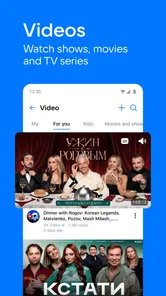
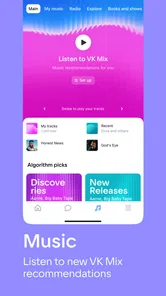
First things first, let’s talk about the entertainment side of VK: music, video, messenger. The app offers a vast library of music tracks from a multitude of genres. Whether you’re into pop, rock, jazz, or classical, you’ll find something that tickles your fancy. What I love is the ability to create playlists and share them with friends. It’s like having a personal DJ right in your pocket. Moreover, the video section is a treasure trove of fun and engaging content. From trending videos to full-length movies, it’s all at your fingertips.
Chatting Made Easy
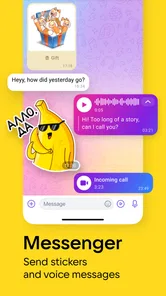
Now, on to the messenger feature. I’ve tried a lot of messaging apps, and VK’s messenger is right up there with the best. It’s straightforward, intuitive, and packed with cool features. You can send texts, voice messages, and even engage in video calls. What’s more, the app integrates seamlessly with the music and video features, so you can easily share your favorite tracks or videos with friends while chatting. It’s a great way to stay connected and share experiences in real time.
The app also boasts robust privacy features, which is a huge plus for me. In a world where data privacy is a growing concern, VK ensures your chats remain secure and private. You can chat away without worrying about prying eyes.
What to consider before settling in
One question I would ask before making VK my main social app is whether the people I want to contact are active there. If they are, the combination of messages, calls, playlists, and video sharing can feel natural. If they are not, a familiar messenger with a larger presence among my contacts is the more practical choice. That social-circle dependency is a real limitation, even when the app itself is easy to navigate.
Another consideration is the balance between breadth and simplicity. VK covers several activities in one place, but that also means it may not feel as focused as a dedicated music or video service. I would use playlists for sharing a mood or exchanging recommendations, while relying on a specialist app if my priority were a particular listening routine or tightly curated viewing experience. The best choice depends on whether convenience across activities matters more to you than depth in one.
Its audience is broad: the app is rated Teen, and the current version is 8.157, with support for devices running iOS 9 or later. Its average rating is 3.3 from around 9.3 million ratings, while roughly 11,000 reviews give prospective users a large pool of reactions to consider. The app is free to install, though optional in-app purchases range from about $0.49 to $124.99 per item. I’d treat those purchases as a reason to check what is offered before buying, rather than assume every feature or piece of media costs nothing.
Making a small routine work better
For a more deliberate everyday workflow, I would separate the quick social task from the browsing task. If I open VK to answer a friend, I can respond first, then share one relevant track or clip while the conversation is fresh. After that, I can leave the app instead of wandering through unrelated material. This keeps the useful part—the context around what I am sharing—without letting a short check-in quietly turn into a long session.
Playlists are also more useful as conversation starters than as a substitute for a carefully managed personal music library. I would make one around a shared occasion, send it to the people involved, and use their reactions to guide what comes next. That workflow suits casual discovery and social recommendations. If I want a specific listening queue, consistent playback habits, or a service centered entirely on music, a dedicated player is likely a better fit.
For a family or friend group, the practical question is not only whether everyone has an account, but whether they are comfortable doing several kinds of activity in the same social space. Someone who wants a clean separation between private conversations and public browsing may prefer keeping messaging and entertainment in different apps. VK’s convenience comes from proximity, and that same proximity can feel busy if you would rather keep those parts of your phone separate.
Moving between tabs without losing your place
One thing that stands out about VK is its user-friendly interface. From the moment you open the app, you’re greeted with a clean and organized layout. It’s easy to navigate, even for someone who may not be tech-savvy. The tabs are clearly labeled, and switching between music, video, and messenger is a breeze. Plus, the app doesn’t feel cluttered, which is a relief for my sometimes overwhelmed brain!
Another highlight is the app’s performance. It runs smoothly without any lag or crashes, which is essential for an app that combines so many features. Whether you’re streaming music, watching videos, or chatting, everything loads quickly and runs seamlessly.
Where the all-in-one approach can fall short
The main friction I would plan around is attention. A social app that also offers entertainment gives me more ways to keep browsing after I have finished the task that brought me in. If I open VK just to answer a message, I try to handle that first and leave the music or video sections for when I actually have time. That small habit keeps the convenience from turning into an unplanned stretch of scrolling.
There is a related trade-off when moving from a conversation into media: the app makes the next activity easy to reach, but easy access is not the same as a focused experience. If I am choosing a film or settling in for a longer listening session, I may want the organization and controls of a specialist service instead. VK is at its best for quick sharing and social discovery, rather than being an automatic first choice for every entertainment task.
I would also avoid choosing it solely because it combines features. If privacy is your deciding factor, read the app’s current privacy controls and settings yourself rather than taking broad reassurance as a substitute for checking how you want to use it. And if you mainly need reliable contact with people who prefer another platform, using that platform directly will be less work. VK is strongest when its social and media sides support the same routine; it is less compelling when you need only one narrow function.
A sensible fit for the right circle
In conclusion, VK: music, video, messenger is a fantastic app that brings together the best of entertainment and communication. It’s perfect for those who love to have everything in one place. I’ve genuinely enjoyed using it and it’s become my go-to app for music, videos, and keeping in touch with friends. If you’re looking for an app that combines functionality with fun, I highly recommend giving VK a try. I promise, it’s worth it!
Who I would recommend it to
I would recommend VK most readily to someone whose friends already use it and who often moves from a conversation to a shared song, playlist, or video. It makes that handoff feel like part of one social routine, instead of a series of separate tasks. The app has a 3.3 average rating, so I would treat its broad reach as evidence that many people use it, not as a guarantee that its mix will suit everyone.
I would be more cautious for someone who wants only private, straightforward messaging, or who already has a music and video setup they like. In those cases, a dedicated messenger or entertainment app may be easier to understand and keep organized. VK is worth trying when its social network is useful to you in its own right; it is harder to justify if you would use only one corner of it.
Overall, my advice is to start with one practical purpose: message the people you know, then see whether sharing media naturally improves those interactions. If it does, the all-in-one design earns its place. If you find yourself switching back to other services for the conversations or entertainment that matter most, there is no need to force VK into a role it does not fill for you.
VK: music, video, messenger Frequently Asked Questions
Can I install VK on Android and iOS?
VK is available as a social app for Android and iOS, so you can consider it for either type of phone. Before downloading, check that your device runs operating-system version 9 or later. VK combines messaging, calls, social activity, music, and video, making it a broader platform than a standalone chat or media app. Its Teen content rating is also worth considering.
How much does VK cost to download?
VK is free to download, which makes it possible to try its social, messaging, music, and video features without paying an upfront price. The app also offers optional in-app purchases, so free access does not mean every available option is necessarily included at no cost. If you are setting it up for someone else, review purchase settings on the device before use.
What is VK’s age rating, and is it suitable for teenagers?
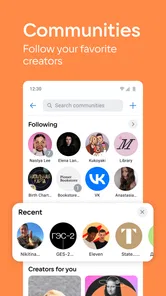
VK has a Teen content rating. Its mix of social networking, messaging, calls, communities, music, and video makes it more suited to teenagers than to young children, although each family can decide what feels appropriate. If you are choosing the app for a younger user, consider the social nature of the platform and review the device’s age-appropriate settings before downloading.
Does VK include messaging, live chats, and calls?
Yes. VK brings together text messaging, live chatting, and calls, so it can serve as a communication app as well as a social network. Those features sit alongside communities, shared content, music, and video. Before downloading, consider whether you want a messenger connected to a wider social platform, rather than an app focused only on private conversations.
Can I use VK without sharing posts publicly?
VK combines social networking with messaging and media, but using the app does not mean every interaction has to be a public post. Its social features include personal communication as well as communities and shared content. Before downloading, consider how you want to participate: you may prefer private conversations, or you may also want to follow communities and share updates with others.
Pros
- Wide variety of music genres available.
- High-quality video streaming.
- Easy-to-use messaging interface.
- Strong privacy settings.
- Regular app updates.
Cons
- Occasional ads can interrupt usage.
- Limited offline music options.
- Some features require a subscription.
- Can consume a lot of data.
- Not all content is available globally.