OBD Fusion (Car Diagnostics)
- 537.00
- 4.7
- Installs
- 100.00K
- Price
- $5.99
Screenshots
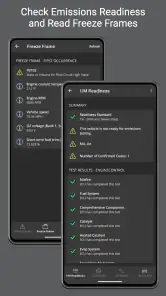
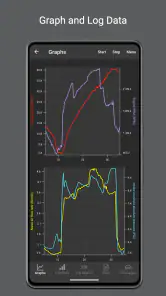
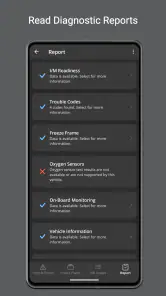
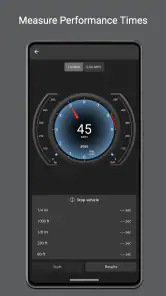
Analysis by Reviewed
My first advice to anyone opening OBD Fusion is to think of it as a window into the car’s diagnostic system, not a magic fix button. The app can help you get a useful first clue when a warning appears, but the best results come from pairing it with a compatible adapter and approaching each reading with a clear question. If you’ve ever wished you could be a detective for your car, it makes that process much more approachable.
What to expect from a phone-based diagnostic tool
OBD Fusion is a paid car diagnostics app from OCTech, LLC, in the communication category. It costs $5.99, with in-app purchases ranging from $14.99 to $74.99 per item, so I’d treat the initial purchase and any extras as separate decisions. It has a 4.7 average from around 2.8 thousand ratings, and more than 100 thousand installs. The app is rated for Everyone, and version 6.14.0 requires Android 6.0 or later.
The key distinction is that the app is only one part of the setup: you also need a compatible OBD-II adapter. That makes it more hands-on than a basic dashboard or trip-tracking app, but it can tell you more about what the car’s diagnostic system is reporting. It is not a substitute for a mechanic, and a code description should be treated as a clue rather than a confirmed diagnosis. If you mainly want navigation, reminders, or a simple fuel log, a general-purpose car app will likely be easier and cheaper to get started with.
Getting Started with Car Diagnostics
First things first, setting up OBD Fusion is a breeze. You’ll need an OBD-II adapter, which you can easily snag online. Once you’ve got that, just plug it into your car’s OBD-II port, open the app, and you’re practically ready to go. The app pairs seamlessly with the adapter via Bluetooth or Wi-Fi, depending on your setup. I was pleasantly surprised by how user-friendly the whole process was. No technical wizardry needed here!
Making the first connection count
Before buying an adapter, check that it works with your phone and the app, and confirm that your vehicle has an OBD-II port. Adapter quality matters: a flaky connection can look like an app problem, interrupt live readings, or make a code lookup feel unreliable. I’d start with a sensible, compatible adapter rather than paying extra for features I may never use. After plugging it in, follow the adapter’s pairing instructions, then select it in the app; Bluetooth and Wi-Fi devices do not always follow identical connection steps.
For a first session, keep the goal small. With the car safely parked, connect and see whether the app can read information from the vehicle. If a warning light brought you here, note the exact diagnostic trouble code before clearing anything. Keeping that first reading gives you something useful to share with a mechanic and prevents you from losing a clue that could help explain an intermittent issue.
Diving Into the Features
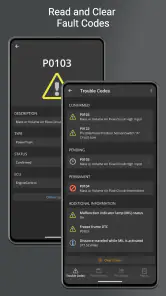
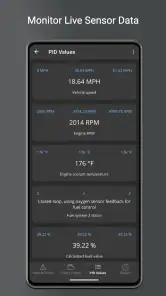
The app isn’t just about reading error codes—though it does that brilliantly. It’s like an encyclopedia of your car’s performance metrics. You can monitor real-time data, like fuel economy, engine RPM, and even track your trips to improve driving habits. I loved how it provides a detailed breakdown of diagnostic trouble codes (DTCs), offering not just the code but a description and even potential solutions. It’s like having a mechanic in your pocket!
You May Like

Clash of Clans Is Won Between the Battles

Android Auto Makes the Case for Quieter Car Software

MobiOffice: Transforming Mobile Productivity with Seamless Integration

EA SPORTS FC™ Mobile Soccer: Redefining Mobile Sports Gaming

How Microsoft OneDrive Became a Mobile Productivity Giant

How Google Translate Breaks Language Barriers Effortlessly
For everyday use, live readings are most helpful when I have a specific question, not when I stare at every gauge at once. A dashboard with only a few relevant values is easier to interpret: for example, someone investigating a rough-running engine may focus on engine-related readings, while a commuter interested in efficiency can prioritize fuel economy. The practical trade-off is that more displayed data does not automatically mean a clearer answer. A value that looks unusual needs context, and a code’s suggested causes can point to several possibilities rather than one guaranteed fix.
A realistic use is a warning light appearing before a weekend drive. I’d pull over somewhere safe, connect the adapter while parked, read and save the code, then decide whether the car needs prompt professional attention. I would not use a phone reading to judge whether a serious fault is safe to ignore. The app can make the conversation with a repair shop more informed, but it cannot inspect a loose connection, hear a noise, or verify a repair on its own.
Trip tracking can also make more sense over several ordinary drives than during one short test. Comparing similar routes and driving conditions is more useful than treating a single reading as a verdict on fuel economy. I’d avoid handling the phone while driving; set up the screen before setting off, or review information once parked. That keeps the diagnostic tool from becoming a distraction and makes the data easier to think through.
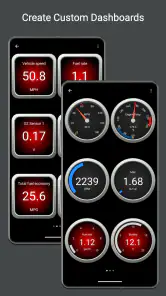
One of my favorite features has to be the customizable dashboards. You can choose which metrics to display, setting up gauges that cater to your specific interests. Whether you’re a speed enthusiast or a fuel economy nerd, the app lets you tailor your experience. It even supports multiple vehicles, so if you’re a family with a fleet, you’re covered.
Multiple-vehicle support is especially useful when household cars have different needs. I’d label each vehicle carefully and check the selected car before connecting, so a reading or saved trip is not mentally assigned to the wrong one. A customized dashboard can likewise serve different purposes: keep a simple set of readings for routine checks, then switch to a more focused layout when investigating a particular symptom. That is more practical than trying to make one crowded screen answer every question.
Understanding the limits of a code reading
A diagnostic trouble code identifies what the vehicle’s system has detected; it does not necessarily name the failed part. Several faults can produce related symptoms, and a code may need to be considered alongside the vehicle’s behavior and other checks. I see the app’s descriptions as a useful starting point for research or a clearer repair-shop conversation, not a shopping list of parts to replace. If the car is running badly or a warning suggests an urgent issue, professional diagnosis is the safer next step.
There is also a difference between having access to readings and knowing which ones matter. Beginners may find unfamiliar abbreviations and changing values confusing at first. I’d begin with the DTCs or a small selection of dashboard metrics, learn what those mean for the question at hand, and add more only when there is a reason. That gradual approach keeps the app approachable without pretending vehicle diagnostics are effortless.
Performance and Usability
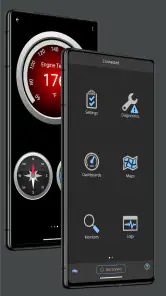
In terms of performance, the app is solid. Data refreshes quickly, and the interface is intuitive. There’s a bit of a learning curve if you’re not familiar with car diagnostics, but the app’s design helps ease you into it. I found myself getting more comfortable with each use, and the community forums are a great resource if you run into any snags.
Compared with a basic code-reader app, OBD Fusion is more appealing if you want to move beyond a one-time check and arrange useful readings on dashboards. A dedicated handheld scanner may suit someone who prefers a physical tool or does not want to rely on a phone and adapter. A repair shop has the advantage when a fault needs testing or expert interpretation. For my money, the app sits in the middle: more flexible than a bare code lookup, but still a companion to hands-on diagnosis rather than a replacement for it.
As for usability, it’s available for both Android and iOS, which is a big plus. The app runs smoothly on both platforms, and I didn’t encounter any significant bugs or crashes. It’s been designed with the user in mind, which is something I always appreciate in an app.
One practical question is whether the app alone is enough to get started. It isn’t: the adapter is a necessary part of the setup, and choosing one that suits your device and vehicle is the first decision to make. Another is whether a novice can use it. I think a beginner can get value from reading a code and checking a few focused readings, as long as they resist treating the app’s interpretation as a final diagnosis. If you want the simplest possible experience with no extra hardware, this is not the right fit.
Choosing the right first task
Once the connection works, I would avoid turning the first session into a tour of every screen. Pick one task: read a stored code, see whether a selected live reading appears, or arrange a small dashboard around a specific concern. That gives you a clear test of whether the adapter and app are communicating, while keeping the results manageable. If nothing useful appears, check the adapter’s pairing instructions and confirm that the right vehicle and device are selected before assuming the car has no relevant information.
A useful habit is to write down the date, the symptom, and the code or reading you saw, then compare that note with what happens next. This is especially helpful when a warning is intermittent: a reading taken while the symptom is present may give a mechanic more context than a vague recollection later. I would keep the note factual and avoid drawing a repair conclusion from one number. The app makes information easier to access; organizing it is what makes it easier to use.
Where it fits among other car tools
For drivers who only want a one-off answer, a simple code reader can be the more economical and straightforward route, particularly if they do not care about arranging live readings. OBD Fusion makes more sense when I expect to return to the information, customize what I watch, or keep checks organized across vehicles. It is also more hands-on than a shop visit: the shop is the better choice when I want a trained person to test a fault, while the app is useful when I want to arrive with a code and a clearer description of what the car has been doing.
That middle ground is its real appeal and its main trade-off. The app can help a curious owner become a better-informed participant in maintenance, but the user still has to choose an adapter, make sense of readings, and know when to stop troubleshooting. If I dislike that kind of involvement, I would rather use a basic service reminder app or leave diagnosis to a professional. If I enjoy learning what the car is reporting, the extra steps feel worthwhile.
Who will get the most from it
I’d recommend it to owners who enjoy understanding their cars, drivers who want a clearer starting point when a warning appears, and DIY-minded people who are comfortable doing a little research. It can also be handy for someone maintaining more than one vehicle, since separate dashboards and vehicle selection make repeated checks easier to organize. I’d skip it if you rarely look under the hood, only need basic travel tools, or expect an app to identify and repair a fault automatically.
It is also a sensible fit for someone who wants to prepare for a repair appointment rather than attempt the repair themselves. Being able to share the exact code and describe when a symptom occurred can make that conversation more specific. On the other hand, a driver who wants a single tap to explain every warning, or who has no interest in buying and pairing an adapter, is likely to find the setup more trouble than it is worth. I see it as a tool for informed curiosity, not a requirement for every car owner.
Is It Worth It?
So, is OBD Fusion worth your time and money? If you’re someone who likes to keep tabs on your car’s health or you’re a DIY enthusiast wanting to save on mechanic fees, it’s definitely a wise investment. The app provides valuable insights that can help you maintain your vehicle better and potentially avoid costly repairs. Plus, there’s something undeniably satisfying about understanding what’s going on under the hood without needing a degree in mechanical engineering.
In conclusion, OBD Fusion stands out in the world of car diagnostics apps. It’s packed with features, easy to use, and genuinely enhances your understanding of your vehicle. Whether you’re a car aficionado or just someone who wants to ensure their ride is in tip-top shape, this app is a game-changer. So, go ahead, give it a try, and unlock the mysteries of your car!
OBD Fusion (Car Diagnostics) Frequently Asked Questions
What does the OBD Fusion purchase include, and are there additional costs?
OBD Fusion is a paid app, and enhanced diagnostics are available through in-app purchases. The listed purchase options range from $14.99 to $74.99 per item, so the total cost depends on which additional diagnostics you choose. Before downloading, consider whether you need only the app’s core functions or want access to enhanced features as well.
What is OBD Fusion, and how does it work?
OBD Fusion is a comprehensive car diagnostics app designed for both Android and iOS devices. It connects to your vehicle's OBD-II port using a compatible adapter to read and interpret fault codes, monitor engine performance, and display real-time data. Users can check and clear trouble codes, which helps in understanding vehicle health without visiting a mechanic.
Is OBD Fusion compatible with all vehicles?
OBD Fusion works with most vehicles manufactured from 1996 onward, as these are equipped with OBD-II systems. However, it's important to ensure that your vehicle's make and model is supported by checking the app's compatibility list. Additionally, a compatible OBD-II adapter is needed to connect your smartphone to the vehicle.
What features does OBD Fusion offer?
OBD Fusion offers a range of features including real-time data monitoring, customizable dashboards, fuel economy tracking, and the ability to read and clear diagnostic trouble codes. Users can also log data for later analysis, set up alerts for specific conditions, and access readiness monitors to check emissions test compliance, making it a versatile tool for car enthusiasts and everyday drivers alike.
Do I need any additional equipment to use OBD Fusion?
Yes, in order to use OBD Fusion, you will need to purchase a compatible OBD-II adapter. This device connects to your vehicle's diagnostic port and pairs with your smartphone via Bluetooth or Wi-Fi. The adapter acts as a bridge between your car's computer and the OBD Fusion app, allowing data to be transferred to your mobile device.
Pros
- Easy-to-use interface.
- Comprehensive diagnostics.
- Customizable dashboards.
- Real-time data monitoring.
- Compatible with a wide range of vehicles.
Cons
- Requires a separate OBD-II adapter.
- Limited free features.
- In-app purchases can be pricey.
- Requires smartphone to operate.
- May not support older vehicles.
- Category
- Communication
- Version
- 6.14.0











