NZ Topo50 Offline - North
- 0.00
- 0.0
- Installs
- 10.00K
- Price
- $3.49
Screenshots
Analysis by Reviewed
I’d choose a map app based on what I need to do outdoors: find my position when reception disappears, read the landscape in enough detail to make sensible decisions, or follow a route with turn-by-turn guidance. NZ Topo50 Offline - North is aimed squarely at the first two needs. It is a paid Maps & Navigation app from Right Place Resources, focused on topographic coverage of New Zealand’s North Island rather than being an all-purpose travel navigator. That distinction matters: I’d consider it for a tramp, a backcountry outing, or a closer look at terrain, but not as my only tool for driving around town.
Choose it for terrain, not turn-by-turn directions
The main decision is whether you want a detailed map available without a mobile connection. An offline map can be useful when reception is unreliable, but it does not remove the need to plan, carry enough battery, and understand the area before setting out. I’d check the intended route while I still have connectivity, make sure the relevant map coverage is ready, and keep a separate navigation plan for anything where a wrong turn would have serious consequences.
For example, on a day trip from a North Island town, I might use a road-navigation app to get to the trailhead, then rely on a topographic map to judge the surrounding terrain once I leave the road. Those are different jobs. A familiar phone map may be better for addresses and driving directions; this app’s appeal is having topographic information on hand beyond the places where everyday navigation is most useful.
A practical test before paying
I’d start by thinking about the places I actually go, not just the activities I hope to do someday. If most outings are in the North Island and involve walking or exploring away from major roads, a focused map is easier to justify than another general-purpose navigation app. If I take only occasional local walks, or mainly need to get from one address to another, the specialised coverage may sit unused on my phone.
The app is listed at $3.49, with optional in-app purchases priced from $0.49 to $0.99 per item. I’d factor those possible add-ons into the decision rather than assuming the initial purchase necessarily covers every need. Its Everyone age rating is broad, but suitability still depends on how confidently the person using it can interpret a topographic map and prepare for a trip.
Getting Around with Ease
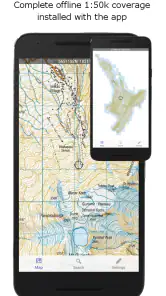
So, what's the first thing you notice about NZ Topo50 Offline - North? It's got this incredibly detailed map spread that makes you feel like a pro navigator. Seriously, it’s like having a bird's eye view of every nook and cranny of the place. You can roam around without a hitch because, guess what, the app works offline! No more relying on patchy signals when you’re in the middle of nowhere.
Features that Stand Out
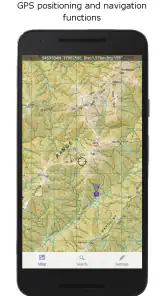
Now, let's dive into some of the coolest features. The maps are high-resolution and packed with details that even the most discerning explorer will appreciate. From contour lines to river paths and elevation details, it’s all laid out for you. Plus, the GPS functionality is spot on, ensuring you’re never lost even if you’ve got the worst sense of direction like me!
More From Our News Desk

Weather by Xiaomi Review: Clear at a Glance, Less Clear Up Close

X Under Pressure: Can It Recover When Posting Goes Wrong?

Clash of Clans Is Won Between the Battles

Android Auto Makes the Case for Quieter Car Software

MobiOffice: Transforming Mobile Productivity with Seamless Integration

EA SPORTS FC™ Mobile Soccer: Redefining Mobile Sports Gaming
Another thing I love is the bookmarking feature. Planning a trip and want to mark some spots? Just drop a pin! This makes it super easy to plan your route ahead of time or just remember that secret fishing spot you stumbled upon.
Make your map marks useful
Bookmarks are most helpful when I treat them as planning notes rather than a substitute for a route. I’d mark a trail junction, a possible rest stop, or the place I intend to turn back, then check those points against the terrain before setting off. On a fishing trip, a pin can help me remember a promising access point for a later visit. The trade-off is that a saved point only helps if I can recognise what it means later, so I’d use clear, practical labels if the app offers them rather than relying on a cluster of unnamed markers.
One useful habit with offline navigation is to look at the map before the outing, not for the first time when I am already uncertain. I’d trace the broad shape of the route, note nearby streams and ridgelines, and identify obvious alternatives if conditions change. That makes the map a decision aid instead of a screen I keep checking at every step. It also helps me notice when a direct-looking line crosses terrain that may be harder to travel than it appears.
User Experience
Let’s talk about user experience. The interface is clean, intuitive, and doesn’t overwhelm you with options. It’s straightforward, which means you spend more time exploring and less time fiddling with settings. Everything loads up pretty quickly, and the clarity of the maps is just brilliant. Even under the blazing sun, the screen remains readable, which is a blessing when you’re out and about.
Setting it up is a breeze too! I was out exploring in less than 10 minutes after downloading the app. Just a couple of taps and swipes and you’re good to go. The app doesn’t demand a lot of your phone’s resources either, so it won’t be draining your battery like a thirsty camel at an oasis.
Use it as part of a simple trip routine
For a realistic day out, I’d use a road app to reach a North Island trailhead, open this map while I still have a connection, and place a few useful bookmarks before starting the walk. At a junction, I could check my position against the surrounding contours and waterways instead of relying on a road-style route line that may not explain the shape of the ground. After the outing, those saved points could also help me remember where I stopped or which access point I want to revisit.
That workflow depends on doing the preparation before leaving the car. Offline use is most helpful when the map needed for the outing is ready in advance; I would not make a remote trip depend on discovering the app’s coverage or setup process at the trailhead. I’d also keep the phone accessible but protected, since the convenience of a digital map is no use if the screen is difficult to consult or the device runs out of power.
Plan for the limits of a phone
Offline access is a real advantage, but it should not be confused with a complete safety system. GPS positioning still depends on the phone being powered and usable, and a readable map cannot tell me whether a track is suitable for my current fitness, weather, or equipment. I’d bring a power bank on a longer outing, keep the phone protected, and carry whatever backup navigation makes sense for the trip. For a short familiar walk, that may feel cautious; in remote terrain, it is sensible preparation.
There is also a regional boundary to keep in mind. This edition is for the North Island, so I would not buy it expecting the same coverage for a South Island itinerary. If I routinely travel across both islands, a broader mapping option may be a better fit, even if a focused North Island map is more relevant for someone whose plans stay there.
Price, scope, and alternatives
The app costs $3.49, with in-app purchases listed from $0.49 to $0.99 per item. I’d weigh that against how often I explore the North Island and whether offline topographic mapping is something I will actually use. Its age rating is Everyone, and it has more than 10,000 installs. The average rating is currently 0.0, so I would not treat a rating score as evidence of how well it will suit my needs; I’d decide based on the map’s regional focus and my intended use.
The alternative is not simply another app with a different map. General-purpose navigation is usually the more convenient choice for finding shops, addresses, and roads, while a paper map gives a no-battery fallback and can be easier to consult at a glance. A dedicated offline topographic app sits between those approaches: convenient on a phone and better suited to terrain reading than a street-focused map, but still dependent on the device. If I mostly want directions for everyday errands, I’d choose the ordinary navigation option. If I need North Island topography without relying on reception, this app makes more sense.
What changes when you switch from a road map
The main adjustment is mental rather than technical: I would stop expecting the map to tell me exactly which way to walk. A street-navigation app tends to make the next manoeuvre the centre of attention; a topographic map asks me to interpret the ground around my position. Contours, watercourses, and the relationship between landmarks are useful only when I take time to read them. Someone who prefers a clear sequence of spoken instructions may find that style slower and less reassuring.
For someone already comfortable with paper topographic maps, the phone format can make it easier to carry a map and check a marked point while moving. But I would not throw away familiar habits just because the app is convenient. Keeping a planned route in mind, knowing where a sensible turnaround point lies, and having a backup remain worthwhile whether the map is digital or printed.
Who benefits most—and who should look elsewhere
This is a better match for a North Island regular than for a traveller seeking one mapping solution for every part of New Zealand. Walkers, riders, and people who revisit the same outdoor areas can get more value from the focused coverage because they have a reason to study the terrain and save useful places. A casual visitor who mainly needs directions between accommodation, shops, and attractions may be happier with standard navigation and fewer map-reading decisions.
I’d also be cautious about recommending it as someone’s first and only navigation aid for a demanding trip. The app can show a map and position, but those do not replace experience, preparation, or an independent fallback. It is most useful when the person holding the phone is willing to make their own decisions from the terrain information rather than expecting the app to choose a safe route automatically.
Final Thoughts
In conclusion, if you’re planning to hit the trails in the North, having NZ Topo50 Offline - North is like having a seasoned guide by your side. The app is comprehensive without being complicated, and its offline capabilities mean you’re never tethered to a signal. Whether you’re hiking, biking, or just exploring, this app gives you the confidence to venture farther and discover more.
So, there you have it! Pack your bags, lace up those boots, and let this app lead the way to adventure. Happy exploring!
Who I’d recommend it to
I’d recommend it to North Island walkers, riders, and explorers who want offline topographic maps and are comfortable using a map to make their own route decisions. I’d skip it if I needed live traffic, address searches, or spoken turn-by-turn directions, or if my regular trips are outside the North Island. It is also not the right choice for anyone expecting a map alone to replace preparation or a backup plan.
Before heading out, I’d confirm that the area I need is available offline, save useful points while planning, and check the route while I still have a connection. That small routine makes the app more useful and reduces the chance of discovering a preparation gap on the trail. For the right kind of North Island outing, it is a focused tool; for everyday driving or nationwide coverage, I’d pick something broader.
My recommendation in brief
My recommendation comes down to the kind of map I want in my pocket. For North Island terrain, offline access, and saved reference points, this is a focused option worth considering. For turn-by-turn driving, searching everyday destinations, or frequent trips beyond the region, I’d choose a broader navigation tool instead. Right Place Resources has built an app with a specific purpose, and I think it makes the most sense when that purpose matches the outing rather than when someone expects one app to handle every kind of navigation.
It was released on June 13, 2017, and the average rating is 0.0, so I would not use a score as a shortcut for deciding whether it suits me. I’d judge it by the practical questions: do I explore the North Island, do I want topographic detail offline, and am I prepared to navigate rather than follow spoken directions? If the answers are yes, the app has a clear role. If not, an ordinary road map or a broader regional option is likely the more comfortable choice.
NZ Topo50 Offline - North Frequently Asked Questions
What regions does NZ Topo50 Offline - North cover?
NZ Topo50 Offline - North is focused on New Zealand’s North Island, with a fully offline topographical map in the NZ Topo50 series. That makes it a specific choice for people exploring this part of the country rather than a general map app for everywhere. Before downloading, consider whether the North Island coverage matches the area you plan to visit.
Does the app require a purchase, and are there in-app purchases?
NZ Topo50 Offline - North is a paid Maps & Navigation app priced at $3.49, with in-app purchases listed at $0.49–$0.99 per item. It is developed by Right Place Resources and has an Everyone content rating. Check the purchase details shown in your app store before downloading so you know what you are buying and whether any optional items are relevant to you.
What is NZ Topo50 Offline - North and what are its primary features?
NZ Topo50 Offline - North is a navigation app designed for outdoor enthusiasts venturing into New Zealand's North Island. It provides users with detailed topographical maps that can be accessed offline, making it an ideal tool for hikers, campers, and adventurers. Key features include high-resolution maps, GPS tracking, route planning, and the ability to mark waypoints, ensuring users can navigate even in remote areas without an internet connection.
Can I use NZ Topo50 Offline - North without an internet connection?
Yes, one of the standout features of NZ Topo50 Offline - North is its offline capability. Users can download maps in advance and access them without an internet connection. This is particularly useful for adventurers who travel to areas with limited or no mobile coverage, ensuring uninterrupted navigation and planning during outdoor activities.
How accurate are the maps provided by NZ Topo50 Offline - North?
The maps in NZ Topo50 Offline - North are based on the official Topo50 series, which are known for their accuracy and detail. These maps are regularly updated to reflect changes in terrain and landmarks, providing users with reliable navigation data. However, it's always recommended to cross-reference with other navigation tools and local information when planning critical routes.
Pros
- Offline access to detailed topographic maps.
- User-friendly interface for easy navigation.
- Regular updates with new map data.
- Comprehensive coverage of North New Zealand.
- Works without an internet connection.
Cons
- Limited to North New Zealand region.
- May require storage space for offline maps.
- No real-time GPS tracking available.
- Paid app with no free version option.
- Interface may be overwhelming for beginners.
- Category
- Maps & Navigation
- Version
- Varies with device











