

NumberGuru: Spam & Caller ID
- 55.00
- 3.4
- Installs
- 10.00K
- Price
- Free

Screenshots
Analysis by Reviewed
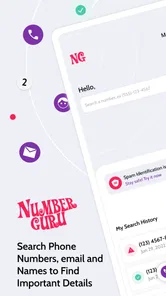
I usually reach for a reverse phone lookup app when a call arrives at the worst possible moment: while I am cooking, commuting, or waiting for an important delivery. NumberGuru: Spam & Caller ID is built for that small but useful decision—whether an unfamiliar number deserves my attention. It combines number searching, name lookup, and spam-call identification in a free communication app from The NumberGuru LLC.
My overall impression is practical rather than spectacular. The app is most valuable when I treat it as a quick second opinion, not as an unquestionable authority. It can help turn an unknown number into a little more context, but the experience depends heavily on the number being searched and on how much information is available for it. That makes the app interesting for everyday screening, while also creating limits that are important to understand before relying on it.
How NumberGuru feels in everyday use
I find the app most useful when it creates a brief pause between an unexpected ring and my response, rather than pulling me into a long investigation. In this section, I’ll look at how that pause can change the flow of everyday calls and help me decide what deserves attention.
Speed expectations when a call is already on the screen
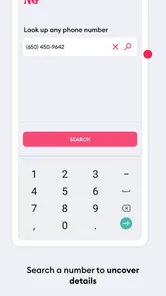
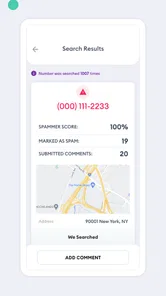
The main appeal is the short path from uncertainty to investigation. I can take an unfamiliar number, search it, and use whatever result appears to decide whether to call back, ignore it, or wait for a voicemail. This is more convenient than manually copying the number into a general web search and sorting through unrelated pages.
That convenience should not be confused with a guarantee of instant certainty. A lookup service has to find a useful match before it can offer meaningful context, and not every number will produce the same quality of result. In practice, I would use NumberGuru quickly during the first pass, then slow down if the result is vague or does not clearly connect the number with a person or spam report.
A good habit is to search the complete number carefully rather than guessing from only the area code or the first few digits. Numbers that look local can still be unwanted, and a familiar-looking prefix is not proof that the caller is trustworthy. The app is helpful here because it encourages checking the exact number instead of relying on instinct.
For a missed call, the workflow is especially straightforward. I can review the number before returning the call, which reduces the chance of responding impulsively to a suspicious message. If the caller leaves a detailed voicemail, I can compare that context with the lookup rather than allowing the app to make the decision for me.
More From Our News Desk

 Gmail
GmailGmail in a Busy Inbox: Who Benefits Most?
From first account to crowded workday, Gmail earns its place through dependable search and flexible sorting—but its best fit depends on how much inbox maintenance you can tolerate.

 Prime Video
Switching to Prime Video: What Changes in Your Viewing Routine
Prime Video can make a compelling second home for streaming, but switching means learning a different catalog, rental layer, and route from browsing to playback.

 Universal TV Remote Control
Universal TV Remote Control Works Best as a Reliable Backup
A phone remote earns its place through quick setup and reliable habits. Here is how to get more from Universal TV Remote Control—and where its limits show.

 Weather - By Xiaomi
Weather by Xiaomi Review: Clear at a Glance, Less Clear Up Close
Xiaomi’s weather app makes everyday forecasts quick to scan, but its calm surface can leave useful details and recovery paths harder to find than they should be.

 X
XX Under Pressure: Can It Recover When Posting Goes Wrong?
A resilience-focused review of X, examining setup, mistaken posts, interruptions, weak connections, and the gaps that matter when recovery needs to be dependable.

 Clash of Clans
Clash of Clans Is Won Between the Battles
Its raids are quick; its community is a long-term project of coordination, teaching, rivalry, and shared responsibility—with all the friction that entails.
Latest News



What happens during heavier use
NumberGuru makes the most sense for occasional checks, but some people will use it in bursts. A person cleaning up a call history, checking several numbers after a busy day, or helping a family member identify repeated calls may perform many searches close together. In that situation, the important question is not just whether one lookup works, but whether the process remains manageable.
I would keep a simple note of numbers that need follow-up instead of repeatedly searching the same entry. This avoids turning the app into a substitute for an organized call log. It also helps separate three different situations: a number with useful caller information, a number associated with spam concerns, and a number that simply has too little context to judge.
That distinction is one of the app’s less obvious lessons. “No clear result” should not automatically mean “safe,” and a spam indication should not be treated as proof of a criminal scheme. A lookup is evidence for a decision, not the decision itself. I find the app most useful when I combine its result with the caller’s behavior, any voicemail, and whether I was actually expecting contact.
For repeated nuisance calls, the app can help me recognize a pattern, but it is not a complete phone-management strategy. I would still use the blocking and reporting tools already available on my phone when appropriate. NumberGuru can add context before that action; it does not replace the phone’s own controls.
Reliability is about context, not just a result
The average rating is 3.4 from around 132 ratings, with 55 written reviews, so the public response appears mixed rather than universally enthusiastic. I read that as a useful warning about expectations: some users will find the lookup helpful, while others may encounter results that do not feel complete or decisive.
The app’s reliability should therefore be judged in layers. First, I ask whether it recognizes the number. Next, I look at whether the identity or spam context seems relevant to the call I received. Finally, I decide what action is sensible. This three-step approach prevents a single label from carrying more weight than it deserves.
There is also a privacy-minded reason to avoid overreacting to a name match. A shared household phone, a business line, a recycled number, or a number used by more than one person can make a result look more definite than it really is. I would never disclose personal information to a caller merely because the app displays a name. Instead, I would use the result to choose a safer verification method.
For example, if I receive a call claiming to be from a bank, a delivery company, or a service provider, I would not call back through a number supplied by the caller. I would open the organization’s official app or use a contact method I already trust. NumberGuru can help me notice that the incoming number is unfamiliar, but it should not become the authority for sensitive financial or account decisions.
Stability and recovery when the first lookup is not enough
In a communication app, stability matters because the useful moment is often brief. I want to search a number without turning a simple missed call into a long troubleshooting session. The sensible way to use this app is to keep the task narrow: search, read the available context, make a cautious decision, and move on.
If a result does not appear useful, I would recover by checking the number’s formatting, trying the search again only once, and then using another trusted source if the issue affects something important. Repeating the same lookup many times rarely creates better evidence. This is a practical limitation of the category, not something an interface can completely solve.
I also recommend keeping the app’s role separate from the phone’s emergency and contact functions. It is not where I would store critical contact information or depend on a caller label during an urgent situation. For ordinary unknown calls, it is a convenient investigation tool; for high-stakes communication, I would verify through an independent channel.
Device constraints and the cost of trying it
NumberGuru is free to install, carries an Everyone content rating, and supports devices running Android 7.0 or later. That makes it accessible to people using older Android hardware, although the age of a device can still affect the general feel of any app. A phone with limited storage, an older processor, or an overloaded system may make searches and screen changes feel less comfortable than they would on a newer model.
The current version is 2.02.86. I would keep the app updated through the normal store process because communication tools benefit from compatibility fixes, especially when the operating system or phone software changes. I would also avoid judging the app solely by one slow moment caused by a weak connection or a busy device; lookup work naturally depends on more than the app’s interface.
There are in-app purchases priced at $24.99 per item. Since the basic app is free, I would start without paying and first decide whether the ordinary lookup workflow actually helps me. Anyone considering a purchase should pause at the payment screen and check exactly what the item unlocks before confirming. A paid option makes sense only if it solves a recurring problem that the free experience leaves unresolved.
Resource demands are best considered in relation to how I use it. A few manual searches are a light, focused task. Keeping any communication app active in the background, if the device offers that option, can have a different effect depending on the phone and system settings. I would avoid granting more access than I am comfortable with and would review the app’s requested permissions during installation rather than accepting everything automatically.
A realistic situation where it earns a place
Imagine I am expecting a repair technician, but the appointment window is broad and the incoming number is unfamiliar. I can search the number before answering or returning the call. If the result aligns with the expected contact, I still confirm the caller’s identity without sharing unnecessary details. If the number looks associated with unwanted calls, I can wait for a voicemail or contact the repair company through its established channel.
This is a good fit because the app reduces uncertainty without pretending to replace judgment. It is also useful for someone who receives frequent calls from new customers, local services, school contacts, or delivery drivers and wants a quick way to separate plausible calls from obvious nuisance traffic.
Another useful workflow is reviewing a family member’s recent missed calls together. Rather than simply telling them to answer or ignore everything, I would search the numbers one at a time and explain why a result is only a clue. That turns the app into a small safety aid, especially for someone who is easily pressured by urgent-sounding callers.
Where usual alternatives may be better
For basic caller screening, the phone’s built-in caller identification, blocking, and spam protection may be enough. Those tools are already integrated into the call screen, so they can be faster and less disruptive when the only goal is deciding whether to answer. If I rarely receive unknown calls, installing a separate lookup app may not add enough value.
A general search engine can be better when the number belongs to a public business and I need broader context, such as an official support page or opening hours. A company’s own app or website is the better choice when the call concerns an account, payment, delivery, or appointment. NumberGuru is strongest in the middle ground: a quick number-focused check before I choose a safer next step.
Dedicated call-blocking services may also suit heavy nuisance-call problems better, particularly for users who want extensive filtering rather than occasional investigation. I would choose NumberGuru when I want to look up a specific number manually, not when I expect one tool to manage every incoming call automatically.
Who should use it, and who should skip it
I would recommend trying it if you regularly wonder who called, prefer checking before calling back, or want a simple reverse phone lookup tool without an upfront purchase. It is also reasonable for people who want to identify possible spam patterns while keeping final control over what happens next.
I would skip it if I need guaranteed identity verification, comprehensive business information, or a fully automatic call-screening system. It is not the right foundation for decisions involving money, passwords, medical matters, or account security. In those cases, independent verification is more important than convenience.
I would also be cautious about paying for extras before establishing a routine. The free entry point lowers the risk of testing the app, but the $24.99 per-item purchase price means a paid feature deserves a clear reason. If I only investigate an unknown number once in a while, the free experience or the phone’s existing tools may be the more sensible choice.
My performance verdict
NumberGuru: Spam & Caller ID is a focused communication app with a useful everyday purpose. Its strength is not that it magically explains every call; its strength is that it gives me a dedicated place to investigate an unfamiliar number before I react. That small pause can be valuable, especially when a caller is persistent or the timing feels suspicious.
The experience is best when I keep expectations realistic. Search quality can vary, results need interpretation, and the app should work alongside—not replace—official contact channels and built-in phone protections. I also see the mixed 3.4 average as a reason to test the free version personally rather than assuming it will work equally well for every number.
For me, the final recommendation is conditional but positive: try it if unknown calls are a recurring annoyance and manual lookup would genuinely help. Use it as a fast clue, record patterns when necessary, and verify important claims elsewhere. If your phone already handles spam screening well or you need a more complete blocking service, another option may be a better fit. Used within those boundaries, this free app from The NumberGuru LLC can make the moment before answering an unfamiliar call a little more informed.
NumberGuru: Spam & Caller ID Frequently Asked Questions
Who develops NumberGuru: Spam & Caller ID, and which devices can run it?
NumberGuru: Spam & Caller ID is a Communication app developed by The NumberGuru LLC. It is available for Android devices running version 7.0 or later, so checking your phone’s operating-system version before downloading can help avoid compatibility issues. The app is rated for Everyone, making its intended audience broad, though parents may still want to review its features and privacy permissions before a child uses it.
What is NumberGuru: Spam & Caller ID used for?
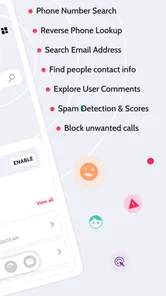
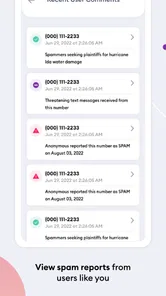
NumberGuru: Spam & Caller ID is designed to help identify unknown callers and recognize numbers associated with suspected spam, telemarketing, or scam activity. After receiving a call, you can use the app to look up the number and review available information or community reports. It is most useful as an identification and screening tool, rather than a guarantee that every caller will be correctly identified.
Does NumberGuru automatically block spam calls?
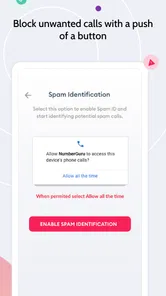
The app’s main purpose is caller identification and reverse phone-number lookup, so users should not assume that every unwanted call will be blocked automatically. Blocking features can depend on the device, operating-system permissions, and the version of the application available in your region. Before relying on it, check the app’s settings and your phone’s call-blocking options to confirm what protection is actually enabled.
Can NumberGuru reveal the name and personal details of any caller?
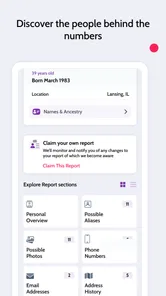
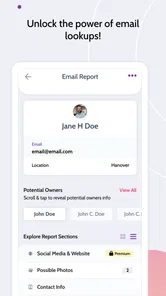
No. NumberGuru cannot be expected to identify every number or provide complete personal information. Results may come from public records, user-submitted reports, business listings, or other available databases, and some numbers may return limited or outdated details. Treat displayed information as a helpful clue, not definitive proof of someone’s identity, especially when making decisions about unfamiliar callers.
Is NumberGuru: Spam & Caller ID free to download and use?
The application is free to download, but some functions can be limited by usage allowances, advertising, subscriptions, or optional in-app purchases. In-app purchases are listed at $24.99 per item, and pricing or available features may vary between Android and iOS and can change over time. Review the current store listing and purchase terms before starting a trial or entering payment information.
Pros
- Identifies many unknown callers before you answer.
- Reverse lookup can reveal useful details about suspicious numbers.
- Spam reports help users recognize recurring scam patterns.
- Simple interface makes searching a phone number quick.
- Useful call-screening tool for reducing unwanted interruptions.
Cons
- Results may be incomplete for private or newly created numbers.
- Some features may require a paid subscription.
- Caller information can occasionally be outdated or inaccurate.
- The app may need access to call-related permissions to work fully.
- Database coverage can vary significantly by country or region.











