NuFACE
- 132.00
- 4.2
- Installs
- 50.00K
- Price
- Free

Screenshots



Analysis by Reviewed
When I assess a beauty app, I look beyond whether it feels polished: can I read it comfortably, move through it without guesswork, and use its guidance in the circumstances I actually have? NuFACE is a beauty app from NuFACE, built around at-home facial-care routines and a companion device. That makes it most relevant to someone who already wants to follow a structured device-based routine, rather than someone looking for a general skincare diary or a library of independent beauty advice.
Using the app in everyday life
NuFACE is free, rated for Everyone, and has an average rating of 4.4 from around 670 ratings. It has over 10,000 installs, and its current version is 4.4.3. The app was released on July 24, 2022. Those figures suggest an established, focused product, though popularity alone doesn’t tell me whether its routine will suit your needs. I’d treat the app as a guide for using the NuFACE approach, not as a substitute for professional skincare advice.
Readability and navigation
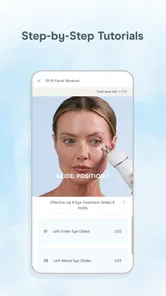
When I first open a routine-based beauty app, I want to know what to do next without having to decode a crowded screen. NuFACE presents itself as an at-home aesthetician, and its useful role is helping users follow facial-care guidance in an organized way. The experience will make the most sense if you are comfortable using a phone while setting up a treatment and following instructions as you go.
A practical tip is to look through the routine before you begin, rather than trying to learn the sequence while holding your device and moving around your face. That small bit of preparation can make the session feel less interrupted. If you have difficulty reading small text, navigating touchscreens, or switching attention between the phone and a mirror, the app may require more effort than a simple paper routine or help from another person.
I’d also make the phone’s role as predictable as possible. Before starting, find the instructions you need and leave the display at a comfortable angle and distance. This is a small workflow choice, but it matters when your attention is divided between a screen, your reflection, and a handheld device. If you need to repeatedly search through menus, unlock the phone, or adjust its position, the routine can become more fiddly than the app’s guided format initially suggests.
For someone who reads more comfortably on a larger display, checking the guidance before the treatment and then keeping a brief written prompt nearby may be easier than repeatedly consulting a phone. That approach is useful even without an access need: it lets you focus on the physical steps rather than trying to remember what comes next. I would not assume a phone guide automatically replaces clear, usable instructions in every setting.
Motor and sensory considerations
Device-guided facial care is not entirely hands-free: you need to handle the companion device and follow the steps at the same time. That can be awkward if you have limited grip, hand control, or comfortable movement around your face. I’d test whether the physical routine feels manageable before building it into a daily habit, and avoid assuming that an on-screen guide removes the motor demands of treatment.
More From Our News Desk

 Gmail
Gmail in a Busy Inbox: Who Benefits Most?
From first account to crowded workday, Gmail earns its place through dependable search and flexible sorting—but its best fit depends on how much inbox maintenance you can tolerate.

 Prime Video
Switching to Prime Video: What Changes in Your Viewing Routine
Prime Video can make a compelling second home for streaming, but switching means learning a different catalog, rental layer, and route from browsing to playback.

 Universal TV Remote Control
 Works Best as a Reliable Backup
A phone remote earns its place through quick setup and reliable habits. Here is how to get more from Universal TV Remote Control—and where its limits show.

 Weather - By Xiaomi
Weather by Xiaomi Review: Clear at a Glance, Less Clear Up Close
Xiaomi’s weather app makes everyday forecasts quick to scan, but its calm surface can leave useful details and recovery paths harder to find than they should be.

 X
X Under Pressure: Can It Recover When Posting Goes Wrong?
A resilience-focused review of X, examining setup, mistaken posts, interruptions, weak connections, and the gaps that matter when recovery needs to be dependable.

 Clash of Clans
 Is Won Between the Battles
Its raids are quick; its community is a long-term project of coordination, teaching, rivalry, and shared responsibility—with all the friction that entails.
Latest News



There is also a sensory side to consider. A beauty routine can involve close-up visual attention and sustained contact with the face, which some people may find tiring or uncomfortable. I would choose a quiet, well-lit moment and stop if the process feels unpleasant. The app’s value is in guiding a routine; it cannot make the physical experience suitable for every person.
One useful way to judge the fit is to separate the app interaction from the treatment itself. Can you comfortably follow the directions on your phone? Can you hold and move the device without strain? Does the facial contact feel acceptable? A routine may work well on the screen but still be a poor physical match, or the reverse. Trying the steps at a calm pace before treating them as a habit gives you a more honest answer than judging the interface alone.
If holding a phone and a treatment device at once is difficult, I’d avoid improvising a setup that feels unstable. A secure place for the phone, a seated position, and having everything within reach can reduce unnecessary movement. This is not a special feature of the app; it is a practical way to make a device-led routine less demanding. If those adjustments still do not make the steps comfortable, a simpler skincare approach may be a better choice.
Situational access and who it suits
If you already own or plan to use a NuFACE device, the app can be a convenient place to orient yourself around its use. It is best suited to someone who likes guided at-home care and can set aside a little uninterrupted time. It may be less useful if you want broad product comparisons, advice across many brands, or a skincare plan that does not depend on a companion device.
For an everyday example, I’d set up a session when I have time to stand or sit at a mirror without rushing. I’d check the routine first, put the phone where I can see it, and keep the device within reach. That avoids juggling the phone mid-step and makes it easier to pause if a notification or household task interrupts. If you need to use the routine while commuting, in a dim room, or in a shared space where you cannot focus, a simpler routine saved for later may be the better choice.
There is a useful distinction between fitting a session into a busy day and trying to perform it in any spare minute. A short gap before leaving home may sound convenient, but rushing can make it harder to follow the guidance and handle the device comfortably. I’d rather choose a repeatable time when I can give the routine proper attention than rely on reminders or good intentions to squeeze it into an unsuitable moment. The app is most helpful when the surrounding setup works too.
For a new user, I’d use the first session as a practical trial rather than a test of willpower. Check whether the instructions are easy to follow, whether your phone stays visible, and whether the device feels manageable throughout. If the routine feels awkward, change the environment before deciding the whole approach is wrong: a chair, better lighting, or a clearer place for the phone might help. If the physical steps remain uncomfortable, that is meaningful feedback, not a reason to push through just because a guide is available.
Compared with the usual alternatives in beauty apps, NuFACE has a narrower purpose than a general skincare tracker or product-discovery app. That focus can be a benefit when you want help with this particular device-based approach, but it is a limitation if you are still deciding among different tools or prefer treatments that need no equipment. I would not choose it as my only source for diagnosing skin concerns or deciding whether a treatment is appropriate for me.
The trade-off is straightforward: broad skincare apps may help organize products or routines across different approaches, while this one is more relevant if your interest is specifically the NuFACE method. A paper checklist can be simpler if all you need is a sequence you already know, and a professional is the more appropriate source for individual concerns. I’d choose the app when its focused guidance is the missing piece, not because one beauty app should cover every question about skin.
Remaining barriers and a balanced verdict
Before relying on the app, I’d check that my phone runs Android 10 or later if I’m using Android, and make sure I can use the companion device comfortably. A phone’s small screen, touch controls, and the need to follow instructions while performing a physical routine are real access barriers, not minor details. If those demands do not suit you, a larger-screen guide, written instructions, or a different kind of skincare app may be more practical.
Another consideration is how much guidance you want from a phone during a personal-care routine. Some people prefer a step-by-step companion; others would rather learn the sequence once and then use a familiar, low-tech prompt. NuFACE’s device-centered focus is useful only if that style fits your habits. If screen interaction makes the experience feel more complicated, a written routine or a less equipment-dependent option may be the more comfortable fit.
My overall view is that NuFACE is worth considering for people who want a focused companion to an at-home facial-care routine and are comfortable with its device-based format. It is not automatically accessible just because it offers guidance, and it is not the right fit for everyone who enjoys skincare. I’d start by checking whether the routine, phone interaction, and physical handling all work for me; if they do, the app may help make the process easier to follow.
Features that Stand Out
Alright, let's dive into some of the features. The app is packed with tutorials and routines that are tailored to different skin types and needs. Whether you're looking to lift, tone, or reduce wrinkles, there's a guided session for you. What I really love is how the app personalizes your routine based on your skin’s progress. It’s like having a trainer for your face!
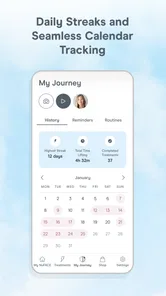
And for those of us who love tracking progress, the app allows you to log your sessions and see how far you've come. There's something incredibly satisfying about seeing those before-and-after photos side by side. Plus, the app sends you reminders, so you never miss a session. It's like having a motivational coach cheering you on.
Why You Might Love It
If you're a fan of convenience, the NuFACE app is your new best friend. It's perfect for busy bees who want to maintain their skincare routine without heading to the spa. The app makes it easy to integrate facial treatments into your daily routine, and let's be honest, who doesn’t want to look fabulous with minimal effort?
Another thing worth mentioning is the community feature. It’s a great way to connect with other users, share tips, and even get some skincare inspiration. It feels like being part of a supportive beauty community, which is a nice touch.
That community-oriented side can appeal if you enjoy exchanging ideas, but I would keep personal treatment decisions grounded in guidance that suits your own circumstances rather than adopting another user’s routine automatically. A shared tip can be interesting without being right for every face, comfort level, or device user. I’d treat social inspiration as a bonus, not as a replacement for professional advice when a skin concern needs individual attention.
For someone deciding whether to install it, the key question is not simply whether guided routines sound appealing. It is whether you expect to use the companion device and whether you want your phone involved in that process. If the answer is yes, the app has a clear role. If you are only browsing general skincare ideas or want help comparing unrelated products, a broader beauty resource will likely serve you better.
The Final Verdict
So, what's the bottom line? The NuFACE app is a game-changer for anyone serious about skincare. It's not just an app; it’s a comprehensive skincare partner. Whether you're a seasoned beauty aficionado or just starting your skincare journey, this app has something to offer. Plus, with its sleek design and easy-to-follow guides, it makes facial treatments accessible to everyone. Give it a try, and let your skin do the talking!
NuFACE Frequently Asked Questions
Is the NuFACE app free, and what devices can I install it on?
NuFACE is a free beauty app from the NuFACE developer, with an Everyone age rating. It is listed for devices running Android 10 or later, so check your operating system before downloading. The app is described as “Your on-demand aesthetician,” making it relevant to people interested in NuFACE and facial skincare routines.
What is NuFACE and how does it work?
NuFACE is a microcurrent facial toning device designed to improve facial contour, skin tone, and reduce wrinkles. It uses low-level electrical currents to stimulate facial muscles, promoting skin rejuvenation and toning. Users typically see results with consistent use. It's important to follow the instructions carefully to achieve the best results. The app is described as an on-demand aesthetician, offering a digital companion for people interested in NuFACE.
Is NuFACE safe to use on all skin types?
Yes, NuFACE is designed to be safe for all skin types. However, it is always recommended to perform a patch test before using it on your face, especially if you have sensitive skin. People with certain medical conditions or who are pregnant should consult a doctor before using the device. The app is not a substitute for personalized medical advice, so check with a healthcare professional when you have a specific concern.
How often should I use the NuFACE device?
For optimal results, it's recommended to use the NuFACE device for about 5-20 minutes per session, five times a week for the first 60 days. Afterward, you can reduce usage to two to three times a week for maintenance. Consistency is key to achieving the best results. Use the device according to its instructions, and treat the app as a companion rather than a replacement for the device’s guidance.
What are the benefits of using NuFACE regularly?
Regular use of NuFACE can lead to a more toned and lifted appearance of facial features, improved skin texture, and reduced appearance of fine lines and wrinkles. The microcurrent technology helps to boost collagen and elastin production, contributing to healthier and more youthful-looking skin. Results are associated with regular device use, so keep expectations realistic and follow the recommended routine.
Pros
- Easy to use with intuitive controls.
- Visible results in just a few weeks.
- Portable design for on-the-go use.
- Multiple intensity settings for customization.
- Comes with a comprehensive user guide.
Cons
- Requires consistent use for best results.
- High initial cost of purchase.
- Battery life could be improved.
- Some users experience skin irritation.
- Limited to facial toning only.