

Nose Job - Plastic Surgery AI
- 4.00
- 4.2
- Installs
- 10.00K
- Price
- Free
Screenshots
Analysis by Reviewed
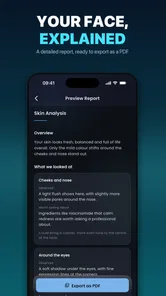
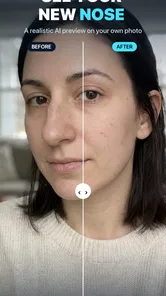
If you are curious about how a different nose, fuller lips, or a sharper jawline might change your face, Nose Job - Plastic Surgery AI is built for that first visual experiment. I approached it as a beauty app rather than a serious medical tool, and that distinction matters: its value is in helping you explore an appearance idea on a photo, not in telling you what procedure you should have.
The app comes from ALICAN TILKI and sits in the beauty category. It is free to install, aimed at Everyone, and supports devices running Android 7.0 or later. Its current version is 1.3.5, and the app has passed the early discovery stage with over ten thousand installs and an average rating of 4.2. That gives it enough visibility to feel established, while the relatively small review base means I would still treat the rating as an initial signal rather than a final verdict.
How I would decide whether this face editor is right for me
My first decision criterion is the question I want answered. If I want a quick, visual “what if?” before discussing a look with a friend, this app makes sense. If I want medical guidance, realistic surgical planning, or an assessment of facial proportions by a qualified professional, it is the wrong category entirely. An AI preview can alter an image, but it cannot examine breathing, skin, bone structure, healing, or the many practical factors involved in rhinoplasty.
The second criterion is how much control I need. A focused app can be more approachable than a full photo-editing suite because the purpose is immediately clear: preview facial changes without learning a large collection of unrelated tools. That simplicity is useful when I want to compare a subtle adjustment with a more noticeable one. It becomes less attractive if I expect detailed retouching, layered editing, or the kind of precise manual control found in advanced editors.
I also consider the quality of the starting photo. Face-editing results depend heavily on a clear, front-facing image with the face visible and lighting that does not create harsh shadows. A tilted head, strong filter, sunglasses, hair across the nose, or an extreme camera angle can make any AI preview less convincing. This is not a flaw unique to this app, but it is an important part of using it fairly. A poor source image can make the result look like a problem with the editor when the real issue is the input.
One practical detail is the payment model. The app is free to begin with, but in-app purchases range from $9.99 to $99.99 per item. That is a wide enough range that I would inspect the purchase screen carefully before committing. I would not assume that installing the app means every editing option is included at no cost. For a casual experiment, the free starting point may be sufficient; for repeated use, the possible expense becomes part of the decision.
Start with a comparison workflow, not a single dramatic edit
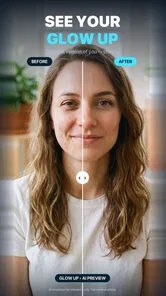
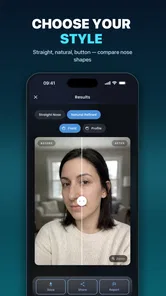
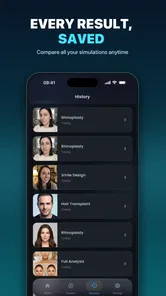
The most useful way I found to approach this kind of tool is to preserve the original photo and create a small set of restrained variations. I would begin with the least noticeable change, save or review it, then compare it with a stronger version. Looking at one edited image by itself encourages me to judge whether it looks attractive. Looking at the original beside several variations helps me judge whether the change actually suits the face.
More From Our News Desk

 Gmail
GmailGmail in a Busy Inbox: Who Benefits Most?
From first account to crowded workday, Gmail earns its place through dependable search and flexible sorting—but its best fit depends on how much inbox maintenance you can tolerate.

 Prime Video
Switching to Prime Video: What Changes in Your Viewing Routine
Prime Video can make a compelling second home for streaming, but switching means learning a different catalog, rental layer, and route from browsing to playback.

 Universal TV Remote Control
Universal TV Remote Control Works Best as a Reliable Backup
A phone remote earns its place through quick setup and reliable habits. Here is how to get more from Universal TV Remote Control—and where its limits show.

 Weather - By Xiaomi
Weather by Xiaomi Review: Clear at a Glance, Less Clear Up Close
Xiaomi’s weather app makes everyday forecasts quick to scan, but its calm surface can leave useful details and recovery paths harder to find than they should be.

 X
XX Under Pressure: Can It Recover When Posting Goes Wrong?
A resilience-focused review of X, examining setup, mistaken posts, interruptions, weak connections, and the gaps that matter when recovery needs to be dependable.

 Clash of Clans
Clash of Clans Is Won Between the Battles
Its raids are quick; its community is a long-term project of coordination, teaching, rivalry, and shared responsibility—with all the friction that entails.
Latest News



That workflow also reduces a common mistake: confusing novelty with improvement. A dramatic nose or jawline change can look interesting simply because it is unfamiliar. A more useful preview asks whether the overall face still feels like the same person and whether the change remains believable when viewed at normal size. I would use the app as a comparison aid, not as a beauty score.
Another helpful habit is to check the result at different viewing sizes. A face edit can appear smooth when zoomed in but artificial when seen as a complete portrait. Conversely, a small adjustment may seem pointless up close yet look more natural in the full image. This is especially relevant when considering subtle nose or lip changes, where proportion matters more than a single isolated feature.
Where the focused approach wins
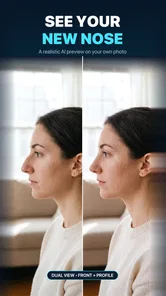
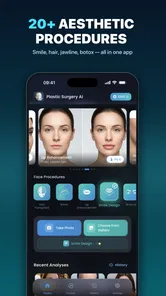
The strongest reason to choose this app is its narrow purpose. The store summary points to nose-job simulation and face editing with AI, including previews for the nose, lips, and jawline. That gives the experience a clear direction instead of making me search through a general editor for the relevant tools. If I am specifically exploring facial appearance, a dedicated preview app can save time and reduce the temptation to over-edit unrelated parts of a portrait.
It is also useful for conversations. Someone considering a cosmetic change may struggle to describe what feels different about a reference image. A visual mock-up can make that conversation easier, whether the discussion is with a partner, a friend, or eventually a qualified clinician. I would bring the original and edited images together rather than presenting the edited result as a prediction. The value is in communicating an idea, not proving an outcome.
For example, imagine I am preparing for a family event and have been wondering whether a slightly different nose profile would change how my face photographs. I could choose a well-lit portrait, create a conservative preview, and compare it with the unedited photo before spending time researching procedures. If the change looks unconvincing or does not improve the balance I had in mind, I have learned something without treating a real intervention as the next automatic step.
The app can also help someone identify what they actually want to discuss. A person may initially think they want a nose change, then notice that the visual balance they prefer comes more from the lips or jawline. That is a useful insight, but it needs restraint. Editing several features at once makes it difficult to know which change produced the reaction. I would alter one area at a time and keep the rest of the face untouched whenever possible.
The best use of this app is visual exploration with realistic expectations. That sounds simple, but it changes how I interpret every result. The preview is not a surgical simulation in the clinical sense, and it should not be used to promise that a real procedure will produce the same appearance. Skin texture, swelling, expression, camera lens, lighting, and healing can all change the final result.
Small details that make the results more useful
One non-obvious trade-off is the tension between a smoother edit and a believable one. AI-based beauty tools often look most impressive when the change is obvious, but obvious changes are not automatically the most informative. I would compare a gentle edit with a stronger one and pay attention to whether the transition around the nose, mouth, and cheeks still looks coherent. If the face begins to look like a generic template, the preview has moved away from a helpful personal reference.
A second insight is to avoid judging a nose edit only from the front. A front-facing image can show width and general balance, but it cannot answer every question about profile appearance. If I want to think about a profile change, I would use a suitable side or three-quarter photo as a separate experiment rather than expecting one image to explain every angle. The result should still be treated as an illustration, because a two-dimensional edit cannot reproduce the full complexity of a three-dimensional face.
A third useful workflow is to keep the expression consistent. Smiling, speaking, or raising the eyebrows can change the apparent shape of the nose, lips, and jaw. If I compare an unedited neutral portrait with an edited smiling portrait, I may credit the app for a difference caused by expression. Using matching expressions and similar lighting makes the comparison more honest.
I would also avoid applying a beauty filter before testing the facial adjustment. Smoothing skin or changing color can make the edited feature seem more harmonious than it really is. Keeping the image as natural as possible helps separate the effect I am evaluating from general cosmetic enhancement. This is a small step, but it makes the app more useful as a decision aid.
Where a different type of app may fit better
A general photo editor may be a better choice for someone who wants complete control over the final image. Those apps typically appeal to users who care about cropping, layers, color, blemish correction, typography, and many other tasks in addition to facial changes. I would choose that route when the goal is a finished social photo rather than a focused appearance preview. The trade-off is a steeper learning curve and more manual work.
A beauty camera may suit someone who wants live effects while taking a selfie. That category is more convenient for experimenting in the moment, especially when the main goal is a playful portrait. A focused nose and face editor is more appropriate when I want to examine a specific change on an existing photograph and think about it calmly. Neither approach is automatically better; they serve different moments and different levels of seriousness.
For actual cosmetic decision-making, the better alternative is not another filter. It is a consultation with a qualified medical professional who can discuss anatomy, risks, realistic outcomes, and suitable options. I would use this app before that conversation only to clarify the look I am trying to describe. I would never use an edited image as evidence that a procedure is safe, necessary, or guaranteed to produce the same result.
People who are sensitive about appearance should also consider whether repeated editing will help or make them more critical of themselves. If I notice that I am endlessly adjusting tiny facial details, comparing myself with an artificial image, or feeling worse after each session, the correct choice is to stop using the tool. A beauty app should remain optional and light, not become a source of pressure.
What the free entry point and upgrades mean in practice
The free price makes it easy to test the basic experience before deciding whether it belongs in my regular toolkit. That is a genuine advantage for a focused app, because I can first see whether the editing style works with my own photos. I would test more than one image before paying: a front view, a three-quarter view, and a neutral expression can reveal whether the results remain useful outside one ideal picture.
The in-app purchase range deserves a deliberate approach. I would read each purchase screen, identify whether it unlocks a one-time option or ongoing access, and avoid buying simply because a preview looks persuasive. Since the app is aimed at a quick visual experiment, a high payment only makes sense to me if I expect to use the available editing tools repeatedly. For a single curiosity-driven test, I would keep my expectations modest and verify what is included first.
There is also a cost to switching away from a dedicated app. A full editor may require more time to learn, while a live beauty camera may encourage quick changes rather than careful comparisons. Moving to a medical consultation has a much greater commitment, but it is the only route that addresses real-world suitability and safety. I see this app as the inexpensive first step in a chain of questions, not a replacement for the later steps.
The app’s Everyone content rating makes it broadly accessible from an age-classification perspective, but that does not mean every use is emotionally appropriate for every person. Younger users may need guidance from a parent or trusted adult when cosmetic procedures are the subject. A visual result can feel authoritative even when it is only an edited image, so I would explain that distinction clearly before treating the preview as meaningful advice.
Who should install it, and who should skip it
I would recommend trying it to someone who wants a quick, private way to explore nose, lip, or jawline ideas on personal photos. It is particularly suitable for a user who prefers a focused interface over a large editing suite and who understands that the result is an approximation. It can also help someone prepare better questions for a future consultation by showing which kind of change they are trying to describe.
I would skip it if I am looking for professional surgical planning, a diagnosis, a guarantee of results, or a detailed explanation of facial anatomy. I would also choose another category if my main goal is live selfie effects, advanced retouching, or a polished final portrait with broad creative controls. The app’s focus is its advantage, but that same focus limits it when my needs move beyond facial-change previews.
Privacy-minded users should make their own careful judgment before selecting personal images for any photo-editing service. I would avoid using photos of other people without permission, and I would think twice before uploading sensitive images. Even when the creative purpose feels harmless, a face is personal information. That consideration belongs in the decision alongside ease of use and price.
My recommendation after weighing the alternatives
My recommendation is cautious but positive: Nose Job - Plastic Surgery AI is worth trying as a first-look beauty visualizer, especially if the specific question concerns a possible change to the nose, lips, or jawline. The free entry point lowers the barrier to testing it, and the focused purpose makes it easier to compare a few controlled variations than to improvise inside a broad editor.
I would use it with original photos, neutral expressions, consistent lighting, and small changes made one at a time. I would save the unedited image, compare every result at normal viewing size, and resist treating the most dramatic version as the most accurate or attractive. Those habits turn a novelty filter into a more sensible reflection tool.
At the same time, I would not let the 4.2 average or the growing install count substitute for personal judgment. They suggest that other users have found enough value to try and rate the app, but they do not tell me whether its results fit my face or whether a paid option is worthwhile. The current version and Android compatibility make it accessible to many users, yet accessibility is not the same as medical reliability.
In the end, I see this app as a conversation starter. It can help me put a vague appearance idea into a visual form, compare alternatives, and decide whether I am merely curious or genuinely ready to seek expert advice. If I keep that boundary clear, it is a useful and approachable addition to the beauty-app category. If I need certainty, clinical detail, or a finished professional edit, I would spend my time—and money—somewhere else.
Nose Job - Plastic Surgery AI Frequently Asked Questions
Does Nose Job - Plastic Surgery AI work on my device?
Nose Job - Plastic Surgery AI is an Android app, and its minimum operating-system requirement is Android 7.0. Before downloading, check your device’s software version and confirm that the app is available for your device in its app store. The app is listed as a Beauty app and is rated for Everyone, though its cosmetic-editing theme may still be worth discussing with younger users.
What can I edit besides my nose?
The app’s store summary describes it as a nose-job simulator and face editor for previewing rhinoplasty, lips, and jawline changes with AI. That makes it useful for exploring more than one facial adjustment in a mock-up, although the result remains an edited image rather than a clinical assessment. If you are interested in a particular change, treat the preview as a visual experiment, not a promise of what a procedure would achieve.
What is Nose Job - Plastic Surgery AI, and how does it work?
Nose Job - Plastic Surgery AI is an image-editing and facial simulation app designed to show how your nose might look after a cosmetic procedure. You typically upload or take a portrait, select the nose area, and apply virtual adjustments such as reshaping, narrowing, or lifting. The result is a visual mock-up for entertainment and general reference, not a medical prediction.
Can Nose Job - Plastic Surgery AI accurately predict my real surgery results?
No. The app cannot accurately predict the outcome of an actual rhinoplasty or other cosmetic procedure. Its results depend on the quality, angle, lighting, and expression in your photo, as well as the app’s automated processing. Real surgical results are influenced by anatomy, skin, healing, technique, and medical decisions. Always consult a qualified, licensed plastic surgeon for professional advice.
Is Nose Job - Plastic Surgery AI free to download and use?
The app is free to download, but it also offers in-app purchases priced from $9.99 to $99.99 per item. Check the purchase details shown in the app before paying, and make sure you understand whether a charge is for a specific feature or another offering. The free download does not mean every possible option is included at no cost.
Pros
- Quickly visualizes potential nose reshaping results
- Simple interface suitable for casual experimentation
- Useful for comparing different nose styles
- Can help prepare ideas for a consultation
- Provides a private way to explore cosmetic changes
Cons
- Results may look artificial or differ from real outcomes
- AI previews should not replace advice from a qualified surgeon
- Some features may require payment or premium access
- Photo quality and lighting can affect the generated result
- May encourage unrealistic expectations about plastic surgery











